
302AI BrowserUse MCP Server
OfficialEnables Claude Desktop to control web browsers through natural language commands for automated web browsing and research tasks.
A Model Context Protocol server that enables Claude Desktop to browse the web, likely allowing the AI to access and interact with web content.
What it does
- Create browser automation tasks
- Query task execution status
- Control web browsers with natural language
- Perform automated web research
- Navigate and interact with websites
- Execute multi-step browser workflows
Best for
About 302AI BrowserUse MCP Server
302AI BrowserUse MCP Server is an official MCP server published by 302ai that provides AI assistants with tools and capabilities via the Model Context Protocol. 302AI BrowserUse MCP Server enables Claude Desktop browser to securely browse and interact with web content — AI web browsing via a Model Context Protocol… It is categorized under browser automation, developer tools.
How to install
You can install 302AI BrowserUse MCP Server in your AI client of choice. Use the install panel on this page to get one-click setup for Cursor, Claude Desktop, VS Code, and other MCP-compatible clients. This server runs locally on your machine via the stdio transport.
License
302AI BrowserUse MCP Server is released under the MIT license. This is a permissive open-source license, meaning you can freely use, modify, and distribute the software.
🤖 302AI BrowserUse MCP Server🚀✨
An AI-powered browser automation server implementing Model Context Protocol (MCP) for natural language browser control and web research.

Previews
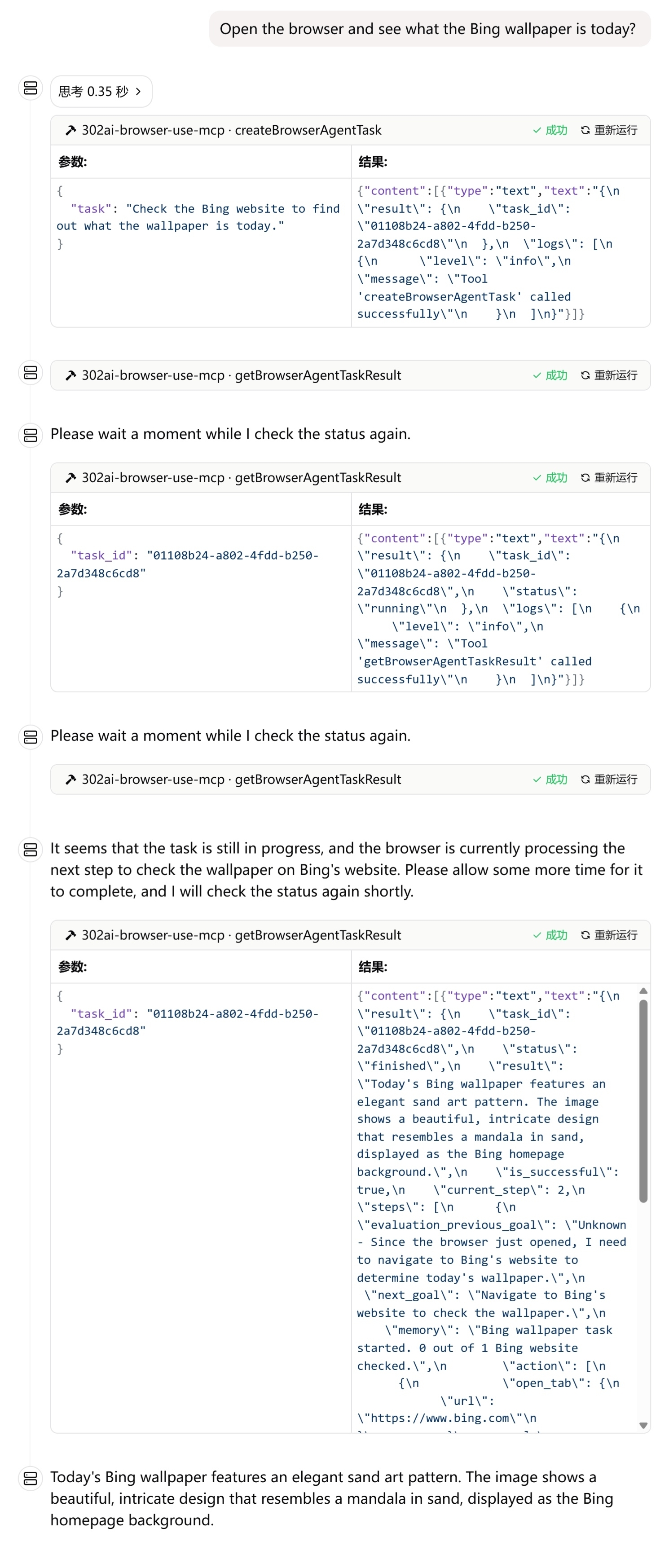
Here are some usage examples
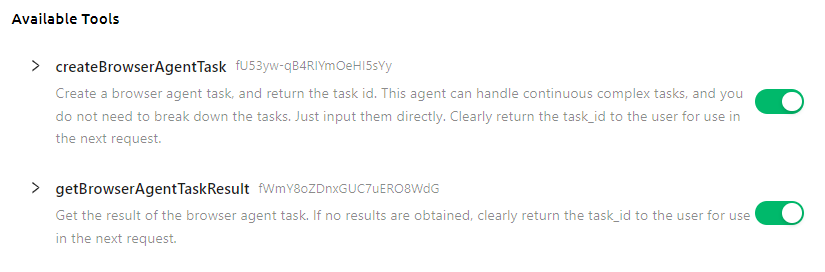
Here is the list of supported tools
✨ Features ✨
- 🔧 Dynamic Loading - Automatically update tool list from remote server.
- 🌐 Multi modes supported, you can use
stdinmode locally, or host it as a remote HTTP server
🚀 Tool List
Development
Install dependencies:
npm install
Build the server:
npm run build
For development with auto-rebuild:
npm run watch
Installation
To use with Claude Desktop, add the server config:
On MacOS: ~/Library/Application Support/Claude/claude_desktop_config.json
On Windows: %APPDATA%/Claude/claude_desktop_config.json
{
  "mcpServers": {
    "302ai-browser-use-mcp": {
      "command": "npx",
      "args": ["-y", "@302ai/browser-use-mcp"],
      "env": {
        "302AI_API_KEY": "YOUR_API_KEY_HERE"
      }
    }
  }
}
To use with Cherry Studio, add the server config:
{
  "mcpServers": {
    "Li2ZXXJkvhAALyKOFeO4N": {
      "name": "302ai-browser-use-mcp",
      "description": "",
      "isActive": true,
      "registryUrl": "",
      "command": "npx",
      "args": [
        "-y",
        "@302ai/browser-use-mcp"
      ],
      "env": {
        "302AI_API_KEY": "YOUR_API_KEY_HERE"
      }
    }
  }
}
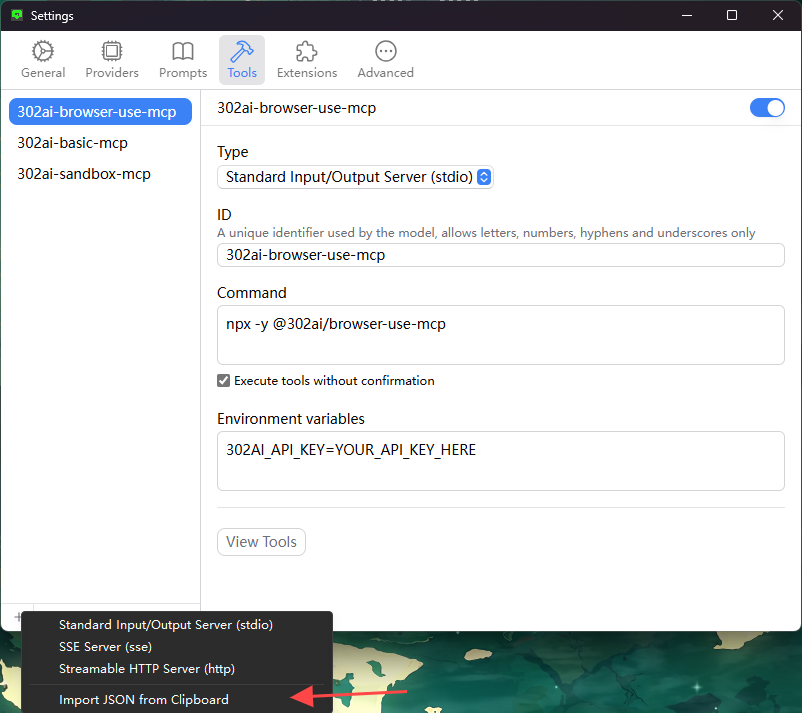
To use with ChatWise, copy the following content to clipboard
{
  "mcpServers": {
    "302ai-sandbox-mcp": {
      "command": "npx",
      "args": ["-y", "@302ai/browser-use-mcp"],
      "env": {
        "302AI_API_KEY": "YOUR_API_KEY_HERE"
      }
    }
  }
}
Go to Settings -> Tools -> Add button -> Select Import from Clipboard
Find Your 302AI_API_KEY here
Debugging
Since MCP servers communicate over stdio, debugging can be challenging. We recommend using the MCP Inspector, which is available as a package script:
npm run inspector
The Inspector will provide a URL to access debugging tools in your browser.
✨ About 302.AI ✨
302.AI is an enterprise-oriented AI application platform that offers pay-as-you-go services, ready-to-use solutions, and an open-source ecosystem.✨
- 🧠 Integrates the latest and most comprehensive AI capabilities and brands, including but not limited to language models, image models, voice models, and video models.
- 🚀 Develops deep applications based on foundation models - we develop real AI products, not just simple chatbots
- 💰 Zero monthly fee, all features are pay-per-use, fully open, achieving truly low barriers with high potential.
- 🛠 Powerful management backend for teams and SMEs - one person manages, many people use.
- 🔗 All AI capabilities provide API access, all tools are open source and customizable (in progress).
- 💡 Strong development team, launching 2-3 new applications weekly, products updated daily. Developers interested in joining are welcome to contact us.
Alternatives




Related Skills
Browse all skillsBrowser automation, debugging, and performance analysis using Puppeteer CLI scripts. Use for automating browsers, taking screenshots, analyzing performance, monitoring network traffic, web scraping, form automation, and JavaScript debugging.
Lightweight Chrome automation toolkit with shared configuration, JSON-first output, and six focused scripts for starting, navigating, inspecting, capturing, evaluating, and cleaning up browser sessions.
Guide users through browser automation setup using Chrome DevTools MCP as the primary path and the OpenCode browser extension as a fallback. Use when the user asks to set up browser automation, Chrome DevTools MCP, browser MCP, browser extension, or runs the browser-setup command.
This skill should be used for browser automation tasks using Chrome DevTools Protocol (CDP). Triggers when users need to launch Chrome with remote debugging, navigate pages, execute JavaScript in browser context, capture screenshots, or interactively select DOM elements. No MCP server required.
Comprehensive CrewAI framework guide for building collaborative AI agent teams and structured workflows. Use when developing multi-agent systems with CrewAI, creating autonomous AI crews, orchestrating flows, implementing agents with roles and tools, or building production-ready AI automation. Essential for developers building intelligent agent systems, task automation, and complex AI workflows.
CCXT cryptocurrency exchange library for TypeScript and JavaScript developers (Node.js and browser). Covers both REST API (standard) and WebSocket API (real-time). Helps install CCXT, connect to exchanges, fetch market data, place orders, stream live tickers/orderbooks, handle authentication, and manage errors. Use when working with crypto exchanges in TypeScript/JavaScript projects, trading bots, arbitrage systems, or portfolio management tools. Includes both REST and WebSocket examples.