
agent-droid-bridge
Agent Droid Bridge gives AI agents programmatic control over Android devices and emulators via ADB, exposed as an MCP server.
An MCP server that connects AI agents to Android devices and emulators over ADB for mobile automation, app testing, and reverse engineering.
About agent-droid-bridge
agent-droid-bridge is a community-built MCP server published by Neverlow512 that provides AI assistants with tools and capabilities via the Model Context Protocol. Agent Droid Bridge gives AI agents programmatic control over Android devices and emulators via ADB, exposed as an MCP server. It is categorized under search web. This server exposes 13 tools that AI clients can invoke during conversations and coding sessions.
How to install
You can install agent-droid-bridge in your AI client of choice. Use the install panel on this page to get one-click setup for Cursor, Claude Desktop, VS Code, and other MCP-compatible clients. This server runs locally on your machine via the stdio transport.
License
agent-droid-bridge is released under the MIT license. This is a permissive open-source license, meaning you can freely use, modify, and distribute the software.
Tools (13)
Returns the current screen as an XML UI hierarchy
Captures the screen as a base64-encoded PNG
Sends a tap gesture at pixel coordinates
Sends a swipe gesture between two points over a given duration
Types text into the focused input field





Agent Droid Bridge
Agent Droid Bridge is an MCP server that connects AI agents to Android devices and emulators over ADB. It is built for mobile automation, app testing, dynamic analysis, and reverse engineering: exposing the full surface of ADB as structured tools that any MCP-compatible AI client can call directly. If ADB can do it, an agent can do it.
⭐ If you like the project, a star helps others find it. ⭐
Note: Purpose-built tools return structured, minimal responses instead of raw XML dumps, keeping agent workflows fast and context consumption low, while keeping performance high.

Demo
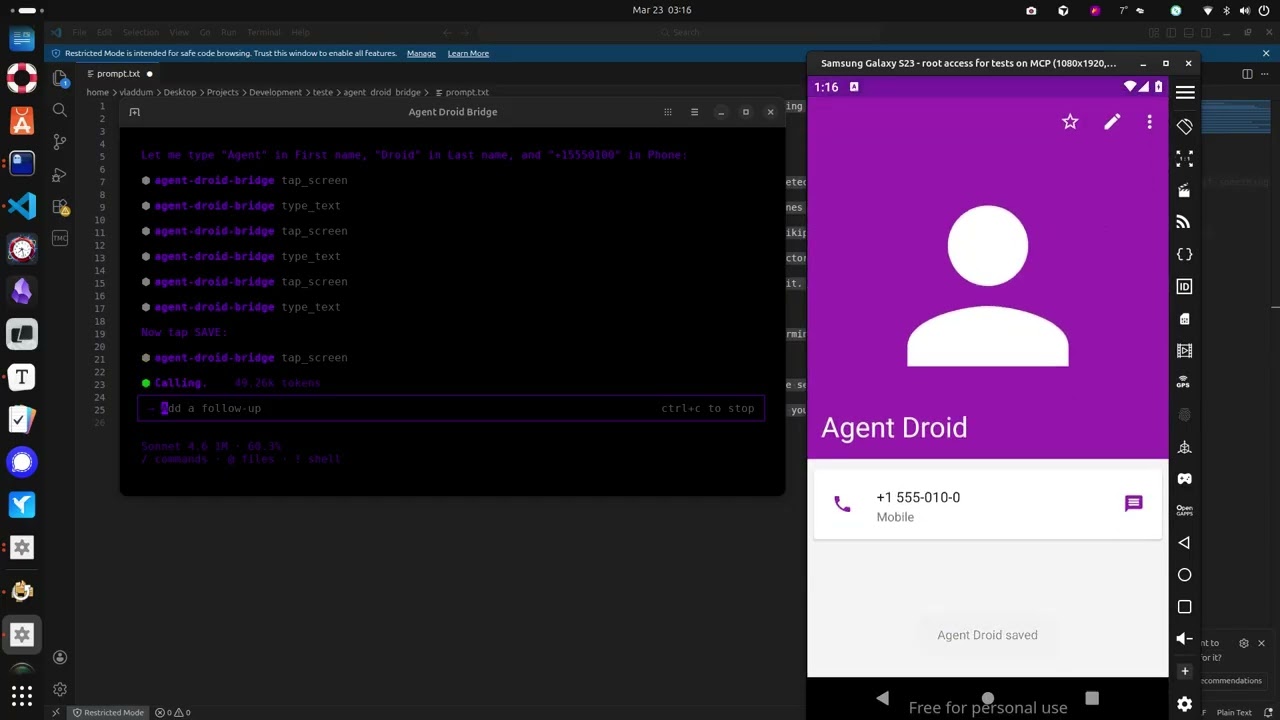
The demo above runs through a few straightforward tasks to show what a connected agent can do, and this is just scratching the surface:
- Installs the Paint app, opens it, and draws a house by calculating pixel coordinates for the walls and roof
- Opens the device browser, searches for "MCP Wikipedia", navigates to the result page, and takes a screenshot
- Opens the Calculator, computes 1337 × 42, and extracts the result to the host machine
- Opens Contacts, creates a new entry with a name and phone number, and confirms it saved
- Opens the Calendar and schedules an appointment for a specific date
- Opens Settings and toggles dark mode
- Extracts the Calculator APK from the device to the host machine
- Installs Notepad, writes a one-sentence summary of every task completed, and takes a final screenshot
What it does
- Exposes 13 MCP tools covering screen capture, UI inspection, screen reading, element extraction, touch and swipe input, text entry, keycode events, app launching, and arbitrary ADB commands
- Auto-detects the connected device when only one is present; presents a device list and requires the user to choose when multiple are connected
- All commands parsed via
shlex— no shell injection possible - Runs over stdio, compatible with any MCP-capable AI client
- Purpose-built screen reading and element extraction tools return structured, minimal responses — a fraction of the size of a raw XML hierarchy — keeping agent context lean across long automation runs
- Two execution modes:
unrestricted(default, with optional shell denylist) andrestricted(allowlist-only — only explicitly permitted shell commands are allowed); setADB_EXECUTION_MODE=restrictedto enable - Set
ADB_ALLOW_SHELL=falseto block alladb shellcommands entirely, regardless of mode - Add tool names to
tools.deniedinadb_config.yamlto hide specific MCP tools from the agent at server startup — all filtering enforced at the server level
Install
uvx agent-droid-bridge
No cloning or virtual environments needed. Requires Python 3.11+ and ADB installed on your host.
uvx is provided by uv. If you don't have it: curl -LsSf https://astral.sh/uv/install.sh | sh
To install from source instead, see docs/setup.md — Option B.
To verify the install: uvx agent-droid-bridge --help
Quick start
- Install ADB — see docs/setup.md for platform-specific instructions
- Connect an Android device or start an emulator
- Add the server to your MCP client config:
{
  "mcpServers": {
    "agent-droid-bridge": {
      "command": "uvx",
      "args": ["agent-droid-bridge"],
      "env": {
        "ADB_EXECUTION_MODE": "unrestricted",
        "ADB_ALLOW_SHELL": "true"
      }
    }
  }
}
- Prompt your agent to use the
agent-droid-bridgeMCP tools
Full setup guide: docs/setup.md
Tools
| Tool | What it does |
|---|---|
get_ui_hierarchy | Returns the current screen as an XML UI hierarchy |
take_screenshot | Captures the screen as a base64-encoded PNG |
tap_screen | Sends a tap gesture at pixel coordinates |
swipe_screen | Sends a swipe gesture between two points over a given duration |
type_text | Types text into the focused input field |
press_key | Sends an Android keycode event (Back, Home, Enter, etc.) |
launch_app | Launches an app by its package/activity component name |
execute_adb_command | Runs an arbitrary ADB or ADB shell command |
list_devices | Lists all Android devices currently visible to ADB with their serial, state, and model |
snapshot_ui | Takes a lightweight UI snapshot and returns a token for use with detect_ui_change |
detect_ui_change | Polls for a UI change after an action; accepts a snapshot token as baseline; returns hierarchy only when requested |
get_screen_elements | Parses the UI hierarchy and returns structured elements with coordinates and interaction properties; supports tappable, interactive, input, and all modes |
get_screen_text | Returns all visible text on screen sorted top-to-bottom, as plain text |
Full parameter reference: docs/tools.md
Configuration
The server is configurable via adb_config.yaml and environment variables. Tuneable parameters include the ADB binary path, command timeouts, log level, execution mode, shell filtering rules, and tool visibility. Full reference: docs/configuration.md.
Documentation
| File | Description |
|---|---|
| docs/setup.md | Prerequisites, installation, and MCP client configuration |
| docs/tools.md | Full parameter reference for all 13 tools |
| docs/configuration.md | Reference for adb_config.yaml and environment variables |
Contributing
Contributions are welcome. See CONTRIBUTING.md for guidelines on setup, code standards, and submitting pull requests.
To report a security vulnerability, follow the process in SECURITY.md — do not open a public issue.
Star History
Alternatives




Related Skills
Browse all skillsOfficial Google SEO guide covering search optimization, best practices, Search Console, crawling, indexing, and improving website search visibility based on official Google documentation
Optimize Core Web Vitals (LCP, INP, CLS) for better page experience and search ranking. Use when asked to "improve Core Web Vitals", "fix LCP", "reduce CLS", "optimize INP", "page experience optimization", or "fix layout shifts".
This skill should be used when users need to search the web for information, find current content, look up news articles, search for images, or find videos. It uses DuckDuckGo's search API to return results in clean, formatted output (text, markdown, or JSON). Use for research, fact-checking, finding recent information, or gathering web resources.
Create user-centered, accessible interface copy (microcopy) for digital products including buttons, labels, error messages, notifications, forms, onboarding, empty states, success messages, and help text. Use when writing or editing any text that appears in apps, websites, or software interfaces, designing conversational flows, establishing voice and tone guidelines, auditing product content for consistency and usability, reviewing UI strings, or improving existing interface copy. Applies UX writing best practices based on four quality standards — purposeful, concise, conversational, and clear. Includes accessibility guidelines, research-backed benchmarks (sentence length, comprehension rates, reading levels), expanded error patterns, tone adaptation frameworks, and comprehensive reference materials.
Automate web browser interactions using natural language via CLI commands. Use when the user asks to browse websites, navigate web pages, extract data from websites, take screenshots, fill forms, click buttons, or interact with web applications. Triggers include "browse", "navigate to", "go to website", "extract data from webpage", "screenshot", "web scraping", "fill out form", "click on", "search for on the web". When taking actions be as specific as possible.
Manage Zotero reference libraries via the Web API. Search, list, add items by DOI/ISBN/PMID (with duplicate detection), delete/trash items, update metadata and tags, export in BibTeX/RIS/CSL-JSON, batch-add from files, check PDF attachments, cross-reference citations, find missing DOIs via CrossRef, and fetch open-access PDFs. Supports --json output for scripting. Use when the user asks about academic references, citation management, literature libraries, PDFs for papers, bibliography export, or Zotero specifically.