
AgentRPC
OfficialAgentRPC provides a universal RPC layer that lets AI agents call functions across different languages and private networks. It wraps your functions and exposes them through MCP and OpenAI-compatible tool interfaces.
A universal RPC layer for AI agents. Connect to any function, any language, any framework, in minutes.
What it does
- Connect functions across multiple programming languages
- Access services in private VPCs without open ports
- Execute long-running functions beyond HTTP timeouts
- Monitor function health with automatic failover
- Register functions with hosted RPC management
- Generate OpenAI-compatible tool definitions
Best for
About AgentRPC
AgentRPC is an official MCP server published by agentrpc that provides AI assistants with tools and capabilities via the Model Context Protocol. AgentRPC is a universal RPC layer for AI agents, enabling seamless connection to any function, language, or framework in minutes. It is categorized under ai ml, developer tools.
How to install
You can install AgentRPC in your AI client of choice. Use the install panel on this page to get one-click setup for Cursor, Claude Desktop, VS Code, and other MCP-compatible clients. This server runs locally on your machine via the stdio transport.
License
AgentRPC is released under the Apache-2.0 license. This is a permissive open-source license, meaning you can freely use, modify, and distribute the software.
AgentRPC



Universal RPC layer for AI agents across network boundaries and languages
Overview
AgentRPC allows you to connect to any function, in any language, across network boundaries. It's ideal when you have services deployed in:
- Private VPCs
- Kubernetes clusters
- Multiple cloud environments
AgentRPC wraps your functions in a universal RPC interface, connecting them to a hosted RPC server accessible through open standards:
- Model Context Protocol (MCP)
- OpenAI-compatible tool definitions (OpenAI, Anthropic, LiteLLM, OpenRouter, etc.)
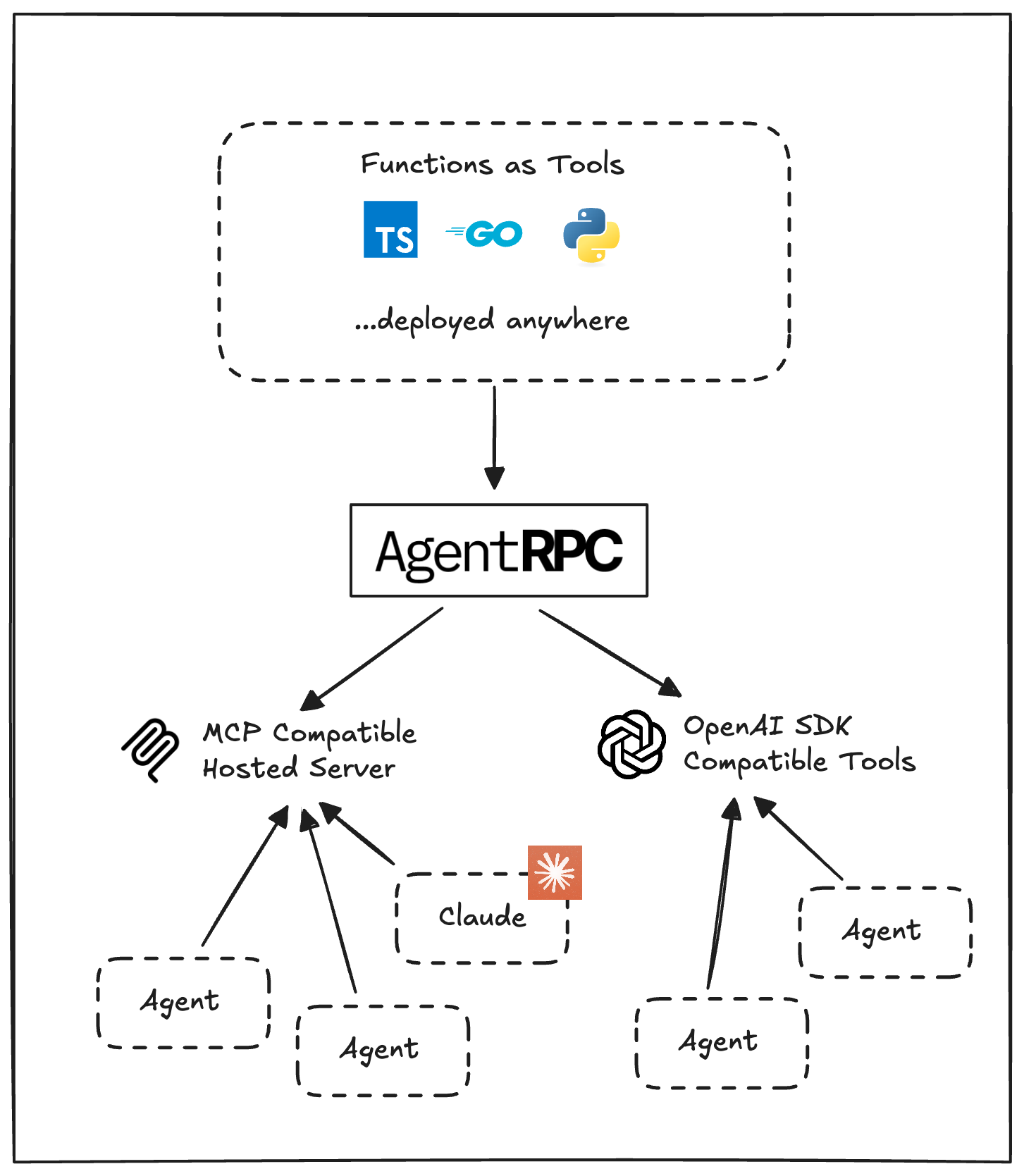
How It Works
- Registration: Use our SDK to register functions and APIs in any language
- Management: The AgentRPC platform (api.agentrpc.com) registers the function and monitors its health
- Access: Receive OpenAPI SDK compatible tool definitions and a hosted MCP server for connecting to compatible agents
Key Features
| Feature | Description |
|---|---|
| Multi-language Support | Connect to tools in TypeScript, Go, Python and .NET (coming soon) |
| Private Network Support | Register functions in private VPCs with no open ports required |
| Long-running Functions | Long polling SDKs allow function calls beyond HTTP timeout limits |
| Full Observability | Comprehensive tracing, metrics, and events for complete visibility |
| Automatic Failover | Intelligent health tracking with automatic failover and retries |
| Framework Compatibility | Out-of-the-box support for MCP and OpenAI SDK compatible agents |
Getting Started
Quick Start
Follow the quick start example on our docs site.
Examples
Explore working examples in the examples directory.
MCP Server
The AgentRPC TypeScript SDK includes an optional MCP (Model Context Protocol) server.
ANGENTRPC_API_SECRET=YOUR_API_SECRET npx agentrpc mcp
This launches an MCP-compliant server for external AI models to interact with your registered tools.
Claude Desktop Integration
Add to your claude_desktop_config.json:
{
  "mcpServers": {
    "agentrpc": {
      "command": "npx",
      "args": [
        "-y",
        "agentrpc",
        "mcp"
      ],
      "env": {
        "AGENTRPC_API_SECRET": "<YOUR_API_SECRET>"
      }
    }
  }
}
Cursor Integration
Add to your ~/.cursor/mcp.json:
{
  "mcpServers": {
    "agentrpc": {
      "command": "npx",
      "args": ["-y", "agentrpc", "mcp"],
      "env": {
        "AGENTRPC_API_SECRET": "<YOUR_API_SECRET>"
      }
    }
  }
}
License
This project is licensed under the Apache License 2.0 - see the LICENSE file for details.
This repository contains all the open-source components and SDKs for AgentRPC.
Alternatives



Related Skills
Browse all skillsUI design system toolkit for Senior UI Designer including design token generation, component documentation, responsive design calculations, and developer handoff tools. Use for creating design systems, maintaining visual consistency, and facilitating design-dev collaboration.
Answer questions about the AI SDK and help build AI-powered features. Use when developers: (1) Ask about AI SDK functions like generateText, streamText, ToolLoopAgent, embed, or tools, (2) Want to build AI agents, chatbots, RAG systems, or text generation features, (3) Have questions about AI providers (OpenAI, Anthropic, Google, etc.), streaming, tool calling, structured output, or embeddings, (4) Use React hooks like useChat or useCompletion. Triggers on: "AI SDK", "Vercel AI SDK", "generateText", "streamText", "add AI to my app", "build an agent", "tool calling", "structured output", "useChat".
Use when working with the OpenAI API (Responses API) or OpenAI platform features (tools, streaming, Realtime API, auth, models, rate limits, MCP) and you need authoritative, up-to-date documentation (schemas, examples, limits, edge cases). Prefer the OpenAI Developer Documentation MCP server tools when available; otherwise guide the user to enable `openaiDeveloperDocs`.
Guide for building TypeScript CLIs with Bun. Use when creating command-line tools, adding subcommands to existing CLIs, or building developer tooling. Covers argument parsing, subcommand patterns, output formatting, and distribution.
Guide developers through setting up development environments with proper tools, dependencies, and configurations
Integrate Vercel AI SDK applications with You.com tools (web search, AI agent, content extraction). Use when developer mentions AI SDK, Vercel AI SDK, generateText, streamText, or You.com integration with AI SDK.