
Google GenAI Toolbox
OfficialConnects AI agents to Google Cloud databases (Cloud SQL, Spanner, AlloyDB) with built-in authentication and connection pooling. Handles the complexity of secure database access for AI applications.
MCP Toolbox for Databases by Google. An open-source server that lets AI agents query Cloud SQL, Spanner, AlloyDB, and other databases with built-in authentication, connection pooling, and security controls.
What it does
- Query Cloud SQL databases
- Connect to Spanner instances
- Access AlloyDB clusters
- Manage database connection pooling
- Handle Google Cloud authentication
- Control database access security
Best for
About Google GenAI Toolbox
Google GenAI Toolbox is an official MCP server published by google that provides AI assistants with tools and capabilities via the Model Context Protocol. Google GenAI Toolbox: open-source GenAI database agent and AI database connector for Google Cloud database—query Cloud SQL connector, Spanner & AlloyDB with… It is categorized under databases, cloud infrastructure, ai ml.
How to install
You can install Google GenAI Toolbox in your AI client of choice. Use the install panel on this page to get one-click setup for Cursor, Claude Desktop, VS Code, and other MCP-compatible clients. This server runs locally on your machine via the stdio transport.
License
Google GenAI Toolbox is released under the Apache-2.0 license. This is a permissive open-source license, meaning you can freely use, modify, and distribute the software.
MCP Toolbox for Databases



[!NOTE] MCP Toolbox for Databases is currently in beta, and may see breaking changes until the first stable release (v1.0).
MCP Toolbox for Databases is an open source MCP server for databases. It enables you to develop tools easier, faster, and more securely by handling the complexities such as connection pooling, authentication, and more.
This README provides a brief overview. For comprehensive details, see the full documentation.
[!NOTE] This solution was originally named “Gen AI Toolbox for Databases” as its initial development predated MCP, but was renamed to align with recently added MCP compatibility.
Table of Contents
Why Toolbox?
Toolbox helps you build Gen AI tools that let your agents access data in your database. Toolbox provides:
- Simplified development: Integrate tools to your agent in less than 10 lines of code, reuse tools between multiple agents or frameworks, and deploy new versions of tools more easily.
- Better performance: Best practices such as connection pooling, authentication, and more.
- Enhanced security: Integrated auth for more secure access to your data
- End-to-end observability: Out of the box metrics and tracing with built-in support for OpenTelemetry.
⚡ Supercharge Your Workflow with an AI Database Assistant ⚡
Stop context-switching and let your AI assistant become a true co-developer. By connecting your IDE to your databases with MCP Toolbox, you can delegate complex and time-consuming database tasks, allowing you to build faster and focus on what matters. This isn't just about code completion; it's about giving your AI the context it needs to handle the entire development lifecycle.
Here’s how it will save you time:
- Query in Plain English: Interact with your data using natural language right from your IDE. Ask complex questions like, "How many orders were delivered in 2024, and what items were in them?" without writing any SQL.
- Automate Database Management: Simply describe your data needs, and let the AI assistant manage your database for you. It can handle generating queries, creating tables, adding indexes, and more.
- Generate Context-Aware Code: Empower your AI assistant to generate application code and tests with a deep understanding of your real-time database schema. This accelerates the development cycle by ensuring the generated code is directly usable.
- Slash Development Overhead: Radically reduce the time spent on manual setup and boilerplate. MCP Toolbox helps streamline lengthy database configurations, repetitive code, and error-prone schema migrations.
Learn how to connect your AI tools (IDEs) to Toolbox using MCP.
General Architecture
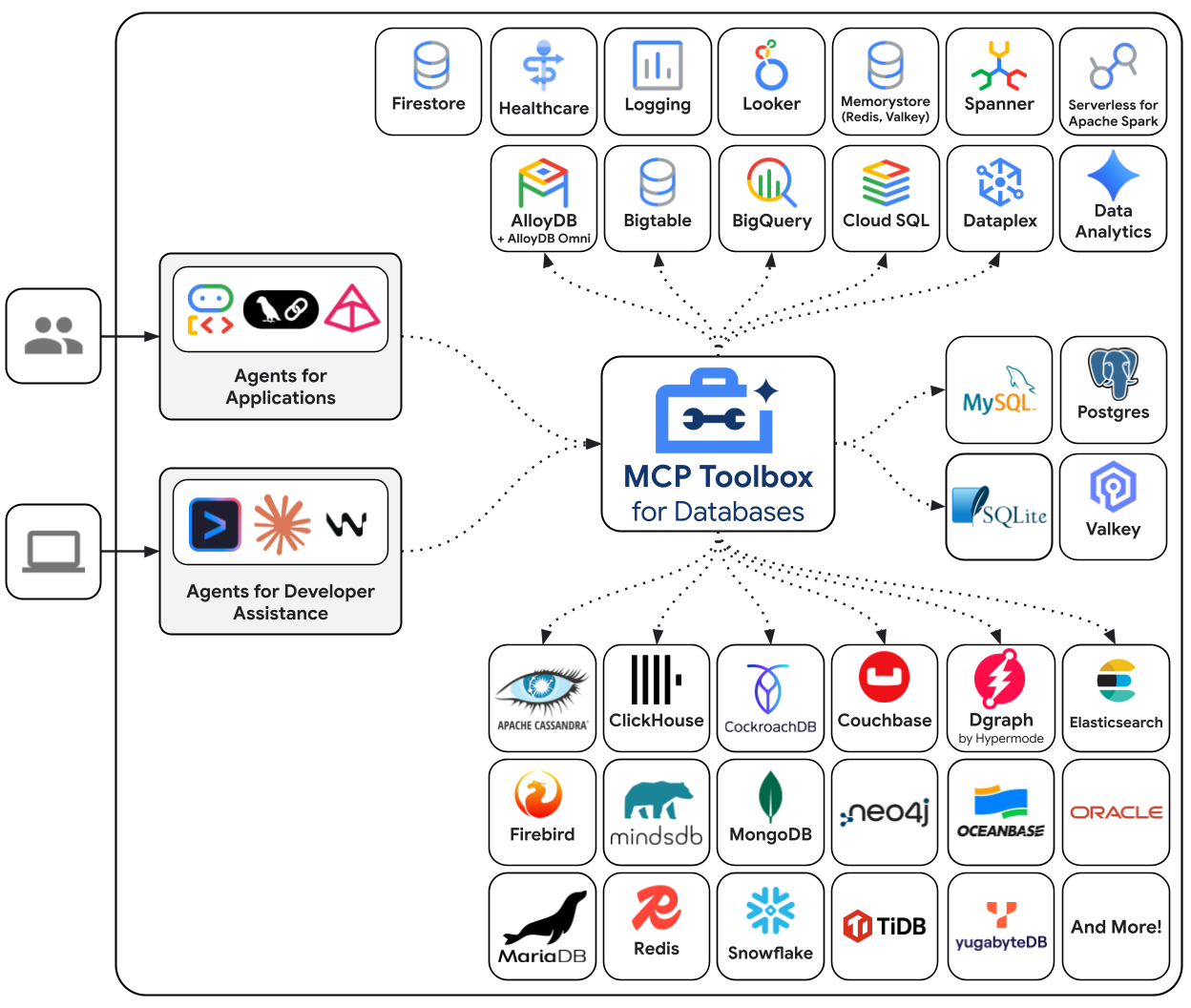
Toolbox sits between your application's orchestration framework and your database, providing a control plane that is used to modify, distribute, or invoke tools. It simplifies the management of your tools by providing you with a centralized location to store and update tools, allowing you to share tools between agents and applications and update those tools without necessarily redeploying your application.
Getting Started
Quickstart: Running Toolbox using NPX
You can run Toolbox directly with a configuration file:
npx @toolbox-sdk/server --tools-file tools.yaml
This runs the latest version of the toolbox server with your configuration file.
[!NOTE] This method should only be used for non-production use cases such as experimentation. For any production use-cases, please consider Installing the server and then running it.
Installing the server
For the latest version, check the releases page and use the following instructions for your OS and CPU architecture.
Binary
To install Toolbox as a binary:
Linux (AMD64)
To install Toolbox as a binary on Linux (AMD64):
# see releases page for other versions
export VERSION=0.28.0
curl -L -o toolbox https://storage.googleapis.com/genai-toolbox/v$VERSION/linux/amd64/toolbox
chmod +x toolbox
macOS (Apple Silicon)
To install Toolbox as a binary on macOS (Apple Silicon):
# see releases page for other versions
export VERSION=0.28.0
curl -L -o toolbox https://storage.googleapis.com/genai-toolbox/v$VERSION/darwin/arm64/toolbox
chmod +x toolbox
macOS (Intel)
To install Toolbox as a binary on macOS (Intel):
# see releases page for other versions
export VERSION=0.28.0
curl -L -o toolbox https://storage.googleapis.com/genai-toolbox/v$VERSION/darwin/amd64/toolbox
chmod +x toolbox
Windows (Command Prompt)
To install Toolbox as a binary on Windows (Command Prompt):
:: see releases page for other versions
set VERSION=0.28.0
curl -o toolbox.exe "https://storage.googleapis.com/genai-toolbox/v%VERSION%/windows/amd64/toolbox.exe"
Windows (PowerShell)
To install Toolbox as a binary on Windows (PowerShell):
# see releases page for other versions
$VERSION = "0.28.0"
curl.exe -o toolbox.exe "https://storage.googleapis.com/genai-toolbox/v$VERSION/windows/amd64/toolbox.exe"
Container image
You can also install Toolbox as a container:# see releases page for other versions
export VERSION=0.28.0
docker pull us-central1-docker.pkg.dev/database-toolbox/toolbox/toolbox:$VERSION
Homebrew
To install Toolbox using Homebrew on macOS or Linux:
brew install mcp-toolbox
Compile from source
To install from source, ensure you have the latest version of Go installed, and then run the following command:
go install github.com/googleapis/[email protected]
Gemini CLI Extensions
To install Gemini CLI Extensions for MCP Toolbox, run the following command:
gemini extensions install https://github.com/gemini-cli-extensions/mcp-toolbox
Running the server
Configure a tools.yaml to define your tools, and then
execute toolbox to start the server:
Binary
To run Toolbox from binary:
./toolbox --tools-file "tools.yaml"
ⓘ Note
Toolbox enables dynamic reloading by default. To disable, use the--disable-reloadflag.
Container image
To run the server after pulling the container image:
export VERSION=0.24.0 # Use the version you pulled
docker run -p 5000:5000 \
-v $(pwd)/tools.yaml:/app/tools.yaml \
us-central1-docker.pkg.dev/database-toolbox/toolbox/toolbox:$VERSION \
--tools-file "/app/tools.yaml"
ⓘ Note
The-vflag mounts your localtools.yamlinto the container, and-pmaps the container's port5000to your host's port5000.
Source
To run the server directly from source, navigate to the project root directory and run:
go run .
ⓘ Note
This command runs the project from source, and is more suitable for development and testing. It does not compile a binary into your$GOPATH. If you want to compile a binary instead, refer the Developer Documentation.
Homebrew
If you installed Toolbox using Homebrew, the toolbox
binary is available in your system path. You can start the server with the same
command:
toolbox --tools-file "tools.yaml"
README truncated. View full README on GitHub.
Alternatives




Related Skills
Browse all skillsBuild and deploy production-ready generative AI agents using Vertex AI, Gemini models, and Google Cloud infrastructure with RAG, function calling, and multi-modal capabilities. Use when appropriate context detected. Trigger with relevant phrases based on skill purpose.
Expert database administrator specializing in modern cloud databases, automation, and reliability engineering. Masters AWS/Azure/GCP database services, Infrastructure as Code, high availability, disaster recovery, performance optimization, and compliance. Handles multi-cloud strategies, container databases, and cost optimization. Use PROACTIVELY for database architecture, operations, or reliability engineering.
Generate and stitch short videos via Google Veo 3.x using the Gemini API (google-genai). Use when you need to create video clips from prompts (ads, UGC-style clips, product demos) and want a reproducible CLI workflow (generate, poll, download MP4, optionally stitch multiple segments).
YouTube Data API v3 analytics toolkit. Analyze YouTube channels, videos, and search results. Use when the user asks to: check YouTube channel stats, analyze video performance, compare channels, search for videos, get subscriber counts, view engagement metrics, find trending videos, get channel uploads, or analyze YouTube competition. Requires a YouTube Data API v3 key from Google Cloud Console.
Full Confluence Cloud REST API v2 skill (pages, spaces, folders, databases, whiteboards, comments, labels, tasks, properties, etc.) with basic/OAuth auth, pagination, and migration from confluence-cli.
Comprehensive Cloudflare platform skill covering Workers, Pages, storage (KV, D1, R2), AI (Workers AI, Vectorize, Agents SDK), networking (Tunnel, Spectrum), security (WAF, DDoS), and infrastructure-as-code (Terraform, Pulumi). Use for any Cloudflare development task.