
Meme Generator (ImgFlip)
Generates custom memes using ImgFlip templates by adding your own text to popular meme formats. Creates actual meme images that can be shared or used in conversations.
Enables meme generation through the ImgFlip API with a single tool that accepts template ID and text placeholder parameters for creating custom memes directly within conversations.
What it does
- Generate custom memes from ImgFlip templates
- Add custom text to meme placeholders
- Create shareable meme images
- Access popular meme formats
Best for
About Meme Generator (ImgFlip)
Meme Generator (ImgFlip) is a community-built MCP server published by haltakov that provides AI assistants with tools and capabilities via the Model Context Protocol. Use our meme generator to quickly create your memes with ImgFlip API. Make your meme easily by adding text and templates—perfect for fun conversations. It is categorized under other.
How to install
You can install Meme Generator (ImgFlip) in your AI client of choice. Use the install panel on this page to get one-click setup for Cursor, Claude Desktop, VS Code, and other MCP-compatible clients. This server runs locally on your machine via the stdio transport.
License
Meme Generator (ImgFlip) is released under the Apache-2.0 license. This is a permissive open-source license, meaning you can freely use, modify, and distribute the software.
Meme MCP Server
A simple Model Context Protocol (MCP) server for generating memes using the ImgFlip API. This server enables AI models and tools to generate meme images from user prompts.
Tools
The server implements the following a single tool called generateMeme.
The tool accepts the following parameters:
templateNumericId: The numeric ID of the meme template to use.text0: The text for the first placeholder.text1: The text for the second placeholder.
Usage
You can configure the meme generator server in your client using the meme-mcp NPM package. Here is an example configuration for Claude Desktop (Settings -> Developer -> Edit Config):
{
  "mcpServers": {
    "meme": {
      "command": "npx",
      "args": ["-y", "meme-mcp"],
      "env": {
        "IMGFLIP_USERNAME": "<IMGFLIP USERNAME>",
        "IMGFLIP_PASSWORD": "<IMGFLIP PASSWORD>"
      }
    }
  }
}
Note: you need to create a free account on ImgFlip to get your username and password.
Troubleshooting
Sometimes Claude Desktop fails to find the right version of npx (especially if you are using NVM, see this Issue for details). In this case, you can manually install meme-mcp globally and then use it directly.
npm install -g meme-mcp
You can find the path of your node executable by running which node in your terminal. After that your configuration should look like this:
{
  "mcpServers": {
    "meme": {
      "command": "/Users/<USERNAME>/.nvm/versions/node/v20.18.2/bin/node",
      "args": ["/Users/<USERNAME>/.nvm/versions/node/v20.18.2/lib/node_modules/meme-mcp/dist/index.js"],
      "env": {
        "IMGFLIP_USERNAME": "<IMGFLIP USERNAME>",
        "IMGFLIP_PASSWORD": "<IMGFLIP PASSWORD>"
      }
    }
  }
}
Example
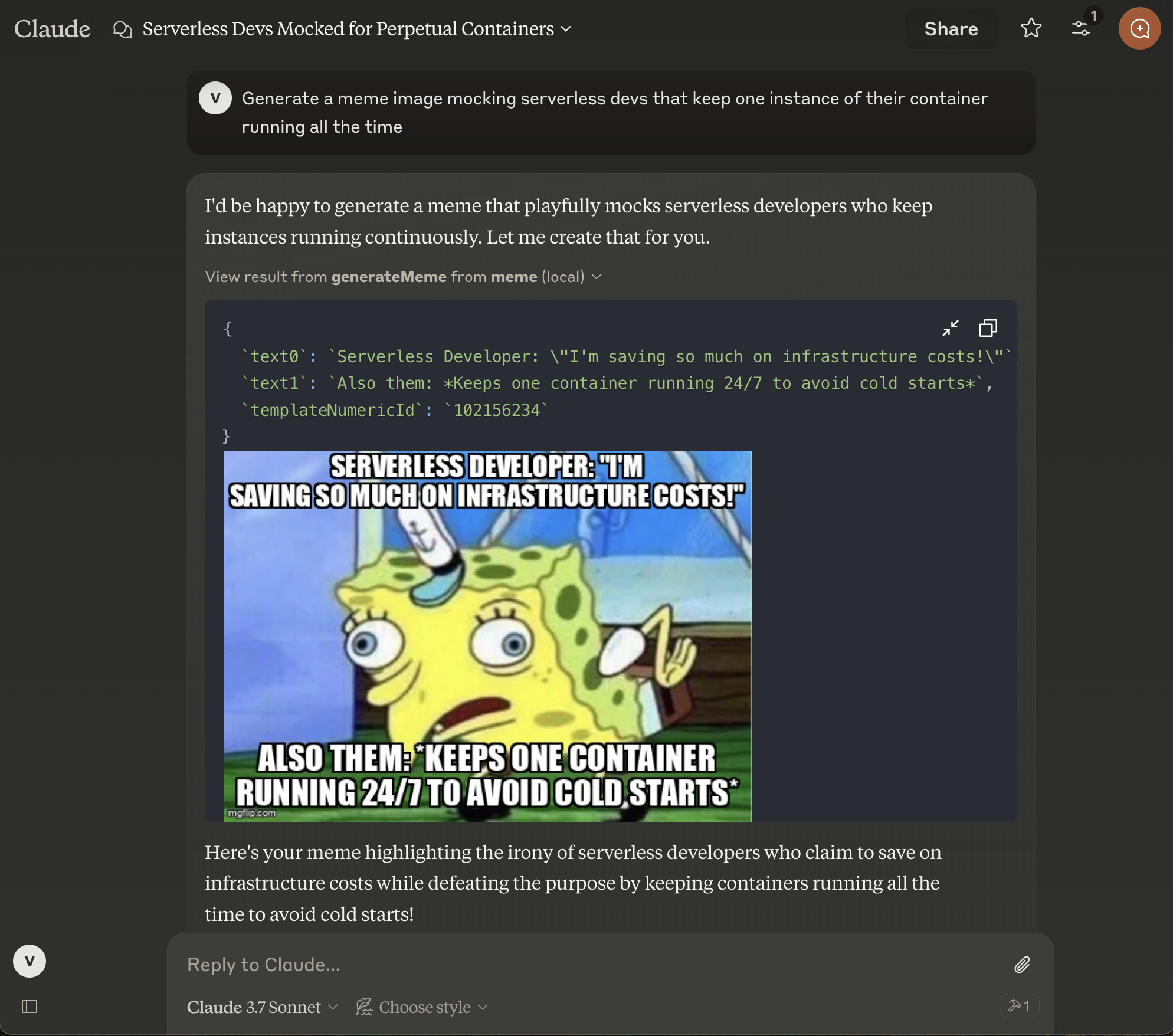
After configuring Claude Desktop, you need to restart it and then you will see the small hammer icon on the bottom right in the chat input. You can then ask Claude to generate a meme for you.
Author
This project is created for fun by Vladimir Haltakov. If you find it interesting you can message me on X @haltakov.
Alternatives




Related Skills
Browse all skillsThis skill should be used when creating or configuring CI/CD pipeline files for automated testing, building, and deployment. Use this for generating GitHub Actions workflows, GitLab CI configs, CircleCI configs, or other CI/CD platform configurations. Ideal for setting up automated pipelines for Node.js/Next.js applications, including linting, testing, building, and deploying to platforms like Vercel, Netlify, or AWS.
Generates structured post outlines from reference materials for wisdom-style social posts. Use when someone wants to extract compelling concepts from newsletters, scripts, notes, or other content and transform them into engaging post outlines with paradoxes, transformations, and powerful insights.
This skill uses the test-doubles-generator plugin to automatically create mocks, stubs, spies, and fakes for unit testing. It analyzes dependencies in the code and generates appropriate test doubles based on the chosen testing framework, such as Jest, Sinon, or others. Use this skill when you need to generate test doubles, mocks, stubs, spies, or fakes to isolate units of code during testing. Trigger this skill by requesting test double generation or using the `/gen-doubles` or `/gd` command.
Create professional draw.io (diagrams.net) diagrams in XML format (.drawio files) with integrated PMP/PMBOK methodologies, extensive visual asset libraries, and industry-standard professional templates. Use this skill when users ask to create flowcharts, swimlane diagrams, cross-functional flowcharts, org charts, network diagrams, UML diagrams, BPMN, project management diagrams (WBS, Gantt, PERT, RACI), risk matrices, stakeholder maps, or any other visual diagram in draw.io format. This skill includes access to custom shape libraries for icons, clipart, and professional symbols.
Presentation creation, editing, and analysis. When Claude needs to work with presentations (.pptx files) for: (1) Creating new presentations, (2) Modifying or editing content, (3) Working with layouts, (4) Adding comments or speaker notes, or any other presentation tasks
Downloads videos from YouTube and other platforms for offline viewing, editing, or archival. Handles various formats and quality options.