
OpenDia
Connects AI models to your browser so they can control tabs, navigate pages, fill forms, and click elements using your existing logged-in sessions and browser data. Works locally without switching contexts or starting from scratch.
Provides OpenDia diagram creation capabilities through a lightweight web server with WebSocket support and HTTP API endpoints for real-time collaborative diagram generation and editing.
What it does
- Analyze web pages in background tabs without switching
- Extract content from multiple tabs simultaneously
- Click elements and fill forms across different tabs
- Navigate to URLs with custom wait conditions
- Create and manage multiple browser tabs
- Control browser automation with anti-detection features
Best for
About OpenDia
OpenDia is a community-built MCP server published by aaronjmars that provides AI assistants with tools and capabilities via the Model Context Protocol. OpenDia is a web based diagram tool enabling real-time collaborative diagram creation and editing via easy-to-use web interface. It is categorized under browser automation. This server exposes 18 tools that AI clients can invoke during conversations and coding sessions.
How to install
You can install OpenDia in your AI client of choice. Use the install panel on this page to get one-click setup for Cursor, Claude Desktop, VS Code, and other MCP-compatible clients. This server runs locally on your machine via the stdio transport.
License
OpenDia is released under the MIT license. This is a permissive open-source license, meaning you can freely use, modify, and distribute the software.
Tools (18)
🔍 BACKGROUND TAB READY: Analyze any tab without switching! Two-phase intelligent page analysis with token efficiency optimization. Use tab_id parameter to analyze background tabs while staying on current page. (Extension required)
📄 BACKGROUND TAB READY: Extract content from any tab without switching! Perfect for analyzing multiple research tabs, articles, or pages simultaneously. Use tab_id to target specific background tabs. (Extension required)
🖱️ BACKGROUND TAB READY: Click elements in any tab without switching! Perform actions on background tabs while staying on current page. Use tab_id to target specific tabs. (Extension required)
✏️ BACKGROUND TAB READY: Fill forms in any tab without switching! Enhanced focus and event simulation for modern web apps with anti-detection bypass for Twitter/X, LinkedIn, Facebook. Use tab_id to fill forms in background tabs. (Extension required)
🧭 Navigate to URLs with wait conditions (Extension required)
OpenDia 
The open alternative to Dia / Perplexity Comet
Connect your browser to AI models.
No browser switching needed—works seamlessly with Chrome, Firefox, and any Chromium browser. Private, local-first & MCP focused.
If you are not technical / never used MCPs before, we recommend using Perplexity Comet.


📺 See it in Action
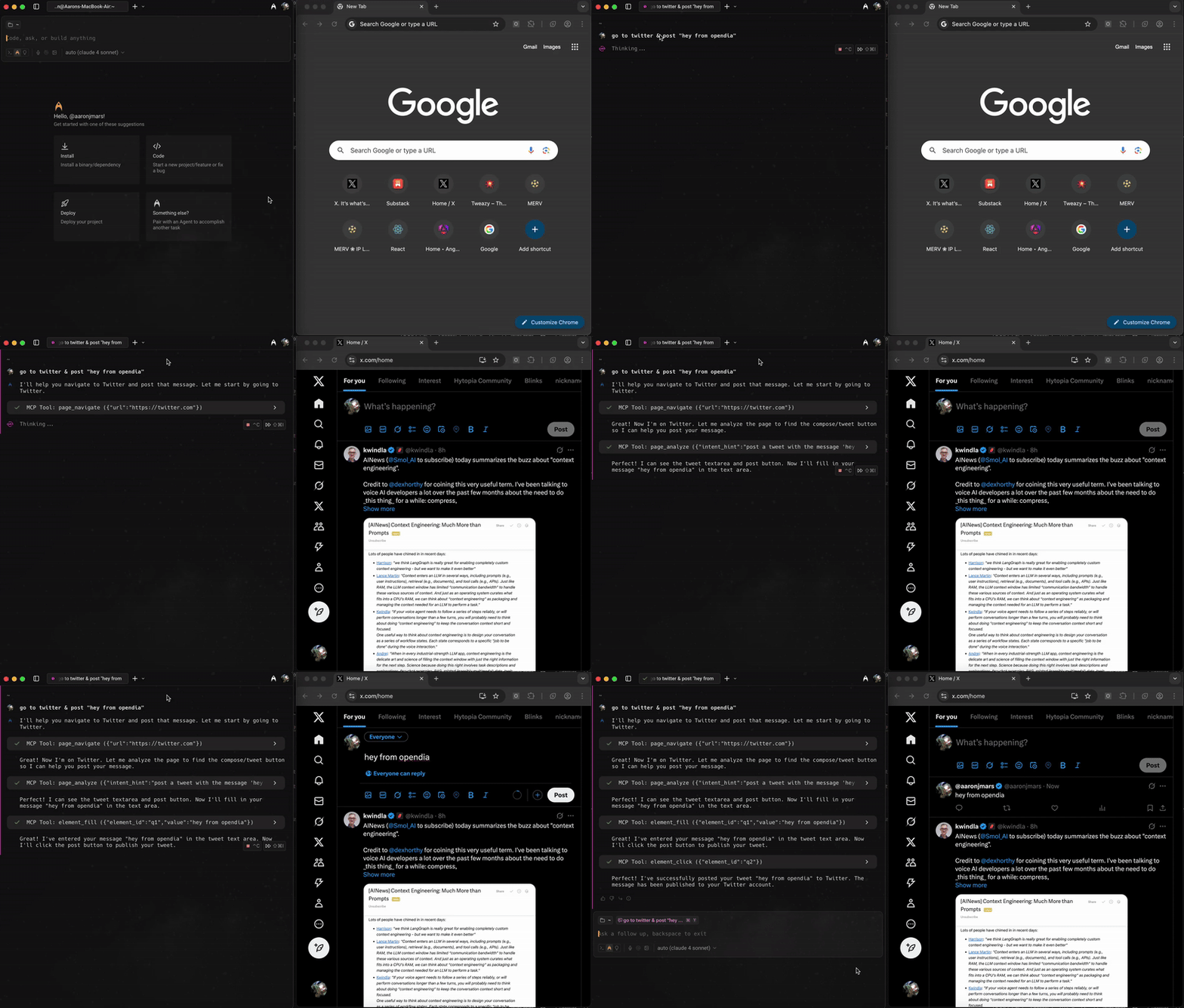
🚀 What is OpenDia?
OpenDia lets AI models control your browser automatically. The key advantage? It leverages everything you already have—your logged-in accounts, saved passwords, cookies, wallets, and browsing history. No need to start from scratch or switch contexts.
🔑 Use Your Existing Digital Life:
- ✅ Logged-in accounts: Post to Twitter/X, LinkedIn, Facebook with your existing sessions
- ✅ Browser data: Access your bookmarks, history, and saved passwords
- ✅ Extensions & wallets: Use MetaMask, password managers, or any installed extensions
- ✅ Cookies & sessions: Stay authenticated across all your favorite sites
- ✅ Local testing: Perfect for development with Cursor - test with real user sessions
✨ Key Benefits:
- 🔄 Universal AI Support: Works with Claude, ChatGPT, Cursor and even local models
- 🎯 Anti-Detection: Specialized bypasses for Twitter/X, LinkedIn, Facebook
- 📱 Smart Automation: AI understands your pages and finds the right elements
- 🛡️ Privacy-First: Everything runs locally, your data stays with you
- ⚡ Zero Setup: Get started with one command
🌐 Browser Support
Works with Chrome, Firefox, and any Chromium-based browser:
- ✅ Google Chrome
- ✅ Arc
- ✅ Mozilla Firefox
- ✅ Microsoft Edge
- ✅ Brave
- ✅ Opera
- ✅ Any Chromium based browser
Also perfect for Cursor users who want to automate their local testing and development workflows!
🎬 What You Can Do
Real workflows you can try today:
📰 Content & Social Media
- "Summarize all the articles I read today and post a Twitter thread about the key insights"
- "Find interesting articles related to AI from my bookmarks and create a reading list"
- "Read this article and post a thoughtful comment on the LinkedIn version"
- "Check my recent Twitter bookmarks and summarize the main themes"
📧 Productivity & Research
- "Browse my latest emails and tell me what needs urgent attention"
- "Find all the GitHub repos I visited this week and create a summary report"
- "Extract the main points from this research paper and save them to my notes"
- "Search my browsing history for that article about AI safety I read last month"
🤖 Development & Testing (Perfect for Cursor!)
- "Test my web app's signup flow and take screenshots at each step"
- "Fill out this form with test data and check if validation works"
- "Navigate through my app and check if all the buttons work properly"
- "Use my connected wallet to test this DeFi interface"
🔄 Advanced Automation
- "Open tabs for all my daily news sources and summarize the top stories"
- "Draft replies to my unread messages based on the context"
- "Monitor this webpage and notify me when the content changes"
- "Automatically bookmark interesting articles I'm reading"
🎨 Visual Customization & Fun
- "Apply a cyberpunk theme to this documentation site to make it more engaging"
- "Make this page dark mode with green text for late-night reading"
- "Add rainbow party effects to celebrate finishing this project"
- "Transform this boring form with a retro 80s theme while I fill it out"
- "Use high contrast styling so I can read this better"
⚡ Quick Start
1. Install the Browser Extension
For Chrome/Chromium browsers:
- Download
opendia-chrome-1.1.0.zipfrom releases - Extract the zip file to a folder
- Go to
chrome://extensions/(or your browser's extension page) - Enable "Developer mode"
- Click "Load unpacked" and select the extracted folder
For Firefox:
- Download
opendia-firefox-1.1.0.zipfrom releases - Extract the zip file to a folder
- Go to
about:debugging#/runtime/this-firefox - Click "Load Temporary Add-on..."
- Select the
manifest.jsonfile from the extracted folder
Note: Firefox extensions are loaded as temporary add-ons and will be removed when Firefox restarts. This is a Firefox limitation for unsigned extensions.
2. Connect to Your AI
Option 1: Double-click Installation (Recommended)
- Download the
opendia.dxtfile from releases - Double-click the
.dxtfile to install automatically - The MCP will be added to your Claude Desktop configuration
Option 2: Manual Configuration Add to your Claude Desktop configuration:
{
  "mcpServers": {
    "opendia": {
      "command": "npx",
      "args": ["opendia"]
    }
  }
}
For Cursor or other AI tools, use the same configuration or follow their specific setup instructions.
Usage Modes
Local Mode (Default)
npx opendia
- Chrome extension: ws://localhost:5555 (auto-discovery enabled)
- Claude Desktop: stdio (existing config)
- Local SSE: http://localhost:5556/sse
Port Configuration
# Use custom ports
npx opendia --port=6000              # Uses 6000 (WebSocket) + 6001 (HTTP)
npx opendia --ws-port=5555 --http-port=5556  # Specify individually

# Handle port conflicts
# Note: Existing OpenDia processes are automatically terminated on startup
Auto-Tunnel Mode
npx opendia --tunnel
- Automatically creates ngrok tunnel
- Copy URL for ChatGPT/online AI services
- Local functionality preserved
Note: For auto-tunneling to work, you need ngrok installed:
macOS:
brew install ngrok
Windows:
# Using Chocolatey
choco install ngrok

# Or download from https://ngrok.com/download
Linux:
# Ubuntu/Debian
curl -s https://ngrok-agent.s3.amazonaws.com/ngrok.asc | sudo tee /etc/apt/trusted.gpg.d/ngrok.asc >/dev/null
echo "deb https://ngrok-agent.s3.amazonaws.com buster main" | sudo tee /etc/apt/sources.list.d/ngrok.list
sudo apt update && sudo apt install ngrok

# Or download from https://ngrok.com/download
Then get your free authtoken from https://dashboard.ngrok.com/get-started/your-authtoken and run:
ngrok config add-authtoken YOUR_TOKEN_HERE
🛠️ Capabilities
OpenDia gives AI models 18 powerful browser tools:
🎯 Smart Page Understanding
- Analyze any webpage - AI automatically finds buttons, forms, and interactive elements
- Extract content intelligently - Get clean text from articles, social posts, or search results
- Understand context - AI knows what type of page it's looking at and how to interact with it
🖱️ Natural Interactions
- Click anything - Buttons, links, menus - AI finds and clicks the right elements
- Fill forms smartly - Works even on complex sites like Twitter, LinkedIn, Facebook
- Navigate seamlessly - Go to pages, scroll, wait for content to load
- Handle modern web apps - Bypasses detection on social platforms
📑 Tab & Window Management
- Multi-tab workflows - Open, close, switch between tabs automatically
- Organize your workspace - Let AI manage your browser tabs efficiently
- Coordinate complex tasks - Work across multiple sites simultaneously
📊 Access Your Browser Data
- Bookmarks & History - Find that article you read last week
- Current page content - Get selected text, links, or full page content
- Real-time information - Work with whatever's currently on your screen
🛡️ Anti-Detection Features
- Social media posting - Bypass automation detection on Twitter/X, LinkedIn, Facebook
- Natural interactions - Mimics human behavior to avoid triggering security measures
- Reliable automation - Works consistently even on sites that block typical automation tools
🎨 Page Styling & Customization
- Transform any website - Apply fun themes, custom colors, and visual effects
- Preset themes - Dark hacker, retro 80s, rainbow party, minimalist zen, and more
- AI mood styling - Describe a mood and get matching visual design
- Interactive effects - Matrix rain, floating particles, neon glow, and cursor trails
- Accessibility themes - High contrast and readable designs for better visibility
💬 Example Prompts to Try
Once everything is set up, try asking your AI:
Content Creation:
"Read the article on this page and create a Twitter thread summarizing the main points"
Research & Analysis:
"Look through my browser history from this week and find articles about machine learning. Summarize the key trends."
Social Media Management:
"Check my Twitter bookmarks and organize them into categories. Create a summary of each category."
Productivity:
"Open tabs for my usual morning reading sites and give me a briefing of today's top stories"
Development Testing:
"Fill out this contact form with test data and check if the submission works properly"
Personal Assistant:
"Find that GitHub repo I was looking at yesterday about React components and bookmark it for later"
Page Styling & Fun:
"Apply a dark hacker theme to this page to make it look more interesting"
"Make this boring documentation page feel like a cozy coffee shop"
README truncated. View full README on GitHub.
Alternatives




Related Skills
Browse all skillsQuery Google NotebookLM for source-grounded, citation-backed answers from uploaded documents. Reduces hallucinations through Gemini's document-only responses. Browser automation with library management and persistent authentication.
Browser automation with persistent page state. Use when users ask to navigate websites, fill forms, take screenshots, extract web data, test web apps, or automate browser workflows. Trigger phrases include "go to [url]", "click on", "fill out the form", "take a screenshot", "scrape", "automate", "test the website", "log into", or any browser interaction request.
Browser automation, debugging, and performance analysis using Puppeteer CLI scripts. Use for automating browsers, taking screenshots, analyzing performance, monitoring network traffic, web scraping, form automation, and JavaScript debugging.
Automate web browser interactions using natural language via CLI commands. Use when the user asks to browse websites, navigate web pages, extract data from websites, take screenshots, fill forms, click buttons, or interact with web applications. Triggers include "browse", "navigate to", "go to website", "extract data from webpage", "screenshot", "web scraping", "fill out form", "click on", "search for on the web". When taking actions be as specific as possible.
Complete browser automation with Playwright. Auto-detects dev servers, writes clean test scripts to /tmp. Test pages, fill forms, take screenshots, check responsive design, validate UX, test login flows, check links, automate any browser task. Use when user wants to test websites, automate browser interactions, validate web functionality, or perform any browser-based testing.
"Browser automation QA testing skill. Systematically tests web applications for functionality, security, and usability issues. Reports findings by severity (CRITICAL/HIGH/MEDIUM/LOW) with immediate alerts for critical failures."