
ROS MCP Server
OfficialConnects language models to ROS/ROS2 robots for natural language control and monitoring. Enables AI to command robots, read sensors, and observe robot state without changing existing robot code.
Unlock true AI-powered robotics—control and observe any ROS1 or ROS2 robot using natural language. ROS-MCP-Server bridges large language models like Claude, GPT, and Gemini with your robot, enabling seamless two-way communication with zero changes to the robot’s code. Instantly browse topics, read sensors, call services, and adjust parameters—all through intuitive commands. Perfect for debugging, real-time control, and monitoring, this server works with both simulated and real robots and supports all MCP-compatible language models. Future updates will add enhanced permissions and action support for even greater flexibility.
What it does
- Control ROS1 and ROS2 robots via natural language
- Read sensor data and topic information in real-time
- Call ROS services and adjust parameters
- Monitor robot state and system status
- Browse available topics and services
- Debug robot behavior through AI interaction
Best for
About ROS MCP Server
ROS MCP Server is an official MCP server published by robotmcp that provides AI assistants with tools and capabilities via the Model Context Protocol. Control any ROS1 or ROS2 robot with natural language using ROS MCP Server—AI-powered, code-free, real-time monitoring and debugging. It is categorized under ai ml, developer tools.
How to install
You can install ROS MCP Server in your AI client of choice. Use the install panel on this page to get one-click setup for Cursor, Claude Desktop, VS Code, and other MCP-compatible clients. This server runs locally on your machine via the stdio transport.
License
ROS MCP Server is released under the Apache-2.0 license. This is a permissive open-source license, meaning you can freely use, modify, and distribute the software.
ROS MCP Server 🧠⇄🤖









ROS-MCP-Server connects large language models (such as Claude, GPT, and Gemini) with existing robots giving them bidirectional AI integration.
With no changes to existing robot source code, this enables:
- 🗣 Commanding the robot in natural language → instructions are translated into ROS/ROS2 commands.
- 👀 Giving AI full visibility → subscribe to topics, call services, read sensor data, and monitor robot state in real time.
✅ Key Benefits
- No robot code changes → only requires adding the
rosbridgenode. - True two-way communication → LLMs can both control robots and observe everything happening in ROS (sensors, topics, parameters).
- ROS1 & ROS2 support → works with both versions out of the box.
- MCP-compatible → integrates with any MCP-enabled LLM (Claude Desktop, Gemini, ChatGPT, and beyond).
🎥 Examples in Action
🖥️ Example - Controlling the MOCA mobile manipulator in NVIDIA Isaac Sim
Commands are entered into Claude Desktop, which uses the MCP server to directly drive the simulated robot.

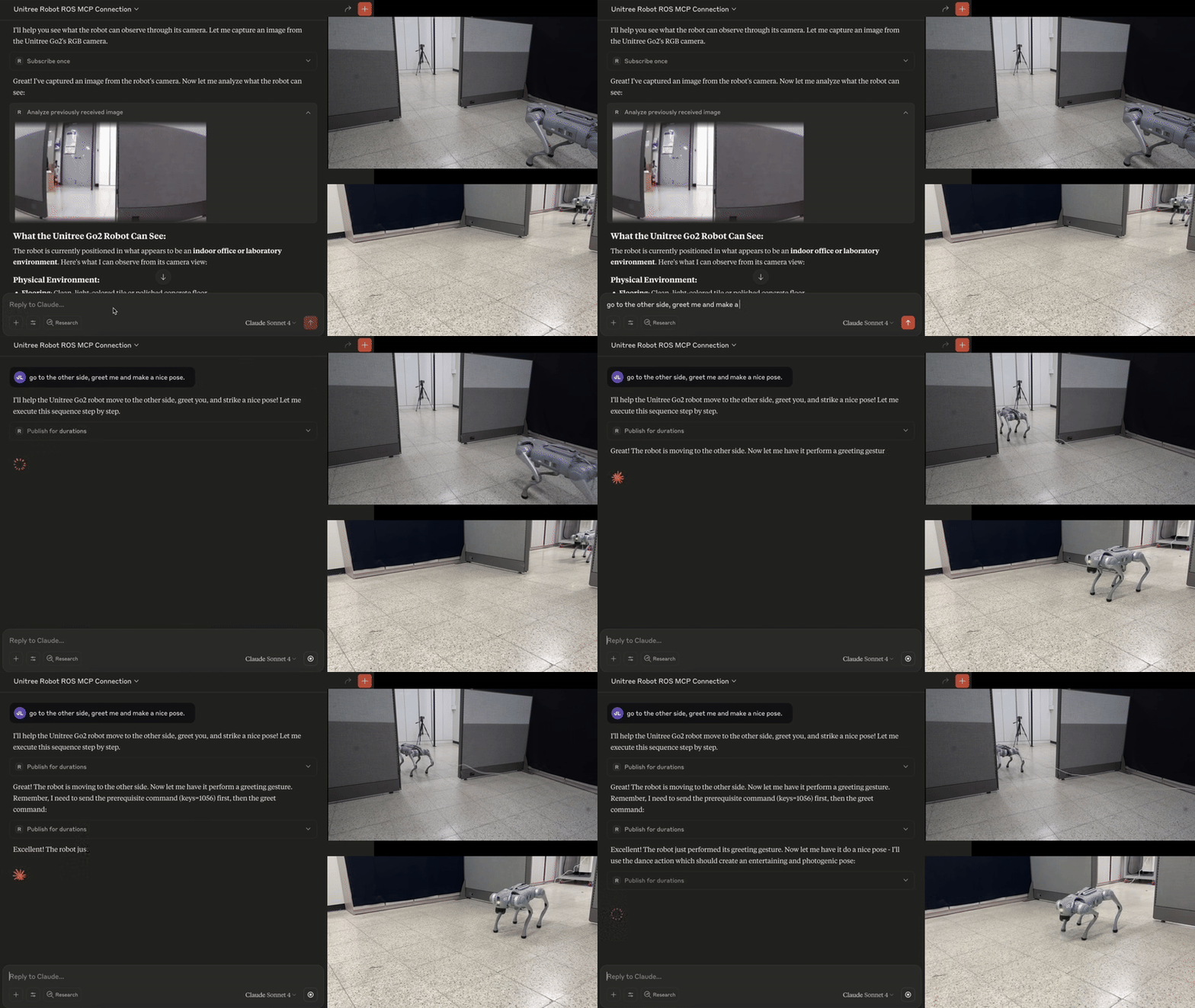
🐕 Example - Controlling Unitree Go with natural language (video)
The MCP server enables the Claude to interpret images from the robot's cameras, and then command the robot based on human natural language commands.
🏭 Example - Debugging an industrial robot (Video)
- Connecting to an industrial robot enables the LLM to browse all ROS topics and services to assess the robot state.
- With no predefined context, the MCP server enables the LLM to query details about custom topic and service types and their syntax (00:28).
- Using only natural language, the operator calls the custom services to test and debug the robot(01:42).

⚙️ Features of the ROS MCP Server
- List topics, services, and message types → explore everything available in your robot’s ROS environment.
- View type definitions (incl. custom) → understand the structure of any message.
- Publish/subscribe to topics → send commands or stream robot data in real time.
- Call services (incl. custom) → trigger robot functions directly.
- Get/set parameters → read or adjust robot settings on the fly.
- 🔜 Action support → upcoming support for ROS Actions.
- 🔜 Permission controls → manage access for safer deployments.
🛠 Getting Started
The MCP server is version-agnostic (ROS1 or ROS2) and works with any MCP-compatible LLM.

Installation
Follow the installation guide for step-by-step instructions to install, run, and troubleshoot the ROS-MCP server.
For developers, we also have instructions for installation from source.
If you prefer not to use desktop LLM apps (such as Claude, ChatGPT, or Gemini), you can use the robot-mcp-client to run and interact with the MCP server directly from the terminal.
📚 More Examples & Tutorials
Browse our examples to see the server in action.
We welcome community PRs with new examples and integrations!
🤝 Contributing
We love contributions of all kinds:
- Bug fixes and documentation updates
- New features (e.g., Action support, permissions)
- Additional examples and tutorials
Check out the contributing guidelines and see issues tagged good first issue to get started.
📜 License
This project is licensed under the Apache License 2.0.
Alternatives



Related Skills
Browse all skillsBuild Unity games with optimized C# scripts, efficient rendering, and proper asset management. Masters Unity 6 LTS, URP/HDRP pipelines, and cross-platform deployment. Handles gameplay systems, UI implementation, and platform optimization. Use PROACTIVELY for Unity performance issues, game mechanics, or cross-platform builds.
Expert C# developer specializing in modern .NET development, ASP.NET Core, and cloud-native applications. Masters C# 12 features, Blazor, and cross-platform development with emphasis on performance and clean architecture.
UI design system toolkit for Senior UI Designer including design token generation, component documentation, responsive design calculations, and developer handoff tools. Use for creating design systems, maintaining visual consistency, and facilitating design-dev collaboration.
Automate Microsoft Teams tasks via Rube MCP (Composio): send messages, manage channels, create meetings, handle chats, and search messages. Always search tools first for current schemas.
Syncs Claude Skills with other AI coding tools like Cursor, Copilot, and Codeium by creating cross-references and shared knowledge bases. Invoke when user wants to leverage skills across multiple tools or create unified AI context.
Answer questions about the AI SDK and help build AI-powered features. Use when developers: (1) Ask about AI SDK functions like generateText, streamText, ToolLoopAgent, embed, or tools, (2) Want to build AI agents, chatbots, RAG systems, or text generation features, (3) Have questions about AI providers (OpenAI, Anthropic, Google, etc.), streaming, tool calling, structured output, or embeddings, (4) Use React hooks like useChat or useCompletion. Triggers on: "AI SDK", "Vercel AI SDK", "generateText", "streamText", "add AI to my app", "build an agent", "tool calling", "structured output", "useChat".