
Slack
Connects to Slack workspaces to manage channels and messaging operations through OAuth authentication. Allows AI assistants to read channels, post messages, reply to threads, and add reactions.
Experience the most powerful MCP server for Slack workspaces with advanced message and channel support. This feature-rich server allows fetching messages from channels, threads, DMs, and group DMs with embedded user info and smart history pagination by date or count. It supports enterprise workspaces, caching for faster access, and flexible transports like Stdio and SSE with proxy settings. Designed for stealth operation or secure access via OAuth, it integrates channel and thread lookups by name or ID to give rich, contextual Slack workspace data efficiently and reliably. Perfect for developers needing robust Slack data handling.
What it does
- List channels in Slack workspaces
- Post messages to specific channels
- Reply to message threads
- Add emoji reactions to messages
- Retrieve channel message history
- Manage user profiles and workspace data
Best for
About Slack
Slack is a community-built MCP server published by korotovsky that provides AI assistants with tools and capabilities via the Model Context Protocol. Powerful MCP server for Slack with advanced API, message fetching, webhooks, and enterprise features. Robust Slack data for developers. It is categorized under communication.
How to install
You can install Slack in your AI client of choice. Use the install panel on this page to get one-click setup for Cursor, Claude Desktop, VS Code, and other MCP-compatible clients. This server runs locally on your machine via the stdio transport.
License
Slack is released under the MIT license. This is a permissive open-source license, meaning you can freely use, modify, and distribute the software.
Slack MCP Server
Model Context Protocol (MCP) server for Slack Workspaces. The most powerful MCP Slack server — supports Stdio, SSE and HTTP transports, proxy settings, DMs, Group DMs, Smart History fetch (by date or count), may work via OAuth or in complete stealth mode with no permissions and scopes in Workspace 😏.
[!IMPORTANT]
We need your support! Each month, over 30,000 engineers visit this repository, and more than 9,000 are already using it.If you appreciate the work our contributors have put into this project, please consider giving the repository a star.
This feature-rich Slack MCP Server has:
- Stealth and OAuth Modes: Run the server without requiring additional permissions or bot installations (stealth mode), or use secure OAuth tokens for access without needing to refresh or extract tokens from the browser (OAuth mode).
- Enterprise Workspaces Support: Possibility to integrate with Enterprise Slack setups.
- Channel and Thread Support with
#Name@Lookup: Fetch messages from channels and threads, including activity messages, and retrieve channels using their names (e.g., #general) as well as their IDs. - Smart History: Fetch messages with pagination by date (d1, 7d, 1m) or message count.
- Unread Messages: Get all unread messages across channels efficiently with priority sorting (DMs > partner channels > internal), @mention filtering, and mark-as-read support.
- Search Messages: Search messages in channels, threads, and DMs using various filters like date, user, and content.
- Safe Message Posting: The
conversations_add_messagetool is disabled by default for safety. Enable it via an environment variable, with optional channel restrictions. - DM and Group DM support: Retrieve direct messages and group direct messages.
- Embedded user information: Embed user information in messages, for better context.
- Cache support: Cache users and channels for faster access.
- Stdio/SSE/HTTP Transports & Proxy Support: Use the server with any MCP client that supports Stdio, SSE or HTTP transports, and configure it to route outgoing requests through a proxy if needed.
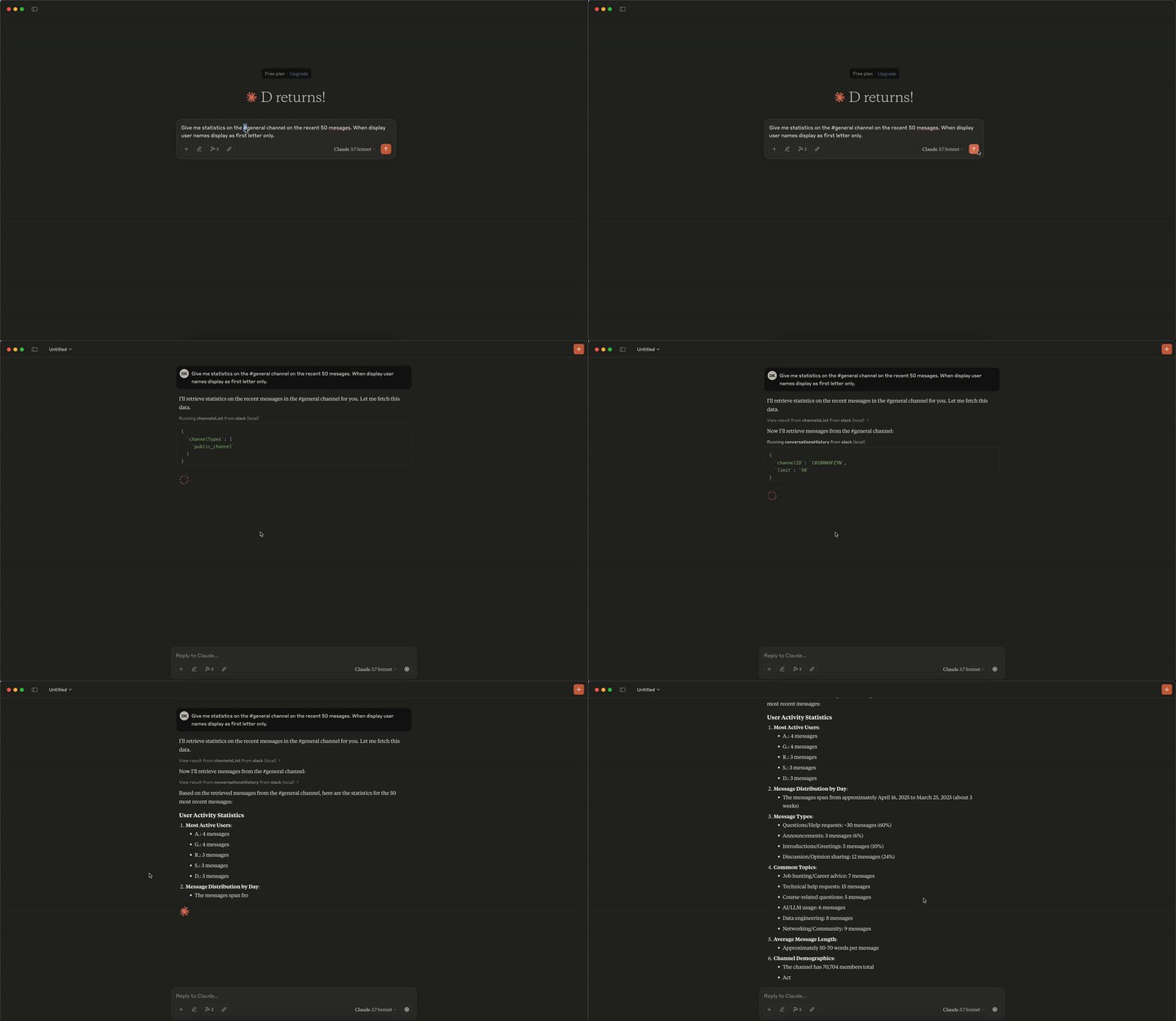
Analytics Demo
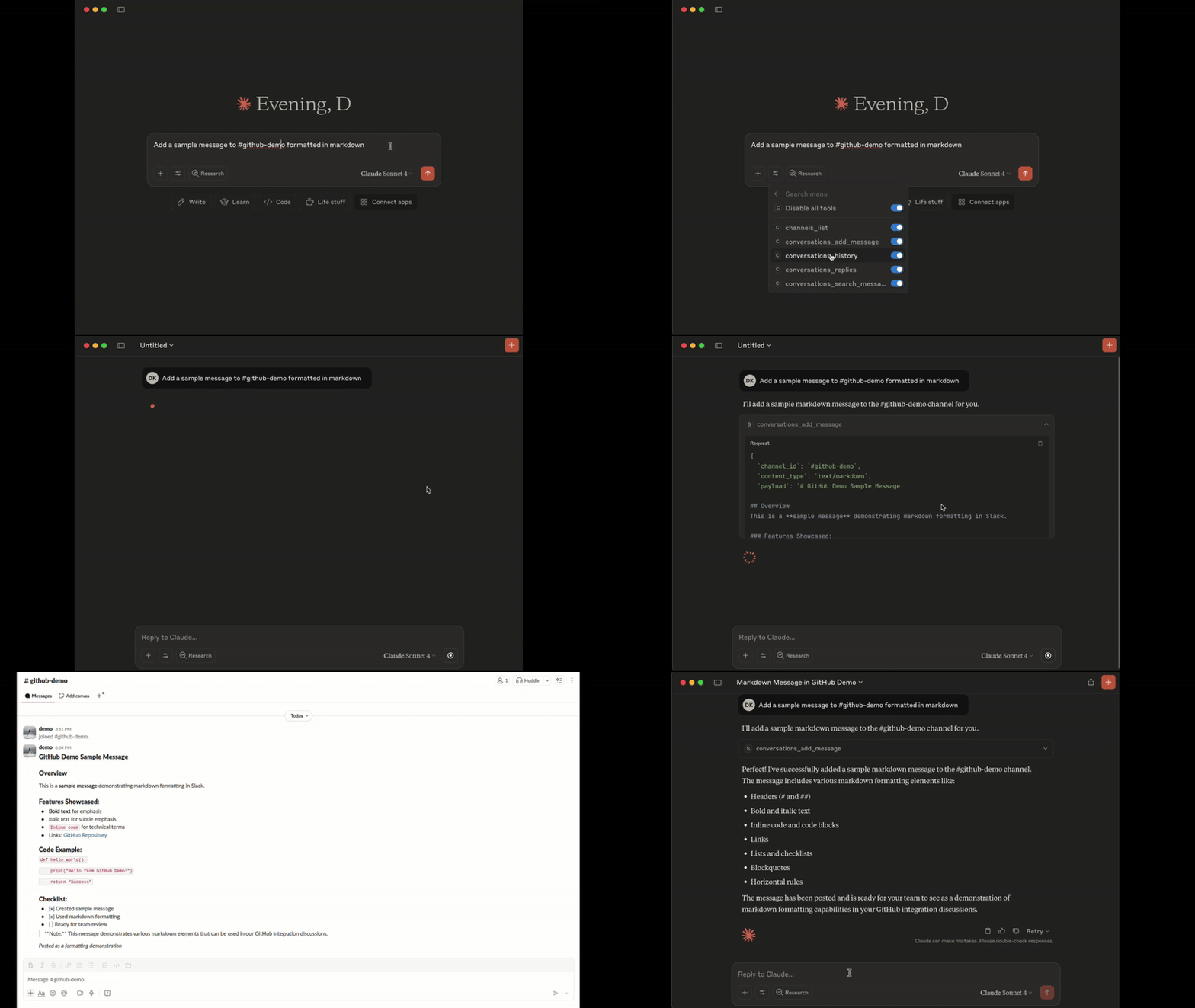
Add Message Demo
Tools
1. conversations_history:
Get messages from the channel (or DM) by channel_id, the last row/column in the response is used as 'cursor' parameter for pagination if not empty
- Parameters:
channel_id(string, required): -channel_id(string): ID of the channel in format Cxxxxxxxxxx or its name starting with#...or@...aka#generalor@username_dm.include_activity_messages(boolean, default: false): If true, the response will include activity messages such aschannel_joinorchannel_leave. Default is boolean false.cursor(string, optional): Cursor for pagination. Use the value of the last row and column in the response as next_cursor field returned from the previous request.limit(string, default: "1d"): Limit of messages to fetch in format of maximum ranges of time (e.g. 1d - 1 day, 1w - 1 week, 30d - 30 days, 90d - 90 days which is a default limit for free tier history) or number of messages (e.g. 50). Must be empty when 'cursor' is provided.
2. conversations_replies:
Get a thread of messages posted to a conversation by channelID and thread_ts, the last row/column in the response is used as cursor parameter for pagination if not empty.
- Parameters:
channel_id(string, required): ID of the channel in formatCxxxxxxxxxxor its name starting with#...or@...aka#generalor@username_dm.thread_ts(string, required): Unique identifier of either a thread’s parent message or a message in the thread. ts must be the timestamp in format1234567890.123456of an existing message with 0 or more replies.include_activity_messages(boolean, default: false): If true, the response will include activity messages such as 'channel_join' or 'channel_leave'. Default is boolean false.cursor(string, optional): Cursor for pagination. Use the value of the last row and column in the response as next_cursor field returned from the previous request.limit(string, default: "1d"): Limit of messages to fetch in format of maximum ranges of time (e.g. 1d - 1 day, 1w - 1 week, 30d - 30 days, 90d - 90 days which is a default limit for free tier history) or number of messages (e.g. 50). Must be empty when 'cursor' is provided.
3. conversations_add_message
Add a message to a public channel, private channel, or direct message (DM, or IM) conversation by channel_id and thread_ts.
Note: Posting messages is disabled by default for safety. To enable, set the
SLACK_MCP_ADD_MESSAGE_TOOLenvironment variable. If set to a comma-separated list of channel IDs, posting is enabled only for those specific channels. See the Environment Variables section below for details.
- Parameters:
channel_id(string, required): ID of the channel in formatCxxxxxxxxxxor its name starting with#...or@...aka#generalor@username_dm.thread_ts(string, optional): Unique identifier of either a thread’s parent message or a message in the thread_ts must be the timestamp in format1234567890.123456of an existing message with 0 or more replies. Optional, if not provided the message will be added to the channel itself, otherwise it will be added to the thread.payload(string, required): Message payload in specified content_type format. Example: 'Hello, world!' for text/plain or '# Hello, world!' for text/markdown.content_type(string, default: "text/markdown"): Content type of the message. Default is 'text/markdown'. Allowed values: 'text/markdown', 'text/plain'.
4. conversations_search_messages
Search messages in a public channel, private channel, or direct message (DM, or IM) conversation using filters. All filters are optional, if not provided then search_query is required.
Note: This tool is not available when using bot tokens (
xoxb-*). Bot tokens cannot use thesearch.messagesAPI.
- Parameters:
search_query(string, optional): Search query to filter messages. Example: 'marketing report' or full URL of Slack message e.g. 'https://slack.com/archives/C1234567890/p1234567890123456', then the tool will return a single message matching given URL, herewith all other parameters will be ignored.filter_in_channel(string, optional): Filter messages in a specific channel by its ID or name. Example:C1234567890or#general. If not provided, all channels will be searched.filter_in_im_or_mpim(string, optional): Filter messages in a direct message (DM) or multi-person direct message (MPIM) conversation by its ID or name. Example:D1234567890or@username_dm. If not provided, all DMs and MPIMs will be searched.filter_users_with(string, optional): Filter messages with a specific user by their ID or display name in threads and DMs. Example:U1234567890or@username. If not provided, all threads and DMs will be searched.filter_users_from(string, optional): Filter messages from a specific user by their ID or display name. Example:U1234567890or@username. If not provided, all users will be searched.filter_date_before(string, optional): Filter messages sent before a specific date in formatYYYY-MM-DD. Example:2023-10-01,July,YesterdayorToday. If not provided, all dates will be searched.filter_date_after(string, optional): Filter messages sent after a specific date in formatYYYY-MM-DD. Example:2023-10-01,July,YesterdayorToday. If not provided, all dates will be searched.filter_date_on(string, optional): Filter messages sent on a specific date in formatYYYY-MM-DD. Example:2023-10-01,July,YesterdayorToday. If not provided, all dates will be searched.filter_date_during(string, optional): Filter messages sent during a specific period in formatYYYY-MM-DD. Example:July,YesterdayorToday. If not provided, all dates will be searched.filter_threads_only(boolean, default: false): If true, the response will include only messages from threads. Default is boolean false.cursor(string, default: ""): Cursor for pagination. Use the value of the last row and column in the response as next_cursor field returned from the previous request.limit(number, default: 20): The maximum number of items to return. Must be an integer between 1 and 100.
5. channels_list:
Get list of channels
- Parameters:
channel_types(string, required): Comma-separated channel types. Allowed values:mpim,im,public_channel,private_channel. Example:public_channel,private_channel,imsort(string, optional): Type of sorting. Allowed values:popularity- sort by number of members/participants in each channel.limit(number, default: 100): The maximum number of items to return. Must be an integer between 1 and 1000 (maximum 999).cursor(string, optional): Cursor for pagination. Use the value of the last row and column in the response as next_cursor field returned from the previous request.
6. reactions_add:
Add an emoji reaction to a message in a public channel, private channel, or direct message (DM, or IM) conversation.
Note: Adding reactions is disabled by default for safety. To enable, set the
SLACK_MCP_ADD_MESSAGE_TOOLenvironment variable. If set to a comma-separated list of channel IDs, reactions are enabled only for those specific channels. See the Environment Variables section below for details.
- Parameters:
channel_id(string, re
README truncated. View full README on GitHub.
Alternatives




Related Skills
Browse all skillsGenerate formatted Slack messages for team communication
Search enterprise context data (Slack, docs, meetings, PRs) from the HERB benchmark to answer questions about products, employees, customers, and organizational activities. Use when answering questions that require searching through enterprise communication and documentation.
Create professional research posters in LaTeX using beamerposter, tikzposter, or baposter. Support for conference presentations, academic posters, and scientific communication. Includes layout design, color schemes, multi-column formats, figure integration, and poster-specific best practices for visual communication.
Expert backend architect specializing in scalable API design, microservices architecture, and distributed systems. Masters REST/GraphQL/gRPC APIs, event-driven architectures, service mesh patterns, and modern backend frameworks. Handles service boundary definition, inter-service communication, resilience patterns, and observability. Use PROACTIVELY when creating new backend services or APIs.
Automate and control Unity Editor with 500+ commands, real-time WebSocket communication, and SQLite integration for efficient game development.
Agile product ownership toolkit for Senior Product Owner including INVEST-compliant user story generation, sprint planning, backlog management, and velocity tracking. Use for story writing, sprint planning, stakeholder communication, and agile ceremonies.