
Summarization
Provides intelligent text summarization capabilities to help AI agents and language models manage context windows by condensing large outputs while preserving key information.
Provides summarized output from various actions, optimizing token usage for efficient processing of large datasets and language models.
What it does
- Summarize command execution results
- Condense file content and directory listings
- Process API responses and error messages
- Generate focused analysis for security or API surfaces
- Store full content for reference while providing summaries
Best for
About Summarization
Summarization is a community-built MCP server published by braffolk that provides AI assistants with tools and capabilities via the Model Context Protocol. Summarization provides efficient text summarization and AI summarizer tools to process large datasets, including YouTube video summarizer capabilities. It is categorized under ai ml, developer tools.
How to install
You can install Summarization in your AI client of choice. Use the install panel on this page to get one-click setup for Cursor, Claude Desktop, VS Code, and other MCP-compatible clients. This server runs locally on your machine via the stdio transport.
License
Summarization is released under the MIT license. This is a permissive open-source license, meaning you can freely use, modify, and distribute the software.
Summarization Functions
Intelligent text summarization for the Model Context Protocol
Features • AI Agent Integration • Installation • Usage

Overview
A powerful MCP server that provides intelligent summarization capabilities through a clean, extensible architecture. Built with modern TypeScript and designed for seamless integration with AI workflows.
Installation
Installing via Smithery
To install Summarization Functions for Claude Desktop automatically via Smithery:
npx -y @smithery/cli install mcp-summarization-functions --client claude
npm i mcp-summarization-functions
AI Agent Integration
This MCP server was primarily developed to enhance the performance and reliability of AI agents like Roo Cline and Cline. It addresses a critical challenge in AI agent operations: context window management.
Context Window Optimization
AI agents frequently encounter situations where their context window gets rapidly filled with large outputs from:
- Command execution results
- File content readings
- Directory listings
- API responses
- Error messages and stack traces
This server helps maintain efficient context usage by:
- Providing concise, relevant summaries instead of full content
- Storing full content for reference when needed
- Offering focused analysis based on specific needs (security, API surface, etc.)
- Supporting multiple output formats for optimal context utilization
Benefits for AI Agents
- Reduced Failure Rates: By preventing context window overflow
- Improved Response Quality: Through focused, relevant summaries
- Enhanced Efficiency: By maintaining important context while reducing noise
- Better Resource Management: Through intelligent content caching and retrieval
- Flexible Integration: Supporting multiple AI providers and configuration options
Recommended AI Agent Prompt
When integrating with AI agents, include the following in your agent's instructions:
# CONTEXT MANAGEMENT

You have access to summarization functions through the MCP server. These functions are NOT optional - you MUST use them for ALL potentially large outputs to prevent context overflow:

MANDATORY SUMMARIZATION:
- You MUST ALWAYS use summarization functions for:
    - ANY first time file reading operations (unless you are CERTAIN its small and you are going to edit it)
    - ALL command execution outputs
    - EVERY directory analysis
    - ANY API responses or error logs
    - ANY output that could be large

NEVER attempt to process raw output directly - ALWAYS use the appropriate summarization function:
• For commands: summarize_command
• For files: summarize_files
• For directories: summarize_directory
• For other text: summarize_text

ALWAYS utilize available features:
• Specify hints for focused analysis
• Choose appropriate output formats
• Use content IDs to access full details only when absolutely necessary

There is NO NEED to process perfect or complete output. Summarized content is ALWAYS preferred over raw data. When in doubt, use summarization.
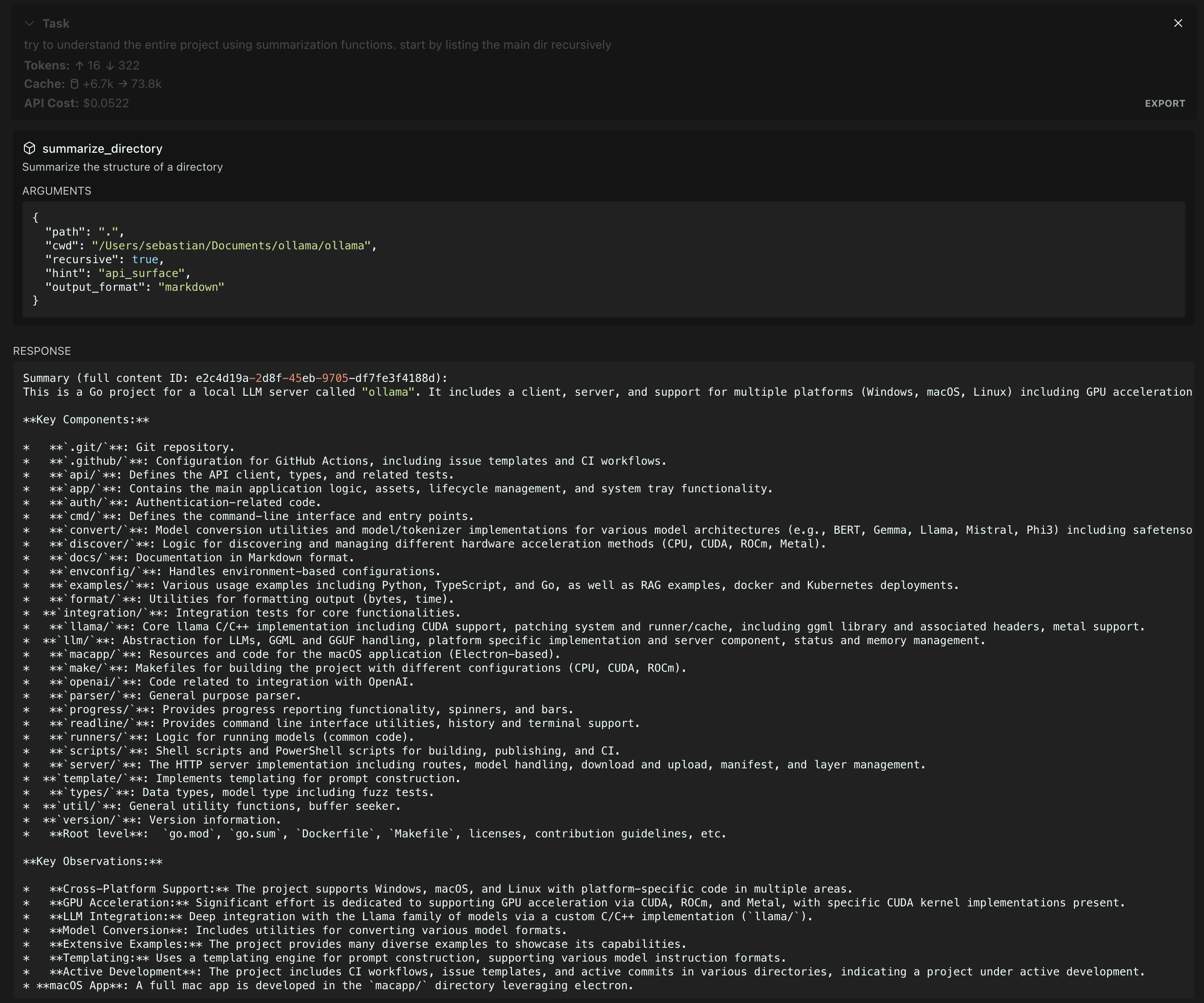
Summarization in action on the Ollama repository (Gemini 2.0 Flash summarization, Claude 3.5 agent)
Features
-
Command Output Summarization
Execute commands and get concise summaries of their output -
File Content Analysis
Summarize single or multiple files while maintaining technical accuracy -
Directory Structure Understanding
Get clear overviews of complex directory structures -
Flexible Model Support Use models from different providers
-
AI Agent Context Optimization Prevent context window overflow and improve AI agent performance through intelligent summarization
Configuration
The server supports multiple AI providers through environment variables:
Required Environment Variables
PROVIDER: AI provider to use. Supported values: -ANTHROPIC- Claude models from Anthropic -OPENAI- GPT models from OpenAI -OPENAI-COMPATIBLE- OpenAI-compatible APIs (e.g. Azure) -GOOGLE- Gemini models from GoogleAPI_KEY: API key for the selected provider
Optional Environment Variables
MODEL_ID: Specific model to use (defaults to provider's standard model)PROVIDER_BASE_URL: Custom API endpoint for OpenAI-compatible providersMAX_TOKENS: Maximum tokens for model responses (default: 1024)SUMMARIZATION_CHAR_THRESHOLD: Character count threshold for when to summarize (default: 512)SUMMARIZATION_CACHE_MAX_AGE: Cache duration in milliseconds (default: 3600000 - 1 hour)MCP_WORKING_DIR- fallback directory for trying to find files with relative paths from
Example Configurations
# Anthropic Configuration
PROVIDER=ANTHROPIC
API_KEY=your-anthropic-key
MODEL_ID=claude-3-5-sonnet-20241022

# OpenAI Configuration
PROVIDER=OPENAI
API_KEY=your-openai-key
MODEL_ID=gpt-4-turbo-preview

# Azure OpenAI Configuration
PROVIDER=OPENAI-COMPATIBLE
API_KEY=your-azure-key
PROVIDER_BASE_URL=https://your-resource.openai.azure.com
MODEL_ID=your-deployment-name

# Google Configuration
PROVIDER=GOOGLE
API_KEY=your-google-key
MODEL_ID=gemini-2.0-flash-exp
Usage
Add the server to your MCP configuration file:
{
		"mcpServers": {
				"MUST_USE_summarization": {
						"command": "node",
						"args": ["path/to/summarization-functions/build/index.js"],
						"env": {
								"PROVIDER": "ANTHROPIC",
								"API_KEY": "your-api-key",
								"MODEL_ID": "claude-3-5-sonnet-20241022",
                "MCP_WORKING_DIR": "default_working_directory"
						}
				}
		}
}
Available Functions
The server provides the following summarization tools:
summarize_command
Execute and summarize command output.
{
  // Required
  command: string,    // Command to execute
  cwd: string,       // Working directory for command execution

  // Optional
  hint?: string,      // Focus area: "security_analysis" | "api_surface" | "error_handling" | "dependencies" | "type_definitions"
  output_format?: string  // Format: "text" | "json" | "markdown" | "outline" (default: "text")
}
summarize_files
Summarize file contents.
{
  // Required
  paths: string[],    // Array of file paths to summarize (relative to cwd)
  cwd: string,       // Working directory for resolving file paths

  // Optional
  hint?: string,      // Focus area: "security_analysis" | "api_surface" | "error_handling" | "dependencies" | "type_definitions"
  output_format?: string  // Format: "text" | "json" | "markdown" | "outline" (default: "text")
}
summarize_directory
Get directory structure overview.
{
  // Required
  path: string,       // Directory path to summarize (relative to cwd)
  cwd: string,       // Working directory for resolving directory path

  // Optional
  recursive?: boolean,  // Whether to include subdirectories. Safe for deep directories
  hint?: string,       // Focus area: "security_analysis" | "api_surface" | "error_handling" | "dependencies" | "type_definitions"
  output_format?: string   // Format: "text" | "json" | "markdown" | "outline" (default: "text")
}
summarize_text
Summarize arbitrary text content.
{
  // Required
  content: string,    // Text content to summarize
  type: string,       // Type of content (e.g., "log output", "API response")

  // Optional
  hint?: string,      // Focus area: "security_analysis" | "api_surface" | "error_handling" | "dependencies" | "type_definitions"
  output_format?: string  // Format: "text" | "json" | "markdown" | "outline" (default: "text")
}
get_full_content
Retrieve the full content for a given summary ID.
{
  // Required
  id: string         // ID of the stored content
}
Running evals
The evals package loads an mcp client that then runs the index.ts file, so there is no need to rebuild between tests. You can load environment variables by prefixing the npx command. Full documentation can be found here.
OPENAI_API_KEY=your-key npx mcp-eval src/evals/evals.ts src/server/mcp-server.ts
License
MIT
Alternatives



Related Skills
Browse all skillsUI design system toolkit for Senior UI Designer including design token generation, component documentation, responsive design calculations, and developer handoff tools. Use for creating design systems, maintaining visual consistency, and facilitating design-dev collaboration.
Answer questions about the AI SDK and help build AI-powered features. Use when developers: (1) Ask about AI SDK functions like generateText, streamText, ToolLoopAgent, embed, or tools, (2) Want to build AI agents, chatbots, RAG systems, or text generation features, (3) Have questions about AI providers (OpenAI, Anthropic, Google, etc.), streaming, tool calling, structured output, or embeddings, (4) Use React hooks like useChat or useCompletion. Triggers on: "AI SDK", "Vercel AI SDK", "generateText", "streamText", "add AI to my app", "build an agent", "tool calling", "structured output", "useChat".
Use when working with the OpenAI API (Responses API) or OpenAI platform features (tools, streaming, Realtime API, auth, models, rate limits, MCP) and you need authoritative, up-to-date documentation (schemas, examples, limits, edge cases). Prefer the OpenAI Developer Documentation MCP server tools when available; otherwise guide the user to enable `openaiDeveloperDocs`.
Guide for building TypeScript CLIs with Bun. Use when creating command-line tools, adding subcommands to existing CLIs, or building developer tooling. Covers argument parsing, subcommand patterns, output formatting, and distribution.
Guide developers through setting up development environments with proper tools, dependencies, and configurations
Integrate Vercel AI SDK applications with You.com tools (web search, AI agent, content extraction). Use when developer mentions AI SDK, Vercel AI SDK, generateText, streamText, or You.com integration with AI SDK.