
ThumbGate
Block repeat AI mistakes with thumbs up/down feedback. Stop paying for the same LLM errors twice. Works with Claude, Cursor, Codex.
Self-improving agent governance system that blocks repeat AI mistakes using thumbs up/down feedback to create Pre-Action Gates, preventing costly token usage on the same errors.
About ThumbGate
ThumbGate is a community-built MCP server published by IgorGanapolsky that provides AI assistants with tools and capabilities via the Model Context Protocol. Block repeat AI mistakes with thumbs up/down feedback. Stop paying for the same LLM errors twice. Works with Claude, Cursor, Codex. It is categorized under search web. This server exposes 10 tools that AI clients can invoke during conversations and coding sessions.
How to install
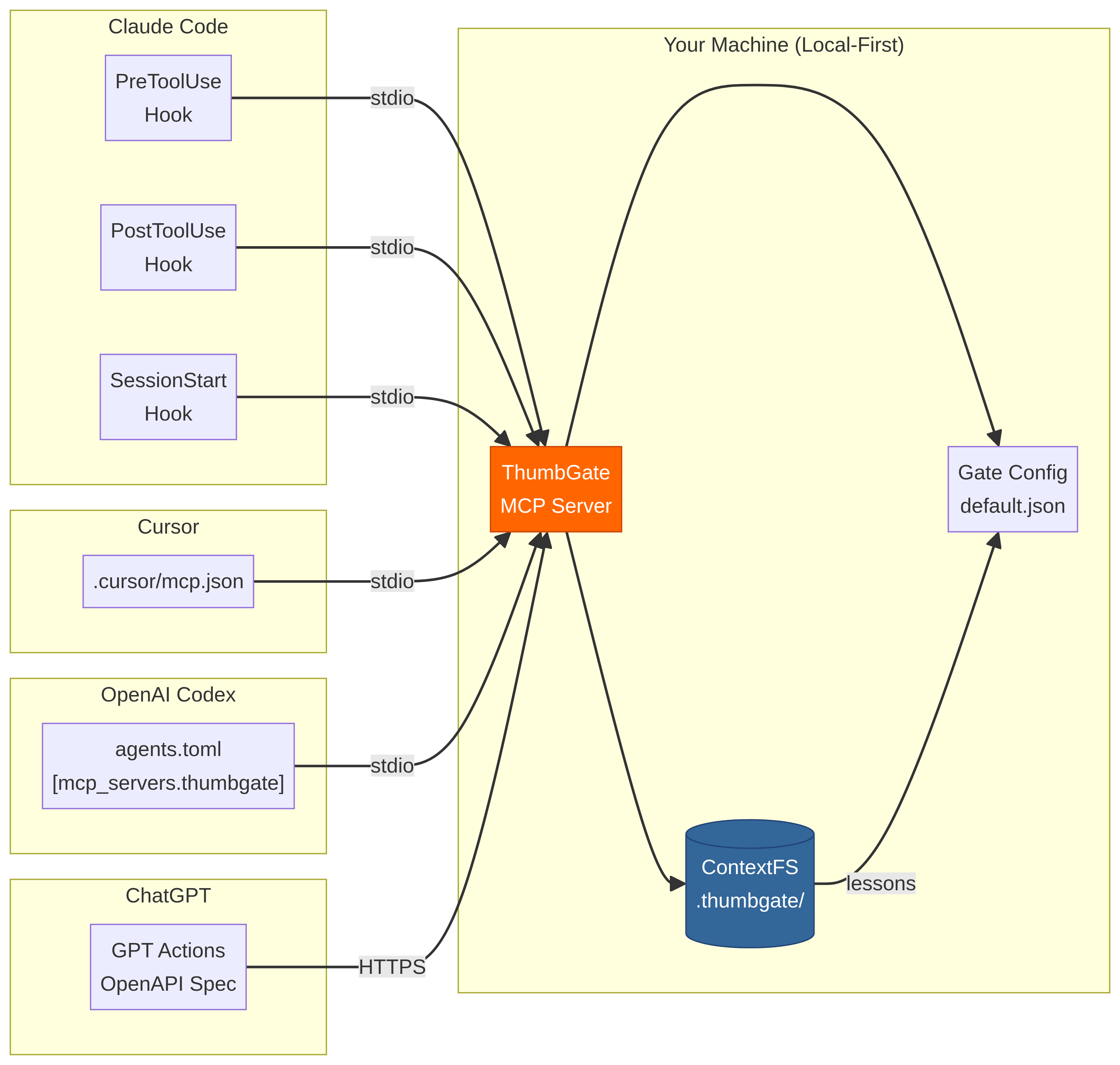
You can install ThumbGate in your AI client of choice. Use the install panel on this page to get one-click setup for Cursor, Claude Desktop, VS Code, and other MCP-compatible clients. This server runs locally on your machine via the stdio transport.
License
ThumbGate is released under the MIT license. This is a permissive open-source license, meaning you can freely use, modify, and distribute the software.
Tools (10)
Initialize ThumbGate for your AI agent with auto-detection
Create a gate rule with custom blocking pattern
Start ThumbGate MCP server for agent integration
Capture thumbs up/down reactions from agent interactions
Convert feedback into enforceable blocking rules
ThumbGate
Your AI coding bill has a leak.
Stop paying $ for the same AI mistake.
Every retry loop, every hallucinated import, every "let me try a different approach" — those are billable tokens on every LLM vendor's bill. Thumbs-down once; ThumbGate blocks that exact mistake on every future call. Across Claude Code, Cursor, Codex, Gemini, Amp, OpenCode — any MCP-compatible agent, forever.
Under the hood: your thumbs-down becomes a Pre-Action Gate that physically blocks the pattern permanently on every future call — across every session, every model, every agent. It is self-improving agent governance: every correction promotes a fresh prevention rule, and your library of Pre-Action Gates grows stronger with every lesson. Works with Claude Code, Cursor, Codex, Gemini CLI, Amp, OpenCode, and any MCP-compatible agent. The monthly Anthropic / OpenAI bill stops paying for the same lesson over and over — local-first enforcement, zero tokens spent on repeats.
Prevent expensive AI mistakes. Make AI stop repeating mistakes. Turn a smart assistant into a reliable operator.
Mission: make AI coding affordable by making sure you never pay for the same mistake twice.


🎬 90-second demo
Watch the force-push scenario: agent tries to git push --force, one thumbs-down, next session it's blocked — zero tokens spent on the repeat.
▶ Watch the 90-second demo · Script · ElevenLabs narration: npm run demo:voiceover
First-dollar activation path
If someone is not already bought into ThumbGate, do not lead with architecture. Lead with one repeated mistake.
- Show the pain: open the ThumbGate GPT and paste the bad answer, risky command, deploy, PR action, or agent plan before it runs again.
- Capture the lesson: type
thumbs down:orthumbs up:with one concrete sentence. Native ChatGPT rating buttons are not the ThumbGate capture path; typed feedback is. - Enforce the repeat: run
npx thumbgate initwhere the agent executes so the lesson can become a Pre-Action Gate instead of another reminder. - Upgrade only after proof: Solo Pro is for the dashboard, DPO export, proof-ready evidence, and higher capture limits after one real blocked repeat. Team starts with the Workflow Hardening Sprint around one repeated failure, one owner, and one proof review.
The buying question is simple: what repeated AI mistake would be worth blocking before the next tool call?
The Problem — the bill nobody talks about
Frontier-model calls are not cheap. Sonnet 4.5 is ~$3 / 1M input tokens and ~$15 / 1M output tokens. Opus is 5× that. Every time your agent:
- hallucinates a function name and you have to correct it,
- retries the same failing tool call until it gives up,
- regenerates a 4,000-token plan you already approved last session,
- repeats a destructive command you blocked manually yesterday,
…you are paying for that round-trip. Twice if it retries. Three times if you re-prompt. And the agent has no memory across sessions, so the meter resets every Monday.
Session 1:  Agent force-pushes to main.     You fix it.    +4,200 tokens
Session 2:  Agent force-pushes again.       You fix it.    +4,200 tokens
Session 3:  Same mistake. Again.            You lose 45m.  +5,800 tokens
That's ~$0.21 in tokens just to fix the same mistake three times — multiplied by every developer, every repeated-mistake class, every week. The math gets ugly fast.
The Solution — fix it once, the bill never sees it again
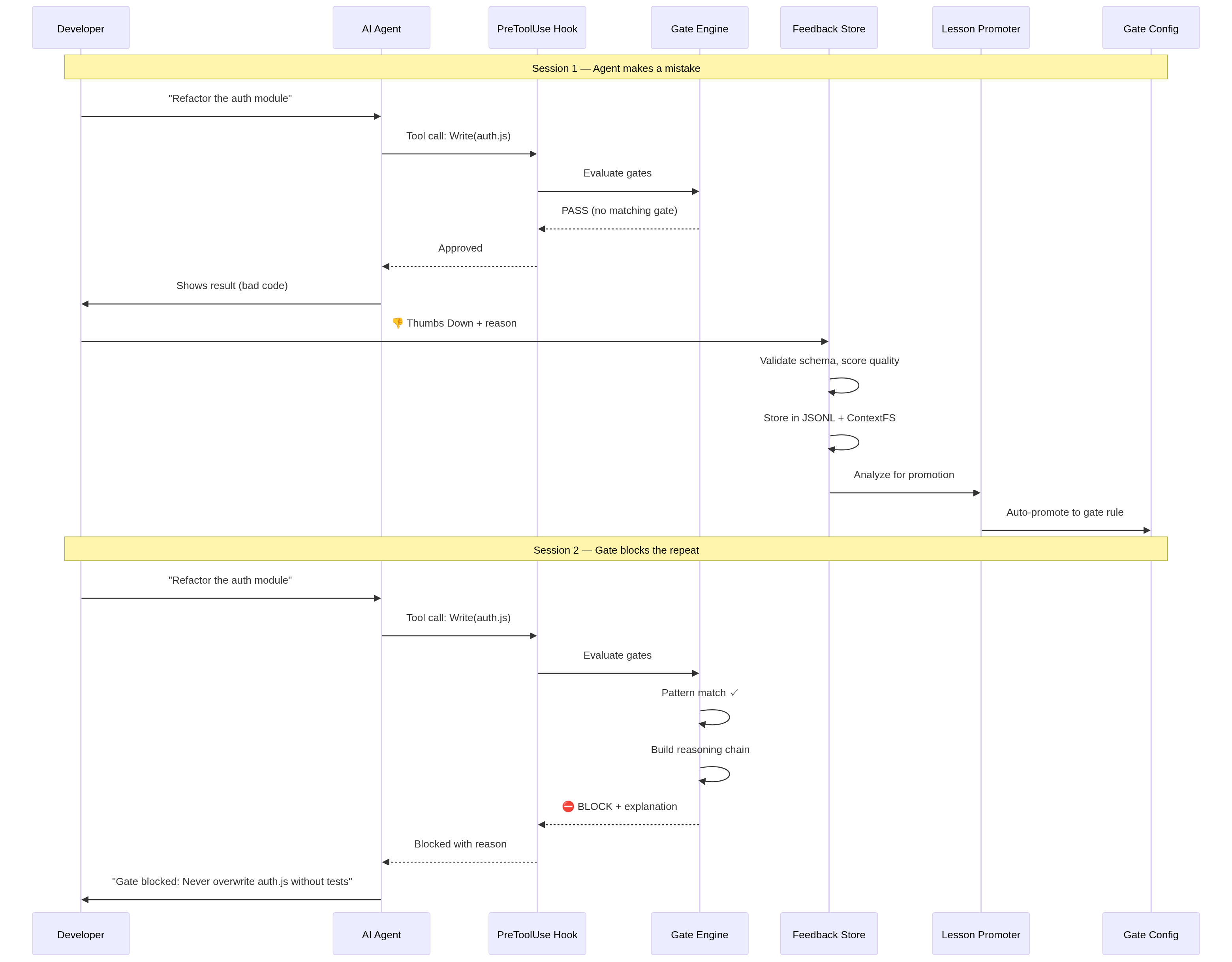
Session 1:  Agent force-pushes to main.     You 👎 it.       +4,200 tokens
Session 2:  ⛔ Gate blocks the force-push.  Zero round-trip. +0 tokens
Session 3+: Never happens again.                              +0 tokens
One thumbs-down. The PreToolUse hook intercepts the call before it reaches the model — no input tokens, no output tokens, no retry loop. The dashboard tracks tokens saved this week as a live counter so you can see exactly what your prevention rules are worth. Mark a review checkpoint once, and the dashboard narrows the next pass to only the feedback, lessons, and gate blocks that landed since your last review.
ThumbGate doesn't make your agent smarter. It makes your agent cheaper to be wrong with.
Quick Start
npx thumbgate init       # auto-detects your agent, wires everything
npx thumbgate capture "Never run DROP on production tables"
That single command creates a gate rule. Next time any AI agent tries to run DROP on production:
⛔ Gate blocked: "Never run DROP on production tables"
   Pattern: DROP.*production
   Verdict: BLOCK
Architecture
ThumbGate operates as a 4-layer enforcement stack between your AI agent and your codebase:
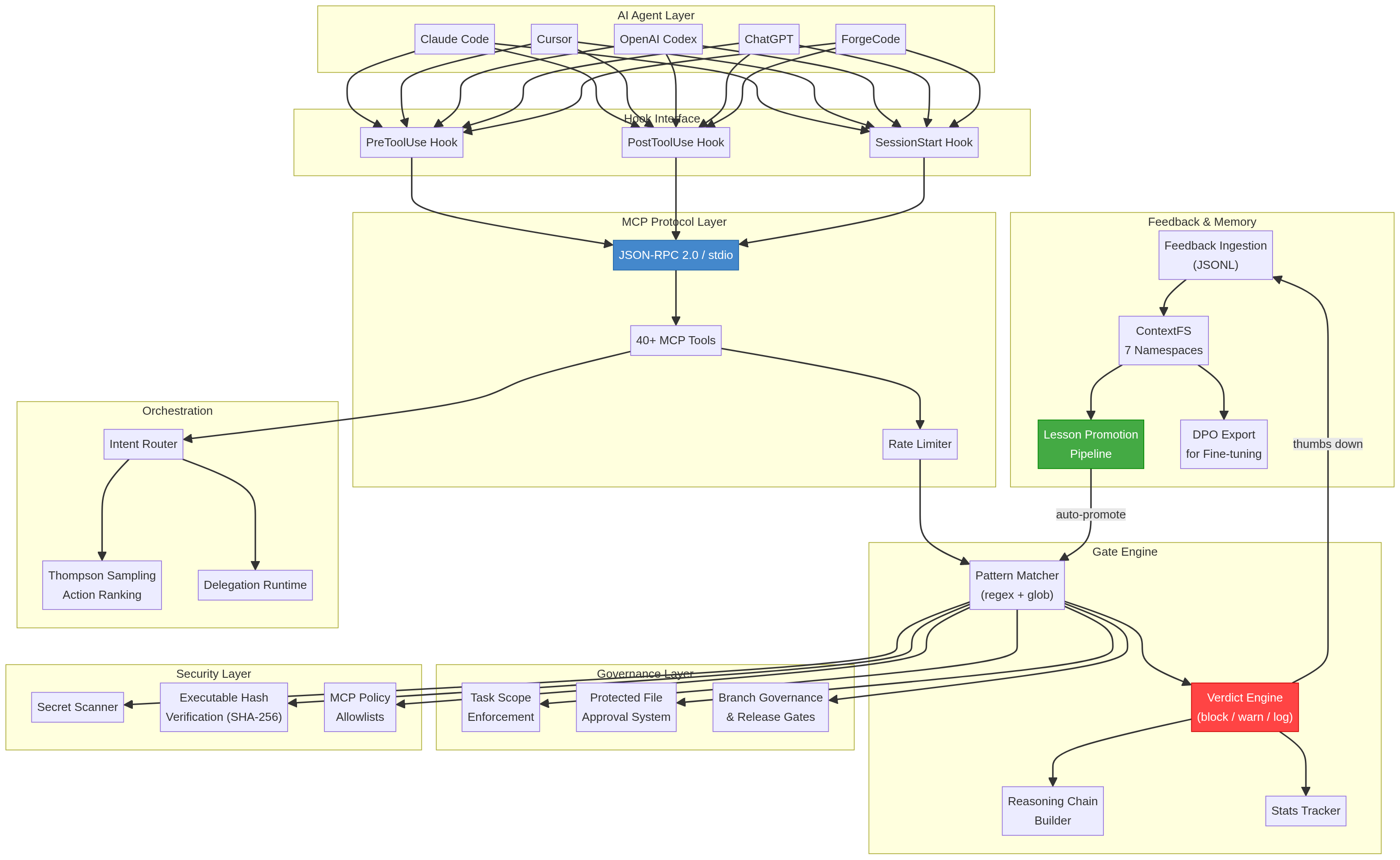
Layer 1: Feedback Capture
Your thumbs-up/down reactions are captured via MCP protocol, CLI, or the ChatGPT GPT surface. Each reaction is stored as a structured lesson with context, timestamp, and severity.
Layer 2: Gate Engine
The gate engine converts lessons into enforceable rules using pattern matching, semantic similarity (via LanceDB vectors), and Thompson Sampling for adaptive rule selection. Rules are stored locally in .thumbgate/gates/.
Layer 3: Pre-Action Interception
Before any agent action executes, ThumbGate's PreToolUse hook intercepts the command and evaluates it against all active gates. This happens at the MCP protocol level — the agent physically cannot bypass it.
Layer 4: Multi-Agent Distribution
Gates are distributed across all connected agents via MCP stdio protocol. One correction in Claude Code protects Cursor, Codex, Gemini CLI, and any MCP-compatible agent.
Prompt engineering still matters, but it is only the starting point. ThumbGate adds prompt evaluation on top: proof lanes, benchmarks, and self-heal checks tell you whether your prompt and workflow actually held up under execution instead of leaving you to guess from vibes.
Install for Your Agent
| Agent | Command |
|---|---|
| Claude Code | npx thumbgate init --agent claude-code |
| Cursor | npx thumbgate init --agent cursor |
| Codex | npx thumbgate init --agent codex |
| Gemini CLI | npx thumbgate init --agent gemini |
| Amp | npx thumbgate init --agent amp |
| Claude Desktop | Download extension bundle |
| Any MCP agent | npx thumbgate serve |
Works with Claude Code, Cursor, Codex, Gemini CLI, Amp, OpenCode, and any MCP-compatible agent.
Status bar proof
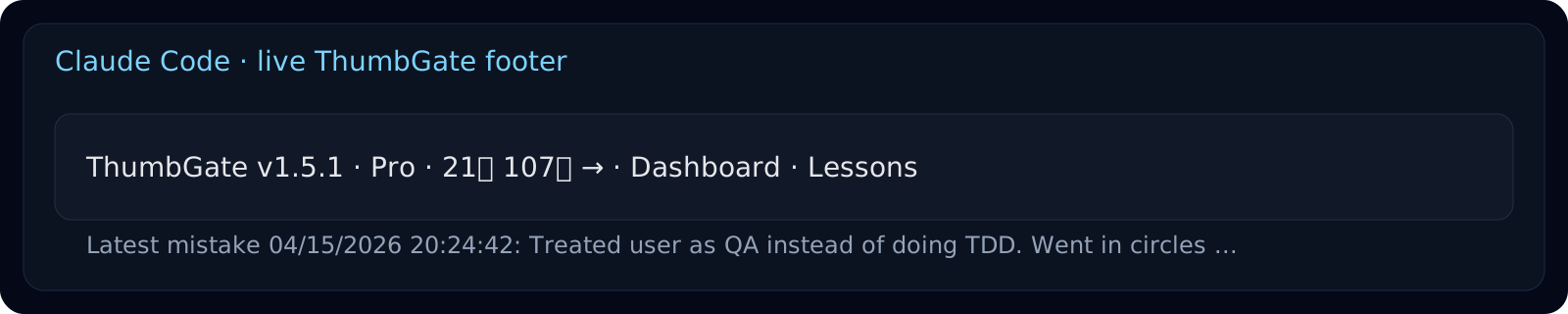
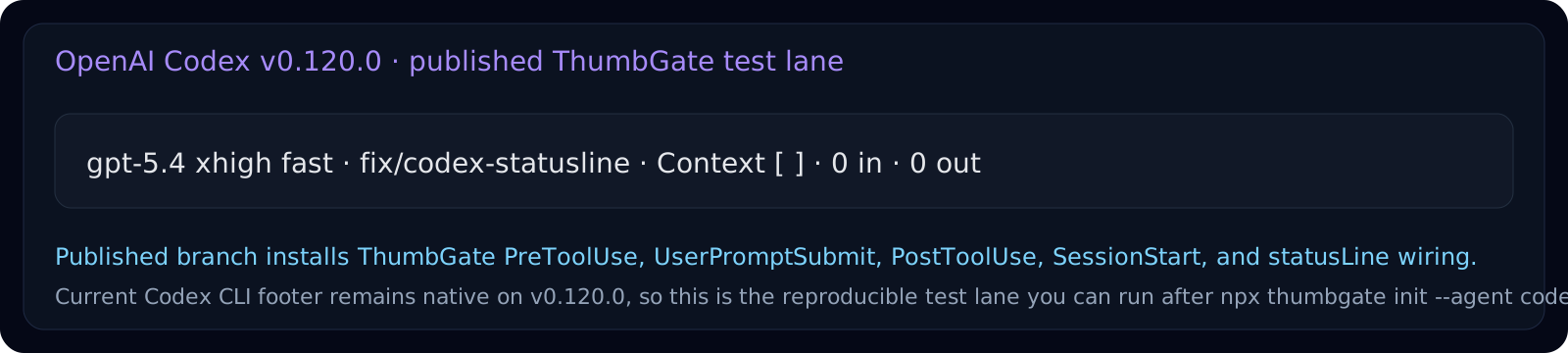
Claude renders the live ThumbGate footer today. npx thumbgate init --agent codex now installs the full Codex hook bundle and writes the ThumbGate statusLine target into ~/.codex/config.json so you can test it on your local Codex build immediately.
Install Codex Plugin
Open the Codex plugin install page or download the standalone bundle from GitHub Releases. The Codex launcher resolves thumbgate@latest when MCP and hooks start, so published npm fixes reach active Codex installs without hand-editing ~/.codex/config.toml.
- Install page: thumbgate-production.up.railway.app/codex-plugin
- Direct zip: thumbgate-codex-plugin.zip
- Follow: plugins/codex-profile/INSTALL.md
How It Works
  STEP 1              STEP 2                 STEP 3
  ────────            ────────               ────────

  You react           ThumbGate learns       The gate holds

  👎 on a bad    ──►  Feedback becomes  ──►  Next time the
  agent action        a saved lesson         agent tries the
                      and a block rule       same thing:
  👍 on a good   ──►  Good pattern gets      ⛔ BLOCKED
  agent action        reinforced                 (or ✅ allowed)
No manual rule-writing. No config files. Your reactions teach the agent what your team actually wants.
ThumbGate sells three concrete outcomes:
- Prevent expensive AI mistakes — catch bad commands, destructive database actions, unsafe publishes, and risky API calls before they run.
- Make AI stop repeating mistakes — fix it once, turn the lesson into a rule, and block the repeat before the next tool call lands.
- Turn AI into a reliable operator — move from a smart assistant that apologizes after damage to a production-ready operator with checkpoints, proof, and enforcement.
- Measure prompts instead of rewriting them blindly — use proof lanes, ThumbGate Bench, and
self-heal:checkto evaluate whether prompts and workflows actually improved behavior.
README truncated. View full README on GitHub.
Alternatives




Related Skills
Browse all skillsOfficial Google SEO guide covering search optimization, best practices, Search Console, crawling, indexing, and improving website search visibility based on official Google documentation
Optimize Core Web Vitals (LCP, INP, CLS) for better page experience and search ranking. Use when asked to "improve Core Web Vitals", "fix LCP", "reduce CLS", "optimize INP", "page experience optimization", or "fix layout shifts".
This skill should be used when users need to search the web for information, find current content, look up news articles, search for images, or find videos. It uses DuckDuckGo's search API to return results in clean, formatted output (text, markdown, or JSON). Use for research, fact-checking, finding recent information, or gathering web resources.
Create user-centered, accessible interface copy (microcopy) for digital products including buttons, labels, error messages, notifications, forms, onboarding, empty states, success messages, and help text. Use when writing or editing any text that appears in apps, websites, or software interfaces, designing conversational flows, establishing voice and tone guidelines, auditing product content for consistency and usability, reviewing UI strings, or improving existing interface copy. Applies UX writing best practices based on four quality standards — purposeful, concise, conversational, and clear. Includes accessibility guidelines, research-backed benchmarks (sentence length, comprehension rates, reading levels), expanded error patterns, tone adaptation frameworks, and comprehensive reference materials.
Automate web browser interactions using natural language via CLI commands. Use when the user asks to browse websites, navigate web pages, extract data from websites, take screenshots, fill forms, click buttons, or interact with web applications. Triggers include "browse", "navigate to", "go to website", "extract data from webpage", "screenshot", "web scraping", "fill out form", "click on", "search for on the web". When taking actions be as specific as possible.
Manage Zotero reference libraries via the Web API. Search, list, add items by DOI/ISBN/PMID (with duplicate detection), delete/trash items, update metadata and tags, export in BibTeX/RIS/CSL-JSON, batch-add from files, check PDF attachments, cross-reference citations, find missing DOIs via CrossRef, and fetch open-access PDFs. Supports --json output for scripting. Use when the user asks about academic references, citation management, literature libraries, PDFs for papers, bibliography export, or Zotero specifically.