
trayd-mcp
Trade Robinhood via Claude with natural language - portfolio analysis, quotes, buy/sell orders, and automated trading strategies.
Trade Robinhood from Claude with portfolio analysis, real-time quotes, and natural language order execution. Supports market orders, limit orders, ladder trading, and automated strategies.
About trayd-mcp
trayd-mcp is a community-built MCP server published by trayders that provides AI assistants with tools and capabilities via the Model Context Protocol. Trade Robinhood via Claude with natural language - portfolio analysis, quotes, buy/sell orders, and automated trading strategies. It is categorized under finance. This server exposes 15 tools that AI clients can invoke during conversations and coding sessions.
How to install
You can install trayd-mcp in your AI client of choice. Use the install panel on this page to get one-click setup for Cursor, Claude Desktop, VS Code, and other MCP-compatible clients. This server runs locally on your machine via the stdio transport.
License
trayd-mcp is released under the MIT license. This is a permissive open-source license, meaning you can freely use, modify, and distribute the software.
Tools (15)
Get current portfolio value and holdings
Get real-time stock quotes
Execute market buy/sell orders
Place limit orders with custom price
Set multiple ladder buy/sell orders across price range
Trayd
Trade Robinhood from Claude. Portfolio analysis, real-time quotes, and order execution through natural language.



Setup
Claude.ai (Web App)
- Go to claude.ai > Settings > Connectors
- Click Add custom connector
- Name:
trayd| URL:https://mcp.trayd.ai/mcp - Click Add > Connect > sign in
- Set "Other tools" to Always allow for the best experience
- Say: "Link my Robinhood account"
Claude Code (Terminal)
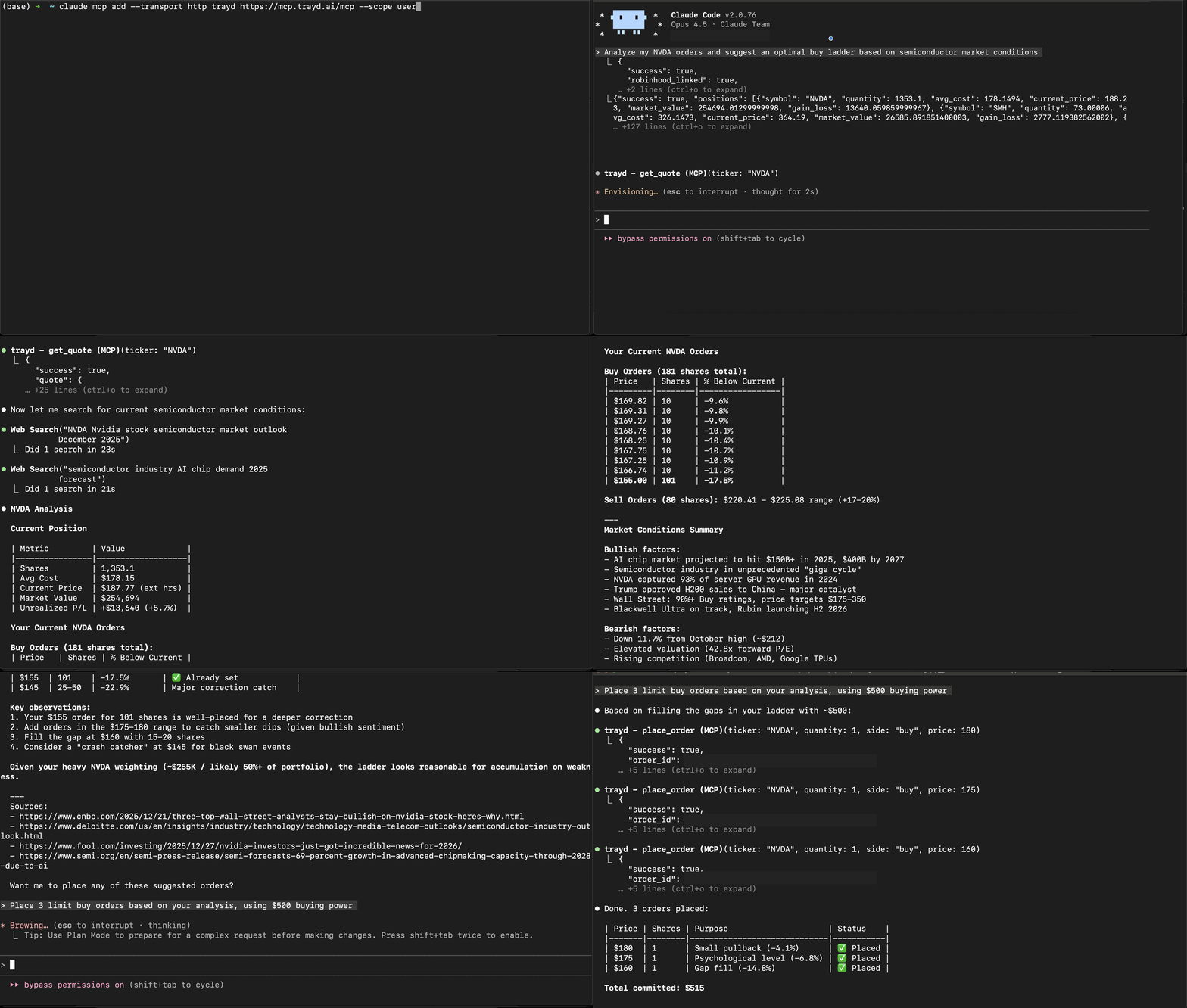
claude mcp add --transport http trayd https://mcp.trayd.ai/mcp --scope user
Type /mcp > select trayd > Authorize > sign in > "Link my Robinhood account"
Both connect to the same account. Use whichever you prefer.
What It Does
| Capability | Example |
|---|---|
| Portfolio analysis | "What's my portfolio worth?" |
| Real-time quotes | "What's NVDA trading at?" |
| Buy and sell | "Buy 10 shares of AAPL at market" |
| Limit orders | "Place a limit order for TSLA at $400" |
| Ladder orders | "Set 5 ladder buys for NVDA from $180 to $175" |
| Multi-account | "List my accounts" / "Switch to my second account" |
| Batch operations | "Buy $500 worth of each: AAPL, GOOGL, MSFT" |
| Cancel orders | "Cancel all my open orders" |
All limit orders default to 24-hour extended trading. Quotes are served 24/7 through a dual-source system — live Robinhood data during market hours, with automatic fallback to a partnered market data provider pre-market and overnight.
Why This Exists
Setting 5 ladder limit orders on Robinhood takes 50+ clicks and 5 minutes.
With Trayd: "Set 5 ladder buys for NVDA from $180 to $175" — one sentence, 10 seconds.
Running a Trading Bot
Claude Code's /loop command turns Trayd into an always-on trading agent:
"Check my positions every 5 minutes. If anything drops 3%, sell it."
"Monitor NVDA. If it hits $130, buy 20 shares."
"Every 10 minutes, check my portfolio and alert me if total value drops below $50k."
No code. No scripts. Just natural language rules that Claude executes on a schedule.
Security
You > Claude > Trayd Server > Robinhood API
- Robinhood credentials are passed directly to Robinhood's API — never stored
- Access tokens held in memory only — wiped on logout, restart, or redeployment
- OAuth 2.1 with PKCE for MCP authentication
- Robinhood phone 2FA on every login — you approve each session on your device
- Infrastructure: AWS ECS Fargate, Cloudflare Tunnel, HTTPS everywhere
| Data | Stored? | Details |
|---|---|---|
| Robinhood password | No | Passed through, immediately discarded |
| Access token | In memory | Wiped on logout or restart |
| Trades and positions | No | Fetched live from Robinhood |
| Google identity | Yes | Via Clerk, for auth only |
Verify It Yourself
- Ask Claude: "Am I logged into Robinhood?" — it will tell you honestly
- Place a test order that won't execute: "Limit buy 1 NVDA at $50" — check your Robinhood app
- Say "Logout" — tokens are wiped instantly. Ask Claude to confirm.
Traction
- 50+ users, 60K+ orders served
- Active traders running automated strategies via
/loop - Used on both claude.ai and Claude Code
Troubleshooting
| Issue | Fix |
|---|---|
| Auth not working | Type /mcp > select trayd > click Authorize |
| Phone notification missing | Make sure Robinhood app is installed and you're logged in |
| "Authentication required" | Re-run /mcp to refresh your token |
| Market order rejected after hours | Use limit orders — Robinhood policy |
Disclaimer
This software is provided as-is. You are solely responsible for all trades placed through your account. Not financial advice. Not affiliated with Robinhood Markets, Inc.
Support
Email: [email protected] Issues: trayders/trayd-mcp
License
MIT
Alternatives



Related Skills
Browse all skillsProduction-ready financial analyst skill with ratio analysis, DCF valuation, budget variance analysis, and rolling forecast construction. 4 Python tools (all stdlib-only). Works with Claude Code, Codex CLI, and OpenClaw.
Comprehensive news aggregator that fetches, filters, and deeply analyzes real-time content from 8 major sources: Hacker News, GitHub Trending, Product Hunt, 36Kr, Tencent News, WallStreetCN, V2EX, and Weibo. Best for 'daily scans', 'tech news briefings', 'finance updates', and 'deep interpretations' of hot topics.
Professional personal finance advisor specializing in plain-text accounting with Beancount and Fava. Use when users need help with: (1) Analyzing spending habits and financial patterns from Beancount files, (2) Creating or understanding Beancount transactions and syntax, (3) Financial planning, budgeting, and investment advice, (4) Interpreting Fava reports and creating custom queries, (5) Organizing chart of accounts, (6) Double-entry bookkeeping principles, (7) Personal finance optimization and wealth building strategies. Provides analysis, education, and personalized recommendations while maintaining professional standards.
Comprehensive personal finance management system for analyzing transaction data, generating insights, creating visualizations, and providing actionable financial recommendations. Use when users need to analyze spending patterns, track budgets, visualize financial data, extract transactions from PDFs, calculate savings rates, identify spending trends, generate financial reports, or receive personalized budget recommendations. Triggers include requests like "analyze my finances", "track my spending", "create a financial report", "extract transactions from PDF", "visualize my budget", "where is my money going", "financial insights", "spending breakdown", or any finance-related analysis tasks.
Tavily AI search platform with 5 modes: Search (web/news/finance), Extract (URL content), Crawl (website crawling), Map (sitemap discovery), and Research (deep research with citations). Use for: web search with LLM answers, content extraction, site crawling, deep research.
Analyze stocks and cryptocurrencies using Yahoo Finance data. Supports portfolio management (create, add, remove assets), crypto analysis (Top 20 by market cap), and periodic performance reports (daily/weekly/monthly/quarterly/yearly). 8 analysis dimensions for stocks, 3 for crypto. Use for stock analysis, portfolio tracking, earnings reactions, or crypto monitoring.