
Yandex Tracker
Connects AI assistants to Yandex Tracker for managing issues, queues, users, and projects. Provides full access to Yandex Tracker's API with OAuth authentication and optional Redis caching.
Integrates with Yandex Tracker for comprehensive issue management, queue operations, user management, and project data access with OAuth 2.0 authentication and Redis caching support.
What it does
- Create and update Yandex Tracker issues
- Manage queues with pagination and metadata
- Execute status transitions and workflow changes
- Search issues using Yandex Tracker Query Language
- Retrieve user account and organizational data
- Access custom fields and project configurations
Best for
About Yandex Tracker
Yandex Tracker is a community-built MCP server published by aikts that provides AI assistants with tools and capabilities via the Model Context Protocol. Integrate Yandex Tracker with project management software for advanced issue tracking, project plan templates, Gantt charts, and more.
How to install
You can install Yandex Tracker in your AI client of choice. Use the install panel on this page to get one-click setup for Cursor, Claude Desktop, VS Code, and other MCP-compatible clients. This server runs locally on your machine via the stdio transport.
License
Yandex Tracker is released under the Apache-2.0 license. This is a permissive open-source license, meaning you can freely use, modify, and distribute the software.
Yandex Tracker MCP Server


mcp-name: io.github.aikts/yandex-tracker-mcp
A comprehensive Model Context Protocol (MCP) server that enables AI assistants to interact with Yandex Tracker APIs. This server provides secure, authenticated access to Yandex Tracker issues, queues, comments, worklogs, and search functionality with optional Redis caching for improved performance.
Documentation in Russian is available here / Документация на русском языке доступна здесь.
Features
- Complete Queue Management: List and access all available Yandex Tracker queues with pagination support, tag retrieval, and detailed metadata
- User Management: Retrieve user account information, including login details, email addresses, license status, and organizational data
- Full Issue Lifecycle: Create, read, update, and manage issues with support for custom fields, attachments, and workflow transitions
- Status Workflow Management: Execute status transitions, close issues with resolutions, and navigate complex workflows
- Field Management: Access global fields, queue-specific local fields, statuses, issue types, priorities, and resolutions
- Advanced Query Language: Full Yandex Tracker Query Language support with complex filtering, sorting, and date functions
- Performance Caching: Optional Redis caching layer for improved response times
- Security Controls: Configurable queue access restrictions and secure token handling
- Multiple Transport Options: Support for stdio, SSE (deprecated), and HTTP transports for flexible integration
- OAuth 2.0 Authentication: Dynamic token-based authentication with automatic refresh support as an alternative to static API tokens
- Organization Support: Compatible with both standard and cloud organization IDs
Organization ID Configuration
Choose one of the following based on your Yandex organization type:
- Yandex Cloud Organization: Use
TRACKER_CLOUD_ORG_IDenv var later for Yandex Cloud-managed organizations - Yandex 360 Organization: Use
TRACKER_ORG_IDenv var later for Yandex 360 organizations
You can find your organization ID in the Yandex Tracker URL or organization settings.
MCP Client Configuration
Installing extension in Claude Desktop
Yandex Tracker MCP Server can be one-click installed in Claude Desktop as and extension.
Installation
- Download the
*.mcpbfile from GitHub Releases. - Double-click the downloaded file to install it in Claude Desktop.
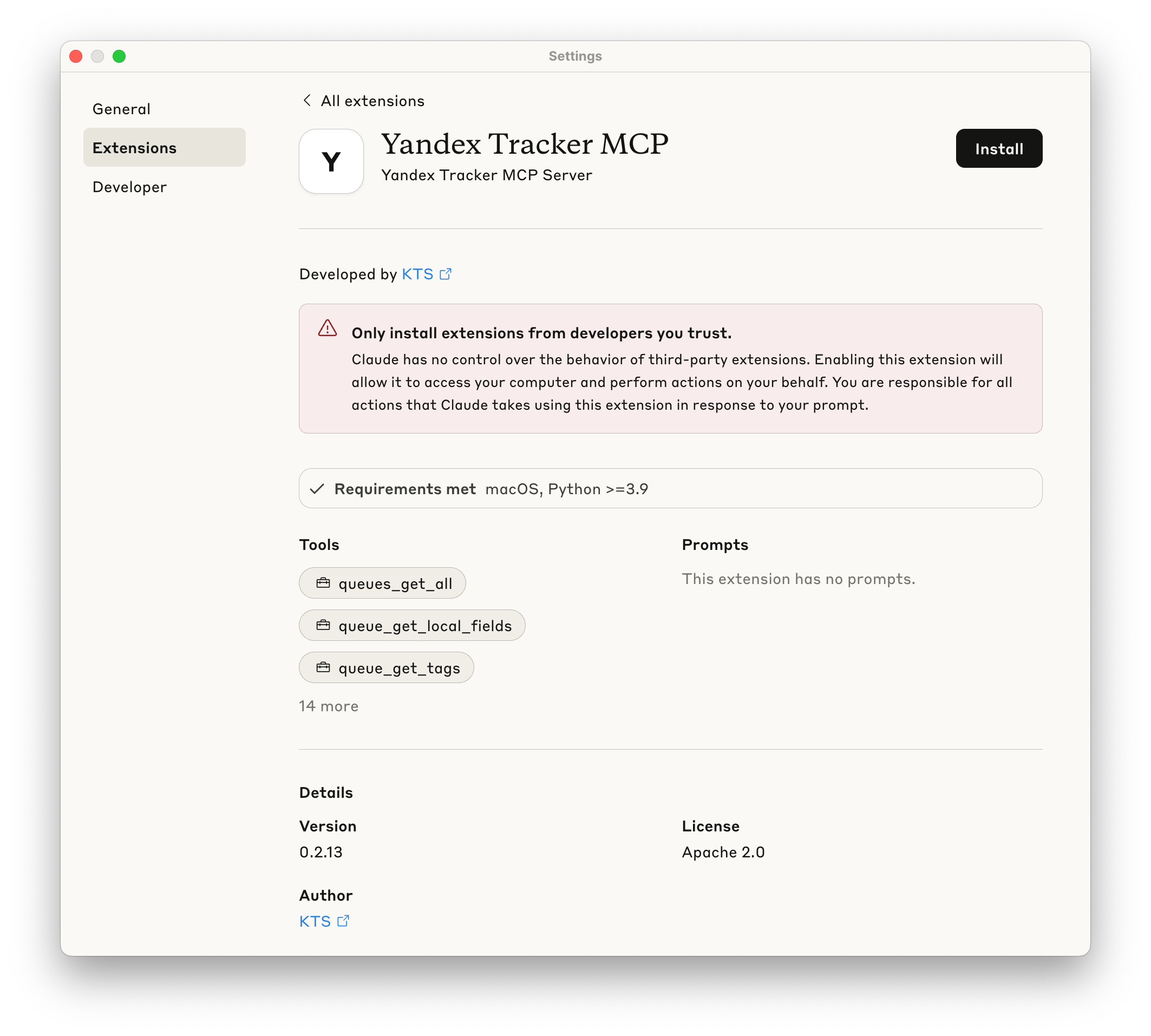
- Provide your Yandex Tracker OAuth token when prompted.
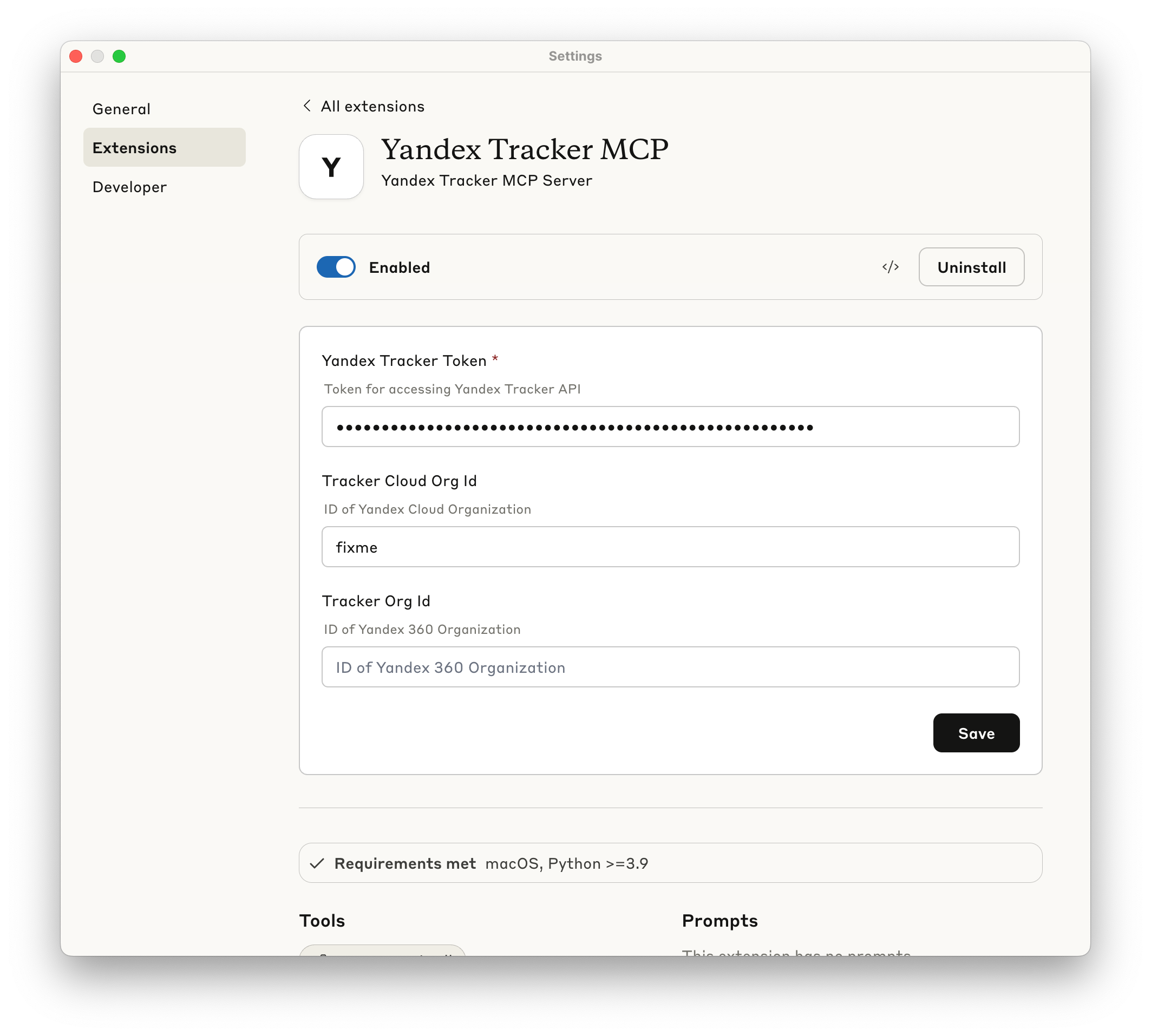
- Make sure extension is enabled - now you may use this MCP Server.
Manual installation
Prerequisites
- uv installed globally
- Valid Yandex Tracker API token with appropriate permissions
The following sections show how to configure the MCP server for different AI clients. You can use either uvx yandex-tracker-mcp@latest or the Docker image ghcr.io/aikts/yandex-tracker-mcp:latest. Both require these environment variables:
- Authentication (one of the following):
TRACKER_TOKEN- Your Yandex Tracker OAuth tokenTRACKER_IAM_TOKEN- Your IAM tokenTRACKER_SA_KEY_ID,TRACKER_SA_SERVICE_ACCOUNT_ID,TRACKER_SA_PRIVATE_KEY- Service account credentials
TRACKER_CLOUD_ORG_IDorTRACKER_ORG_ID- Your Yandex Cloud (or Yandex 360) organization ID
Claude Desktop
Configuration file path:
- macOS:
~/Library/Application Support/Claude/claude_desktop_config.json - Windows:
%APPDATA%\Claude\claude_desktop_config.json
Using uvx:
{
  "mcpServers": {
    "yandex-tracker": {
      "command": "uvx",
      "args": ["yandex-tracker-mcp@latest"],
      "env": {
        "TRACKER_TOKEN": "your_tracker_token_here",
        "TRACKER_CLOUD_ORG_ID": "your_cloud_org_id_here",
        "TRACKER_ORG_ID": "your_org_id_here"
      }
    }
  }
}
Using Docker:
{
  "mcpServers": {
    "yandex-tracker": {
      "command": "docker",
      "args": [
        "run", "--rm", "-i",
        "-e", "TRACKER_TOKEN",
        "-e", "TRACKER_CLOUD_ORG_ID",
        "-e", "TRACKER_ORG_ID",
        "ghcr.io/aikts/yandex-tracker-mcp:latest"
      ],
      "env": {
        "TRACKER_TOKEN": "your_tracker_token_here",
        "TRACKER_CLOUD_ORG_ID": "your_cloud_org_id_here",
        "TRACKER_ORG_ID": "your_org_id_here"
      }
    }
  }
}
Claude Code
Using uvx:
claude mcp add yandex-tracker uvx yandex-tracker-mcp@latest \
  -e TRACKER_TOKEN=your_tracker_token_here \
  -e TRACKER_CLOUD_ORG_ID=your_cloud_org_id_here \
  -e TRACKER_ORG_ID=your_org_id_here \
  -e TRANSPORT=stdio
Using Docker:
claude mcp add yandex-tracker docker "run --rm -i -e TRACKER_TOKEN=your_tracker_token_here -e TRACKER_CLOUD_ORG_ID=your_cloud_org_id_here -e TRACKER_ORG_ID=your_org_id_here -e TRANSPORT=stdio ghcr.io/aikts/yandex-tracker-mcp:latest"
Cursor
Configuration file path:
- Project-specific:
.cursor/mcp.jsonin your project directory - Global:
~/.cursor/mcp.json
Using uvx:
{
  "mcpServers": {
    "yandex-tracker": {
      "command": "uvx",
      "args": ["yandex-tracker-mcp@latest"],
      "env": {
        "TRACKER_TOKEN": "your_tracker_token_here",
        "TRACKER_CLOUD_ORG_ID": "your_cloud_org_id_here",
        "TRACKER_ORG_ID": "your_org_id_here"
      }
    }
  }
}
Using Docker:
{
  "mcpServers": {
    "yandex-tracker": {
      "command": "docker",
      "args": [
        "run", "--rm", "-i",
        "-e", "TRACKER_TOKEN",
        "-e", "TRACKER_CLOUD_ORG_ID",
        "-e", "TRACKER_ORG_ID",
        "ghcr.io/aikts/yandex-tracker-mcp:latest"
      ],
      "env": {
        "TRACKER_TOKEN": "your_tracker_token_here",
        "TRACKER_CLOUD_ORG_ID": "your_cloud_org_id_here",
        "TRACKER_ORG_ID": "your_org_id_here"
      }
    }
  }
}
Windsurf
Configuration file path:
~/.codeium/windsurf/mcp_config.json
Access via: Windsurf Settings → Cascade tab → Model Context Protocol (MCP) Servers → "View raw config"
Using uvx:
{
  "mcpServers": {
    "yandex-tracker": {
      "command": "uvx",
      "args": ["yandex-tracker-mcp@latest"],
      "env": {
        "TRACKER_TOKEN": "your_tracker_token_here",
        "TRACKER_CLOUD_ORG_ID": "your_cloud_org_id_here",
        "TRACKER_ORG_ID": "your_org_id_here"
      }
    }
  }
}
Using Docker:
{
  "mcpServers": {
    "yandex-tracker": {
      "command": "docker",
      "args": [
        "run", "--rm", "-i",
        "-e", "TRACKER_TOKEN",
        "-e", "TRACKER_CLOUD_ORG_ID",
        "-e", "TRACKER_ORG_ID",
        "ghcr.io/aikts/yandex-tracker-mcp:latest"
      ],
      "env": {
        "TRACKER_TOKEN": "your_tracker_token_here",
        "TRACKER_CLOUD_ORG_ID": "your_cloud_org_id_here",
        "TRACKER_ORG_ID": "your_org_id_here"
      }
    }
  }
}
Zed
Configuration file path:
~/.config/zed/settings.json
Access via: Cmd+, (macOS) or Ctrl+, (Linux/Windows) or command palette: "zed: open settings"
Note: Requires Zed Preview version for MCP support.
Using uvx:
{
  "context_servers": {
    "yandex-tracker": {
      "source": "custom",
      "command": {
        "path": "uvx",
        "args": ["yandex-tracker-mcp@latest"],
        "env": {
          "TRACKER_TOKEN": "your_tracker_token_here",
          "TRACKER_CLOUD_ORG_ID": "your_cloud_org_id_here",
          "TRACKER_ORG_ID": "your_org_id_here"
        }
      }
    }
  }
}
Using Docker:
{
  "context_servers": {
    "yandex-tracker": {
      "source": "custom",
      "command": {
        "path": "docker",
        "args": [
          "run", "--rm", "-i",
          "-e", "TRACKER_TOKEN",
          "-e", "TRACKER_CLOUD_ORG_ID",
          "-e", "TRACKER_ORG_ID",
          "ghcr.io/aikts/yandex-tracker-mcp:latest"
        ],
        "env": {
          "TRACKER_TOKEN": "your_tracker_token_here",
          "TRACKER_CLOUD_ORG_ID": "your_cloud_org_id_here",
          "TRACKER_ORG_ID": "your_org_id_here"
        }
      }
    }
  }
}
GitHub Copilot (VS Code)
Configuration file path:
- Workspace:
.vscode/mcp.jsonin your project directory - Global: VS Code
settings.json
Option 1: Workspace Configuration (Recommended for security)
Create .vscode/mcp.json:
Using uvx:
{
  "inputs": [
    {
      "type": "promptString",
      "id": "tracker-token",
      "description": "Yandex Tracker Token",
      "password": true
    },
    {
      "type": "promptString",
      "id": "cloud-org-id",
      "description": "Yandex Cloud Organization ID"
    },
    {
      "type": "promptString",
      "id": "org-id",
      "description": "Yandex Tracker Organization ID (optional)"
    }
  ],
  "servers": {
    "yandex-tracker": {
      "type": "stdio",
      "command": "uvx",
      "args": ["yandex-tracker-mcp@latest"],
      "env": {
        "TRA

---

*README truncated. [View full README on GitHub](https://github.com/aikts/yandex-tracker-mcp).*
Related Skills
Browse all skillsTrack complex, multi-session work with dependency graphs using bd (beads) issue tracker. Use when work spans multiple sessions, has complex dependencies, or requires persistent context across compaction cycles. For simple single-session linear tasks, TodoWrite remains appropriate.
Personal task management with daily standups and weekly reviews. Use when: (1) User says 'daily standup' or asks what's on their plate, (2) User says 'weekly review' or asks about last week's progress, (3) User wants to add/update/complete tasks, (4) User asks about blockers or deadlines, (5) User shares meeting notes and wants tasks extracted, (6) User asks 'what's due this week' or similar.
Vehicle maintenance tracker and mechanic advisor. Tracks mileage, service intervals, fuel economy, costs, warranties, and recalls. Researches manufacturer schedules, estimates costs, projects service dates, tracks providers, and proactively reminds about upcoming/overdue services. Supports VIN decode and auto-population of vehicle specs, NHTSA recall monitoring, MPG tracking with anomaly detection, warranty expiration alerts, pre-trip/seasonal checklists, mileage projection, service provider history, tax deduction integration, emergency info cards, and cost-per-mile analysis. Use when discussing vehicle maintenance, oil changes, service intervals, mileage tracking, fuel economy, warranties, recalls, RV maintenance, roof sealing, generator service, slide-outs, winterization, or anything mechanic-related. Supports any vehicle type including trucks, cars, motorcycles, dirt bikes, ATVs, RVs, and boats.
Track crypto prices, set alerts, and search coins via CoinGecko API.
Track pregnancy journey with weekly updates, symptom logging, and milestone countdowns
Track blockchain addresses in real-time - monitor whale movements, get alerts on transactions, analyze portfolio changes across Ethereum, Solana, and other chains.