wecom
Send messages to WeCom (企业微信) via webhooks using MCP protocol. Works with Claude Code, Claude Desktop, and other MCP clients.
Install
mkdir -p .claude/skills/wecom && curl -L -o skill.zip "https://mcp.directory/api/skills/download/5657" && unzip -o skill.zip -d .claude/skills/wecom && rm skill.zipInstalls to .claude/skills/wecom
About this skill
WeCom Skill
Send text and markdown messages to WeCom (企业微信) via incoming webhooks (ENV: WECOM_WEBHOOK_URL).
WeCom is the enterprise version (using in office) of the famous all-in-on IM WeChat envied by Elon Musk.
Setup
# Navigate to skill directory
cd skills/wecom

# Install dependencies
npm install

# Build TypeScript
npm run build

# Set webhook URL
export WECOM_WEBHOOK_URL="https://qyapi.weixin.qq.com/cgi-bin/webhook/send?key=YOUR_KEY"
Usage with Claude Code
Add to your ~/.config/claude_code/mcp.json:
{
  "mcpServers": {
    "wecom": {
      "command": "node",
      "args": ["/path/to/clawdbot/skills/wecom/dist/index.js"],
      "env": {
        "WECOM_WEBHOOK_URL": "https://qyapi.weixin.qq.com/cgi-bin/webhook/send?key=YOUR_KEY"
      }
    }
  }
}
Then restart Claude Code. You'll have two new tools:
Tools
send_wecom_message
Send a text message to WeCom.
# Simple message
await send_wecom_message({ content: "Hello from OpenClaw!" });

# With mentions
await send_wecom_message({
  content: "Meeting starting now",
  mentioned_list: ["zhangsan", "lisi"]
});
send_wecom_markdown
Send a markdown message (WeCom flavor).
await send_wecom_markdown({
  content: `# Daily Report

**Completed:**
- Task A
- Task B

**Pending:**
- Task C

<@zhangsan>`
});
WeCom Markdown Tags
WeCom supports:
| Feature | Syntax |
|---|---|
| Bold | **text** or <strong>text</strong> |
| Italic | *text* or <i>text</i> |
| Strikethrough | ~~text~~ or <s>text</s> |
| Mention | <@userid> |
| Link | <a href="url">text</a> |
| Image | <img src="url" /> |
| Font size | <font size="5">text</font> |
| Color | <font color="#FF0000">text</font> |
Environment Variables
| Variable | Required | Default | Description |
|---|---|---|---|
WECOM_WEBHOOK_URL | Yes | - | WeCom webhook URL |
WECOM_TIMEOUT_MS | No | 10000 | Request timeout (ms) |
How To
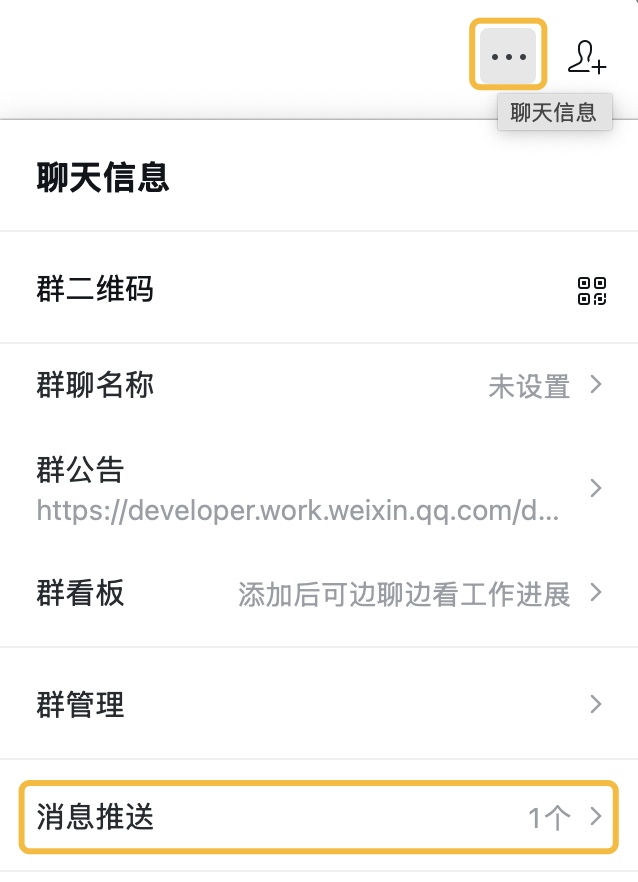
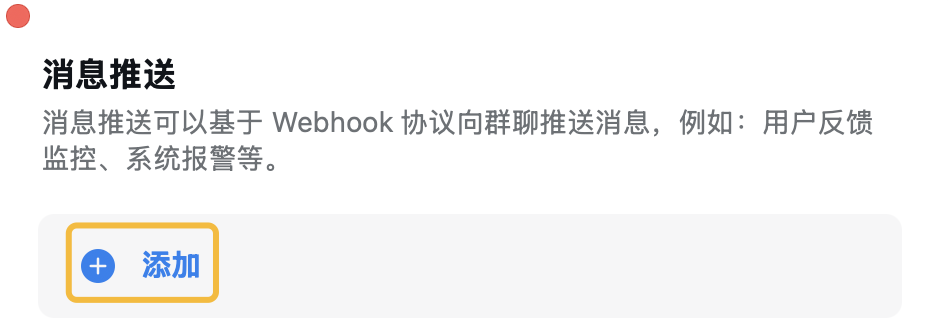
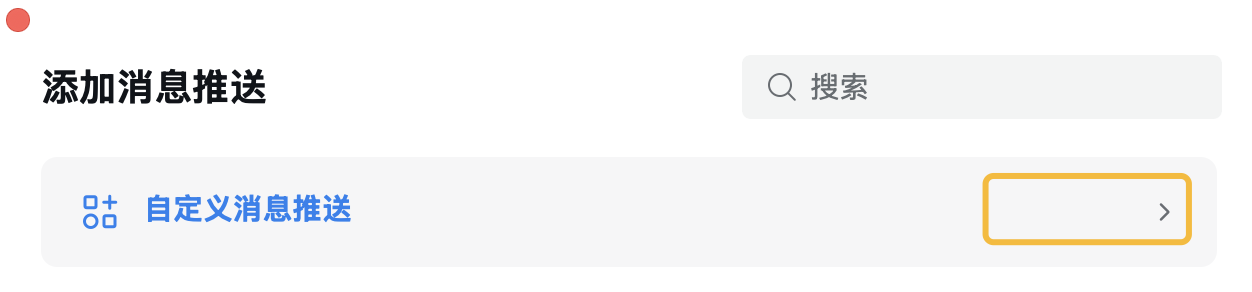
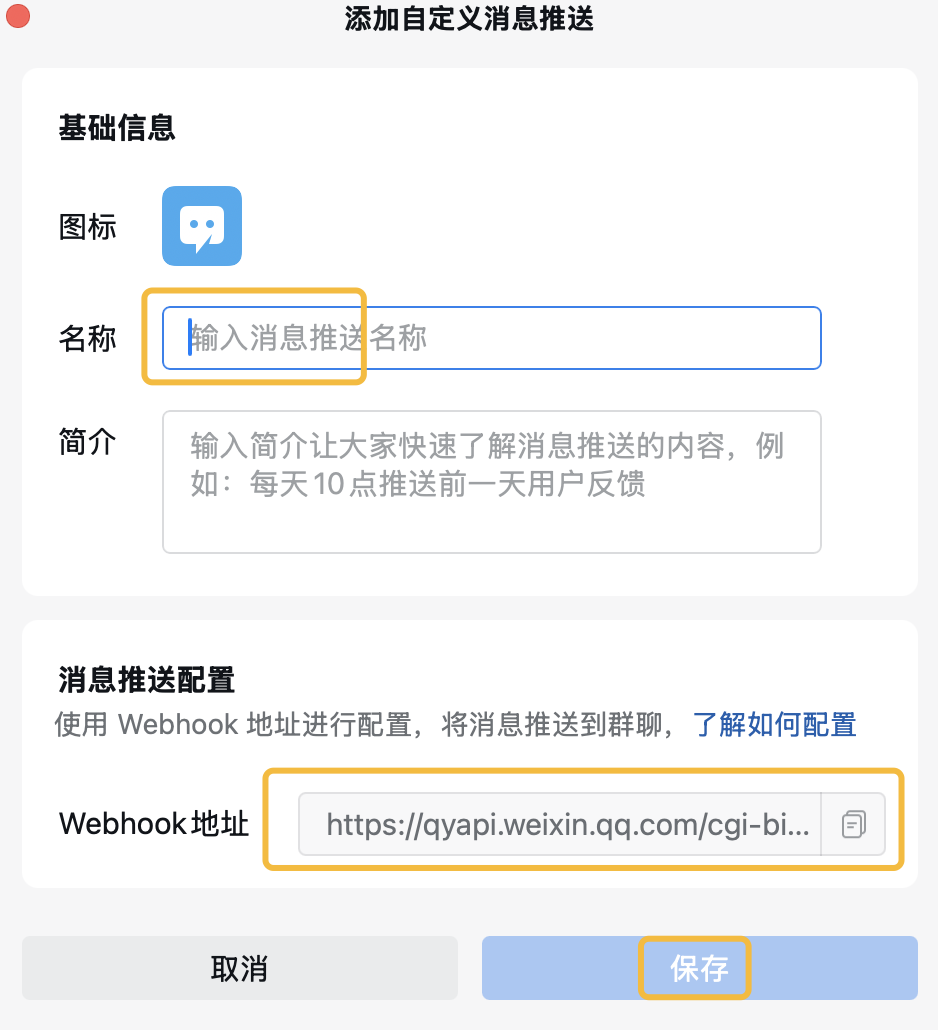
Get WECOM_WEBHOOK_URL following steps here, and envolve it as a bot into a group chat:
(Tip: You should get the WECOM_WEBHOOK_URL entirely as a URL, NOT just a KEY )
STEP 1
STEP 2
STEP 3
STEP 4
Reference
More by openclaw
View all skills by openclaw →You might also like
nano-banana-pro
garg-aayush
Generate and edit images using Google's Nano Banana Pro (Gemini 3 Pro Image) API. Use when the user asks to generate, create, edit, modify, change, alter, or update images. Also use when user references an existing image file and asks to modify it in any way (e.g., "modify this image", "change the background", "replace X with Y"). Supports both text-to-image generation and image-to-image editing with configurable resolution (1K default, 2K, or 4K for high resolution). DO NOT read the image file first - use this skill directly with the --input-image parameter.
ui-ux-pro-max
nextlevelbuilder
"UI/UX design intelligence. 50 styles, 21 palettes, 50 font pairings, 20 charts, 8 stacks (React, Next.js, Vue, Svelte, SwiftUI, React Native, Flutter, Tailwind). Actions: plan, build, create, design, implement, review, fix, improve, optimize, enhance, refactor, check UI/UX code. Projects: website, landing page, dashboard, admin panel, e-commerce, SaaS, portfolio, blog, mobile app, .html, .tsx, .vue, .svelte. Elements: button, modal, navbar, sidebar, card, table, form, chart. Styles: glassmorphism, claymorphism, minimalism, brutalism, neumorphism, bento grid, dark mode, responsive, skeuomorphism, flat design. Topics: color palette, accessibility, animation, layout, typography, font pairing, spacing, hover, shadow, gradient."
youtube-transcribe-skill
feiskyer
Extract subtitles/transcripts from a YouTube video URL and save as a local file. Use when you need to extract subtitles from a YouTube video.
pdf-to-markdown
aliceisjustplaying
Convert entire PDF documents to clean, structured Markdown for full context loading. Use this skill when the user wants to extract ALL text from a PDF into context (not grep/search), when discussing or analyzing PDF content in full, when the user mentions "load the whole PDF", "bring the PDF into context", "read the entire PDF", or when partial extraction/grepping would miss important context. This is the preferred method for PDF text extraction over page-by-page or grep approaches.
flutter-development
aj-geddes
Build beautiful cross-platform mobile apps with Flutter and Dart. Covers widgets, state management with Provider/BLoC, navigation, API integration, and material design.
drawio-diagrams-enhanced
jgtolentino
Create professional draw.io (diagrams.net) diagrams in XML format (.drawio files) with integrated PMP/PMBOK methodologies, extensive visual asset libraries, and industry-standard professional templates. Use this skill when users ask to create flowcharts, swimlane diagrams, cross-functional flowcharts, org charts, network diagrams, UML diagrams, BPMN, project management diagrams (WBS, Gantt, PERT, RACI), risk matrices, stakeholder maps, or any other visual diagram in draw.io format. This skill includes access to custom shape libraries for icons, clipart, and professional symbols.
Related MCP Servers
Browse all servers Microsoft Teams
Integrate Microsoft Teams with Microsoft Graph API to manage chats, messages, and users securely using device code authentication.
 LinkedIn API
Leverage LinkedIn API to automate connections, search profiles, manage posts, and enhance sales or recruitment using powerful LinkedIn tools.
 Ntfy Push Notifications
Send customizable push notifications for websites using Ntfy, a web push service for cloud messages and real-time task alerts.
 Webhooks
Webhooks enable automated notifications and workflow automation software integration by sending customizable messages to external endpoints.
 Telnyx MCP Server
Telnyx MCP Server: manage phone numbers, calls, SMS and AI assistants with Telnyx API. Real-time webhooks, voice & messaging, cloud storage and embeddings.
 Instagram Direct Messages
Access and manage your Instagram Direct Messages with a Python server. Send, read, and retrieve conversations easily using Instagram cookies.