
3D Asset Processing
Analyzes, validates, and optimizes 3D glTF/GLB models for web and game engines. Provides compression, format conversion, and geometry processing tools.
Processes and optimizes 3D glTF/GLB models with analysis, validation, format conversion, compression, and geometry simplification tools for web, mobile, and game engine compatibility.
What it does
- Analyze 3D models for statistics and optimization recommendations
- Validate glTF/GLB files for compliance and compatibility
- Convert between glTF and GLB formats
- Compress models with Draco and Meshopt algorithms
- Optimize textures with WebP/AVIF/JPEG compression
- Simplify geometry and reduce file sizes
Best for
About 3D Asset Processing
3D Asset Processing is a community-built MCP server published by geolibra that provides AI assistants with tools and capabilities via the Model Context Protocol. Convert pictures into 3D models or STEP files to STL. Optimize, compress, and validate 3D assets for web, mobile, and gaming workflows. It is categorized under developer tools, design. This server exposes 4 tools that AI clients can invoke during conversations and coding sessions.
How to install
You can install 3D Asset Processing in your AI client of choice. Use the install panel on this page to get one-click setup for Cursor, Claude Desktop, VS Code, and other MCP-compatible clients. This server runs locally on your machine via the stdio transport.
License
3D Asset Processing is released under the MIT license. This is a permissive open-source license, meaning you can freely use, modify, and distribute the software.
Tools (4)
Analyze a 3D model and provide detailed statistics and recommendations
Validate a 3D model for compliance and compatibility
Execute gltf-pipeline CLI for BASIC glTF operations: glTF↔GLB conversion, embed/separate resources, glTF 1.0→2.0 upgrade, basic Draco compression, cleanup unused elements. Limited to basic file format operations and simple compression.
Execute gltf-transform CLI for ADVANCED glTF processing: Meshopt compression, Draco compression, texture compression (WebP/AVIF/JPEG/PNG), KTX2+Basis compression (ETC1S/UASTC), geometry optimization (quantize/weld/simplify/tangents), scene optimization (center/flatten/join), material conversion (metalrough/unlit), animation optimization (resample). Supports multi-step processing for complex operations.
3D Asset Processing MCP
A comprehensive MCP server for processing, validating, optimizing, and analyzing 3D models with glTF/GLB support.
Features
- Analysis: Get detailed model statistics including geometry, materials, animations, and performance metrics
- Validation: Ensure 3D models meet standards using built-in checks
- Basic Processing: Convert between glTF/GLB formats using gltf-pipeline
- Advanced Processing: Apply Meshopt/Draco compression, texture optimization, and geometry processing using gltf-transform
Installation
Add to your MCP client configuration:
{
  "mcpServers": {
    "3d-asset-processing-mcp": {
      "command": "npx",
      "args": ["-y", "3d-asset-processing-mcp"]
    }
  }
}
All dependencies (gltf-pipeline, gltf-transform) are included - no additional setup required.
Available Tools
analyze_model: Analyze 3D models and provide detailed statisticsvalidate_model: Validate 3D models for compliance and compatibilitygltf-pipeline-executor: Basic glTF operations (conversion, format upgrade, simple compression)gltf-transform-executor: Advanced glTF processing (Meshopt/Draco compression, texture optimization, geometry processing)
Development
# Clone the repository
git clone [email protected]:GeoLibra/3d-asset-processing-mcp.git
cd 3d-asset-processing-mcp

# Install dependencies
npm install

# Build the project
npm run build

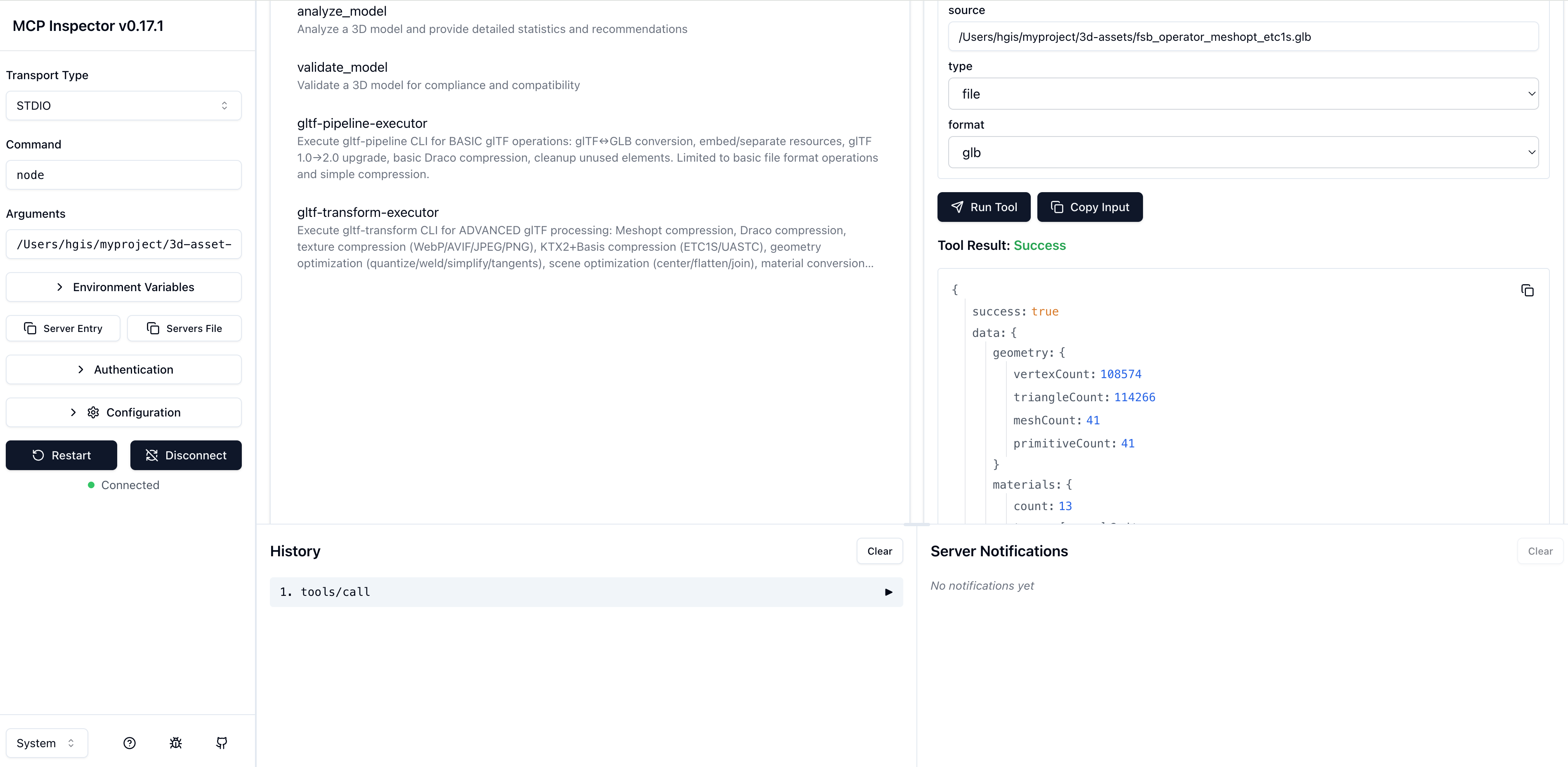
# debug mcp
"3d-asset-processing-mcp": {
  "command": "node",
  "args": [
    "/Users/hgis/myproject/3d-asset-processing-mcp/dist/server.js"
  ]
}
debug mcp
npx @modelcontextprotocol/inspector
License
MIT
Alternatives



Related Skills
Browse all skillsUI design system toolkit for Senior UI Designer including design token generation, component documentation, responsive design calculations, and developer handoff tools. Use for creating design systems, maintaining visual consistency, and facilitating design-dev collaboration.
Create aesthetically beautiful interfaces following proven design principles. Use when building UI/UX, analyzing designs from inspiration sites, generating design images with ai-multimodal, implementing visual hierarchy and color theory, adding micro-interactions, or creating design documentation. Includes workflows for capturing and analyzing inspiration screenshots with chrome-devtools and ai-multimodal, iterative design image generation until aesthetic standards are met, and comprehensive design system guidance covering BEAUTIFUL (aesthetic principles), RIGHT (functionality/accessibility), SATISFYING (micro-interactions), and PEAK (storytelling) stages. Integrates with chrome-devtools, ai-multimodal, media-processing, ui-styling, and web-frameworks skills.
Use when building CLI tools, implementing argument parsing, or adding interactive prompts. Invoke for CLI design, argument parsing, interactive prompts, progress indicators, shell completions.
Guidance for SAM-based cell segmentation and mask conversion tasks involving MobileSAM, mask-to-polygon conversion, CSV processing, and command-line interface design. This skill applies when working with Segment Anything Model (SAM) for biological image segmentation, converting binary masks to polygon coordinates, processing microscopy data, or building CLI tools that interface with deep learning models. (project)
Context-aware routing to the Anytype iOS design system including icons, typography, colors, and spacing. Use when working with Figma-to-code translation, design assets, or UI components.
Build Unity games with optimized C# scripts, efficient rendering, and proper asset management. Masters Unity 6 LTS, URP/HDRP pipelines, and cross-platform deployment. Handles gameplay systems, UI implementation, and platform optimization. Use PROACTIVELY for Unity performance issues, game mechanics, or cross-platform builds.