
Repomix
OfficialPackages entire codebases into consolidated, AI-friendly formats that optimize token usage for analysis by ChatGPT, Claude, and other AI models. Supports local directories and remote GitHub repositories with intelligent compression and security filtering.
Easily pack your entire codebase into optimized, AI-friendly formats with Repomix. This powerful tool transforms repositories for seamless analysis by AI models like ChatGPT, Claude, Gemini, and more. Repomix offers flexible output styles (XML, Markdown, plain text), intelligent code compression for fewer tokens, token counting, customizable inclusion/exclusion, and strong security checks to prevent leaking sensitive data. With support for GitHub Actions, browser/VSCode extensions, and remote repositories, Repomix streamlines code review, documentation, and AI-driven development workflows—making large projects easier to analyze, refactor, or migrate using modern AI tools.
What it does
- Pack local code directories into AI-optimized formats
- Clone and package remote GitHub repositories
- Search through packed codebase files with grep functionality
- Generate Claude Agent Skills from codebases
- Read and analyze existing repomix output files
- Count tokens and compress code intelligently
Best for
About Repomix
Repomix is an official MCP server published by yamadashy that provides AI assistants with tools and capabilities via the Model Context Protocol. Optimize your codebase for AI with Repomix—transform, compress, and secure repos for easier analysis with modern AI tools. It is categorized under developer tools. This server exposes 8 tools that AI clients can invoke during conversations and coding sessions.
How to install
You can install Repomix in your AI client of choice. Use the install panel on this page to get one-click setup for Cursor, Claude Desktop, VS Code, and other MCP-compatible clients. This server runs locally on your machine via the stdio transport.
License
Repomix is released under the MIT license. This is a permissive open-source license, meaning you can freely use, modify, and distribute the software.
Tools (8)
Package a local code directory into a consolidated file for AI analysis. This tool analyzes the codebase structure, extracts relevant code content, and generates a comprehensive report including metrics, file tree, and formatted code content. Supports multiple output formats: XML (structured with <file> tags), Markdown (human-readable with ## headers and code blocks), JSON (machine-readable with files as key-value pairs), and Plain text (simple format with separators). Also supports Tree-sitter compression for efficient token usage.
Fetch, clone, and package a GitHub repository into a consolidated file for AI analysis. This tool automatically clones the remote repository, analyzes its structure, and generates a comprehensive report. Supports multiple output formats: XML (structured with <file> tags), Markdown (human-readable with ## headers and code blocks), JSON (machine-readable with files as key-value pairs), and Plain text (simple format with separators). Also supports various GitHub URL formats and includes security checks to prevent exposure of sensitive information.
Attach an existing Repomix packed output file for AI analysis. This tool accepts either a directory containing a repomix output file or a direct path to a packed repository file. Supports multiple formats: XML (structured with <file> tags), Markdown (human-readable with ## headers and code blocks), JSON (machine-readable with files as key-value pairs), and Plain text (simple format with separators). Calling the tool again with the same file path will refresh the content if the file has been updated. It will return in that case a new output ID and the updated content.
Read the contents of a Repomix-generated output file. Supports partial reading with line range specification for large files. This tool is designed for environments where direct file system access is limited (e.g., web-based environments, sandboxed applications). For direct file system access, use standard file operations.
Search for patterns in a Repomix output file using grep-like functionality with JavaScript RegExp syntax. Returns matching lines with optional context lines around matches.

Warp, built for coding with multiple AI agents
Available for MacOS, Linux, & Windows

Tower, the most powerful Git client for Mac and Windows

Pack your codebase into AI-friendly formats
Use Repomix online! 👉 repomix.com
Need discussion? Join us on Discord!
Share your experience and tips
Stay updated on new features
Get help with configuration and usage






📦 Repomix is a powerful tool that packs your entire repository into a single, AI-friendly file.
It is perfect for when you need to feed your codebase to Large Language Models (LLMs) or other AI tools like Claude,
ChatGPT, DeepSeek, Perplexity, Gemini, Gemma, Llama, Grok, and more.
Please consider sponsoring me.


🏆 Open Source Awards Nomination
We're honored! Repomix has been nominated for the Powered by AI category at the JSNation Open Source Awards 2025.
This wouldn't have been possible without all of you using and supporting Repomix. Thank you!
🎉 New: Repomix Website & Discord Community!
- Try Repomix in your browser at repomix.com
- Join our Discord Server for support and discussion
We look forward to seeing you there!
🌟 Features
- AI-Optimized: Formats your codebase in a way that's easy for AI to understand and process.
- Token Counting: Provides token counts for each file and the entire repository, useful for LLM context limits.
- Simple to Use: You need just one command to pack your entire repository.
- Customizable: Easily configure what to include or exclude.
- Git-Aware: Automatically respects your
.gitignore,.ignore, and.repomixignorefiles. - Security-Focused: Incorporates Secretlint for robust security checks to detect and prevent inclusion of sensitive information.
- Code Compression: The
--compressoption uses Tree-sitter to extract key code elements, reducing token count while preserving structure.
🚀 Quick Start
Using the CLI Tool >_
You can try Repomix instantly in your project directory without installation:
npx repomix@latest
Or install globally for repeated use:
# Install using npm
npm install -g repomix

# Alternatively using yarn
yarn global add repomix

# Alternatively using bun
bun add -g repomix

# Alternatively using Homebrew (macOS/Linux)
brew install repomix

# Then run in any project directory
repomix
That's it! Repomix will generate a repomix-output.xml file in your current directory, containing your entire
repository in an AI-friendly format.
You can then send this file to an AI assistant with a prompt like:
This file contains all the files in the repository combined into one.
I want to refactor the code, so please review it first.
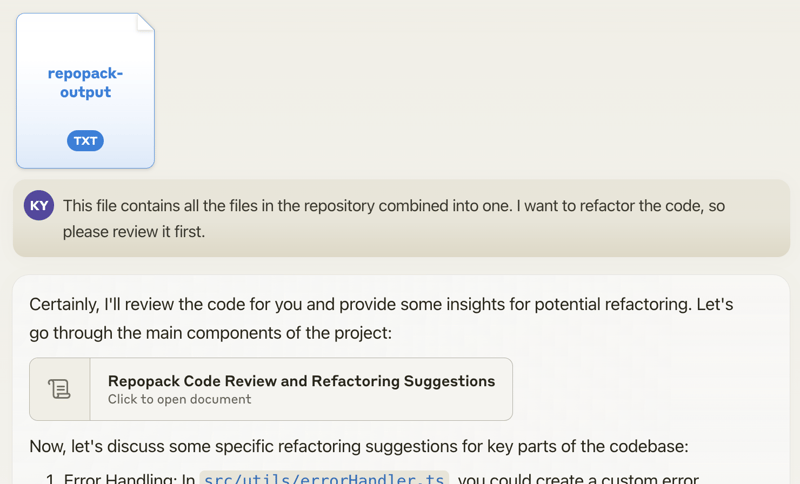
When you propose specific changes, the AI might be able to generate code accordingly. With features like Claude's Artifacts, you could potentially output multiple files, allowing for the generation of multiple interdependent pieces of code.
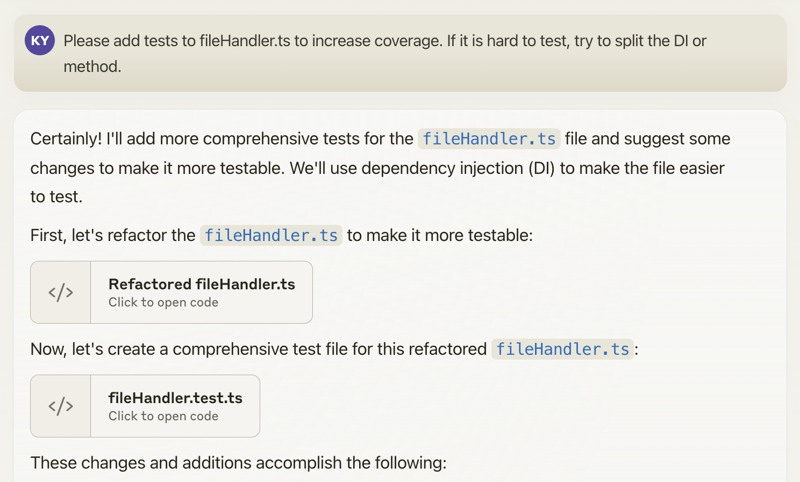
Happy coding! 🚀
Using The Website 🌐
Want to try it quickly? Visit the official website at repomix.com. Simply enter your repository name, fill in any optional details, and click the Pack button to see your generated output.
Available Options
The website offers several convenient features:
- Customizable output format (XML, Markdown, or Plain Text)
- Instant token count estimation
- Much more!
Using The Browser Extension 🧩
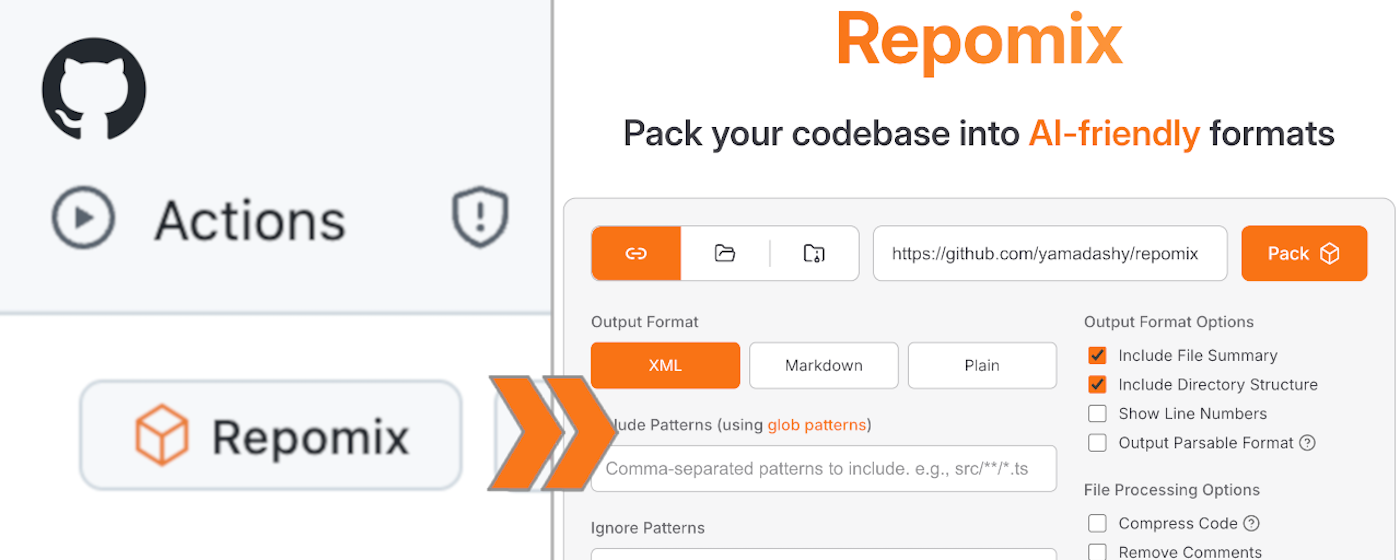
Get instant access to Repomix directly from any GitHub repository! Our Chrome extension adds a convenient "Repomix" button to GitHub repository pages.
Install
- Chrome Extension: Repomix - Chrome Web Store
- Firefox Add-on: Repomix - Firefox Add-ons
Features
- One-click access to Repomix for any GitHub repository
- More exciting features coming soon!
Using The VSCode Extension ⚡️
A community-maintained VSCode extension called Repomix Runner (created by massdo) lets you run Repomix right inside your editor with just a few clicks. Run it on any folder, manage outputs seamlessly, and control everything through VSCode's intuitive interface.
Want your output as a file or just the content? Need automatic cleanup? This extension has you covered. Plus, it works smoothly with your existing repomix.config.json.
Try it now on the VSCode Marketplace! Source code is available on GitHub.
Alternative Tools 🛠️
If you're using Python, you might want to check out Gitingest, which is better suited for Python ecosystem and data
science workflows:
https://github.com/cyclotruc/gitingest
📊 Usage
To pack your entire repository:
repomix
To pack a specific directory:
repomix path/to/directory
To pack specific files or directories using glob patterns:
repomix --include "src/**/*.ts,**/*.md"
To exclude specific files or directories:
repomix --ignore "**/*.log,tmp/"
To pack a remote repository:
repomix --remote https://github.com/yamadashy/repomix

# You can also use GitHub shorthand:
repomix --remote yamadashy/repomix

# You can specify the branch name, tag, or commit hash:
repomix --remote https://github.com/yamadashy/repomix --remote-branch main

# Or use a specific commit hash:
repomix --remote https://github.com/yamadashy/repomix --remote-branch 935b695

# Another convenient way is specifying the branch's URL
repomix --remote https://github.com/yamadashy/repomix/tree/main

# Commit's URL is also supported
repomix --remote https://github.com/yamadashy/repomix/commit/836abcd7335137228ad77feb28655d85712680f1
To pack files from a file list (pipe via stdin):
# Using find command
find src -name "*.ts" -type

---

*README truncated. [View full README on GitHub](https://github.com/yamadashy/repomix).*
Alternatives



Related Skills
Browse all skillsUI design system toolkit for Senior UI Designer including design token generation, component documentation, responsive design calculations, and developer handoff tools. Use for creating design systems, maintaining visual consistency, and facilitating design-dev collaboration.
Answer questions about the AI SDK and help build AI-powered features. Use when developers: (1) Ask about AI SDK functions like generateText, streamText, ToolLoopAgent, embed, or tools, (2) Want to build AI agents, chatbots, RAG systems, or text generation features, (3) Have questions about AI providers (OpenAI, Anthropic, Google, etc.), streaming, tool calling, structured output, or embeddings, (4) Use React hooks like useChat or useCompletion. Triggers on: "AI SDK", "Vercel AI SDK", "generateText", "streamText", "add AI to my app", "build an agent", "tool calling", "structured output", "useChat".
Use when working with the OpenAI API (Responses API) or OpenAI platform features (tools, streaming, Realtime API, auth, models, rate limits, MCP) and you need authoritative, up-to-date documentation (schemas, examples, limits, edge cases). Prefer the OpenAI Developer Documentation MCP server tools when available; otherwise guide the user to enable `openaiDeveloperDocs`.
Guide for building TypeScript CLIs with Bun. Use when creating command-line tools, adding subcommands to existing CLIs, or building developer tooling. Covers argument parsing, subcommand patterns, output formatting, and distribution.
Guide developers through setting up development environments with proper tools, dependencies, and configurations
Integrate Vercel AI SDK applications with You.com tools (web search, AI agent, content extraction). Use when developer mentions AI SDK, Vercel AI SDK, generateText, streamText, or You.com integration with AI SDK.