
Actor-Critic Thinking
Analyzes creative works, decisions, and complex scenarios by alternating between empathetic actor and objective critic perspectives. Provides balanced, multi-dimensional evaluations with actionable feedback.
Provides dual-perspective analysis through alternating actor and critic viewpoints for evaluating creative works, strategic decisions, and complex scenarios requiring both empathetic understanding and objective assessment.
What it does
- Analyze content from actor (creator) perspective
- Evaluate work from critic (analyzer) perspective
- Track rounds of dual-perspective analysis
- Generate balanced assessments combining empathy and objectivity
- Provide constructive improvement suggestions
- Review creative works and strategic decisions
Best for
About Actor-Critic Thinking
Actor-Critic Thinking is a community-built MCP server published by aquarius-wing that provides AI assistants with tools and capabilities via the Model Context Protocol. Actor-Critic Thinking offers a unique dual-perspective approach to analyze creative works and decisions with empathy and objectivity. It is categorized under ai ml. This server exposes 1 tool that AI clients can invoke during conversations and coding sessions.
How to install
You can install Actor-Critic Thinking in your AI client of choice. Use the install panel on this page to get one-click setup for Cursor, Claude Desktop, VS Code, and other MCP-compatible clients. This server runs locally on your machine via the stdio transport.
License
Actor-Critic Thinking is released under the MIT license. This is a permissive open-source license, meaning you can freely use, modify, and distribute the software.
Tools (1)
A sophisticated tool for dual-perspective performance analysis through actor-critic methodology. This tool enables comprehensive evaluation of performances, creative works, or decisions by embodying both the performer's mindset and the critic's analytical perspective. Each thought alternates between actor (creative/experiential) and critic (analytical/evaluative) viewpoints, creating a balanced assessment. When to use this tool: - Evaluating artistic performances, creative works, or strategic decisions - Analyzing the gap between intention and execution - Providing constructive feedback that considers both creative vision and technical execution - Reviewing complex scenarios that require both empathy and objectivity - Situations requiring balanced assessment of subjective and objective criteria - Performance reviews that need both self-reflection and external evaluation - Creative processes that benefit from iterative refinement Key features: - Alternates between actor (performer) and critic (evaluator) perspectives - Tracks rounds of dual-perspective analysis - Allows for multiple rounds of actor-critic dialogue - Balances empathetic understanding with objective analysis - Generates nuanced, multi-dimensional assessments - Provides actionable feedback for improvement Parameters explained: - content: Your current analysis content from the specified role perspective - role: Either "actor" (empathetic/creative viewpoint) or "critic" (analytical/evaluative viewpoint) - nextRoundNeeded: True if another round of actor-critic dialogue is needed - thoughtNumber: Current thought number in the sequence (increments with each thought) - totalThoughts: Total number of thoughts planned (must be odd and >= 3) Actor perspective should include: * Understanding intentions, creative choices, emotional context, challenges faced * Self-reflection on performance and decision-making process * Explanation of creative vision and goals Critic perspective should include: * Technical execution analysis, effectiveness evaluation * Audience impact assessment, comparative analysis * Objective feedback and improvement suggestions You should: 1. Start with either actor or critic perspective 2. Alternate between perspectives to maintain balance 3. Continue rounds until comprehensive analysis is achieved 4. Focus on relevant performance aspects 5. Generate balanced assessments that honor both perspectives 6. Provide constructive, actionable feedback 7. Only set nextRoundNeeded to false when analysis is complete
Actor-Critic Thinking MCP Server
A dual-perspective thinking analysis server based on Model Context Protocol (MCP), providing comprehensive performance evaluation through Actor-Critic methodology.
Showcase
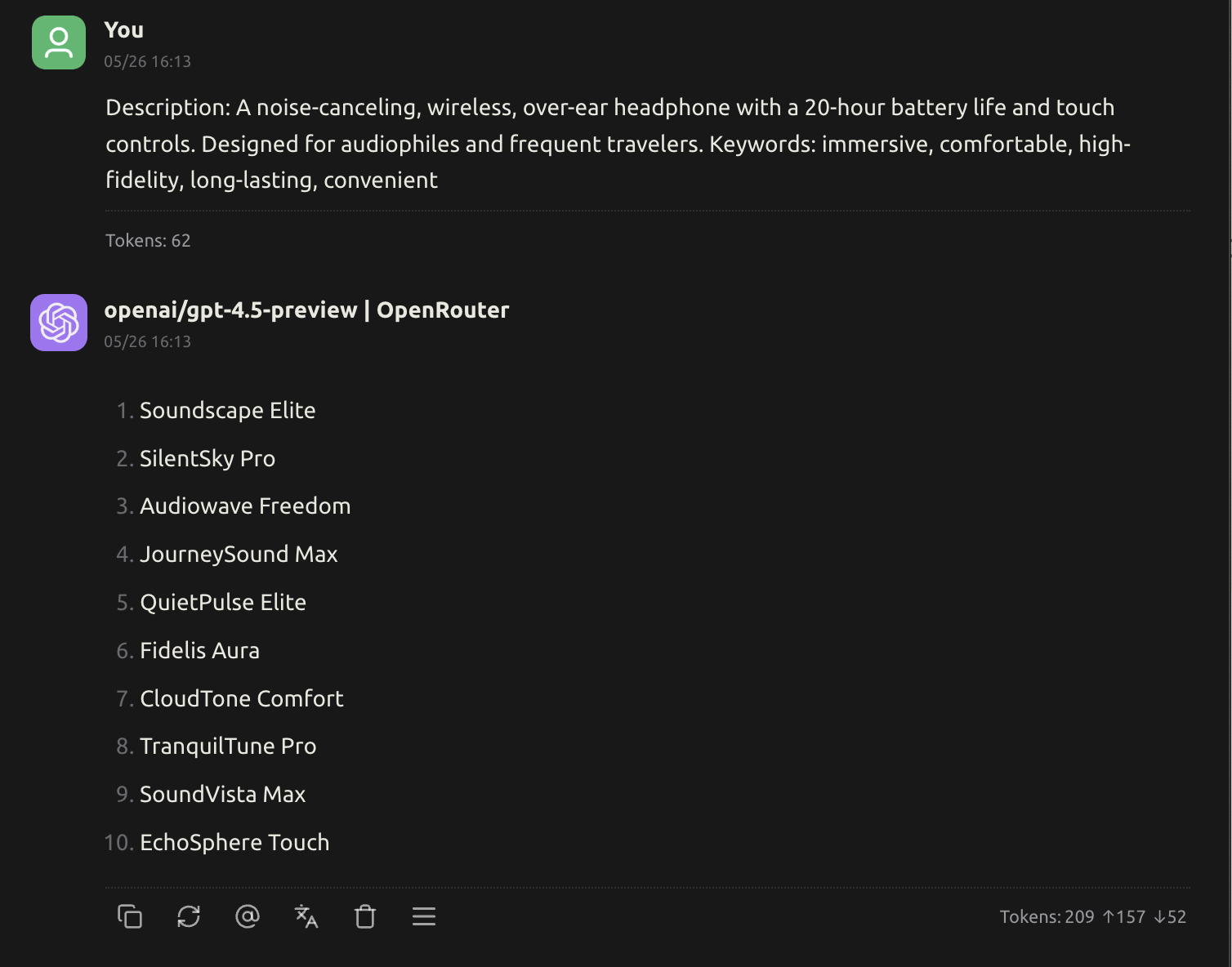
Without Actor-Critic Thinking
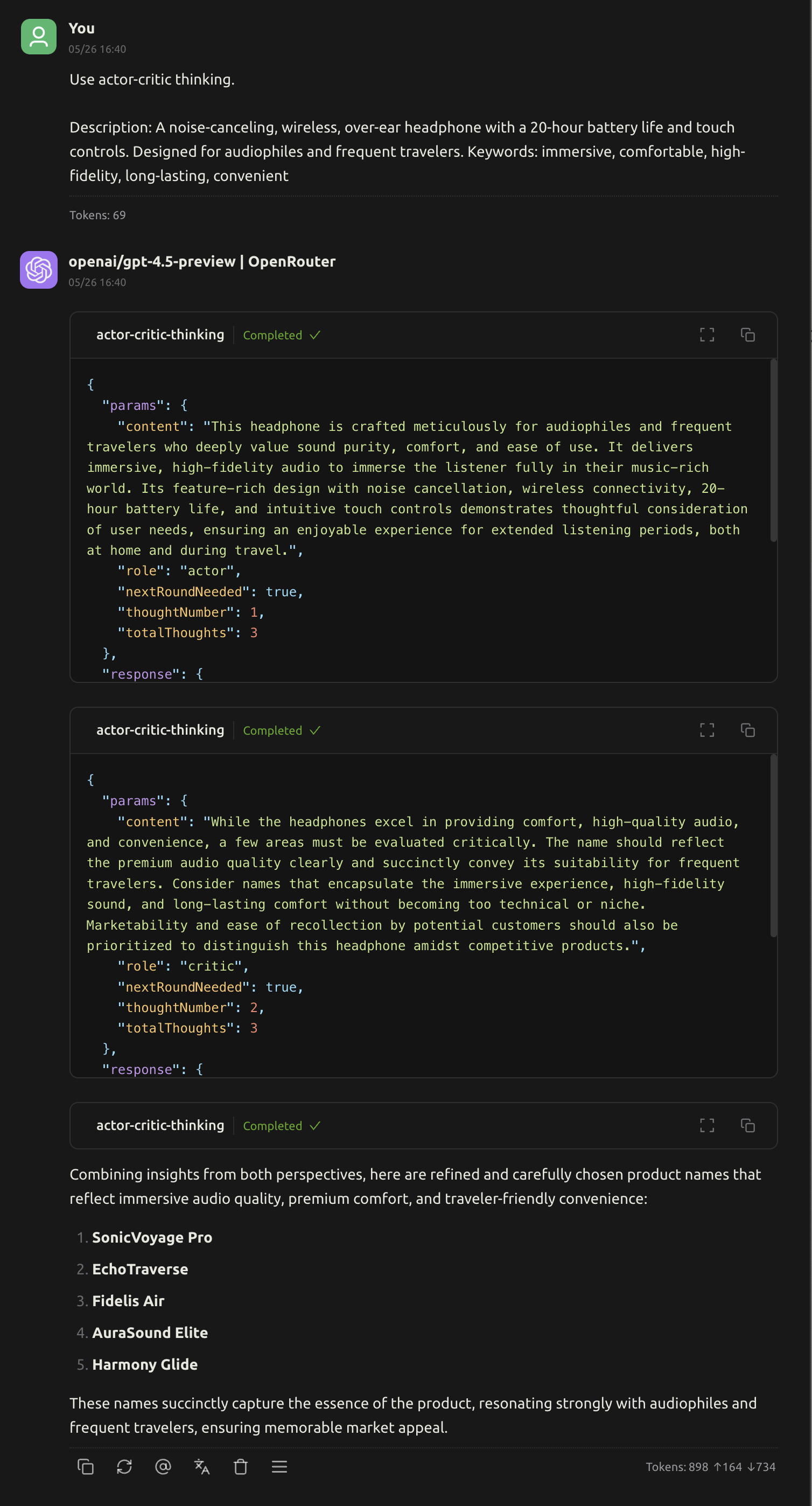
Features
- Dual-perspective Analysis: Alternates between actor (creator/performer) and critic (analyzer/evaluator) perspectives
- Round Tracking: Tracks rounds of dual-perspective analysis
- Balanced Assessment: Combines empathetic understanding with objective analysis
- Multi-dimensional Evaluation: Generates nuanced, multi-dimensional assessments
- Actionable Feedback: Provides constructive improvement suggestions
Use Cases
- Evaluating artistic performances, creative works, or strategic decisions
- Analyzing the gap between intention and execution
- Providing constructive feedback that considers both creative vision and technical execution
- Reviewing complex scenarios that require both empathy and objectivity
- Situations requiring balanced assessment of subjective and objective criteria
- Performance reviews that need both self-reflection and external evaluation
- Creative processes that benefit from iterative refinement
Parameters
Required Parameters
content(string): Current analysis content from the specified role perspectiverole(string): Perspective role, options:"actor": Actor perspective (empathetic/creative viewpoint)"critic": Critic perspective (analytical/evaluative viewpoint)
nextRoundNeeded(boolean): Whether another round of actor-critic dialogue is neededthoughtNumber(integer): Current thought number in the sequence (minimum: 1)totalThoughts(integer): Total number of thoughts planned (must be odd and >= 3)
Role Perspective Guidelines
Actor perspective should include:
- Understanding intentions, creative choices, emotional context, challenges faced
- Self-reflection on performance and decision-making process
- Explanation of creative vision and goals
Critic perspective should include:
- Technical execution analysis, effectiveness evaluation
- Audience impact assessment, comparative analysis
- Objective feedback and improvement suggestions
How to use
{
  "mcpServers": {
    "actor-critic-thinking": {
      "command": "npx",
      "args": ["-y", "mcp-server-actor-critic-thinking"]
    }
  }
}
Installation and Running
# Build the project
npm run build

# Run the server
node dist/index.js
Example Usage
System prompt:
Your task is to generate creative, memorable, and marketable product names based on the provided description and keywords. The product names should be concise (2-4 words), evocative, and easily understood by the target audience. Avoid generic or overly literal names. Instead, aim to create a name that stands out, captures the essence of the product, and leaves a lasting impression.
User prompt:
Description: A noise-canceling, wireless, over-ear headphone with a 20-hour battery life and touch controls. Designed for audiophiles and frequent travelers. Keywords: immersive, comfortable, high-fidelity, long-lasting, convenient
Best Practices
- Start with either actor or critic perspective
- Alternate between perspectives to maintain balance
- Continue rounds until comprehensive analysis is achieved
- Focus on relevant performance aspects
- Generate balanced assessments that honor both perspectives
- Provide constructive, actionable feedback
- Only set
nextRoundNeededto false when analysis is complete
Alternatives




Related Skills
Browse all skillsUse when complex problems require systematic step-by-step reasoning with ability to revise thoughts, branch into alternative approaches, or dynamically adjust scope. Ideal for multi-stage analysis, design planning, problem decomposition, or tasks with initially unclear scope.
Node.js development principles and decision-making. Framework selection, async patterns, security, and architecture. Teaches thinking, not copying.
Invoke deep sequential thinking for complex problem-solving. Use when the user says 'use ultrathink', 'ultrathink', or when tackling problems that require careful step-by-step reasoning, planning, hypothesis generation, or multi-step analysis.
Evaluate research rigor. Assess methodology, experimental design, statistical validity, biases, confounding, evidence quality (GRADE, Cochrane ROB), for critical analysis of scientific claims.
Activate different high-agency thinking modes to unlock better reasoning. Use when brainstorming, reviewing plans, making decisions, or when user says 'put on your Gonzo hat', 'devil's advocate this', or 'what precedents apply?'
Creative problem-solving techniques for breaking through stuck points - includes collision-zone thinking, inversion, pattern recognition, and simplification