
amazon-ads-mcp-server
Connects to Amazon Advertising data through MarketplaceAdPros integration, providing access to campaigns, reports, and advertising resources. Query Amazon ads data and reports with plain English.
amazon-ads-mcp-server
What it does
- Access Amazon advertising campaigns and ad groups
- Query advertising reports with natural language
- Retrieve keywords and product ads data
- Get MarketplaceAdPros recommendations and experiments
- Analyze Sponsored Products, Brands, and Display campaigns
Best for
About amazon-ads-mcp-server
amazon-ads-mcp-server is a community-built MCP server published by marketplaceadpros that provides AI assistants with tools and capabilities via the Model Context Protocol. Fast, secure Amazon Ads MCP server for processing Amazon Marketing Cloud data and optimizing Amazon Advertising performance. It is categorized under analytics data.
How to install
You can install amazon-ads-mcp-server in your AI client of choice. Use the install panel on this page to get one-click setup for Cursor, Claude Desktop, VS Code, and other MCP-compatible clients. This server runs locally on your machine via the stdio transport.
License
amazon-ads-mcp-server is released under the MIT license. This is a permissive open-source license, meaning you can freely use, modify, and distribute the software.
amazon-ads-mcp-server
Connect to your Amazon Advertising Data by integrating your account with MarketplaceAdPros.
Provides access to:
- Advertising Resources in Sponsored Products, Sponsored Brands and Sponsored Display, like Campaigns, Ad Groups, Keywords, Product Ads, Targeting
- Reports and ability to query them with plain english.
- Marketplace Ad Pros Recommendations, Experiments and more with purchased subscription plan
Also available as a Streamable HTTP MCP Server by connecting to https://app.marketplaceadpros.com/mcp
Installation
To add the amazon-ads-mcp-server to your MCP client of choice, add the following to the server config:
On MacOS: ~/Library/Application Support/Claude/claude_desktop_config.json
On Windows: %APPDATA%/Claude/claude_desktop_config.json
Env Vars
BEARER_TOKEN: The Bearer token you got from MarketplaceAdPros.com
Configuration
You can use it via npx in your Claude Desktop configuration like this:
{
  "mcpServers": {
    "marketplaceadpros": {
      "command": "npx",
      "args": [
        "@marketplaceadpros/amazon-ads-mcp-server"
      ],
      "env": {
        "BEARER_TOKEN": "abcdefghijklmnop"
      }
    }
  }
}
Or, if you clone the repo, you can build and use in your Claude Desktop configuration like this:
{
  "mcpServers": {
    "marketplaceadpros": {
      "command": "node",
      "args": [
        "/path/to/amazon-ads-mcp-server/build/index.js"
      ],
      "env": {
        "BEARER_TOKEN": "abcdefghijklmnop"
      }
    }
  }
}
Or, if your client supports the Streamable HTTP MCP Servers, you can just point to the MCP endpoint at https://app.marketplaceadpros.com/mcp.
{
  "mcpServers": {
    "marketplaceadpros": {
      "type": "streamable-http",
      "url": "https://app.marketplaceadpros.com/mcp"
    }
  }
}
Or, configure in LibreChat like:
  MAP:
    type: streamable-http
    url: https://app.marketplaceadpros.com/mcp
    headers:
      Authorization: "Bearer abcdefghijklmnop"
Development
Install dependencies:
npm install
Build the server:
npm run build
For development with auto-rebuild:
npm run watch
Debugging
Since MCP servers communicate over stdio, debugging can be challenging. We recommend using the MCP Inspector, which is available as a package script:
npm run inspector
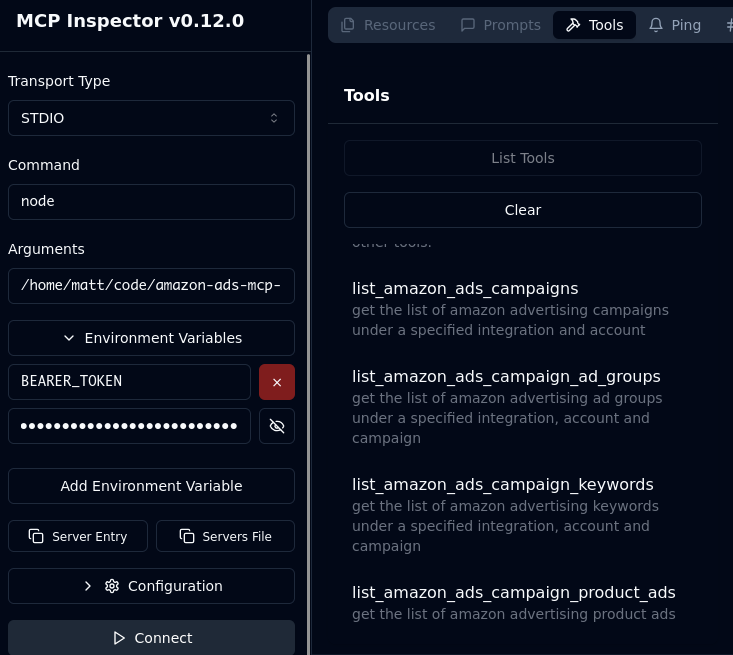
The Inspector will provide a URL to access debugging tools in your browser.
Acknowledgements
- Obviously the modelcontextprotocol and Anthropic teams for the MCP Specification. https://modelcontextprotocol.io/introduction
- MarketplaceAdPros for enabling and sponsoring this project.
Alternatives



Related Skills
Browse all skillsAnalyze Google Analytics data, review website performance metrics, identify traffic patterns, and suggest data-driven improvements. Use when the user asks about analytics, website metrics, traffic analysis, conversion rates, user behavior, or performance optimization.
Transform data into compelling narratives using visualization, context, and persuasive structure. Use when presenting analytics to stakeholders, creating data reports, or building executive presentations.
Advanced content and topic research skill that analyzes trends across Google Analytics, Google Trends, Substack, Medium, Reddit, LinkedIn, X, blogs, podcasts, and YouTube to generate data-driven article outlines based on user intent analysis
YouTube Data API v3 analytics toolkit. Analyze YouTube channels, videos, and search results. Use when the user asks to: check YouTube channel stats, analyze video performance, compare channels, search for videos, get subscriber counts, view engagement metrics, find trending videos, get channel uploads, or analyze YouTube competition. Requires a YouTube Data API v3 key from Google Cloud Console.
Expert data scientist for advanced analytics, machine learning, and statistical modeling. Handles complex data analysis, predictive modeling, and business intelligence. Use PROACTIVELY for data analysis tasks, ML modeling, statistical analysis, and data-driven insights.
Comprehensive backend development guide for Langfuse's Next.js 14/tRPC/Express/TypeScript monorepo. Use when creating tRPC routers, public API endpoints, BullMQ queue processors, services, or working with tRPC procedures, Next.js API routes, Prisma database access, ClickHouse analytics queries, Redis queues, OpenTelemetry instrumentation, Zod v4 validation, env.mjs configuration, tenant isolation patterns, or async patterns. Covers layered architecture (tRPC procedures → services, queue processors → services), dual database system (PostgreSQL + ClickHouse), projectId filtering for multi-tenant isolation, traceException error handling, observability patterns, and testing strategies (Jest for web, vitest for worker).