
Android MCP Toolkit
Connects AI agents to Android development tools for asset conversion, debugging, and testing. Converts SVGs to VectorDrawables and provides live access to Android device diagnostics.
Supercharge AI-driven Android workflows with fast SVG conversion and live logcat insights. Android MCP Toolkit bridges modern AI agents to native Android tools, enabling instant SVG-to-VectorDrawable transformation, filtered crash diagnostics, and automated translation length checks—all through a script-friendly server. With high extensibility, it’s ideal for streamlining asset management, debugging, and localization-flagging, making native Android development smarter and more accessible for both humans and AI agents.
What it does
- Convert SVGs to Android VectorDrawable XML
- Monitor and filter Android device logs in real-time
- Take screenshots of Android devices
- Simulate user interactions like taps and swipes
- Check translation text length differences
- Inspect current app activity and UI hierarchy
Best for
About Android MCP Toolkit
Android MCP Toolkit is a community-built MCP server published by Nam0101 that provides AI assistants with tools and capabilities via the Model Context Protocol. Supercharge Android Studio workflows with AI-driven SVG conversion, live logcat, and advanced mobile dev tools for smarter native development. It is categorized under developer tools. This server exposes 7 tools that AI clients can invoke during conversations and coding sessions.
How to install
You can install Android MCP Toolkit in your AI client of choice. Use the install panel on this page to get one-click setup for Cursor, Claude Desktop, VS Code, and other MCP-compatible clients. This server runs locally on your machine via the stdio transport.
License
Android MCP Toolkit is released under the MIT license. This is a permissive open-source license, meaning you can freely use, modify, and distribute the software.
Tools (7)
Convert SVG markup or files into Android VectorDrawable XML quickly, optionally writing to disk.
Unified tool to read logs, capture crashes, check ANRs, and clear buffers.
Inspect current focused app/window via dumpsys window.
Compare original and translated text lengths to detect layout risk; configurable tolerancePercent (default 30%).
Capture the current UI hierarchy as XML using uiautomator.
Android MCP Toolkit for AI Agents
Small MCP server with three tools:
- Fast SVG → Android VectorDrawable conversion (cached, file or inline).
- adb logcat reader with package/pid/tag filters for quick crash triage.
- Translation length difference estimator to flag risky length deltas before layout breaks.
Why this exists
The Mission: Bringing Native Android to the AI Agent Era
While the AI ecosystem flourishes with web-first tools, Android development often feels left behind. This MCP server is my answer to that gap—a dedicated bridge connecting AI Agents directly to the Android toolchain.
⚡ Zero-Friction Asset Conversion: Convert SVGs to VectorDrawables instantly without the overhead of launching Android Studio.
🔍 Direct Diagnostic Access: Empower agents to pull, filter, and analyze adb logcat streams (by package, PID, or tag) in real-time.
🤖 Agent-Native Architecture: Deliver structured, scriptable outputs that LLMs can parse and act upon efficiently.
🚀 Built for Extensibility: A solid foundation designed to grow, paving the way for future utilities like bitmap helpers and asset validation.
Pairing ideas
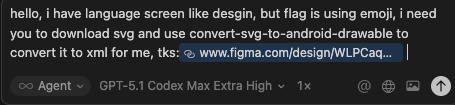
- Figma MCP: grab SVGs from designs, feed to
convert-svg-to-android-drawableto get XML for Android resources. - Debugging: while running the app, call
read-adb-logcatwith package name or tag to capture crashes and filtered logs without leaving the MCP client.
Previews
SVG to VectorDrawable
- Figma request → SVG extraction
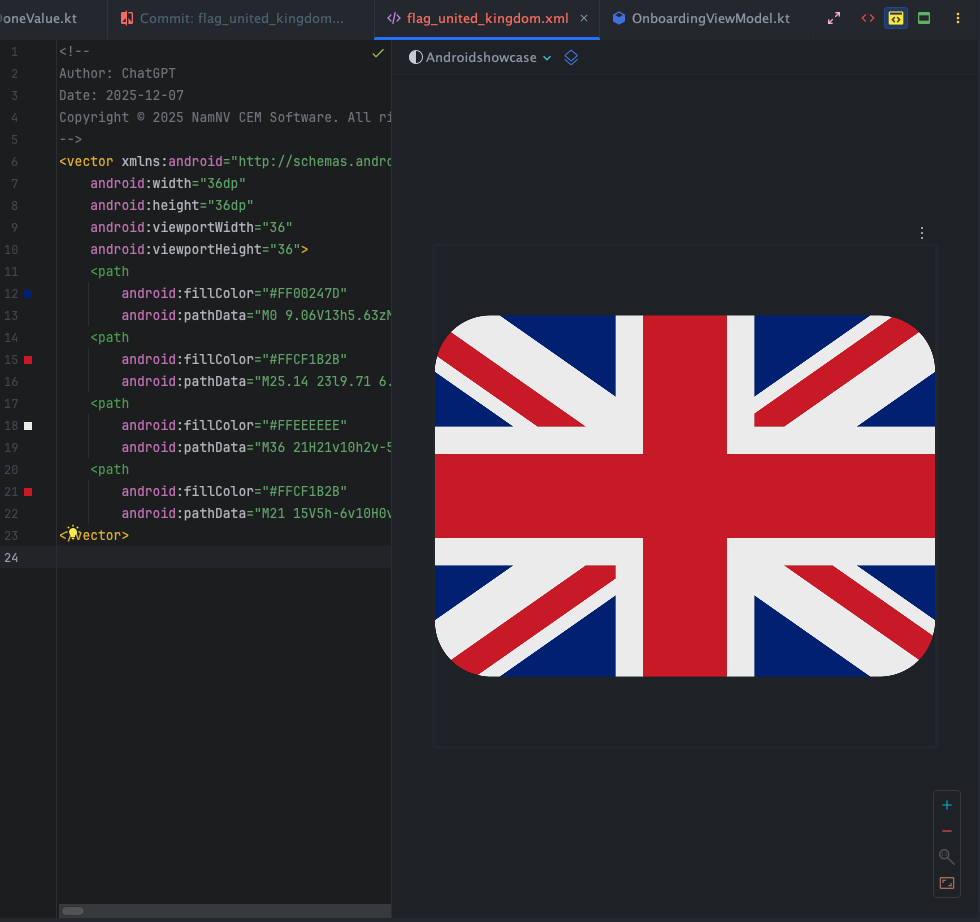
- Flag conversion preview (single)
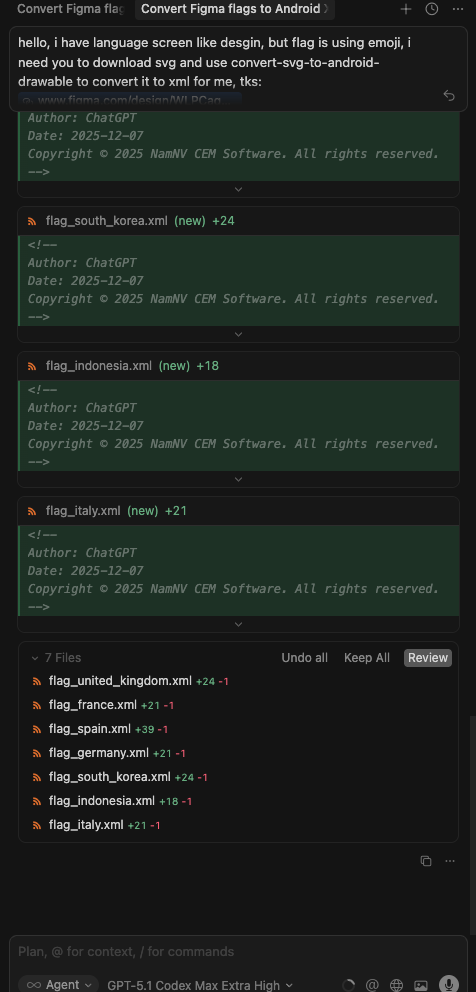
- Batch flag review (side-by-side)
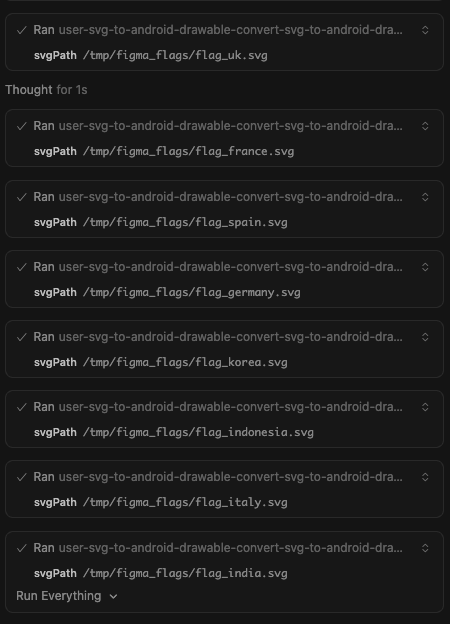
- Batch run via MCP (console)
ADB logcat tool
- Crash capture prompt (inputs + filters)
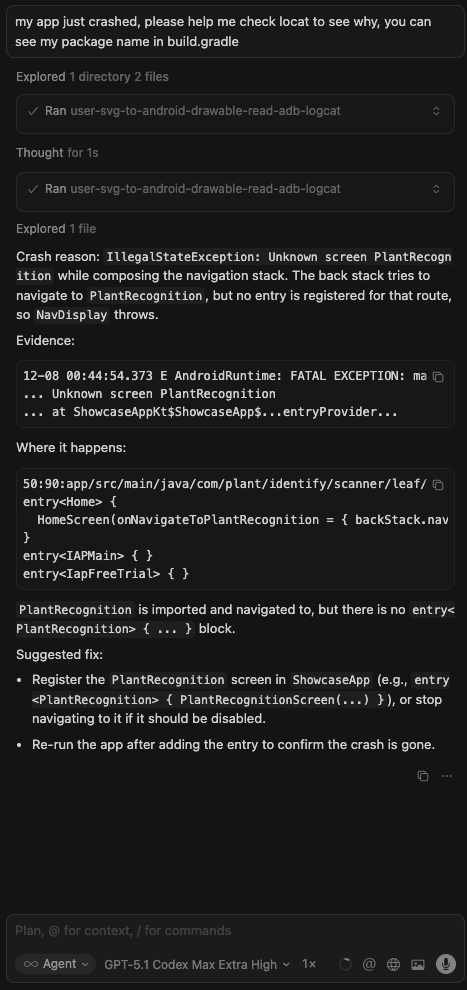
- Response preview (summarized logcat)

Current tools
-
convert-svg-to-android-drawable- Inputs:
svg(inline) orsvgPath(file path). Optional:outputPath,floatPrecision(default 2),fillBlack(default false),xmlTag(default false),tint,cache(default true). - Output: VectorDrawable XML text; also writes to disk when
outputPathis provided. - Performance: LRU cache (32 entries) keyed by SVG + options plus fast reuse in-session.
- Converter: vendored fork in
vendor/svg2vectordrawablewith fixes forrgb()/rgba(),hsl()/hsla(), and named colors. Upstream license:vendor/svg2vectordrawable/LICENSE(MIT).
- Inputs:
-
manage-logcat- Inputs:
action:read(default),crash,anr, orclear.packageName: Optional. Resolves PID viaadb shell pidof.pid: Optional. Explicit PID.tag: Optional. Filter by tag (e.g.MyApp).priority:V,D,I,W,E,F,S(defaultV).maxLines: Tail count (default 200, max 2000).timeoutMs: Default 5000.
- Behavior:
read: Fetches logcat tail.crash: Fetcheslogcat -b crash.anr: Fetches recent ActivityManager ANR logs + tail of/data/anr/traces.txt.clear: clears logcat buffers.
- Inputs:
-
get-current-activity- Inputs:
timeoutMs(default5000, max15000). - Behavior: Inspects
dumpsys windowto find the currently focused app/window. Useful to verify state.
- Inputs:
-
dump-ui-hierarchy- Inputs:
timeoutMs(default 10000). - Behavior: Captures current UI hierarchy as XML via
uiautomator.
- Inputs:
-
take-screenshot- Inputs:
outputPath(required),timeoutMs. - Behavior: Saves device screenshot to local file.
- Inputs:
-
inject-input- Inputs:
command(tap,text,swipe,keyevent,back,home),args(array),timeoutMs. - Optional:
elementIdorelementText(finds element center and taps it). - Behavior: Simulates user interaction suitable for testing flows.
- Inputs:
-
estimate-text-length-difference- Inputs:
sourceText(original),translatedText(to compare),tolerancePercent(default30, max500). - Behavior: Measures grapheme length of both strings, computes percent change, and reports whether it exceeds the tolerance (useful to catch translation length blowups that could break layouts).
- Inputs:
Roadmap (planned)
- Additional MCP tools for Android assets (e.g., batch conversions, validations, optimizers).
- Optional resource prompts for common Android drawables/templates.
Quick start
npm installnpm run buildnode dist/index.js(stdio MCP server)
Run via npx
- Global:
npx android-mcp-toolkit
Use in Cursor (MCP config)
Add to your Cursor settings JSON:
{
  "mcpServers": {
    "android-mcp-toolkit": {
      "command": "npx",
      "args": [
        "-y",
        "android-mcp-toolkit"
      ]
    }
  }
}
The npx call downloads the published package; no local path required.
Quick install via Cursor deep link:
cursor://anysphere.cursor-deeplink/mcp/install?name=android-mcp-toolkit&config=eyJjb21tYW5kIjoibnB4IC15IGFuZHJvaWQtbWNwLXRvb2xraXQifQ%3D%3D
Examples
- Input SVG:
sample_svg.svg - Output VectorDrawable:
examples/sample_svg.xml
Notes
- Transport: stdio via
@modelcontextprotocol/sdk. - Base deps kept minimal; everything needed to convert SVGs is vendored/included.
Contact
Alternatives



Related Skills
Browse all skillsUI design system toolkit for Senior UI Designer including design token generation, component documentation, responsive design calculations, and developer handoff tools. Use for creating design systems, maintaining visual consistency, and facilitating design-dev collaboration.
Comprehensive guide for creating professional UI/UX designs in Penpot using MCP tools. Use this skill when: (1) Creating new UI/UX designs for web, mobile, or desktop applications, (2) Building design systems with components and tokens, (3) Designing dashboards, forms, navigation, or landing pages, (4) Applying accessibility standards and best practices, (5) Following platform guidelines (iOS, Android, Material Design), (6) Reviewing or improving existing Penpot designs for usability. Triggers: "design a UI", "create interface", "build layout", "design dashboard", "create form", "design landing page", "make it accessible", "design system", "component library".
Answer questions about the AI SDK and help build AI-powered features. Use when developers: (1) Ask about AI SDK functions like generateText, streamText, ToolLoopAgent, embed, or tools, (2) Want to build AI agents, chatbots, RAG systems, or text generation features, (3) Have questions about AI providers (OpenAI, Anthropic, Google, etc.), streaming, tool calling, structured output, or embeddings, (4) Use React hooks like useChat or useCompletion. Triggers on: "AI SDK", "Vercel AI SDK", "generateText", "streamText", "add AI to my app", "build an agent", "tool calling", "structured output", "useChat".
Lightweight Chrome automation toolkit with shared configuration, JSON-first output, and six focused scripts for starting, navigating, inspecting, capturing, evaluating, and cleaning up browser sessions.
Use when working with the OpenAI API (Responses API) or OpenAI platform features (tools, streaming, Realtime API, auth, models, rate limits, MCP) and you need authoritative, up-to-date documentation (schemas, examples, limits, edge cases). Prefer the OpenAI Developer Documentation MCP server tools when available; otherwise guide the user to enable `openaiDeveloperDocs`.
Guide for building TypeScript CLIs with Bun. Use when creating command-line tools, adding subcommands to existing CLIs, or building developer tooling. Covers argument parsing, subcommand patterns, output formatting, and distribution.