
AppInsight (App Store / Play Store)
Retrieves comprehensive data from Apple App Store and Google Play Store including app details, reviews, ratings, and market intelligence. Provides tools to search, analyze, and compare mobile apps across both major app marketplaces.
Analyze data from both the Apple App Store and Google Play Store
What it does
- Search apps across App Store and Google Play
- Fetch detailed app information and metadata
- Retrieve user reviews and ratings data
- Get app version history and release notes
- Find similar apps and competitor analysis
- Access developer portfolios and privacy details
Best for
About AppInsight (App Store / Play Store)
AppInsight (App Store / Play Store) is a community-built MCP server published by jiantaofu that provides AI assistants with tools and capabilities via the Model Context Protocol. AppInsight (App Store / Play Store): Analyze app data from both the Apple App Store and Google Play Store to optimize your mobile strategy. It is categorized under analytics data. This server exposes 20 tools that AI clients can invoke during conversations and coding sessions.
How to install
You can install AppInsight (App Store / Play Store) in your AI client of choice. Use the install panel on this page to get one-click setup for Cursor, Claude Desktop, VS Code, and other MCP-compatible clients. This server runs locally on your machine via the stdio transport.
License
AppInsight (App Store / Play Store) is released under the MIT license. This is a permissive open-source license, meaning you can freely use, modify, and distribute the software.
Tools (20)
Search for apps on the App Store. Returns a list of apps with the following fields: - id: App Store ID number - appId: Bundle ID (e.g. 'com.company.app') - title: App name - icon: Icon image URL - url: App Store URL - price: Price in USD - currency: Price currency code - free: Boolean indicating if app is free - description: App description - developer: Developer name - developerUrl: Developer's App Store URL - developerId: Developer's ID - genre: App category name - genreId: Category ID - released: Release date (ISO string)
Get detailed information about an App Store app. Returns an object with: - id: App Store ID number - appId: Bundle ID (e.g. 'com.company.app') - title: App name - url: App Store URL - description: Full app description - icon: Icon URL - genres: Array of category names - genreIds: Array of category IDs - primaryGenre: Main category name - primaryGenreId: Main category ID - contentRating: Content rating (e.g. '4+') - languages: Array of language codes - size: App size in bytes - requiredOsVersion: Minimum iOS version required - released: Initial release date (ISO string) - updated: Last update date (ISO string) - releaseNotes: Latest version changes - version: Current version string - price: Price in USD - currency: Price currency code - free: Boolean indicating if app is free - developerId: Developer's ID - developer: Developer name - developerUrl: Developer's App Store URL - developerWebsite: Developer's website URL if available - score: Current rating (0-5) - reviews: Total number of ratings - currentVersionScore: Current version rating (0-5) - currentVersionReviews: Current version review count - screenshots: Array of screenshot URLs - ipadScreenshots: Array of iPad screenshot URLs - appletvScreenshots: Array of Apple TV screenshot URLs - supportedDevices: Array of supported device IDs - ratings: Total number of ratings (when ratings option enabled) - histogram: Rating distribution by star level (when ratings option enabled)
Get reviews for an App Store app. Returns an array of reviews with: - id: Review ID - userName: Reviewer's name - userUrl: Reviewer's profile URL - version: App version reviewed - score: Rating (1-5) - title: Review title - text: Review content - url: Review URL - updated: Review date (ISO string)
Get similar apps ('customers also bought') from the App Store. Returns a list of apps with: - id: App Store ID number - appId: Bundle ID (e.g. 'com.company.app') - title: App name - icon: Icon image URL - url: App Store URL - price: Price in USD - currency: Price currency code - free: Boolean indicating if app is free - description: App description - developer: Developer name - developerUrl: Developer's App Store URL - developerId: Developer's ID - genre: App category name - genreId: Category ID - released: Release date (ISO string)
Get apps by a developer on the App Store. Returns a list of apps with: - id: App Store ID number - appId: Bundle ID (e.g. 'com.company.app') - title: App name - icon: Icon image URL - url: App Store URL - price: Price in USD - currency: Price currency code - free: Boolean indicating if app is free - description: App description - developer: Developer name - developerUrl: Developer's App Store URL - developerId: Developer's ID - genre: App category name - genreId: Category ID - released: Release date (ISO string)
App Market Intelligence MCP
An MCP server that provides comprehensive market intelligence by analyzing data from both the Apple App Store and Google Play Store. Get insights about apps, market trends, competitors, and user feedback across the major mobile app marketplaces.
API Coverage
App Store API Coverage
| API Function | Implemented | MCP Tool Name | Description |
|---|---|---|---|
| app | ✅ | app-store-details | Get detailed information about an App Store app |
| list | ✅ | app-store-list | Retrieve apps from iTunes collections |
| search | ✅ | app-store-search | Search for apps on the App Store |
| developer | ✅ | app-store-developer | Get apps by a developer |
| privacy | ✅ | app-store-privacy | Get privacy details for an app |
| suggest | ✅ | app-store-suggest | Get search suggestions |
| similar | ✅ | app-store-similar | Get similar apps |
| reviews | ✅ | app-store-reviews | Get app reviews |
| ratings | ✅ | app-store-ratings | Get app ratings |
| versionHistory | ✅ | app-store-version-history | Get app version history |
Google Play API Coverage
| API Function | Implemented | MCP Tool Name | Description |
|---|---|---|---|
| app | ✅ | google-play-details | Get detailed app information |
| list | ✅ | google-play-list | Retrieve apps from collections |
| search | ✅ | google-play-search | Search for apps |
| developer | ✅ | google-play-developer | Get apps by developer |
| suggest | ✅ | google-play-suggest | Get search suggestions |
| reviews | ✅ | google-play-reviews | Get app reviews |
| similar | ✅ | google-play-similar | Get similar apps |
| permissions | ✅ | google-play-permissions | Get app permissions |
| datasafety | ✅ | google-play-datasafety | Get data safety information |
| categories | ✅ | google-play-categories | Get list of categories |
Usage
Start the MCP server:
node src/server.js
The server exposes tools that can be used through any MCP client. For example, using Claude for Desktop, you can:
- Search for apps across both stores
- Get detailed app information
- Read reviews and ratings
- Find similar apps
- Check app privacy and permissions
- And more
Usage Examples
// Get top free iOS apps
{
  "name": "app-store-list",
  "params": {
    "collection": "topfreeapplications",
    "num": 10
  }
}

// Get top paid Android games
{
  "name": "google-play-list",
  "params": {
    "collection": "TOP_PAID",
    "category": "GAME",
    "num": 10
  }
}
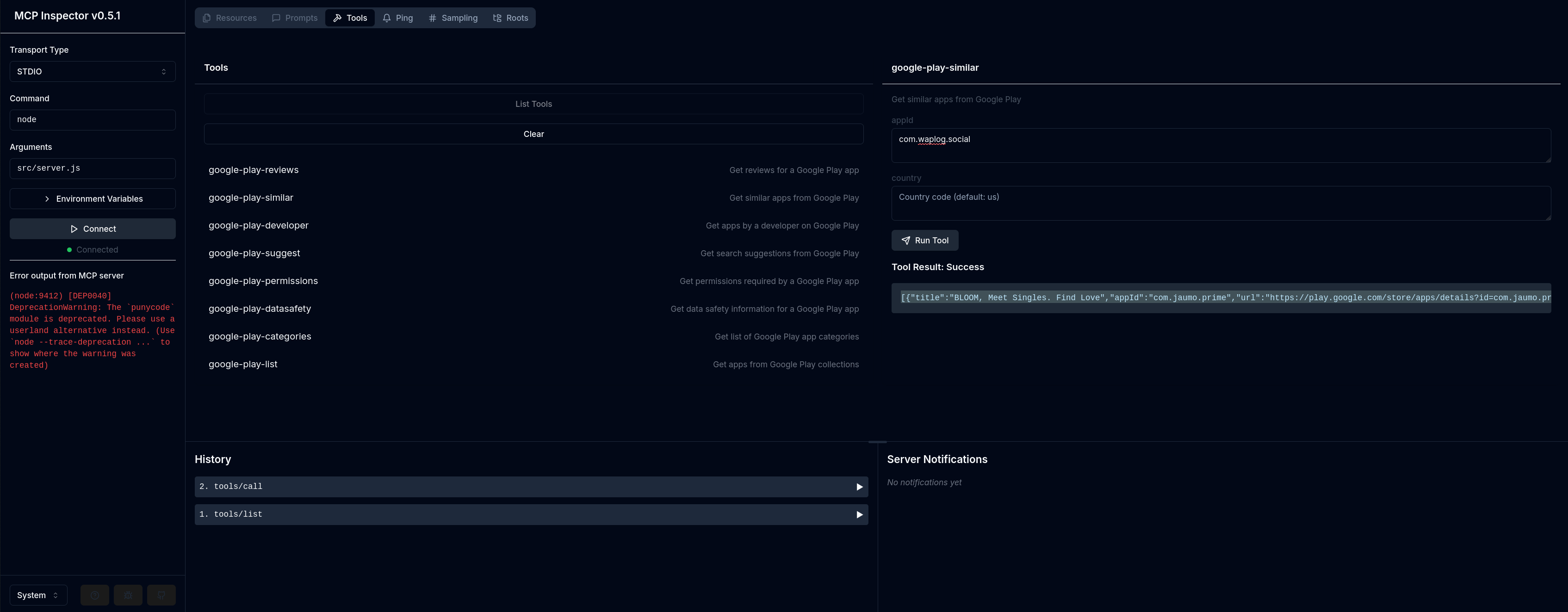
Test with MCP Inspector
npm run test:inspector
Test with mcp-cli
npx @wong2/mcp-cli npx -y "app-insight-mcp"
Usage with Claude Desktop
Add this to your claude_desktop_config.json:
Installing via Smithery
To install App Market Intelligence for Claude Desktop automatically via Smithery:
npx -y @smithery/cli install @JiantaoFu/appinsightmcp --client claude
Docker
{
  "mcpServers": {
    "app-insight-mcp": {
      "command": "docker",
      "args": [
        "run",
        "-i",
        "--rm",
        "app-insight-mcp"
      ]
    }
  }
}
NPX
{
  "mcpServers": {
    "app-insight-mcp": {
      "command": "npx",
      "args": [
        "-y",
        "@jeromyfu/app-insight-mcp"
      ]
    }
  }
}
Build
Docker build:
docker build -t app-insight-mcp -f Dockerfile .
Error Handling
All tools include error handling and will return appropriate error messages if:
- Required parameters are missing
- API calls fail
- Rate limits are hit
- Invalid IDs or parameters are provided
Contributing
Feel free to contribute by:
- Implementing missing features
- Improving error handling
- Adding more API capabilities
- Enhancing documentation
License
MIT
Alternatives



Related Skills
Browse all skillsAutomates browser interactions for web testing, form filling, screenshots, and data extraction. Use when the user needs to navigate websites, interact with web pages, fill forms, take screenshots, test web applications, or extract information from web pages.
Complete App Store Optimization (ASO) toolkit for researching, optimizing, and tracking mobile app performance on Apple App Store and Google Play Store
Expert Svelte/SvelteKit development assistant for building components, utilities, and applications. Use when creating Svelte components, SvelteKit applications, implementing reactive patterns, handling state management, working with stores, transitions, animations, or any Svelte/SvelteKit development task. Includes comprehensive documentation access, code validation with svelte-autofixer, and playground link generation.
Develop native iOS applications with Swift/SwiftUI. Masters iOS 18, SwiftUI, UIKit integration, Core Data, networking, and App Store optimization. Use PROACTIVELY for iOS-specific features, App Store optimization, or native iOS development.
Use this skill for setting up vector similarity search with pgvector for AI/ML embeddings, RAG applications, or semantic search. **Trigger when user asks to:** - Store or search vector embeddings in PostgreSQL - Set up semantic search, similarity search, or nearest neighbor search - Create HNSW or IVFFlat indexes for vectors - Implement RAG (Retrieval Augmented Generation) with PostgreSQL - Optimize pgvector performance, recall, or memory usage - Use binary quantization for large vector datasets **Keywords:** pgvector, embeddings, semantic search, vector similarity, HNSW, IVFFlat, halfvec, cosine distance, nearest neighbor, RAG, LLM, AI search Covers: halfvec storage, HNSW index configuration (m, ef_construction, ef_search), quantization strategies, filtered search, bulk loading, and performance tuning.
Instrument a webapp to send useful telemetry data to Azure App Insights