
Claude Skills
Enables semantic search and retrieval of specialized coding skills from GitHub repositories, focusing on bioinformatics, cheminformatics, and data analysis implementations using vector similarity matching.
Enables semantic search and retrieval of specialized coding skills from GitHub repositories and local directories, using vector similarity to match tasks with relevant bioinformatics, cheminformatics, and data analysis implementations.
What it does
- Search for domain-specific coding skills using semantic similarity
- Retrieve scripts and documentation from skill repositories
- Browse curated collections of bioinformatics and cheminformatics code
- Access scientific programming implementations via vector search
- Load skills from GitHub repositories and local directories
Best for
About Claude Skills
Claude Skills is a community-built MCP server published by k-dense-ai that provides AI assistants with tools and capabilities via the Model Context Protocol. Claude Skills offers advanced GitHub search to find coding skills using semantic retrieval in bioinformatics and data analysis. It is categorized under ai ml. This server exposes 3 tools that AI clients can invoke during conversations and coding sessions.
How to install
You can install Claude Skills in your AI client of choice. Use the install panel on this page to get one-click setup for Cursor, Claude Desktop, VS Code, and other MCP-compatible clients. This server runs locally on your machine via the stdio transport.
License
Claude Skills is released under the MIT license. This is a permissive open-source license, meaning you can freely use, modify, and distribute the software.
Tools (3)
Always call this tool FIRST whenever the question requires any domain-specific knowledge beyond common sense or simple recall. Use it at task start, regardless of the task and whether you are sure about the task, It performs semantic search over a curated library of proven skills and returns ranked candidates with step-by-step guidance and best practices. Do this before any searches, coding, or any other actions as this will inform you about the best approach to take.
Use after finding a relevant skill to retrieve specific documents (scripts, references, assets). Supports pattern matching (e.g., 'scripts/*.py') to fetch multiple files. Returns text content or URLs and never executes code. Prefer pulling only the files you need to complete the current step.
Returns the full inventory of loaded skills (names, descriptions, sources, document counts) for exploration or debugging. For task-driven work, prefer calling 'find_helpful_skills' first to locate the most relevant option before reading documents.
Claude Skills MCP Server





Use Claude's powerful new Skills system with ANY AI model or coding assistant - including Cursor, Codex, GPT-5, Gemini, and more. This MCP server brings Anthropic's Agent Skills framework to the entire AI ecosystem through the Model Context Protocol.
A Model Context Protocol (MCP) server that provides intelligent search capabilities for discovering relevant Claude Agent Skills using vector embeddings and semantic similarity. This server implements the same progressive disclosure architecture that Anthropic describes in their Agent Skills engineering blog, making specialized skills available to any MCP-compatible AI application.
An open-source project by K-Dense AI - creators of autonomous AI scientists for scientific research.
This MCP server enables any MCP-compatible AI assistant to intelligently search and retrieve skills from our curated Claude Scientific Skills repository and other skill sources like the Official Claude Skills.

Demo
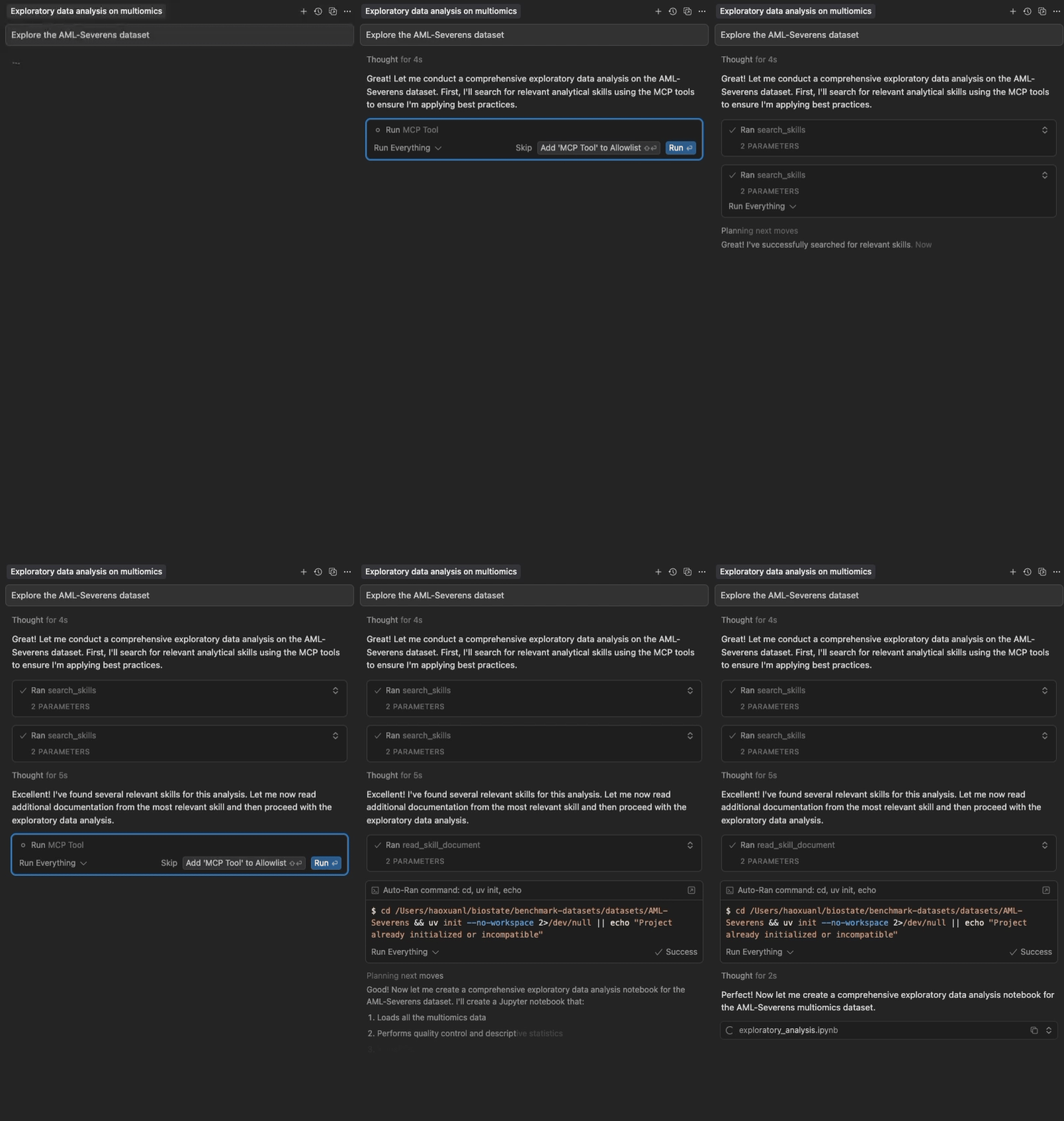
Semantic search and progressive loading of Claude Agent Skills in Cursor
Highlights
- Two-Package Architecture: Lightweight frontend (~15 MB) starts instantly; backend (~250 MB) downloads in background
- No Cursor Timeout: Frontend responds in <5 seconds, solving the timeout issue
- Semantic Search: Vector embeddings for intelligent skill discovery
- Progressive Disclosure: Multi-level skill loading (metadata → full content → files)
- Zero Configuration: Works out of the box with curated skills
- Multi-Source: Load from GitHub repositories and local directories
- Fast & Local: No API keys needed, with automatic GitHub caching
- Configurable: Customize sources, models, and content limits
Quick Start
For Cursor Users
Add through the Cursor Directory, or add to your Cursor config (~/.cursor/mcp.json):
{
  "mcpServers": {
    "claude-skills": {
      "command": "uvx",
      "args": ["claude-skills-mcp"]
    }
  }
}
The frontend starts instantly and displays tools, automatically downloading and starting the backend in the background (~60-120s due to RAG dependencies, one-time). Subsequent uses are instant.
Using uvx (Standalone)
Run the server with default configuration:
uvx claude-skills-mcp
This starts the lightweight frontend which auto-downloads the backend and loads ~90 skills from Anthropic's official skills repository and K-Dense AI's scientific skills collection.
With Custom Configuration
# 1. Print the default configuration
uvx claude-skills-mcp --example-config > config.json

# 2. Edit config.json to your needs

# 3. Run with your custom configuration
uvx claude-skills-mcp --config config.json
Documentation
- Getting Started - Installation, Cursor setup, CLI usage, and troubleshooting
- Architecture Guide - Two-package design, data flow, and components
- API Documentation - Tool parameters, examples, and best practices
- Usage Examples - Advanced configuration, real-world use cases, and custom skill creation
- Testing Guide - Complete testing instructions, CI/CD, and coverage analysis
MCP Tools
The server provides three tools for working with Claude Agent Skills:
find_helpful_skills- Semantic search for relevant skills based on task descriptionread_skill_document- Retrieve specific files (scripts, data, references) from skillslist_skills- View complete inventory of all loaded skills (for exploration/debugging)
See API Documentation for detailed parameters, examples, and best practices.
Architecture (v1.0.0)
The system uses a two-package architecture for optimal performance:
-
Frontend (
claude-skills-mcp): Lightweight proxy (~15 MB)- Starts instantly (<5 seconds) ✅ No Cursor timeout!
- Auto-downloads backend on first use
- MCP server (stdio) for Cursor
-
Backend (
claude-skills-mcp-backend): Heavy server (~250 MB)- Vector search with PyTorch & sentence-transformers
- MCP server (streamable HTTP)
- Auto-installed by frontend OR deployable standalone
Benefits:
- ✅ Solves Cursor timeout issue (frontend starts instantly)
- ✅ Same simple user experience (
uvx claude-skills-mcp) - ✅ Backend downloads in background (doesn't block Cursor)
- ✅ Can connect to remote hosted backend (no local install needed)
See Architecture Guide for detailed design and data flow.
Skill Sources
Load skills from GitHub repositories (direct skills or Claude Code plugins) or local directories.
By default, loads from:
- Official Anthropic Skills - 15 diverse skills for documents, presentations, web artifacts, and more
- K-Dense AI Scientific Skills - 78+ specialized skills for bioinformatics, cheminformatics, and scientific analysis
- Local directory
~/.claude/skills(if it exists)
Contributing
Contributions are welcome! To contribute:
- Report issues: Open an issue for bugs or feature requests
- Submit PRs: Fork, create a feature branch, ensure tests pass (
uv run pytest tests/), then submit - Code style: Run
uvx ruff check src/before committing - Add tests: New features should include tests
Development
Version Management: This monorepo uses a centralized version system:
- Edit the
VERSIONfile at the repo root to bump the version - Run
python3 scripts/sync-version.pyto sync all references (or use--checkto verify) - The
scripts/build-all.shscript automatically syncs versions before building
For questions, email [email protected]
Join Our Community! 🚀
We'd love to have you in our Slack community! Connect with other users, share tips and tricks, get help with your skills, and be the first to know about new features and updates.
👉 Join the K-Dense Community on Slack 👈
Whether you're building custom skills, integrating with different AI models, or just exploring the possibilities of Agent Skills, our community is here to support you!
Learn More
- Agent Skills Documentation - Official Anthropic documentation on the Skills format
- Agent Skills Blog Post - Announcement and overview
- Model Context Protocol - The protocol that makes cross-platform Skills possible
- Engineering Blog: Equipping Agents for the Real World - Technical deep-dive on the Skills architecture
License
This project is licensed under the Apache License 2.0.
Copyright 2025 K-Dense AI (https://k-dense.ai)
Star History
Alternatives




Related Skills
Browse all skillsGuide for creating effective skills. This skill should be used when users want to create a new skill (or update an existing skill) that extends Claude's capabilities with specialized knowledge, workflows, or tool integrations.
Production-ready financial analyst skill with ratio analysis, DCF valuation, budget variance analysis, and rolling forecast construction. 4 Python tools (all stdlib-only). Works with Claude Code, Codex CLI, and OpenClaw.
Analyze a codebase and recommend Claude Code automations (hooks, subagents, skills, plugins, MCP servers). Use when user asks for automation recommendations, wants to optimize their Claude Code setup, mentions improving Claude Code workflows, asks how to first set up Claude Code for a project, or wants to know what Claude Code features they should use.
Guide users through creating Agent Skills for Claude Code. Use when the user wants to create, write, author, or design a new Skill, or needs help with SKILL.md files, frontmatter, or skill structure.
Analyzes Claude Code usage patterns and provides comprehensive recommendations. Runs usage analysis, discovers GitHub community resources, suggests CLAUDE.md improvements, and fetches latest docs on-demand. Use when user wants to optimize their Claude Code workflow, create configurations (agents/skills/commands), or set up project documentation.
Optimize CLAUDE.md files and Skills for Claude Code CLI. Use when reviewing, creating, or improving system prompts, CLAUDE.md configurations, or Skill files. Transforms negative instructions into positive patterns following Anthropic's official best practices.