
DevDocs MCP
Extracts and searches technical documentation from any website, making it AI-accessible for faster development. Features a UI-based interface for managing documentation sources.
Completely free, private, UI-based tech documentation MCP server. Extract and search documentation from any website for AI-powered coding assistance. 2,000+ GitHub stars.
What it does
- Extract documentation from any website
- Search through technical documentation
- Convert web docs to AI-readable format
- Manage documentation sources through UI
- Scrape entire website contents
Best for
About DevDocs MCP
DevDocs MCP is a community-built MCP server published by CyberAGI that provides AI assistants with tools and capabilities via the Model Context Protocol. DevDocs MCP - Free, private UI to extract and search docs from any site. AI-powered coding assistance with 2,000+ GitHub stars. It is categorized under developer tools.
How to install
You can install DevDocs MCP in your AI client of choice. Use the install panel on this page to get one-click setup for Cursor, Claude Desktop, VS Code, and other MCP-compatible clients. This server runs locally on your machine via the stdio transport.
License
DevDocs MCP is released under the Apache-2.0 license. This is a permissive open-source license, meaning you can freely use, modify, and distribute the software.
DevDocs by CyberAGI 🚀
[!WARNING] 📌 DevDocs Status: Not publicly maintained. Enhanced internal version at CyberAGI — public release coming soon. If you have any questions please reach out to [email protected]
Turn Weeks of Documentation Research into Hours of Productive Development
Perfect For • Features • Why DevDocs • Getting Started • Scripts • Compare to FireCrawl • Discord • DevDocs Roadmap
🚀 Technology Partners




🎯 Perfect For
🏢 Enterprise Software Developers
Skip weeks of reading documentation and dealing with technical debt. Implement ANY technology faster by letting DevDocs handle the heavy lifting of documentation understanding.
🕸️ Web Scrapers
Pull entire contents of websites with Smart Discovery of Child URLs up to level 5. Perfect for both internal and external website documentation with intelligent crawling.
👥 Development Teams
Leverage internal documentation with built-in MCP servers and Claude integration for intelligent data querying. Transform your team's knowledge base into an actionable resource.
🚀 Indie Hackers
DevDocs + VSCode(cline) + Your Idea = Ship products fast with ANY technology. No more getting stuck in documentation hell when building your next big thing.
✨ Features
🧠 Intelligent Crawling
- Smart Depth Control: Choose crawl depth from 1-5 levels
- Automatic Link Discovery: Finds and categorizes all related content
- Selective Crawling: Pick exactly what you want to extract
- Child URL Detection: Automatically discovers and maps website structure
⚡ Performance & Speed
- Parallel Processing: Crawl multiple pages simultaneously
- Smart Caching: Never waste time on duplicate content
- Lazy Loading Support: Handles modern web apps effortlessly
- Rate Limiting: Respectful crawling that won't overload servers
🎯 Content Processing
- Clean Extraction: Get content without the fluff
- Multiple Formats: Export to MD or JSON for LLM fine-tuning
- Structured Output: Logically organized content
- MCP Server Integration: Ready for AI processing
🛡️ Enterprise Features
- Error Recovery: Auto-retry on failures
- Full Logging: Track every operation
- API Access: Integrate with your tools
- Team Management: Multiple seats and roles
🤔 Why DevDocs?
The Problem
Documentation is everywhere and LLMs are OUTDATED in their knowledge. Reading it, understanding it, and implementing it takes weeks of research and development even for senior engineers. We cut down that time to hours.
Our Solution
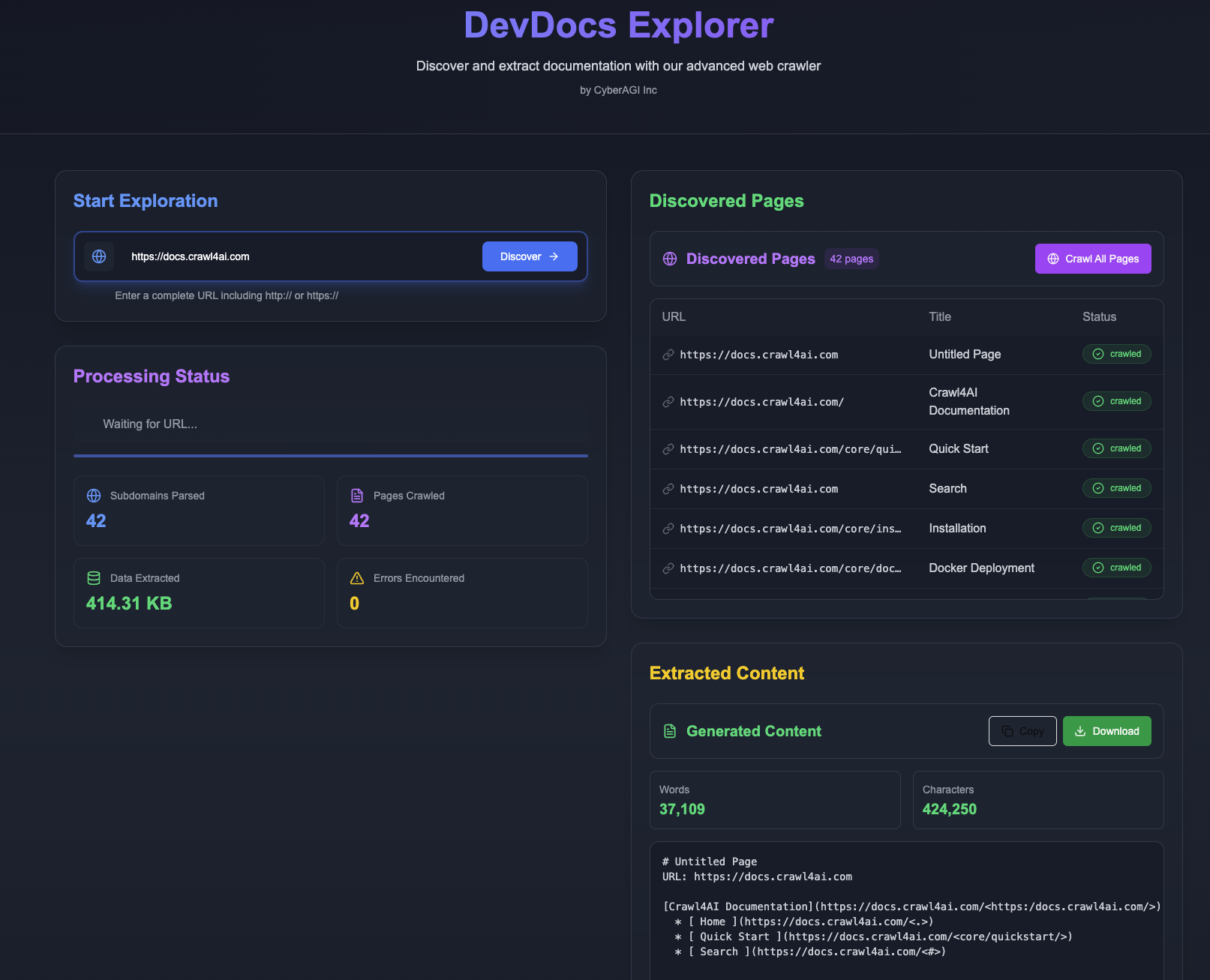
DevDocs brings documentation to you. Point it at any tech documentation URL, and watch as it:
- Discovers all related pages to that technology
- Extracts meaningful content without the fluff
- Organizes information logically inside an MCP server ready for your LLM to query
- Presents it in a clean, searchable format in MD or JSON for finetuning LLM purpose
🔥 We want anyone in the world to have the ability to build amazing products quickly using the most cutting edge LLM technology.
💰 Pricing Comparison
| Feature | DevDocs | Firecrawl |
|---|---|---|
| Free Tier | Unlimited pages | None |
| Starting Price | Free Forever | $16/month |
| Enterprise Plan | Custom | $333/month |
| Crawl Speed | 1000/min | 20/min |
| Depth Levels | Up to 5 | Limited |
| Team Seats | Unlimited | 1-5 seats |
| Export Formats | MD, JSON, LLM-ready MCP servers | Limited formats |
| API Access | Coming Soon | Limited |
| Model Context Protocol Integration | ✅ | ❌ |
| Support | Priority Available via Discord | Standard only |
| Self-hosted (free use) | ✅ | ❌ |
🚀 Getting Started
DevDocs is designed to be easy to use with Docker, requiring minimal setup for new users.
Prerequisites
- Docker installed on your system
- Git for cloning the repository
Quick Start with Docker (Recommended)
For Mac/Linux users:
# Clone the repository
git clone https://github.com/cyberagiinc/DevDocs.git

# Navigate to the project directory
cd DevDocs

# Configure environment variables
# Copy the template file to .env
cp .env.template .env

# Ensure NEXT_PUBLIC_BACKEND_URL in .env is set correctly (e.g., http://localhost:24125)
# This allows the frontend (running in your browser) to communicate with the backend service.


# Start all services using Docker
./docker-start.sh
For Windows users: Experimental Only (Not Tested Yet)
# Clone the repository
git clone https://github.com/cyberagiinc/DevDocs.git

# Navigate to the project directory

cd DevDocs

# Configure environment variables
# Copy the template file to .env

copy .env.template .env

# Ensure NEXT_PUBLIC_BACKEND_URL in .env is set correctly (e.g., http://localhost:24125)

# This allows the frontend (running in your browser) to communicate with the backend service.

# Prerequisites: Install WSL 2 and Docker Desktop
# Docker Desktop for Windows requires WSL 2. Please ensure you have WSL 2 installed and running first.
# 1. Install WSL 2: Follow the official Microsoft guide: https://learn.microsoft.com/en-us/windows/wsl/install
# 2. Install Docker Desktop for Windows: Download and install from the official Docker website. Docker Desktop includes Docker Compose.


# Start all services using Docker
docker-start.bat
Note for Windows Users
If you encounter permission issues, you may need to run the script as administrator or manually set permissions on the logs, storage, and crawl_results directories. The script uses the
icaclscommand to set permissions, which might require elevated privileges on some Windows systems.Manually Setting Permissions on Windows:
If you need to manually set permissions, you can do so using either the Windows GUI or command line:
Using Windows Explorer:
- Right-click on each directory (logs, storage, crawl_results)
- Select "Properties"
- Go to the "Security" tab
- Click "Edit" to change permissions
- Click "Add" to add users/groups
- Type "Everyone" and click "Check Names"
- Click "OK"
- Select "Everyone" in the list
- Check "Full control" under "Allow"
- Click "Apply" and "OK"
Using Command Prompt (as Administrator):
icacls logs /grant Everyone:F /T
icacls storage /grant Everyone:F /T
icacls crawl_results /grant Everyone:F /T
Note about docker-compose.yml on Windows
If you encounter issues with the docker-compose.yml file (such as "Top-level object must be a mapping" error), the
docker-start.batscript automatically fixes this by ensuring the file has the correct format and encoding. This fix is applied every time you run the script, so you don't need to manually modify the file.
This single command will:
- Create all necessary directories
- Set appropriate permissions
- Build and start all Docker containers
- Monitor the services to ensure they're running properly
Accessing DevDocs
Once the services are running:
- Frontend UI: http://localhost:3001
- Backend API: http://localhost:24125
- Crawl4AI Service: http://localhost:11235
Logs and Monitoring
When using Docker, logs can be accessed :
- Container Logs (recommended for debugging):
# View logs from a specific container
docker logs devdocs-frontend
docker logs devdocs-backend
docker logs devdocs-mcp
docker logs devdocs-crawl4ai

# Follow logs in real-time
docker logs -f devdocs-backend
To stop all services, press Ctrl+C in the terminal where docker-start is running.
📜 Scripts and Their Purpose
DevDocs includes various utility scripts to help with development, testing, and maintenance. Here's a quick reference:
Startup Scripts
start.sh/start.bat/start.ps1- Start all services (frontend, backend, MCP) for local development.docker-start.sh/docker-start.bat- Start all services using Docker containers.
MCP Server Scripts
check_mcp_health.sh- Verify the MCP server's health and configuration status.restart_and_test_mcp.sh- Restart Docker containers with updated MCP configuration and test connectivity.
Crawl4AI Scripts
check_crawl4ai.sh- Check the status and health of the Crawl4AI service.debug_crawl4ai.sh- Run Crawl4AI in debug mode with verbose logging for troubleshooting.test_crawl4ai.py- Run tests against the Crawl4AI service to verify functionality.test_from_container.sh- Test the Crawl4AI service from within a Docker container.
Utility Scripts
view_result.sh- Display crawl results in a formatted view.- `fi
README truncated. View full README on GitHub.
Alternatives



Related Skills
Browse all skillsUI design system toolkit for Senior UI Designer including design token generation, component documentation, responsive design calculations, and developer handoff tools. Use for creating design systems, maintaining visual consistency, and facilitating design-dev collaboration.
Answer questions about the AI SDK and help build AI-powered features. Use when developers: (1) Ask about AI SDK functions like generateText, streamText, ToolLoopAgent, embed, or tools, (2) Want to build AI agents, chatbots, RAG systems, or text generation features, (3) Have questions about AI providers (OpenAI, Anthropic, Google, etc.), streaming, tool calling, structured output, or embeddings, (4) Use React hooks like useChat or useCompletion. Triggers on: "AI SDK", "Vercel AI SDK", "generateText", "streamText", "add AI to my app", "build an agent", "tool calling", "structured output", "useChat".
Use when working with the OpenAI API (Responses API) or OpenAI platform features (tools, streaming, Realtime API, auth, models, rate limits, MCP) and you need authoritative, up-to-date documentation (schemas, examples, limits, edge cases). Prefer the OpenAI Developer Documentation MCP server tools when available; otherwise guide the user to enable `openaiDeveloperDocs`.
Guide for building TypeScript CLIs with Bun. Use when creating command-line tools, adding subcommands to existing CLIs, or building developer tooling. Covers argument parsing, subcommand patterns, output formatting, and distribution.
Guide developers through setting up development environments with proper tools, dependencies, and configurations
Integrate Vercel AI SDK applications with You.com tools (web search, AI agent, content extraction). Use when developer mentions AI SDK, Vercel AI SDK, generateText, streamText, or You.com integration with AI SDK.