
Flint Note
A local note-taking system designed specifically for AI agents to create, organize, and search structured markdown notes with custom note types and metadata schemas.
Agent-first note-taking application that provides complete access to a structured note management system with wikilink support, hybrid search capabilities, and vault organization for building knowledge bases and research workflows.
What it does
- Create custom note types with AI instructions and metadata schemas
- Generate structured notes using agent-defined templates
- Search notes with hybrid content and metadata queries
- Execute SQL queries against the notes database
- Update and organize notes with wikilink support
- Batch process multiple notes efficiently
Best for
About Flint Note
Flint Note is a community-built MCP server published by disnet that provides AI assistants with tools and capabilities via the Model Context Protocol. Flint Note is a knowledge base software with wikilinks, hybrid search, and structured vaults for organized note-taking and research workflows. It is categorized under productivity. This server exposes 28 tools that AI clients can invoke during conversations and coding sessions.
How to install
You can install Flint Note in your AI client of choice. Use the install panel on this page to get one-click setup for Cursor, Claude Desktop, VS Code, and other MCP-compatible clients. This server runs locally on your machine via the stdio transport.
License
Flint Note is released under the GPL-3.0 license.
Tools (28)
Create a new note type with description, agent instructions, and metadata schema
Create one or more notes of the specified type(s)
Retrieve a specific note by identifier
Retrieve multiple notes by their identifiers
Update one or more existing notes

Flint
Ignite Deep Knowledge
Flint is a note-taking app that helps you capture ideas, connect them together, and make them part of how you think.
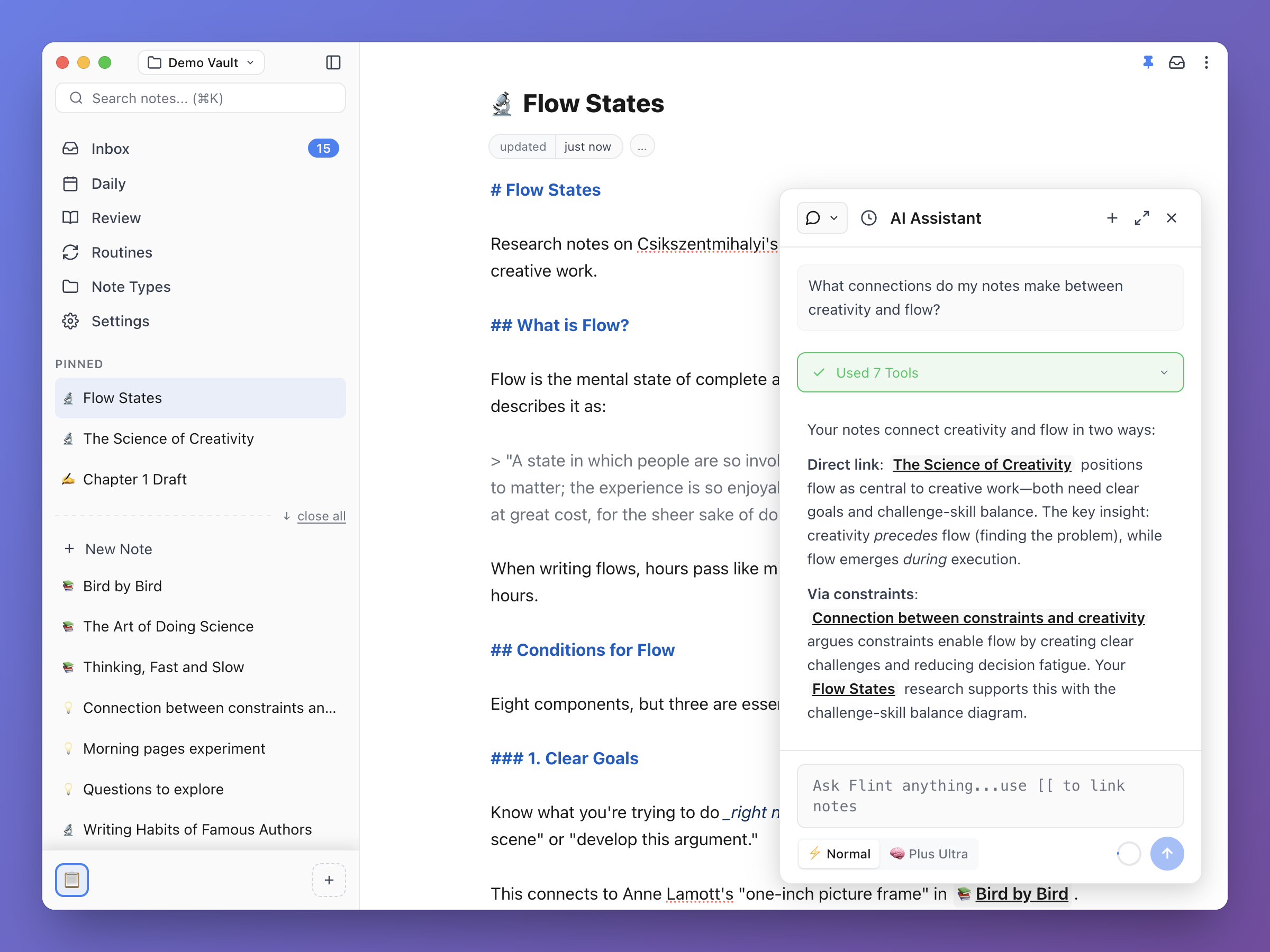
Status
Flint is currently in beta. Expect some bugs and unfinished polish as development continues. We welcome feedback and contributions!
The Deep Knowledge Cycle
Flint aim is to build deep knowledge by supporting the complete learning cycle of externalizing (getting ideas out), internalizing (making them yours), and resurfacing (bringing them back repeatedly over time to ground memory).
Most tools optimize for one part of this cycle. Flint optimizes for the entire process.
1. Externalize
Getting ideas out of your head without barriers. The system handles organization so you can focus on thinking.
2. Internalize
Making ideas yours through connection and reflection. This is where notes become knowledge.
3. Resurface
Active recall brings past ideas back at optimal intervals, grounding them in memory.
Core Principles
- Notes as thinking units - Think in ideas and connections, not files and folders
- Agent assistance, not replacement - AI helps with structural tasks while you think
- Frictionless capture - No barriers to writing things down
- Plain text first - Markdown files you own, no proprietary formats
- Local-first - Your data stays on your machine
- Open source - No vendor lock-in, community-driven development
Read docs/FLINT-OVERVIEW.md for a deeper understanding of Flint's philosophy.
Quick start
Flint is built with Electron, Svelte 5, and TypeScript.
Quick Start
# Install dependencies
npm install

# Start development server
npm run dev

# Run linter and TypeScript checks
npm run check

# Run tests
npm run test:run
Command Line Arguments
Flint supports command line arguments for automation and scripting:
# Open a specific vault by name
flint --vault "My Notes"
flint -v "My Notes"

# Open a vault by ID
flint --vault-id vault-abc12345

# Import a directory of markdown files as a new vault
flint --import /path/to/markdown/folder
flint -i /path/to/folder

# Import with a custom vault name
flint --import /path/to/folder --vault-name "Custom Name"
flint -i /path/to/folder -n "Custom Name"
Documentation
- Getting Started - Step-by-step setup guide
- Flint Overview - Philosophy and core beliefs
- Core Concepts - Fundamental concepts
- Architecture - System architecture
- Design - UI design and components
Contributing
Flint is open source and welcomes contributions! Whether you want to fix bugs, add features, or improve documentation, we'd love your help.
See CONTRIBUTING.md for detailed guidelines.
License
Flint is licensed under the GNU General Public License v3.0.
Community & Support
- GitHub - github.com/disnet/flint-note
- Website - flintnote.com
- Web App - app.flintnote.com
- Discord - Join the community
- Issues - Report bugs and request features on GitHub Issues
- Discussions - Ask questions and share ideas on GitHub Discussions
Alternatives




Related Skills
Browse all skillsCreate daily notes and manage morning, midday, and evening routines. Structure daily planning, task review, and end-of-day reflection. Use for daily productivity routines or when asked to create today's note.
Manage productivity with FlowMind — goals, tasks (with subtasks), notes, people, and tags via REST API. Use when the user wants to create, list, update, or delete goals, tasks, notes, contacts, or tags; manage focus/priorities; track progress; or organize their productivity workspace through FlowMind.
Presentation creation, editing, and analysis. When Claude needs to work with presentations (.pptx files) for: (1) Creating new presentations, (2) Modifying or editing content, (3) Working with layouts, (4) Adding comments or speaker notes, or any other presentation tasks
Query Google NotebookLM for source-grounded, citation-backed answers from uploaded documents. Reduces hallucinations through Gemini's document-only responses. Browser automation with library management and persistent authentication.
Create professional slide decks from topics or documents. Generates structured content with data-driven charts, speaker notes, and complete PPTX files. Applies persuasive storytelling principles (Pyramid Principle, assertion-evidence). Supports multiple formats (Marp, PowerPoint). Use for presentations, pitches, slide decks, or keynotes.
WeChat Reading (微信读书) CLI tool for fetching notes and highlights. Use when: (1) user asks about weread/微信读书 notes or highlights, (2) fetching today's or recent reading notes, (3) exporting book highlights, (4) managing reading bookshelf, (5) any task involving reading notes from WeChat Reading.