
Flux (AO & Arweave)
Enables developers to run, create, and test AO (Arweave's compute layer) code using natural language commands without needing deep technical knowledge of the underlying systems.
Integrates with Arweave and AO ecosystems to enable developers to run, create, and test AO code and blueprints using natural language commands without requiring deep technical knowledge of the underlying systems.
What it does
- Run AO code with natural language commands
- Create custom AO blueprints using plain English
- Test AO processes and handlers automatically
- Generate complex AO handlers from descriptions
- Integrate with existing AI development tools
Best for
About Flux (AO & Arweave)
Flux (AO & Arweave) is a community-built MCP server published by asrvd that provides AI assistants with tools and capabilities via the Model Context Protocol. Flux (AO & Arweave) lets developers easily run, create, and test AO code using natural language—no deep technical skills needed. It is categorized under developer tools.
How to install
You can install Flux (AO & Arweave) in your AI client of choice. Use the install panel on this page to get one-click setup for Cursor, Claude Desktop, VS Code, and other MCP-compatible clients. This server supports remote connections over HTTP, so no local installation is required.
License
Flux (AO & Arweave) is released under the MIT license. This is a permissive open-source license, meaning you can freely use, modify, and distribute the software.
Flux
AI based AO tool calling on steroids that integrates with your existing tools and editor using a MCP server.
https://github.com/user-attachments/assets/3484e2db-e7cb-479a-84a2-0b399e1149ac
Features Implemented
- Run AO code using just natural language
- Create and run custom AO code/blueprints completely using natural language
- Integrates with your existing AI dev tools like Cursor, Windsurf, Claude, and anything that supports MCP tool calling
- Can test out all the code it pushes to an process
- Can create and test complex handlers
Features to be implemented
- Inetgration with AO ecosystem tools
- Better code generation capabilities by adding more context about AO
Tech stack
- AO
- Arweave
- MCP typescript sdk
- Typescript
- Node.js
Installation
There are currently two ways to install and use Flux, right now it has been tested significantly only on Cursor so we will be showing how to install FLux in Cursor -
-
Local Setup - For users who want everything to be present locally, no remote servers involved
- Make sure you have latest stable version of NODE.js installed - Node.js download
- Open Cursor and go to Settings > Cursor Settings > MCP > Add new MCP tool
- Paste this code in the file
"mcpServers": { "flux": { "command": "npx", "args": ["-y", "flux-ao@latest"], } } - if you did everything correctly you will be able to see the flux MCP loaded with all the tools, and its ready to be used in Cursor (PS: You might have to reload the MCP multiple times or restart Cursor)!
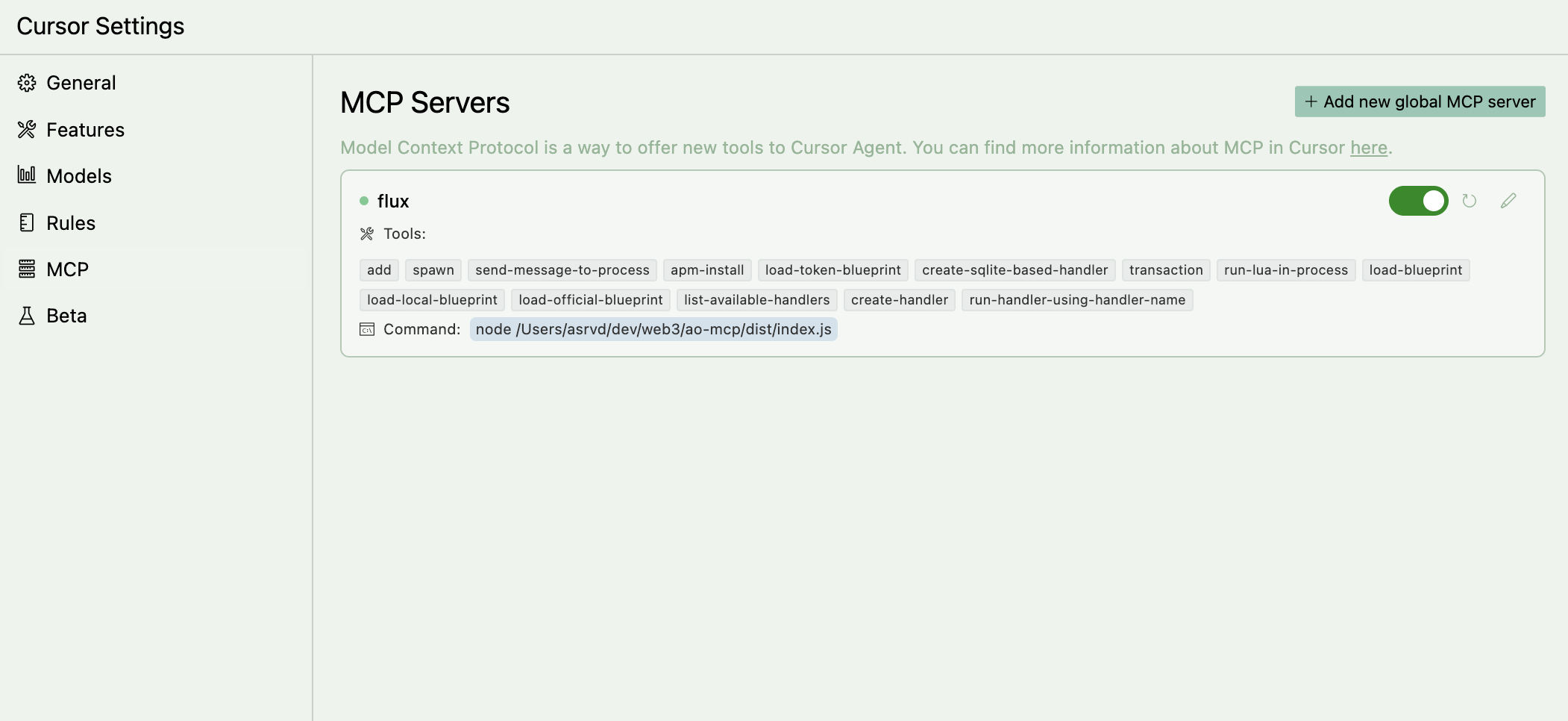
-
Remote Setup - For users who want to use Flux without installing anything locally
- Open Cursor and go to Settings > Cursor Settings > MCP > Add new MCP tool
- Paste this code in the file
"mcpServers": { "flux": { "url": "https://flux-2esw.onrender.com/sse", } } - if you did everything correctly you will be able to see the flux MCP loaded with all the tools, and its ready to be used in Cursor (PS: You might have to reload the MCP multiple times or restart Cursor)!
Usage
We would suggest you add the llms.txt for AO docs in cursor first and use it as a context before you start using the MCP server. If you don't know how to do it, checkoout this documentation on how to add docs to cursor.
The more context you give to cursor, the more acurate the responses will be.
Now add these custom rules in your Cursor project to make sure Cursor doesn't hallucinate or give wrong responses. You can add these rules in the Settings > Cursor Settings > Rules > Add new rule.
For adding json capabilities ONLY IF NEEDED, you need to add a line "local json = require("json")" on top of file. BUT DONT USE IT UNLESS NEEDED. SIMPLE THINGS CAN BE DONE USING AO PROCESS STATE

Always use Send instead of msg.reply

Always make sure a handler is sending out a response/reply (using Send) and send it as data as well instaed of just returning using tags

Never add any tags by yourself, always add tags when needed or instructed by user, also {"Action":"Eval"} tag is for running lua in an ao process and {"Action" : "action_name"} is for running a handler

Never add the "Type" tag to anything, thats reserved for internal ao specifications

Always use Handler.utils whever possible when creating a handler, for example --
    Handlers.add(
        "pingpong",
        Handlers.utils.hasMatchingTag("Action", "Ping"),
        function (msg)
            Handlers.utils.reply("Pong")(msg) -- or use Send() here
        end
    )
Now you can start using the Flux MCP server in Cursor Agents.
Support
If you find any issues with the Server or encounter any bugs, please let us know by opening an issue or mailing us @ [email protected]
Alternatives



Related Skills
Browse all skillsUI design system toolkit for Senior UI Designer including design token generation, component documentation, responsive design calculations, and developer handoff tools. Use for creating design systems, maintaining visual consistency, and facilitating design-dev collaboration.
Answer questions about the AI SDK and help build AI-powered features. Use when developers: (1) Ask about AI SDK functions like generateText, streamText, ToolLoopAgent, embed, or tools, (2) Want to build AI agents, chatbots, RAG systems, or text generation features, (3) Have questions about AI providers (OpenAI, Anthropic, Google, etc.), streaming, tool calling, structured output, or embeddings, (4) Use React hooks like useChat or useCompletion. Triggers on: "AI SDK", "Vercel AI SDK", "generateText", "streamText", "add AI to my app", "build an agent", "tool calling", "structured output", "useChat".
Expert Kubernetes architect specializing in cloud-native infrastructure, advanced GitOps workflows (ArgoCD/Flux), and enterprise container orchestration. Masters EKS/AKS/GKE, service mesh (Istio/Linkerd), progressive delivery, multi-tenancy, and platform engineering. Handles security, observability, cost optimization, and developer experience. Use PROACTIVELY for K8s architecture, GitOps implementation, or cloud-native platform design.
Use when working with the OpenAI API (Responses API) or OpenAI platform features (tools, streaming, Realtime API, auth, models, rate limits, MCP) and you need authoritative, up-to-date documentation (schemas, examples, limits, edge cases). Prefer the OpenAI Developer Documentation MCP server tools when available; otherwise guide the user to enable `openaiDeveloperDocs`.
Guide for building TypeScript CLIs with Bun. Use when creating command-line tools, adding subcommands to existing CLIs, or building developer tooling. Covers argument parsing, subcommand patterns, output formatting, and distribution.
Guide developers through setting up development environments with proper tools, dependencies, and configurations