Fused MCP Agents
OfficialConnects Claude to arbitrary Python code execution, allowing data scientists to run custom Python scripts and access APIs directly through the Claude desktop app.
A Python-based MCP server that allows Claude and other LLMs to execute arbitrary Python code directly through your desktop Claude app, enabling data scientists to connect LLMs to APIs and executable code.
What it does
- Execute arbitrary Python code through Claude
- Connect Claude to external APIs via Python
- Run data science workflows from chat interface
- Process data with custom Python scripts
- Integrate Python libraries and packages
Best for
About Fused MCP Agents
Fused MCP Agents is an official MCP server published by fusedio that provides AI assistants with tools and capabilities via the Model Context Protocol. Fused MCP Agents — Python-based MCP server to run Python from Claude, enabling Claude Python integration and LLM Python agents to connect LLMs to APIs and… It is categorized under developer tools.
How to install
You can install Fused MCP Agents in your AI client of choice. Use the install panel on this page to get one-click setup for Cursor, Claude Desktop, VS Code, and other MCP-compatible clients. This server runs locally on your machine via the stdio transport.
License
Fused MCP Agents is released under the MIT license. This is a permissive open-source license, meaning you can freely use, modify, and distribute the software.
Fused MCP Agents: Setting up MCP Servers for Data



Documentation 🌪️ Read the announcement 🔥 Join Discord
MCP servers allow LLMs like Claude to make HTTP requests, connecting them to APIs & executable code. We built this repo for ourselves & anyone working with data to easily pass any Python code directly to your own desktop Claude app.
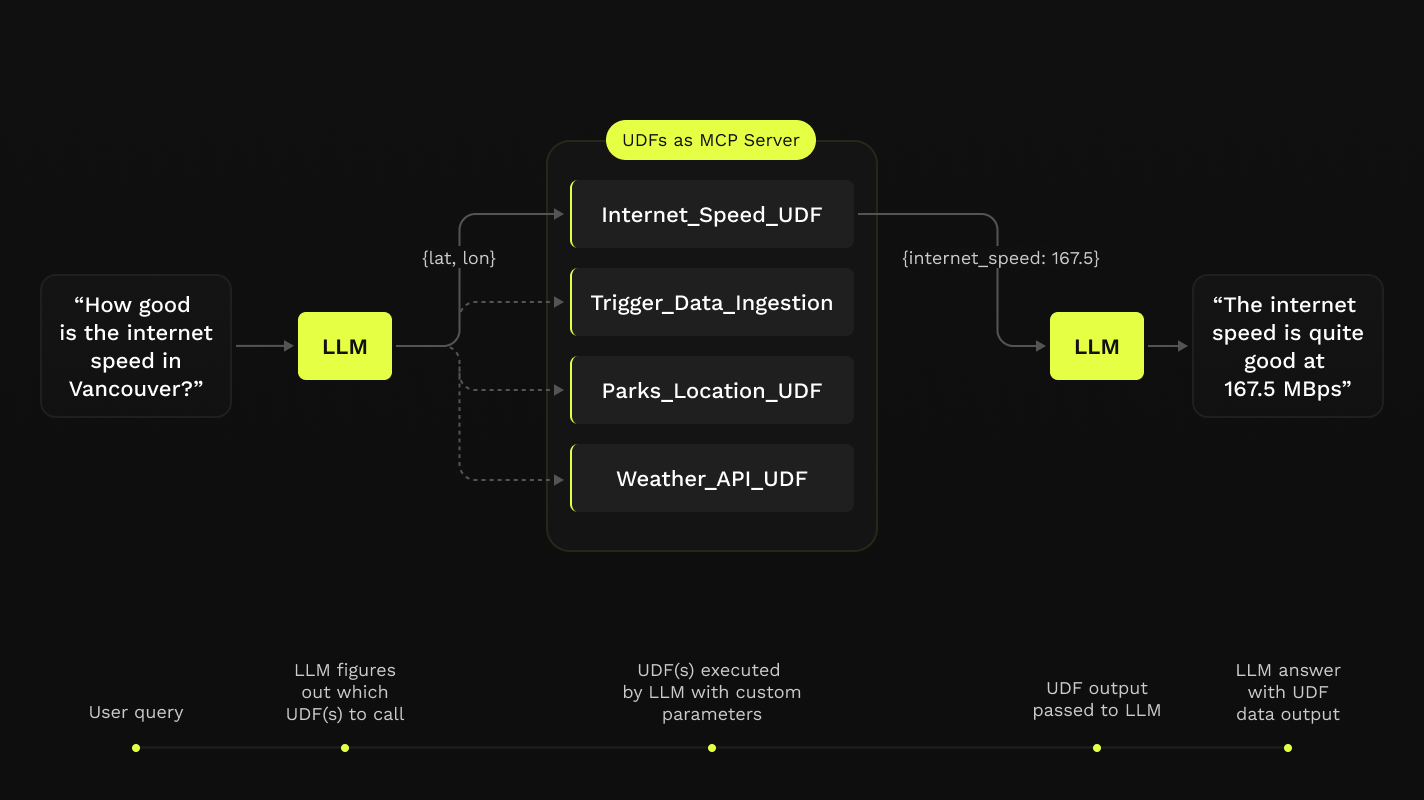
This repo offers a simple step-by-step notebook workflow to setup MCP Servers with Claude's Desktop App, all in Python built on top of Fused User Defined Functions (UDFs).

Requirements
- Python 3.11
- Latest Claude Desktop app installed (macOS & Windows)
If you're on Linux, the desktop app isn't available so we've made a simple client you can use to have it running locally too!
You do not need a Fused account to do any of this! All of this will be running on your local machine.
Installation
-
Clone this repo in any local directory, and navigate to the repo:
git clone https://github.com/fusedio/fused-mcp.git cd fused-mcp/ -
Install
uvif you don't have it:macOS / Linux:
curl -LsSf https://astral.sh/uv/install.sh | shWindows:
powershell -ExecutionPolicy ByPass -c "irm https://astral.sh/uv/install.ps1 | iex" -
Test out the client by asking for its info:
uv run main.py -h -
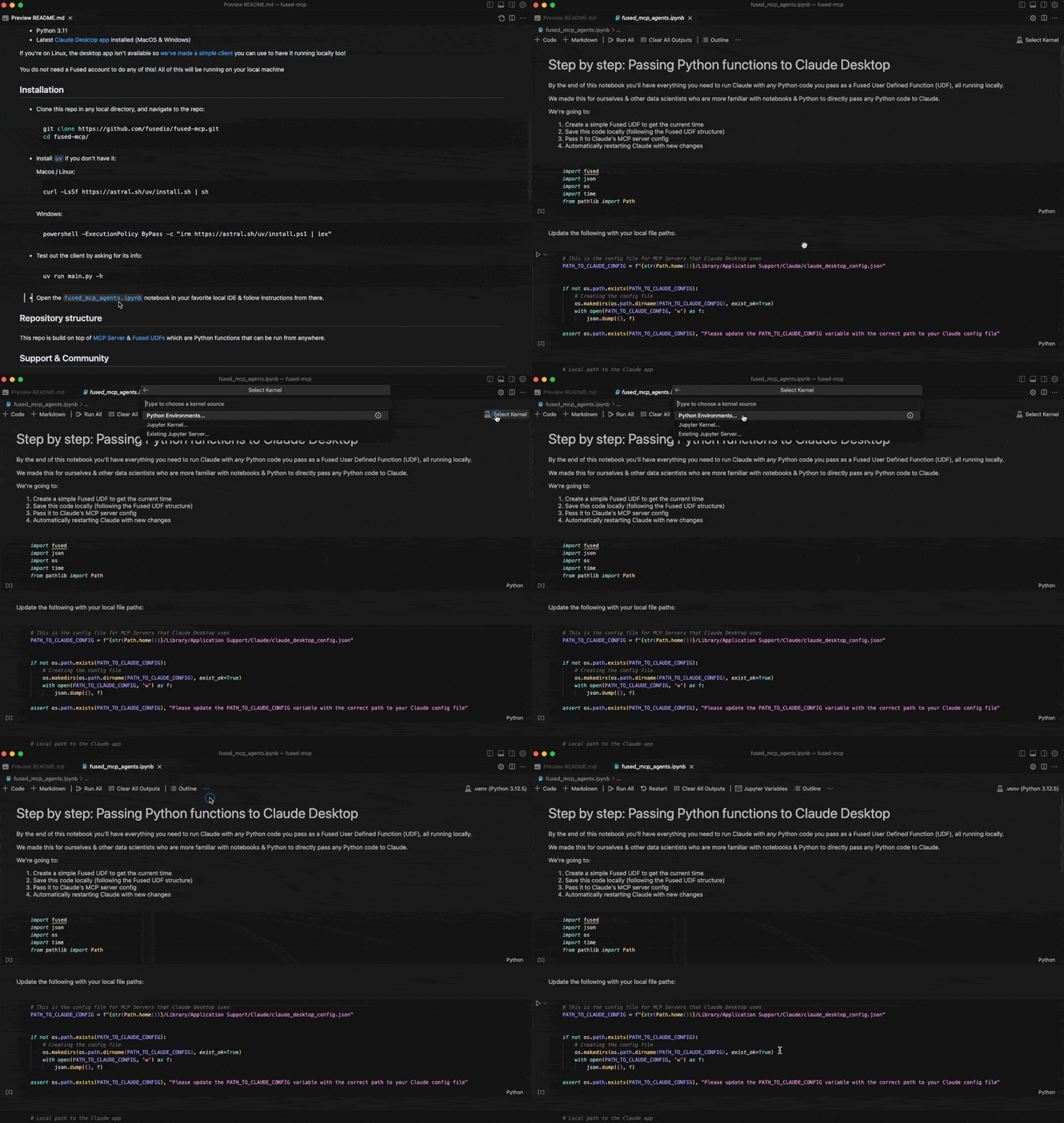
Start by following our getting-started notebook
fused_mcp_agents.ipynbin your favorite local IDE to get set up and then make your way to the more advanced notebook to make your own Agents & functions
Repository structure
This repo is build on top of MCP Server & Fused UDFs which are Python functions that can be run from anywhere.
Support & Community
Feel free to join our Discord server if you want some help getting unblocked!
Here are a few common steps to debug the setup:
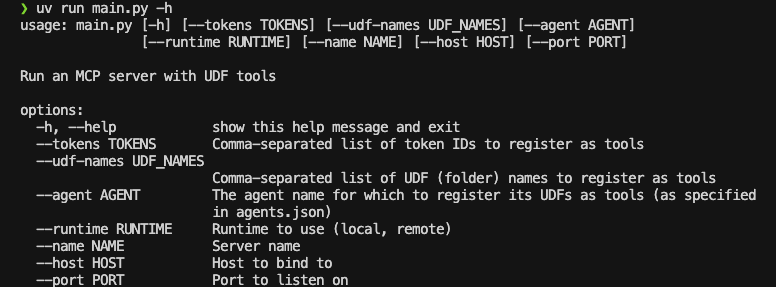
- Running
uv run main.py -hshould return something like this:
- You might need to pass global paths to some functions to the
Claude_Desktop_Config.json. For example, by default we only passuv:
{
    "mcpServers": {
        "qgis": {
            "command": "uv",
            "args": ["..."]
        }

    }
}
But you might need to pass the full path to uv, which you can simply pass to common.generate_local_mcp_config in the notebook:
# in fused_mcp_agents.ipynb
import shutil

common.generate_local_mcp_config(
    config_path=PATH_TO_CLAUDE_CONFIG,
    agents_list = ["get_current_time"],
    repo_path= WORKING_DIR,
    uv_path=shutil.which('uv'),
)
Which would create a config like this:
{
    "mcpServers": {
        "qgis": {
            "command": "/Users/<YOUR_USERNAME>/.local/bin/uv",
            "args": ["..."]
        }

    }
}
- If Claude runs without showing any connected tools, take a look at the MCP Docs for troubleshooting the Claude Desktop setup
Contribute
Feel free to open PRs to add your own UDFs to udfs/ so others can play around with them locally too!
Using a local Claude client (without Claude Desktop app)
If you are unable to install the Claude Desktop app (e.g., on Linux), we provide a small example local client interface to use Claude with the MCP server configured in this repo:
NOTE: You'll need an API key for Claude here as you won't use the Desktop App
-
Create an Anthropic Console Account
-
Create an Anthropic API Key
-
Create a
.env:touch .env -
Add your key as
ANTHROPIC_API_KEYinside the.env:# .env ANTHROPIC_API_KEY = "your-key-here" -
Start the MCP server:
uv run main.py --agent get_current_time -
In another terminal session, start the local client, pointing to the address of the server:
uv run client.py http://localhost:8080/sse
Alternatives



Related Skills
Browse all skillsAnswer questions about the AI SDK and help build AI-powered features. Use when developers: (1) Ask about AI SDK functions like generateText, streamText, ToolLoopAgent, embed, or tools, (2) Want to build AI agents, chatbots, RAG systems, or text generation features, (3) Have questions about AI providers (OpenAI, Anthropic, Google, etc.), streaming, tool calling, structured output, or embeddings, (4) Use React hooks like useChat or useCompletion. Triggers on: "AI SDK", "Vercel AI SDK", "generateText", "streamText", "add AI to my app", "build an agent", "tool calling", "structured output", "useChat".
Comprehensive CrewAI framework guide for building collaborative AI agent teams and structured workflows. Use when developing multi-agent systems with CrewAI, creating autonomous AI crews, orchestrating flows, implementing agents with roles and tools, or building production-ready AI automation. Essential for developers building intelligent agent systems, task automation, and complex AI workflows.
Technical workflow for implementing accessible React user interfaces with shadcn/ui, Tailwind CSS, and TanStack Query. Includes 6-phase process with mandatory Style Guide compliance, Context7 best practices consultation, Chrome DevTools validation, and WCAG 2.1 AA accessibility standards. Use after Test Agent, Implementer, and Supabase agents complete their work.
UI design system toolkit for Senior UI Designer including design token generation, component documentation, responsive design calculations, and developer handoff tools. Use for creating design systems, maintaining visual consistency, and facilitating design-dev collaboration.
Build AI agents and apps with Composio - access 200+ external tools with Tool Router or direct execution
Build agentic applications with GitHub Copilot SDK. Use when embedding AI agents in apps, creating custom tools, implementing streaming responses, managing sessions, connecting to MCP servers, or creating custom agents. Triggers on Copilot SDK, GitHub SDK, agentic app, embed Copilot, programmable agent, MCP server, custom agent.