
Genkit
OfficialProvides a knowledge graph interface that can both consume MCP resources and expose Genkit AI framework tools. Manages entities, relations, and observations in a searchable graph structure.
Consume MCP resources or expose Genkit tools as server.
What it does
- Create entities and relations in knowledge graphs
- Search and query knowledge graph nodes
- Add observations to existing entities
- Delete entities, relations, and observations
- Read entire knowledge graph structure
- Open specific graph nodes by name
Best for
About Genkit
Genkit is an official MCP server published by firebase that provides AI assistants with tools and capabilities via the Model Context Protocol. Genkit — consume MCP resources or expose powerful Genkit tools as a server for streamlined development and integration. It is categorized under ai ml, developer tools. This server exposes 9 tools that AI clients can invoke during conversations and coding sessions.
How to install
You can install Genkit in your AI client of choice. Use the install panel on this page to get one-click setup for Cursor, Claude Desktop, VS Code, and other MCP-compatible clients. This server runs locally on your machine via the stdio transport.
License
Genkit is released under the Apache-2.0 license. This is a permissive open-source license, meaning you can freely use, modify, and distribute the software.
Tools (9)
Create multiple new entities in the knowledge graph
Create multiple new relations between entities in the knowledge graph. Relations should be in active voice
Add new observations to existing entities in the knowledge graph
Delete multiple entities and their associated relations from the knowledge graph
Delete specific observations from entities in the knowledge graph


Genkit is an open-source framework for building full-stack AI-powered applications, built and used in production by Google's Firebase. It provides SDKs for multiple programming languages with varying levels of stability:
- JavaScript/TypeScript: Production-ready with full feature support
- Go: Production-ready with full feature support
- Python (Alpha): Early development with core functionality
It offers a unified interface for integrating AI models from providers like Google, OpenAI, Anthropic, Ollama, and more. Rapidly build and deploy production-ready chatbots, automations, and recommendation systems using streamlined APIs for multimodal content, structured outputs, tool calling, and agentic workflows.
Get started with just a few lines of code:
import { genkit } from 'genkit';
import { googleAI } from '@genkit-ai/google-genai';

const ai = genkit({ plugins: [googleAI()] });

const { text } = await ai.generate({
    model: googleAI.model('gemini-2.5-flash'),
    prompt: 'Why is Firebase awesome?'
});
Explore & build with Genkit
Play with AI sample apps, with visualizations of the Genkit code that powers them, at no cost to you.
Key capabilities
| Broad AI model support | Use a unified interface to integrate with hundreds of models from providers like Google, OpenAI, Anthropic, Ollama, and more. Explore, compare, and use the best models for your needs. |
| Simplified AI development | Use streamlined APIs to build AI features with structured output, agentic tool calling, context-aware generation, multi-modal input/output, and more. Genkit handles the complexity of AI development, so you can build and iterate faster. |
| Web and mobile ready | Integrate seamlessly with frameworks and platforms including Next.js, React, Angular, iOS, Android, using purpose-built client SDKs and helpers. |
| Cross-language support | Build with the language that best fits your project. Genkit provides SDKs for JavaScript/TypeScript, Go, and Python (Alpha) with consistent APIs and capabilities across all supported languages. |
| Deploy anywhere | Deploy AI logic to any environment that supports your chosen programming language, such as Cloud Functions for Firebase, Google Cloud Run, or third-party platforms, with or without Google services. |
| Developer tools | Accelerate AI development with a purpose-built, local CLI and Developer UI. Test prompts and flows against individual inputs or datasets, compare outputs from different models, debug with detailed execution traces, and use immediate visual feedback to iterate rapidly on prompts. |
| Production monitoring | Ship AI features with confidence using comprehensive production monitoring. Track model performance, and request volumes, latency, and error rates in a purpose-built dashboard. Identify issues quickly with detailed observability metrics, and ensure your AI features meet quality and performance targets in real-world usage. |
How does it work?
Genkit simplifies AI integration with an open-source SDK and unified APIs that work across various model providers and programming languages. It abstracts away complexity so you can focus on delivering great user experiences.
Some key features offered by Genkit include:
- Text and image generation
- Type-safe, structured data generation
- Tool calling
- Prompt templating
- Persisted chat interfaces
- AI workflows
- AI-powered data retrieval (RAG)
Genkit is designed for server-side deployment in multiple language environments, and also provides seamless client-side integration through dedicated helpers and client SDKs.
Implementation path
| 1 | Choose your language and model provider | Select the Genkit SDK for your preferred language (JavaScript/TypeScript, Go, or Python (Alpha)). Choose a model provider like Google Gemini or Anthropic, and get an API key. Some providers, like Vertex AI, may rely on a different means of authentication. |
| 2 | Install the SDK and initialize | Install the Genkit SDK, model-provider package of your choice, and the Genkit CLI. Import the Genkit and provider packages and initialize Genkit with the provider API key. |
| 3 | Write and test AI features | Use the Genkit SDK to build AI features for your use case, from basic text generation to complex multi-step workflows and agents. Use the CLI and Developer UI to help you rapidly test and iterate. |
| 4 | Deploy and monitor | Deploy your AI features to Firebase, Google Cloud Run, or any environment that supports your chosen programming language. Integrate them into your app, and monitor them in production in the Firebase console. |
Get started
Development tools
Genkit provides a CLI and a local UI to streamline your AI development workflow.
CLI
The Genkit CLI includes commands for running and evaluating your Genkit functions (flows) and collecting telemetry and logs.
- Install:
npm install -g genkit-cli - Run a command, wrapped with telemetry, a interactive developer UI, etc:
genkit start -- <command to run your code>
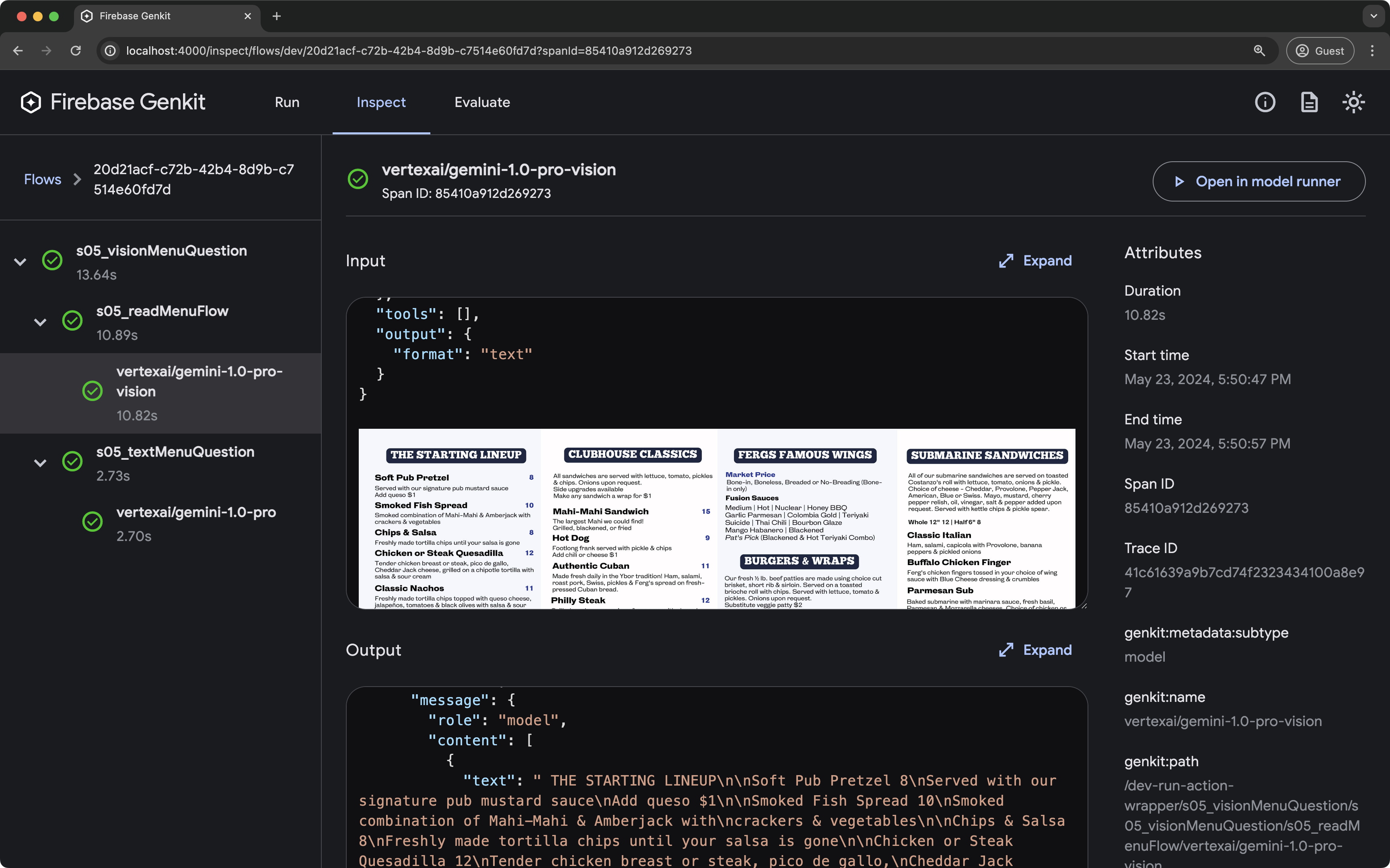
Developer UI
The Genkit developer UI is a local interface for testing, debugging, and iterating on your AI application.
Key features:
- Run: Execute and experiment with Genkit flows, prompts, queries, and more in dedicated playgrounds.
- Inspect: Analyze detailed traces of past executions, including step-by-step breakdowns of complex flows.
- Evaluate: Review the results of evaluations run against your flows, including performance metrics and links to relevant traces.
Try Genkit in Firebase Studio
Want to skip the local setup? Click below to try out Genkit using Firebase Studio, Google's AI-assisted workspace for full-stack app development in the cloud.

Connect with us
- Join us on Discord – Get help, share ideas, and chat with other developers.
- Contribute on GitHub – Report bugs, suggest features, or explore the source code.
- Contribute to Documentation and Samples – Report issues in Genkit's documentation, or contribute to the samples.

Contributing
Contributions to Genkit are welcome and highly appreciated! See our Contribution Guide to get started.
Authors
Genkit is built by Firebase with contributions from the Open Source Community.
Alternatives



Related Skills
Browse all skillsUI design system toolkit for Senior UI Designer including design token generation, component documentation, responsive design calculations, and developer handoff tools. Use for creating design systems, maintaining visual consistency, and facilitating design-dev collaboration.
Answer questions about the AI SDK and help build AI-powered features. Use when developers: (1) Ask about AI SDK functions like generateText, streamText, ToolLoopAgent, embed, or tools, (2) Want to build AI agents, chatbots, RAG systems, or text generation features, (3) Have questions about AI providers (OpenAI, Anthropic, Google, etc.), streaming, tool calling, structured output, or embeddings, (4) Use React hooks like useChat or useCompletion. Triggers on: "AI SDK", "Vercel AI SDK", "generateText", "streamText", "add AI to my app", "build an agent", "tool calling", "structured output", "useChat".
Use when working with the OpenAI API (Responses API) or OpenAI platform features (tools, streaming, Realtime API, auth, models, rate limits, MCP) and you need authoritative, up-to-date documentation (schemas, examples, limits, edge cases). Prefer the OpenAI Developer Documentation MCP server tools when available; otherwise guide the user to enable `openaiDeveloperDocs`.
Guide for building TypeScript CLIs with Bun. Use when creating command-line tools, adding subcommands to existing CLIs, or building developer tooling. Covers argument parsing, subcommand patterns, output formatting, and distribution.
Guide developers through setting up development environments with proper tools, dependencies, and configurations
Integrate Vercel AI SDK applications with You.com tools (web search, AI agent, content extraction). Use when developer mentions AI SDK, Vercel AI SDK, generateText, streamText, or You.com integration with AI SDK.