
GIS Operations
Performs geospatial calculations and transformations using WKT geometry strings. Handles coordinate system conversions, spatial analyses, and geometric operations for mapping applications.
Integrates with geospatial libraries to perform geometric transformations, coordinate system conversions, and spatial analyses using WKT geometry strings for map creation and location-based services.
What it does
- Transform coordinates between different projection systems
- Calculate spatial relationships between geometries
- Perform geometric operations on WKT strings
- Analyze distances and areas from geospatial data
- Convert between coordinate reference systems
- Process geometric transformations for mapping
Best for
About GIS Operations
GIS Operations is a community-built MCP server published by mahdin75 that provides AI assistants with tools and capabilities via the Model Context Protocol. Convert lat long or GPS data easily with GIS Operations. Perform coordinate transformations, MGRS, and military grid conversions with accuracy. It is categorized under analytics data.
How to install
You can install GIS Operations in your AI client of choice. Use the install panel on this page to get one-click setup for Cursor, Claude Desktop, VS Code, and other MCP-compatible clients. This server runs locally on your machine via the stdio transport.
License
GIS Operations is released under the MIT license. This is a permissive open-source license, meaning you can freely use, modify, and distribute the software.
GIS MCP Server
| Category | Badges |
|---|---|
| Package |    |
| Installation & Transport |    |
| Data Sources |       |
| Agentic AI | -3776AB?logo=langchain&logoColor=white) -111827?logo=openai&logoColor=white) |
| Community |    |
✨ Want to perform accurate geospatial analysis in your chatbot? ✨
Install GIS-MCP and transform your AI's spatial capabilities!
A Model Context Protocol (MCP) server implementation that connects Large Language Models (LLMs) to GIS operations using GIS libraries, enabling AI assistants to perform geospatial operations and transformations.
🌐 Website: gis-mcp.com
Current version is 0.14.0 (Beta):
We welcome contributions and developers to join us in building this project.
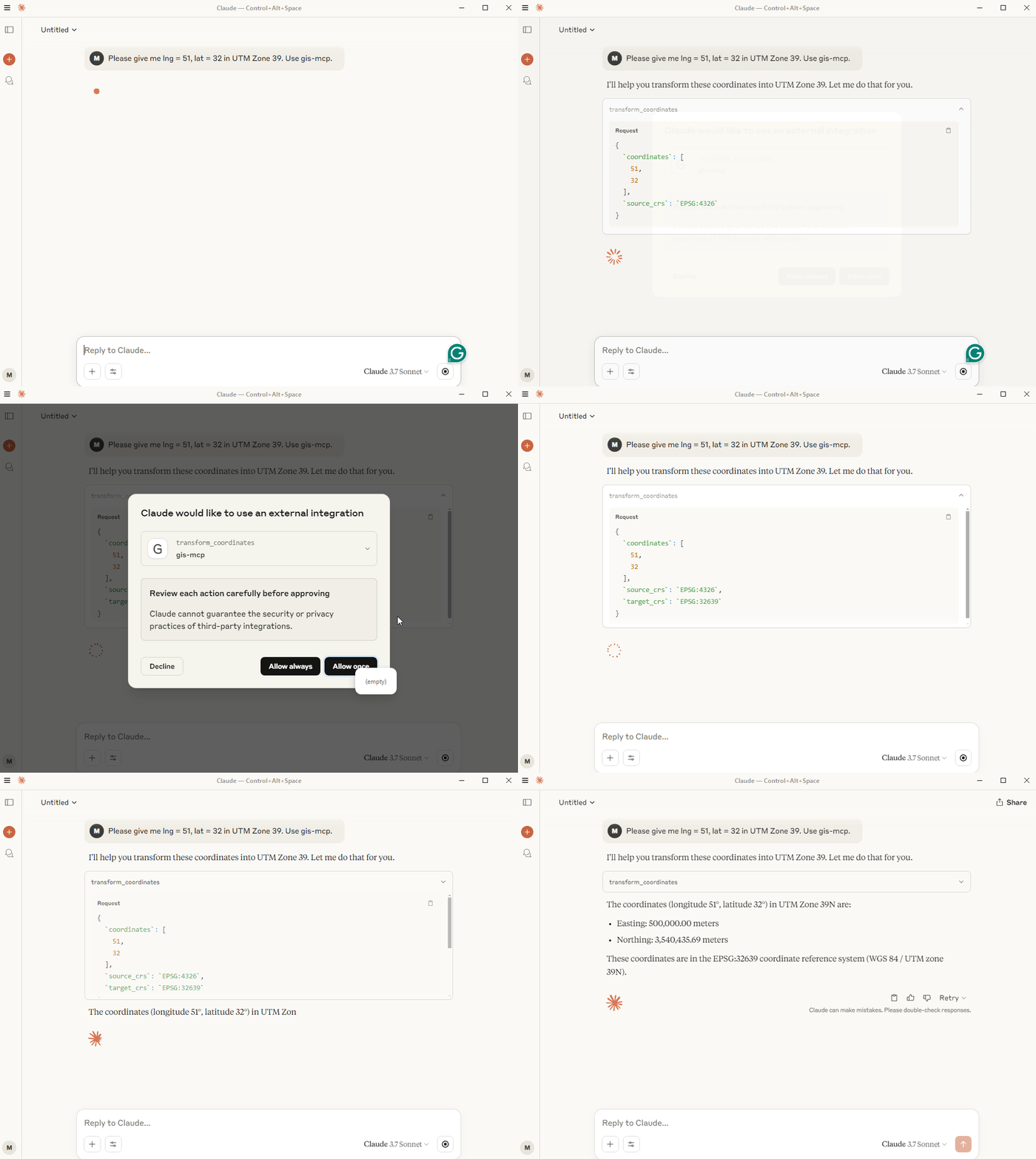
🎥 Demo
📋 Table of Contents
- Features
- Prerequisites
- Vibe Coding
- Installation
- Build Your First GIS AI Agent
- Available Functions
- Client Development
- Planned Features
- Contributing
- License
- Related Projects
- Support
- Badges
🚀 Features
GIS MCP Server empowers AI assistants with advanced geospatial intelligence. Key features include:
- 🔹 Comprehensive Geometry Operations – Perform intersection, union, buffer, difference, and other geometric transformations with ease.
- 🔹 Advanced Coordinate Transformations – Effortlessly reproject and transform geometries between coordinate reference systems.
- 🔹 Accurate Measurements – Compute distances, areas, lengths, and centroids precisely.
- 🔹 Spatial Analysis & Validation – Validate geometries, run proximity checks, and perform spatial overlays or joins.
- 🔹 Raster & Vector Support – Process raster layers, compute indices like NDVI, clip, resample, and merge with vector data.
- 🔹 Spatial Statistics & Modeling – Leverage PySAL for spatial autocorrelation, clustering, and neighborhood analysis.
- 🔹 Easy Integration – Connect seamlessly with MCP-compatible clients like Claude Desktop or Cursor IDE.
- 🔹 HTTP/SSE Transport – Run as HTTP service with RESTful storage endpoints for file upload/download operations.
- 🔹 Flexible & Extensible – Supports Pytho
README truncated. View full README on GitHub.
Alternatives



Related Skills
Browse all skillsPython library for working with geospatial vector data including shapefiles, GeoJSON, and GeoPackage files. Use when working with geographic data for spatial analysis, geometric operations, coordinate transformations, spatial joins, overlay operations, choropleth mapping, or any task involving reading/writing/analyzing vector geographic data. Supports PostGIS databases, interactive maps, and integration with matplotlib/folium/cartopy. Use for tasks like buffer analysis, spatial joins between datasets, dissolving boundaries, clipping data, calculating areas/distances, reprojecting coordinate systems, creating maps, or converting between spatial file formats.
Use when building Apache Spark applications, distributed data processing pipelines, or optimizing big data workloads. Invoke for DataFrame API, Spark SQL, RDD operations, performance tuning, streaming analytics.
Analyze correlation analyzer operations. Auto-activating skill for Data Analytics. Triggers on: correlation analyzer, correlation analyzer Part of the Data Analytics skill category. Use when analyzing or auditing correlation analyzer. Trigger with phrases like "correlation analyzer", "correlation analyzer", "analyze correlation r".
Configure with aggregation helper operations. Auto-activating skill for Data Analytics. Triggers on: aggregation helper, aggregation helper Part of the Data Analytics skill category. Use when working with aggregation helper functionality. Trigger with phrases like "aggregation helper", "aggregation helper", "aggregation".
Optimize sql query optimizer operations. Auto-activating skill for Data Analytics. Triggers on: sql query optimizer, sql query optimizer Part of the Data Analytics skill category. Use when working with sql query optimizer functionality. Trigger with phrases like "sql query optimizer", "sql optimizer", "sql".
Analyze ab test analyzer operations. Auto-activating skill for Data Analytics. Triggers on: ab test analyzer, ab test analyzer Part of the Data Analytics skill category. Use when writing or running tests. Trigger with phrases like "ab test analyzer", "ab analyzer", "analyze ab test r".