
iTerm
Lets AI assistants directly execute shell commands and read output from your active iTerm terminal tab. Provides full terminal control including REPL interaction and control characters.
Enables direct execution of shell commands in the active iTerm tab, streamlining terminal-based workflows and automation tasks.
What it does
- Execute shell commands in active iTerm tab
- Read terminal output selectively
- Send control characters (Ctrl-C, Ctrl-Z, etc.)
- Interact with REPLs and long-running processes
- Monitor command execution in real-time
Best for
About iTerm
iTerm is a community-built MCP server published by ferrislucas that provides AI assistants with tools and capabilities via the Model Context Protocol. Streamline terminal workflows by executing shell commands directly in the active iTerm tab for fast automation and productivity. It is categorized under developer tools. This server exposes 3 tools that AI clients can invoke during conversations and coding sessions.
How to install
You can install iTerm in your AI client of choice. Use the install panel on this page to get one-click setup for Cursor, Claude Desktop, VS Code, and other MCP-compatible clients. This server runs locally on your machine via the stdio transport.
License
iTerm is released under the MIT license. This is a permissive open-source license, meaning you can freely use, modify, and distribute the software.
Tools (3)
Writes text to the active iTerm terminal - often used to run a command in the terminal
Reads the output from the active iTerm terminal
Sends a control character to the active iTerm terminal (e.g., Control-C, or special sequences like ']' for telnet escape)
iterm-mcp
A Model Context Protocol server that provides access to your iTerm session.
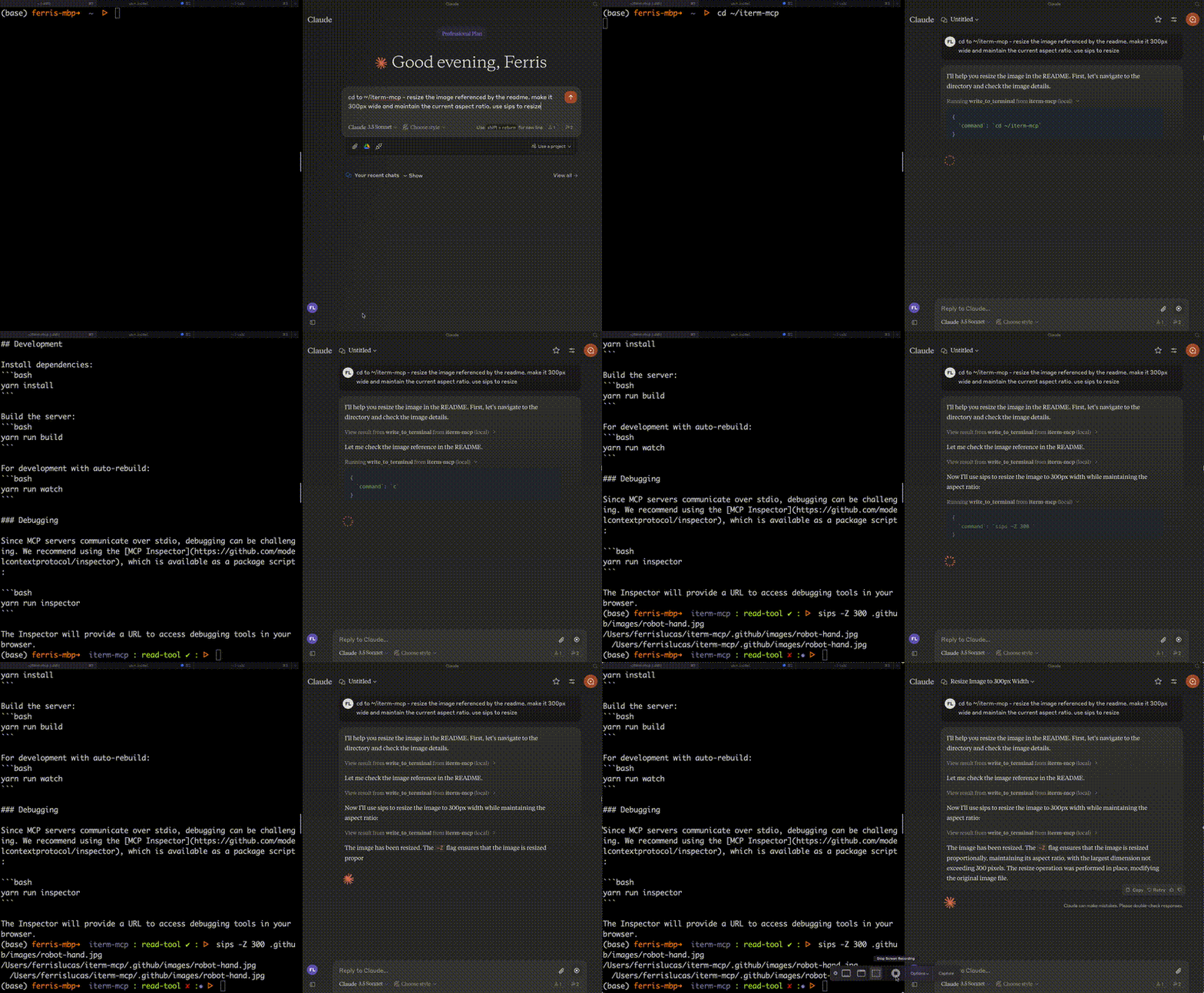
Features
Efficient Token Use: iterm-mcp gives the model the ability to inspect only the output that the model is interested in. The model typically only wants to see the last few lines of output even for long running commands.
Natural Integration: You share iTerm with the model. You can ask questions about what's on the screen, or delegate a task to the model and watch as it performs each step.
Full Terminal Control and REPL support: The model can start and interact with REPL's as well as send control characters like ctrl-c, ctrl-z, etc.
Easy on the Dependencies: iterm-mcp is built with minimal dependencies and is runnable via npx. It's designed to be easy to add to Claude Desktop and other MCP clients. It should just work.
Safety Considerations
- The user is responsible for using the tool safely.
- No built-in restrictions: iterm-mcp makes no attempt to evaluate the safety of commands that are executed.
- Models can behave in unexpected ways. The user is expected to monitor activity and abort when appropriate.
- For multi-step tasks, you may need to interrupt the model if it goes off track. Start with smaller, focused tasks until you're familiar with how the model behaves.
Tools
write_to_terminal- Writes to the active iTerm terminal, often used to run a command. Returns the number of lines of output produced by the command.read_terminal_output- Reads the requested number of lines from the active iTerm terminal.send_control_character- Sends a control character to the active iTerm terminal.
Requirements
- iTerm2 must be running
- Node version 18 or greater
Installation
To use with Claude Desktop, add the server config:
On macOS: ~/Library/Application Support/Claude/claude_desktop_config.json
On Windows: %APPDATA%/Claude/claude_desktop_config.json
{
  "mcpServers": {
    "iterm-mcp": {
      "command": "npx",
      "args": [
        "-y",
        "iterm-mcp"
      ]
    }
  }
}
Installing via Smithery
To install iTerm for Claude Desktop automatically via Smithery:
npx -y @smithery/cli install iterm-mcp --client claude
Development
Install dependencies:
yarn install
Build the server:
yarn run build
For development with auto-rebuild:
yarn run watch
Debugging
Since MCP servers communicate over stdio, debugging can be challenging. We recommend using the MCP Inspector, which is available as a package script:
yarn run inspector
yarn debug <command>
The Inspector will provide a URL to access debugging tools in your browser.
Alternatives



Related Skills
Browse all skillsUI design system toolkit for Senior UI Designer including design token generation, component documentation, responsive design calculations, and developer handoff tools. Use for creating design systems, maintaining visual consistency, and facilitating design-dev collaboration.
Answer questions about the AI SDK and help build AI-powered features. Use when developers: (1) Ask about AI SDK functions like generateText, streamText, ToolLoopAgent, embed, or tools, (2) Want to build AI agents, chatbots, RAG systems, or text generation features, (3) Have questions about AI providers (OpenAI, Anthropic, Google, etc.), streaming, tool calling, structured output, or embeddings, (4) Use React hooks like useChat or useCompletion. Triggers on: "AI SDK", "Vercel AI SDK", "generateText", "streamText", "add AI to my app", "build an agent", "tool calling", "structured output", "useChat".
Use when working with the OpenAI API (Responses API) or OpenAI platform features (tools, streaming, Realtime API, auth, models, rate limits, MCP) and you need authoritative, up-to-date documentation (schemas, examples, limits, edge cases). Prefer the OpenAI Developer Documentation MCP server tools when available; otherwise guide the user to enable `openaiDeveloperDocs`.
Guide for building TypeScript CLIs with Bun. Use when creating command-line tools, adding subcommands to existing CLIs, or building developer tooling. Covers argument parsing, subcommand patterns, output formatting, and distribution.
Guide developers through setting up development environments with proper tools, dependencies, and configurations
Integrate Vercel AI SDK applications with You.com tools (web search, AI agent, content extraction). Use when developer mentions AI SDK, Vercel AI SDK, generateText, streamText, or You.com integration with AI SDK.