
kubectl
Allows you to manage Kubernetes clusters using natural language instead of complex kubectl commands. You can debug pods, deploy applications, and manage resources through conversational AI.
Enables natural language interaction with Kubernetes resources, allowing developers to manage clusters through conversational interfaces instead of complex kubectl commands.
What it does
- Debug crashed pods with natural language queries
- Deploy applications through conversation
- Manage Helm charts via AI chat
- Audit security configurations
- Optimize cluster costs
- Visualize cluster dashboards
Best for
About kubectl
kubectl is a community-built MCP server published by rohitg00 that provides AI assistants with tools and capabilities via the Model Context Protocol. Interact with Kubernetes resources using natural language instead of complex kubectl commands. Simplify cluster management with kubectl. It is categorized under cloud infrastructure, developer tools.
How to install
You can install kubectl in your AI client of choice. Use the install panel on this page to get one-click setup for Cursor, Claude Desktop, VS Code, and other MCP-compatible clients. This server runs locally on your machine via the stdio transport.
License
kubectl is released under the MIT license. This is a permissive open-source license, meaning you can freely use, modify, and distribute the software.

kubectl-mcp-server
Control your entire Kubernetes infrastructure through natural language conversations with AI.
Talk to your clusters like you talk to a DevOps expert. Debug crashed pods, optimize costs, deploy applications, audit security, manage Helm charts, and visualize dashboards—all through natural language.









Installation
Quick Start with npx (Recommended - Zero Install)
# Run directly without installation - works instantly!
npx -y kubectl-mcp-server

# Or install globally for faster startup
npm install -g kubectl-mcp-server
Or install with pip (Python)
# Standard installation
pip install kubectl-mcp-server

# With interactive UI dashboards (recommended)
pip install kubectl-mcp-server[ui]
📑 Table of Contents
- What Can You Do?
- Why kubectl-mcp-server?
- Live Demos
- Installation
- Getting Started
- Quick Setup with Your AI Assistant
- All Supported AI Assistants
- Complete Feature Set
- Using the CLI
- Advanced Configuration
- Optional Features
- Enterprise
- Integrations & Ecosystem
- In-Cluster Deployment
- Multi-Cluster Support
- Architecture
- Agent Skills
- Development & Testing
- Contributing
- Support & Community
What Can You Do?
Simply ask your AI assistant in natural language:
💬 "Why is my pod crashing?"
- Instant crash diagnosis with logs, events, and resource analysis
- Root cause identification with actionable recommendations
💬 "Deploy a Redis cluster with 3 replicas"
- Creates deployment with best practices
- Configures services, persistent storage, and health checks
💬 "Show me which pods are wasting resources"
- AI-powered cost optimization analysis
- Resource recommendations with potential savings
💬 "Which services can't reach the database?"
- Network connectivity diagnostics with DNS resolution
- Service chain tracing from ingress to pods
💬 "Audit security across all namespaces"
- RBAC permission analysis
- Secret security scanning and pod security policies
💬 "Show me the cluster dashboard"
- Interactive HTML dashboards with live metrics
- Visual timeline of events and resource usage
253 powerful tools | 8 workflow prompts | 8 data resources | Works with all major AI assistants
Why kubectl-mcp-server?
- 🚀 Stop context-switching - Manage Kubernetes directly from your AI assistant conversations
- 🧠 AI-powered diagnostics - Get intelligent troubleshooting, not just raw data
- 💰 Built-in cost optimization - Identify waste and get actionable savings recommendations
- 🔒 Enterprise-ready - OAuth 2.1 auth, RBAC validation, non-destructive mode, secret masking
- ⚡ Zero learning curve - Natural language instead of memorizing kubectl commands
- 🌐 Universal compatibility - Works with Claude, Cursor, Windsurf, Copilot, and 15+ other AI tools
- 📊 Visual insights - Interactive dashboards and browser automation for web-based tools
- ☸️ Production-grade - Deploy in-cluster with kMCP, 216 passing tests, active maintenance
From debugging crashed pods to optimizing cluster costs, kubectl-mcp-server is your AI-powered DevOps companion.
Live Demos
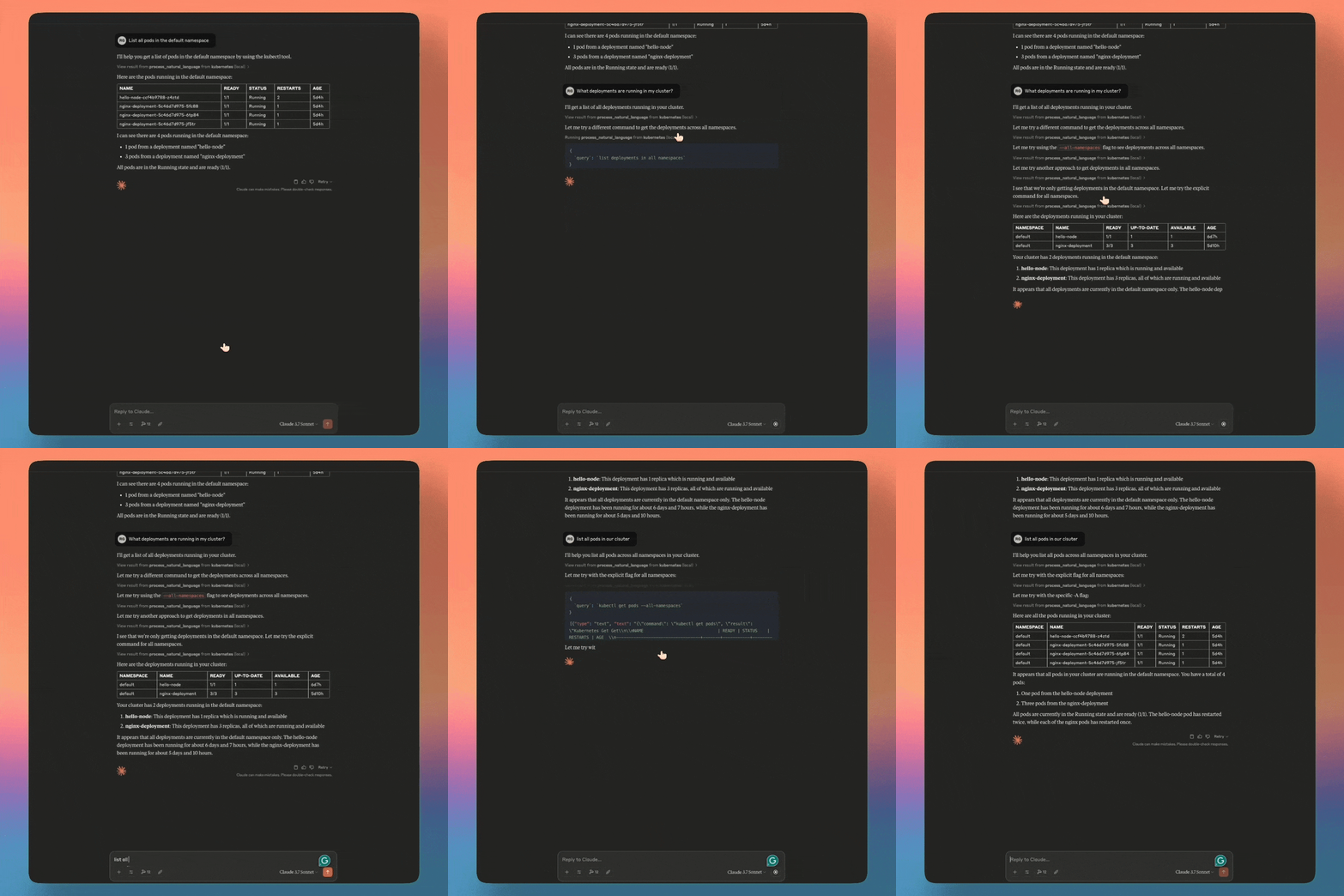
Claude Desktop
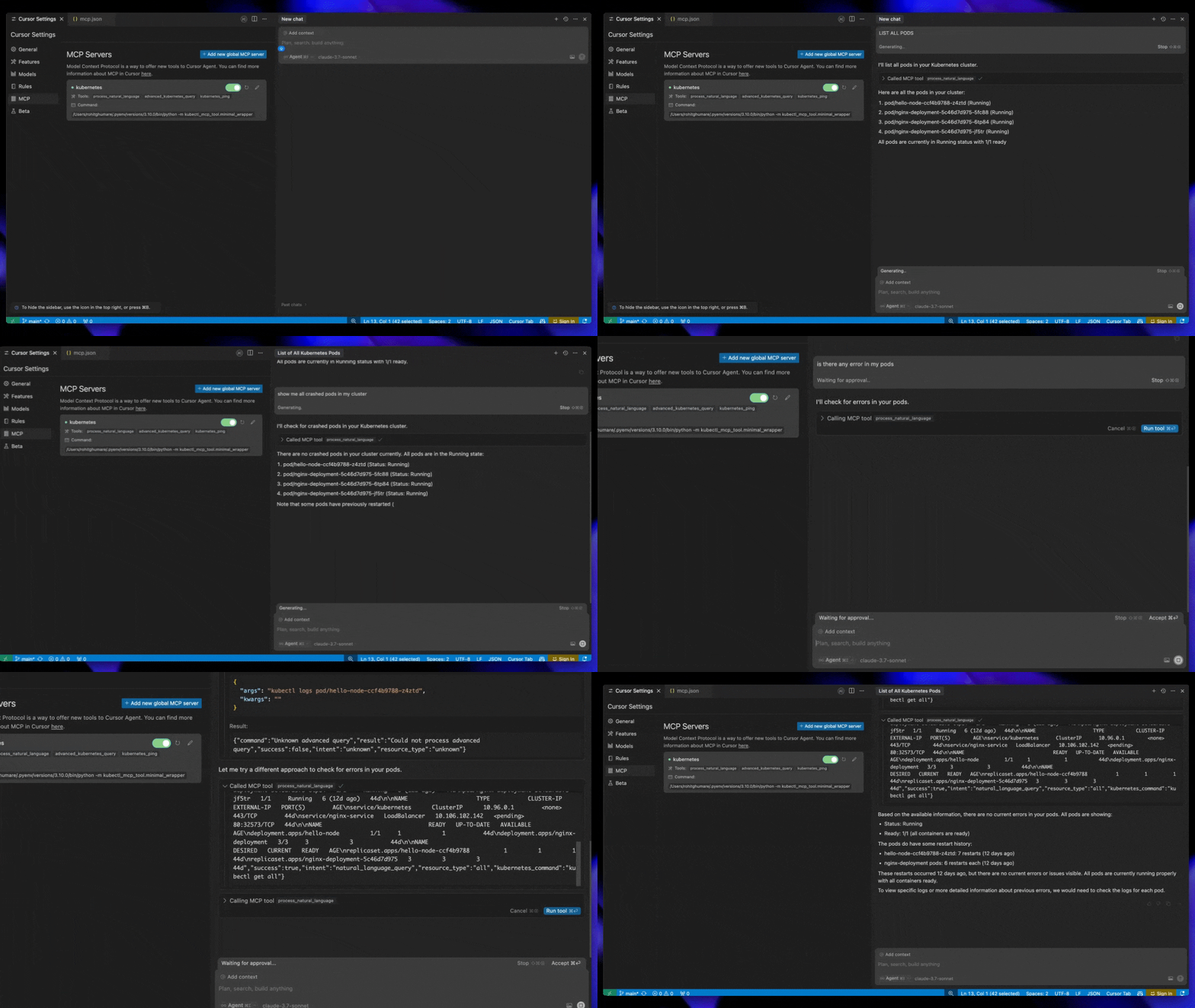
Cursor AI
Windsurf
Installation
Quick Start with npx (Recommended - Zero Install)
# Run directly without installation - works instantly!
npx -y kubectl-mcp-server

# Or install globally for faster startup
npm install -g kubectl-mcp-server
Or install with pip (Python)
# Standard installation
pip install kubectl-mcp-server

# With interactive UI dashboards (recommended)
pip install kubectl-mcp-server[ui]
Install from GitHub Release
# Install specific version directly from GitHub release (replace {VERSION} with desired version)
pip install https://github.com/rohitg00/kubectl-mcp-server/releases/download/v{VERSION}/kubectl_mcp_server-{VERSION}-py3-none-any.whl

# Example: Install v1.19.0
pip install https://github.com/rohitg00/kubectl-mcp-server/releases/download/v1.19.0/kubectl_mcp_server-1.19.0-py3-none-any.whl

# Or install latest from git
pip install git+https://github.com/rohitg00/kubectl-mcp-server.git
Prerequisites
- Python 3.9+ (for pip installation)
- Node.js 14+ (for npx installation)
- kubectl installed and configured
- Access to a Kubernetes cluster
Docker
# Pull from Docker Hub
docker pull rohitghumare64/kubectl-mcp-server:latest

# Or pull from GitHub Container Registry
docker pull ghcr.io/rohitg00/kubectl-mcp-server:latest

# Run with stdio transport
docker run -i -v $HOME/.kube:/root/.kube:ro rohitghumare64/kubectl-mcp-server:latest

# Run with HTTP transport
docker run -p 8000:8000 -v $HOME/.kube:/root/.kube:ro rohitghumare64/kubectl-mcp-server:latest --transport sse
Getting Started
1. Test the Server (Optional)
Before integrating with your AI assistant, verify the installation:
# Check if kubectl is configured
kubectl cluster-info

# Test the MCP server directly
kubectl-mcp-server info

# List all available tools
kubectl-mcp-server tools

# Try calling a tool
kubectl-mcp-server call get_pods '{"namespace": "kube-system"}'
2. Connect to Your AI Assistant
Choose your favorite AI assistant and add the configuration:
Quick Setup with Your AI Assistant
Claude Desktop
Add to ~/Library/Application Support/Claude/claude_desktop_config.json:
{
  "mcpServers": {
    "kubernetes": {
      "command": "npx",
      "args": ["-y", "kubectl-mcp-server"]
    }
  }
}
Cursor AI
Add to ~/.cursor/mcp.json:
{
  "mcpServers": {
    "kubernetes": {
      "command": "npx",
      "args": ["-y", "kubectl-mcp-server"]
    }
  }
}
Windsurf
Add to ~/.config/windsurf/mcp.json:
{
  "mcpServers": {
    "kubernetes": {
      "command": "npx",
      "args": ["-y", "kubectl-mcp-server"]
    }
  }
}
Using Python Instead of npx
{
  "mcpServers": {
    "kubernetes": {
      "command": "python",
      "args": ["-m", "kubectl_mcp_tool.mcp_server"],
      "env": {
        "KUBECONFIG": "/path/to/.kube/config"
      }
    }
  }
}
More integrations: GitHub Copilot, Goose, Gemini CLI, Roo Code, and 15+ other clients —> see full configuration guide below.
3. Restart Your AI Assistant
After adding the configuration, restart your AI assistant (GitHub Copilot, Claude Code,Claude Desktop, Cursor, etc.) to load the MCP server.
4. Try These Commands
Start a conversation with your AI assistant and try these:
**Troubleshooting
README truncated. View full README on GitHub.
Alternatives



Related Skills
Browse all skillsExpert Kubernetes architect specializing in cloud-native infrastructure, advanced GitOps workflows (ArgoCD/Flux), and enterprise container orchestration. Masters EKS/AKS/GKE, service mesh (Istio/Linkerd), progressive delivery, multi-tenancy, and platform engineering. Handles security, observability, cost optimization, and developer experience. Use PROACTIVELY for K8s architecture, GitOps implementation, or cloud-native platform design.
Build comprehensive ML pipelines, experiment tracking, and model registries with MLflow, Kubeflow, and modern MLOps tools. Implements automated training, deployment, and monitoring across cloud platforms. Use PROACTIVELY for ML infrastructure, experiment management, or pipeline automation.
Expert C# developer specializing in modern .NET development, ASP.NET Core, and cloud-native applications. Masters C# 12 features, Blazor, and cross-platform development with emphasis on performance and clean architecture.
UI design system toolkit for Senior UI Designer including design token generation, component documentation, responsive design calculations, and developer handoff tools. Use for creating design systems, maintaining visual consistency, and facilitating design-dev collaboration.
Answer questions about the AI SDK and help build AI-powered features. Use when developers: (1) Ask about AI SDK functions like generateText, streamText, ToolLoopAgent, embed, or tools, (2) Want to build AI agents, chatbots, RAG systems, or text generation features, (3) Have questions about AI providers (OpenAI, Anthropic, Google, etc.), streaming, tool calling, structured output, or embeddings, (4) Use React hooks like useChat or useCompletion. Triggers on: "AI SDK", "Vercel AI SDK", "generateText", "streamText", "add AI to my app", "build an agent", "tool calling", "structured output", "useChat".
Comprehensive Cloudflare platform skill covering Workers, Pages, storage (KV, D1, R2), AI (Workers AI, Vectorize, Agents SDK), networking (Tunnel, Spectrum), security (WAF, DDoS), and infrastructure-as-code (Terraform, Pulumi). Use for any Cloudflare development task.