
Lighthouse Portfolio Tracker
Connects to your Lighthouse.one cryptocurrency portfolio to fetch portfolio value, asset allocations, holdings data, and performance metrics for analysis through Claude.
Integrates with Lighthouse.one cryptocurrency portfolio tracker to fetch and display detailed portfolio data including total value, asset allocations, and major holdings through secure token-based authentication.
What it does
- Authenticate with Lighthouse.one using transfer tokens
- Fetch total portfolio value and asset distributions
- View detailed holdings and connected wallet information
- Access yield data and staking rewards
- Analyze portfolio performance over time
Best for
About Lighthouse Portfolio Tracker
Lighthouse Portfolio Tracker is a community-built MCP server published by l3wi that provides AI assistants with tools and capabilities via the Model Context Protocol. Track your cryptocurrency portfolio with Lighthouse Portfolio Tracker. Securely view holdings, asset allocation, and crypto wallet tracking insights. It is categorized under finance, analytics data. This server exposes 5 tools that AI clients can invoke during conversations and coding sessions.
How to install
You can install Lighthouse Portfolio Tracker in your AI client of choice. Use the install panel on this page to get one-click setup for Cursor, Claude Desktop, VS Code, and other MCP-compatible clients. This server runs locally on your machine via the stdio transport.
License
Lighthouse Portfolio Tracker is released under the MIT license. This is a permissive open-source license, meaning you can freely use, modify, and distribute the software.
Tools (5)
Lighthouse MCP
A Model Context Protocol (MCP) server that enables Claude to interact with your Lighthouse.one portfolio data. This integration allows you to query and analyze your crypto portfolio directly through Claude.
Features
- Authentication: Securely authenticate with Lighthouse using transfer token URLs
- Portfolio Overview: Get detailed breakdowns of your portfolio including:
- Total portfolio value
- Asset type distribution
- Major holdings (≥ $1,000)
- List of connected wallets/accounts
- Asset Details: View detailed information about specific assets in your portfolio
- Transaction History: Access your transaction history across wallets
- Performance Analysis: Get insights on portfolio performance over time
You can ask Claude any form of natural language questions about performance, assets distribution etc and it will try its best to invoke the right tools and generate an asnwer for you.
Usage with Claude Desktop
NOTE: You must have at least Node LTS installed to use this MCP server. Try N-Install to quickly install Node on your system.
Add this to your claude_desktop_config.json:
{
  "mcpServers": {
    "lighthouse": {
      "command": "npx",
      "args": ["-y", "mcp-lighthouse"]
    }
  }
}
Then restart the Claude app. If you don't get any errors on startup, then the MCP server is working.
Authentication Walkthrough
You'll be asked for the authentication URL. To get it, follow these steps:
- Go to the Settings page on Lighthouse.one
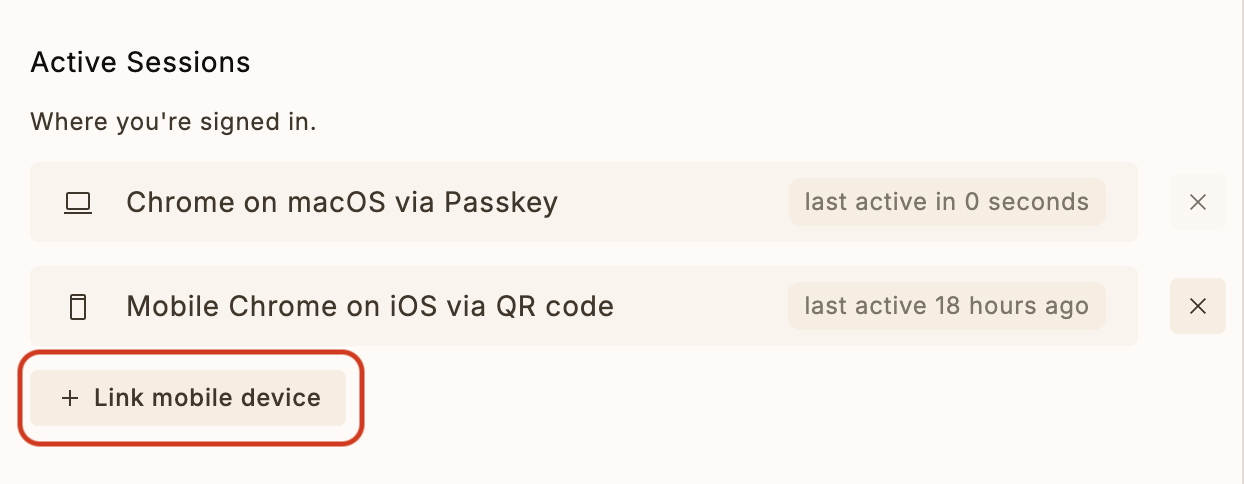
- Click on "Link Mobile Device" option
- Click on "Copy transfer link"
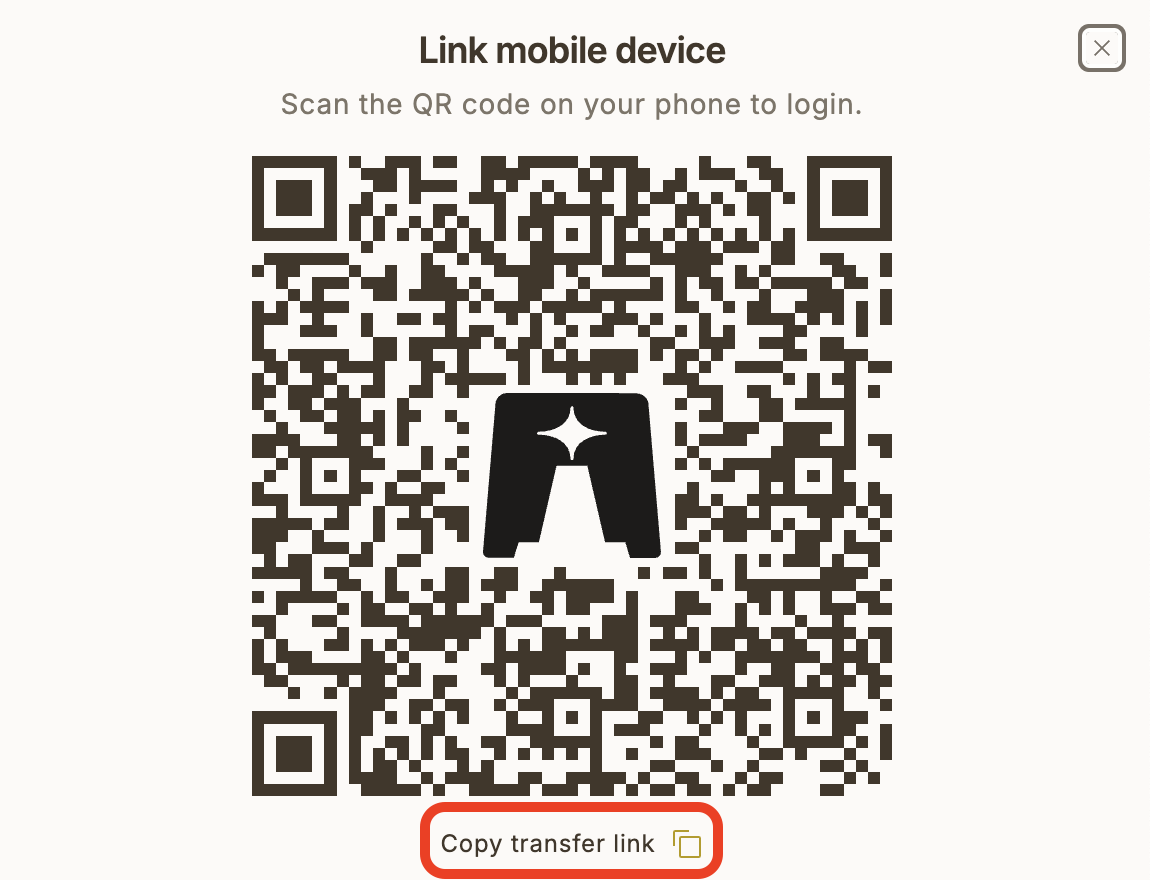
Note: The URL will be in the format of a Lighthouse transfer token URL which Claude can use to authenticate your session.
Available Commands
Once connected, you can use the following commands with Claude:
-
Authenticate
Use the authenticate command with a Lighthouse transfer token URL to log in. -
List Portfolios
Use the listLighthousePortfolios command to see all your portfolios and their total values. -
Get Portfolio Overview
Use the getLighthousePortfolio command to view your current portfolio status with detailed breakdowns. -
Get Yield Data
Use the getLighthouseYieldData command to see yield information for your portfolio. -
Get Performance Data
Use the getLighthousePerformanceData command to analyze your portfolio's performance over time.
Session Management
- The server maintains a session file (
.lighthouse_session) to persist your authentication - You only need to authenticate once unless you explicitly log out or the session expires
- Session data is stored securely on your local machine
NOTE: You can always revoke the session key from the Lighthouse dashboard.
Security Note
This MCP server runs locally on your machine and communicates directly with Lighthouse's API. Your authentication credentials are never shared with Claude or any third-party services.
Running Locally
- Build the project:
npm install

npm run build
- Add the MCP server to Claude
Paste this JSON into the Develop settings of the Claude app. Make sure to point to the correct build output.
{
  "mcpServers": {
    "lighthouse": {
      "command": "path/to/node/installation",
      "args": ["path/to/this/folder/mcp-lighthouse/dist/index.js"]
    }
  }
}
Development
The project is built with TypeScript and uses the FastMCP framework for MCP server implementation. To modify or extend the functionality:
- Make changes to
index.ts - Rebuild the project:
npm run build - Restart the server
Requirements
- Node.js 16 or higher
- npm or yarn
- A Lighthouse.one account
Alternatives



Related Skills
Browse all skillsAnalyze stocks and cryptocurrencies using Yahoo Finance data. Supports portfolio management (create, add, remove assets), crypto analysis (Top 20 by market cap), and periodic performance reports (daily/weekly/monthly/quarterly/yearly). 8 analysis dimensions for stocks, 3 for crypto. Use for stock analysis, portfolio tracking, earnings reactions, or crypto monitoring.
Read and manage Kubera.com portfolio data (net worth, assets, debts, allocation, holdings). Use when a user asks about their finances, net worth, portfolio, investments, holdings, asset allocation, or wants to update asset values in Kubera. Works with any AI agent or CLI that can run Python scripts.
Prevent accidental modification of sacred spreadsheet formulas in Google Sheets Portfolio Tracker. Blocks edits to GOOGLEFINANCE formulas, calculated columns, and total rows. Allows only IFERROR wrappers, fixing broken references, and expanding ranges. Triggers on update formula, modify column, fix errors, or any attempt to edit formula-based cells.
Use this skill to track institutional investor ownership changes and portfolio flows using 13F filings data. Analyzes hedge funds, mutual funds, and other institutional holders to identify stocks with significant smart money accumulation or distribution. Helps discover stocks before major moves by following where sophisticated investors are deploying capital.
Analyze Google Analytics data, review website performance metrics, identify traffic patterns, and suggest data-driven improvements. Use when the user asks about analytics, website metrics, traffic analysis, conversion rates, user behavior, or performance optimization.
Transform data into compelling narratives using visualization, context, and persuasive structure. Use when presenting analytics to stakeholders, creating data reports, or building executive presentations.