
MCP Easy Copy
MCP Easy Copy lets you quickly access and copy all MCP services from Claude Desktop config files for effortless troubleshooting.
Utility server that automatically reads Claude Desktop configuration files and presents all available MCP services in an easy-to-copy format for quick access and troubleshooting.
About MCP Easy Copy
MCP Easy Copy is a community-built MCP server published by f-is-h that provides AI assistants with tools and capabilities via the Model Context Protocol. MCP Easy Copy lets you quickly access and copy all MCP services from Claude Desktop config files for effortless troubleshooting. It is categorized under productivity. This server exposes 1 tool that AI clients can invoke during conversations and coding sessions.
How to install
You can install MCP Easy Copy in your AI client of choice. Use the install panel on this page to get one-click setup for Cursor, Claude Desktop, VS Code, and other MCP-compatible clients. This server runs locally on your machine via the stdio transport.
License
MCP Easy Copy is released under the MIT license. This is a permissive open-source license, meaning you can freely use, modify, and distribute the software.
Tools (1)
List all MCP services available in this Claude instance
MCP Easy Copy




A Model Context Protocol server that makes it easy to discover and copy available MCP services in Claude Desktop.
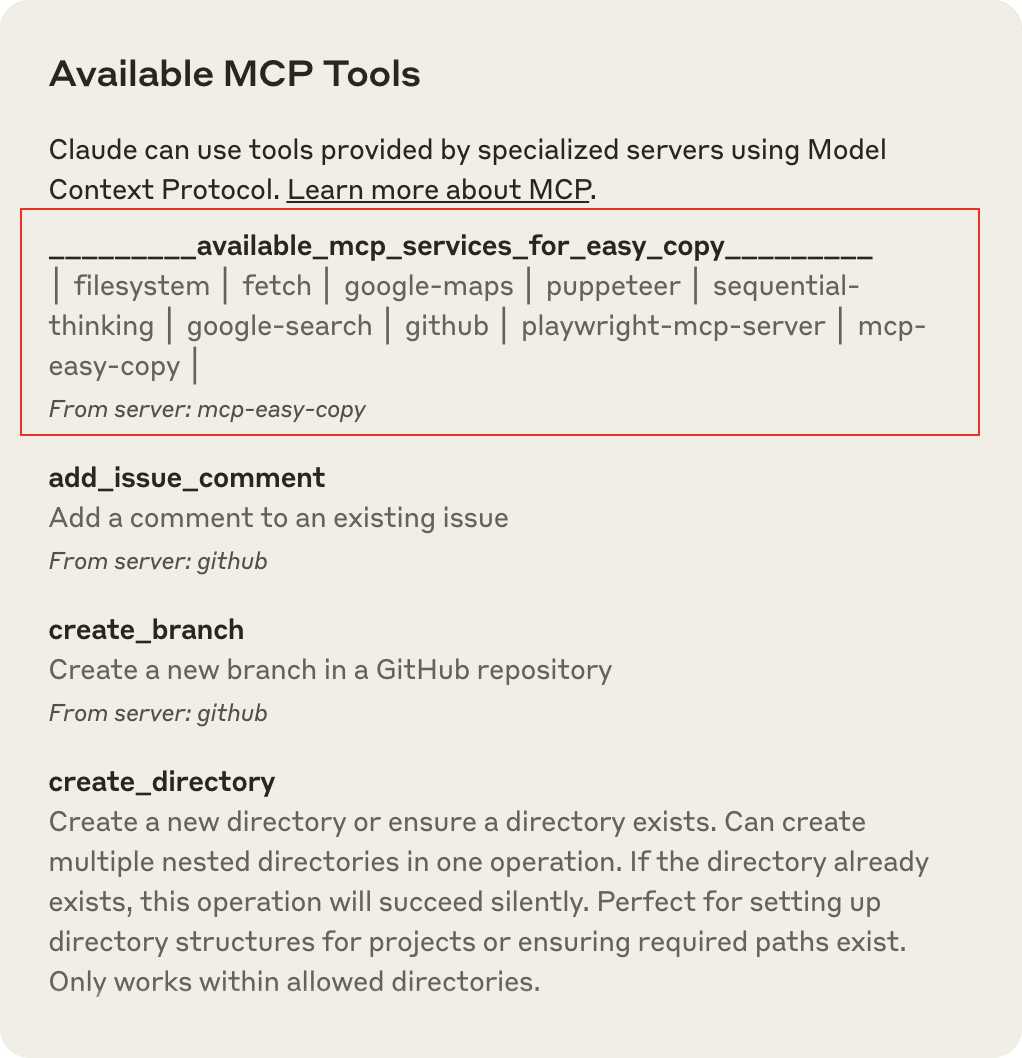
Purpose
This MCP server is designed to be your first stop when working with Claude Desktop. It solves the problem of having to remember MCP service names or looking them up in configuration files by:
- Automatically reading the Claude Desktop configuration file
- Extracting the names of all configured MCP services
- Presenting them in an easy-to-copy format at the top of the tools list
Although Claude can now automatically select the appropriate MCP services in most scenarios, there are still situations where users need to explicitly specify an MCP service name. These situations include:
- When you have many MCP services configured, making the tools list long and difficult to navigate
- When specific MCP services offer multiple callable actions, further increasing the list length
- When you need to direct Claude to use a specific service rather than relying on its automatic selection
- When troubleshooting or comparing results between different MCP services
This tool bridges that gap, making all available services easily accessible without having to search through configuration files.
Features
- Appears at the top of tools list: Uses special name formatting to always appear first
- Dynamic updates: Always shows the latest available services
- Copy-friendly format: Numbered list for easy reference
- Zero external dependencies: Just needs Node.js
Installation
Option 1: Install via npm (Recommended)
npm install -g @fishes/mcp-easy-copy
Then add to your Claude Desktop configuration:
{
  "mcpServers": {
    "mcp-easy-copy": {
      "command": "npx",
      "args": [
        "-y",
        "@fishes/mcp-easy-copy"
      ]
    }
  }
}
Option 2: Installing via Smithery
To install Easy Copy for Claude Desktop automatically via Smithery:
npx -y @smithery/cli install @fisheepx/mcp-easy-copy --client claude
Option 3: Manual Installation
-
Clone the repository:
git clone https://github.com/f-is-h/mcp-easy-copy.git cd mcp-easy-copy -
Install dependencies and build:
npm install npm run build -
Configure Claude Desktop:
For macOS: Edit
~/Library/Application Support/Claude/claude_desktop_config.jsonFor Windows: Edit
%APPDATA%\Claude\claude_desktop_config.jsonAdd the following configuration:
{ "mcpServers": { "mcp-easy-copy": { "command": "node", "args": [ "/ABSOLUTE/PATH/TO/mcp_easy_copy/build/index.js" ] } } } -
Restart Claude Desktop
Using the Tool
Once installed, you can use the service in two ways:
-
Via the tools menu: Click the hammer icon in Claude Desktop and select the service at the top of the list (it will show all available services in its description)
-
Via a prompt: Ask Claude something like:
Please list all MCP services that are available to youor
Please use _________mcp-easy-copy_________ to show me all available MCP services
Development
MCP Easy Copy is built with TypeScript and uses the Model Context Protocol SDK.
# Install dependencies
npm install

# Build the project
npm run build

# Test with the MCP Inspector
npm run inspector
Troubleshooting
If the tool doesn't work as expected:
-
Check logs: Look at the log files
- macOS:
~/Library/Logs/Claude/mcp-server-mcp-easy-copy.log - Windows:
%APPDATA%\Claude\logs\mcp-server-mcp-easy-copy.log
- macOS:
-
Verify configuration: Make sure your
claude_desktop_config.jsonis valid JSON -
Check Node.js: Ensure Node.js is properly installed (
node --version) -
Restart Claude: Always restart Claude Desktop after making configuration changes
-
Use the Inspector: Run
npm run inspectorto debug with the MCP Inspector
Other Badges
Glama
MseeP.ai
License
Future Vision
While we have no specific knowledge of Anthropic's roadmap, we imagine that future versions of Claude's client could potentially implement features like autocomplete when using the '@' symbol. Such a feature might display a dropdown list of available MCP services, making it much easier for users to explicitly instruct Claude to utilize specific services.
Even if such improvements eventually make this project obsolete, we'd be delighted to see Claude's interface evolve in ways that improve user experience. After all, the goal of this tool is to make MCP services more accessible, and having that functionality built directly into Claude would be the ultimate success.
Alternatives




Related Skills
Browse all skillsCreate user-centered, accessible interface copy (microcopy) for digital products including buttons, labels, error messages, notifications, forms, onboarding, empty states, success messages, and help text. Use when writing or editing any text that appears in apps, websites, or software interfaces, designing conversational flows, establishing voice and tone guidelines, auditing product content for consistency and usability, reviewing UI strings, or improving existing interface copy. Applies UX writing best practices based on four quality standards — purposeful, concise, conversational, and clear. Includes accessibility guidelines, research-backed benchmarks (sentence length, comprehension rates, reading levels), expanded error patterns, tone adaptation frameworks, and comprehensive reference materials.
When the user needs to generate, iterate, or scale ad creative for paid advertising. Use when they say 'write ad copy,' 'generate headlines,' 'create ad variations,' 'bulk creative,' 'iterate on ads,' 'ad copy validation,' 'RSA headlines,' 'Meta ad copy,' 'LinkedIn ad,' or 'creative testing.' This is pure creative production — distinct from paid-ads (campaign strategy). Use ad-creative when you need the copy, not the campaign plan.
Node.js development principles and decision-making. Framework selection, async patterns, security, and architecture. Teaches thinking, not copying.
Create beautiful visual art in .png and .pdf documents using design philosophy. You should use this skill when the user asks to create a poster, piece of art, design, or other static piece. Create original visual designs, never copying existing artists' work to avoid copyright violations.
Research a topic from the last 30 days on Reddit + X + Web, become an expert, and write copy-paste-ready prompts for the user's target tool.
Draft marketing content across channels — blog posts, social media, email newsletters, landing pages, press releases, and case studies. Use when writing any marketing content, when you need channel-specific formatting, SEO-optimized copy, headline options, or calls to action.