
Meta MCP Proxy
Combines multiple MCP servers into a single interface with smart search and discovery, reducing context size by providing unified 'discover' and 'execute' methods instead of exposing hundreds of individual tools.
Unifies multiple MCP servers into a single gateway with built-in search capabilities, enabling tools to be discovered and executed across different specialized services through one interface
What it does
- Search tools across multiple MCP servers
- Route tool execution to appropriate servers
- Integrate custom JavaScript functions as tools
- Filter and discover relevant tools with fuzzy matching
- Configure server connections via JSON config
- Reduce LLM context with unified proxy interface
Best for
About Meta MCP Proxy
Meta MCP Proxy is a community-built MCP server published by nullplatform that provides AI assistants with tools and capabilities via the Model Context Protocol. Meta MCP Proxy unifies multiple MCP servers into one gateway with search, making tool discovery and execution simple across services. It is categorized under developer tools.
How to install
You can install Meta MCP Proxy in your AI client of choice. Use the install panel on this page to get one-click setup for Cursor, Claude Desktop, VS Code, and other MCP-compatible clients. This server runs locally on your machine via the stdio transport.
License
Meta MCP Proxy is released under the NOASSERTION license.
Meta MCP Proxy
A flexible Model Context Protocol (MCP) proxy that enables discovery and execution of tools across multiple MCP servers and JavaScript functions. Enabling to have a reduced context event if you have houndreds of tools. This mcp act as wrapper of other mcps (or libraries) doing a kind of Local RAG (Retrieval Augmented Generation) to reduce the context size providing the llm with 2 methods (discover and execute) and asking the llm to be concise about discovery. The execute method is a simple proxy
We extremely recommends add the configuration discoverDescriptionExtras to extends in details about the purpose of the tools and for what kind of topics the llm should use it.
Features
- 🌉 Unified Tool Discovery: Search for tools across multiple MCP servers
- 🔌 Proxy Execution: Route tool calls to the appropriate server
- 🔍 Smart Search: Find the best tool for the job with fuzzy matching
- 🧩 JavaScript Integration: Expose custom JavaScript functions as MCP tools
- 📝 Configurable: Load configuration from files or command-line arguments
Usage
🧱 Installation
Edit your file ~/Library/Application Support/Claude/claude_desktop_config.json
and add the following
{
  "mcpServers": {
    "mcp-openapi-proxy": {
      "command": "npx",
      "args": ["@nullplatform/meta-mcp-proxy","-f","config.json"]
    }
  }
}
Configuration File Format
Your config.json should follow this structure:
{
  "discoverDescriptionExtras": "Additional description for discovery",
  "discoverLimit": 10,
  "mcpServers": {
    "server-name": {
      "command": "command-to-execute",
      "args": ["arg1", "arg2"],
      "env": {
        "ENV_VAR1": "value1",
        "ENV_VAR2": "value2"
      },
      "transport": "stdio"
    }
  }
}
as example
{
  "discoverDescriptionExtras": "Api used to manage a pet store with access to pets, pet types, users, orders and store",
  "mcpServers": {
    "mcp-petstore": {
        "command": "uvx",
        "args": ["mcp-openapi-proxy"],
        "env": {
            "OPENAPI_SPEC_URL": "https://petstore.swagger.io/v2/swagger.json",
            "API_KEY": "xxxxx"
       }
    }
  }
}
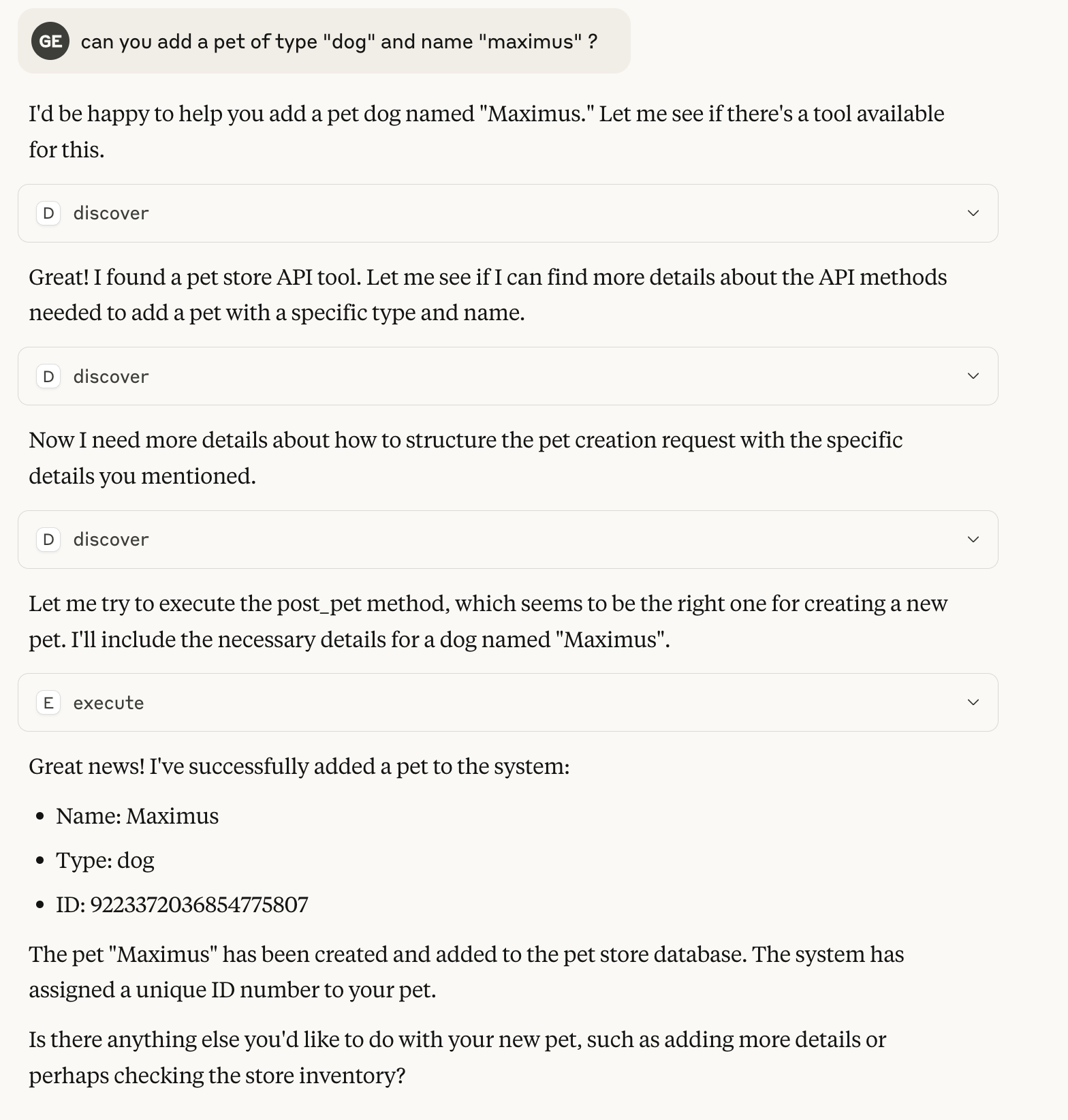
Example 0-Shot conversation with Claude
the example is using the demo config with the pet store with almost no description of what the api
As a Library
You can also use Meta MCP Proxy as a library in your own JavaScript applications:
import { MCPProxy } from '@nullplatform/meta-mcp-proxy';

// Create a new proxy instance
const mcpProxy = new MCPProxy({
  mcpServers: {
    "my-server": {
      "command": "path/to/server",
      "args": [],
      "env": {}
    }
  },
  discoverLimit: 10
});

// Register a custom JavaScript function
mcpProxy.registerJsFunction(
  "myFunction",
  "Description of my function",
  {
    properties: {
      param1: {
        type: "string",
        description: "First parameter"
      },
      param2: {
        type: "number",
        description: "Second parameter"
      }
    },
    required: ["param1"]
  },
  async ({ param1, param2 }) => {
    // Implementation goes here
    return {
      content: [
        {
          type: "text",
          text: JSON.stringify({ result: `Processed ${param1}` })
        }
      ]
    };
  }
);

// Start the MCP server
await mcpProxy.startMCP();
Example creating an mcp with meta-mcp-proxy as a lib
License
MIT
Alternatives



Related Skills
Browse all skillsUI design system toolkit for Senior UI Designer including design token generation, component documentation, responsive design calculations, and developer handoff tools. Use for creating design systems, maintaining visual consistency, and facilitating design-dev collaboration.
Answer questions about the AI SDK and help build AI-powered features. Use when developers: (1) Ask about AI SDK functions like generateText, streamText, ToolLoopAgent, embed, or tools, (2) Want to build AI agents, chatbots, RAG systems, or text generation features, (3) Have questions about AI providers (OpenAI, Anthropic, Google, etc.), streaming, tool calling, structured output, or embeddings, (4) Use React hooks like useChat or useCompletion. Triggers on: "AI SDK", "Vercel AI SDK", "generateText", "streamText", "add AI to my app", "build an agent", "tool calling", "structured output", "useChat".
Use when working with the OpenAI API (Responses API) or OpenAI platform features (tools, streaming, Realtime API, auth, models, rate limits, MCP) and you need authoritative, up-to-date documentation (schemas, examples, limits, edge cases). Prefer the OpenAI Developer Documentation MCP server tools when available; otherwise guide the user to enable `openaiDeveloperDocs`.
Guide for building TypeScript CLIs with Bun. Use when creating command-line tools, adding subcommands to existing CLIs, or building developer tooling. Covers argument parsing, subcommand patterns, output formatting, and distribution.
Guide developers through setting up development environments with proper tools, dependencies, and configurations
Integrate Vercel AI SDK applications with You.com tools (web search, AI agent, content extraction). Use when developer mentions AI SDK, Vercel AI SDK, generateText, streamText, or You.com integration with AI SDK.