
Mobile Next
Automate iOS and Android apps by controlling devices through accessibility data or screen coordinates. Works with emulators, simulators, and physical devices without needing platform-specific knowledge.
Experience seamless mobile automation across iOS and Android devices with Mobile MCP, a fast, platform-agnostic server. It enables interaction with native apps using accessibility data or screenshot analysis, supporting emulators, simulators, and physical devices. Designed for AI agents and large language models, Mobile MCP automates multi-step workflows, extracts structured screen data, and simplifies complex mobile tasks without needing platform-specific knowledge. Its deterministic, lightweight design ensures reliable UI automation and testing, making it an essential tool for developers and automation engineers aiming to scale mobile app interactions effortlessly and intuitively.
What it does
- Launch and terminate mobile apps
- Click and long press at screen coordinates
- List UI elements with accessibility labels
- Press device buttons and navigate interfaces
- Open URLs in mobile browsers
- Extract structured screen data
Best for
About Mobile Next
Mobile Next is a community-built MCP server published by mobile-next that provides AI assistants with tools and capabilities via the Model Context Protocol. Mobile Next offers fast, seamless mobile automation for iOS and Android. Automate apps, extract data, and simplify mobile workflows effortlessly. It is categorized under developer tools. This server exposes 19 tools that AI clients can invoke during conversations and coding sessions.
How to install
You can install Mobile Next in your AI client of choice. Use the install panel on this page to get one-click setup for Cursor, Claude Desktop, VS Code, and other MCP-compatible clients. This server runs locally on your machine via the stdio transport.
License
Mobile Next is released under the Apache-2.0 license. This is a permissive open-source license, meaning you can freely use, modify, and distribute the software.
Tools (19)
List all available devices. This includes both physical devices and simulators. If there is more than one device returned, you need to let the user select one of them.
List all the installed apps on the device
Launch an app on mobile device. Use this to open a specific app. You can find the package name of the app by calling list_apps_on_device.
Stop and terminate an app on mobile device
Get the screen size of the mobile device in pixels
Mobile Next - MCP server for Mobile Development and Automation | iOS, Android, Simulator, Emulator, and Real Devices
This is a Model Context Protocol (MCP) server that enables scalable mobile automation, development through a platform-agnostic interface, eliminating the need for distinct iOS or Android knowledge. You can run it on emulators, simulators, and real devices (iOS and Android). This server allows Agents and LLMs to interact with native iOS/Android applications and devices through structured accessibility snapshots or coordinate-based taps based on screenshots.



 Link to github.com




https://github.com/user-attachments/assets/c4e89c4f-cc71-4424-8184-bdbc8c638fa1
🚀 Mobile MCP Roadmap: Building the Future of Mobile
Join us on our journey as we continuously enhance Mobile MCP! Check out our detailed roadmap to see upcoming features, improvements, and milestones. Your feedback is invaluable in shaping the future of mobile automation.
Main use cases
How we help to scale mobile automation:
- 📲 Native app automation (iOS and Android) for testing or data-entry scenarios.
- 📝 Scripted flows and form interactions without manually controlling simulators/emulators or real devices (iPhone, Samsung, Google Pixel etc)
- 🧭 Automating multi-step user journeys driven by an LLM
- 👆 General-purpose mobile application interaction for agent-based frameworks
- 🤖 Enables agent-to-agent communication for mobile automation usecases, data extraction
Main Features
- 🚀 Fast and lightweight: Uses native accessibility trees for most interactions, or screenshot based coordinates where a11y labels are not available.
- 🤖 LLM-friendly: No computer vision model required in Accessibility (Snapshot).
- 🧿 Visual Sense: Evaluates and analyses what's actually rendered on screen to decide the next action. If accessibility data or view-hierarchy coordinates are unavailable, it falls back to screenshot-based analysis.
- 📊 Deterministic tool application: Reduces ambiguity found in purely screenshot-based approaches by relying on structured data whenever possible.
- 📺 Extract structured data: Enables you to extract structred data from anything visible on screen.
🎯 Platform Support
| Platform | Supported |
|---|---|
| iOS Real Device | ✅ |
| iOS Simulator | ✅ |
| Android Real Device | ✅ |
| Android Emulator | ✅ |
🔧 Available MCP Tools
📱 Click to expand tool list - List of Mobile MCP tools for automation and development
For detailed implementation and parameter specifications, see
src/server.ts
Device Management
mobile_list_available_devices- List all available devices (simulators, emulators, and real devices)mobile_get_screen_size- Get the screen size of the mobile device in pixelsmobile_get_orientation- Get the current screen orientation of the devicemobile_set_orientation- Change the screen orientation (portrait/landscape)
App Management
mobile_list_apps- List all installed apps on the devicemobile_launch_app- Launch an app using its package namemobile_terminate_app- Stop and terminate a running appmobile_install_app- Install an app from file (.apk, .ipa, .app, .zip)mobile_uninstall_app- Uninstall an app using bundle ID or package name
Screen Interaction
mobile_take_screenshot- Take a screenshot to understand what's on screenmobile_save_screenshot- Save a screenshot to a filemobile_list_elements_on_screen- List UI elements with their coordinates and propertiesmobile_click_on_screen_at_coordinates- Click at specific x,y coordinatesmobile_double_tap_on_screen- Double-tap at specific coordinatesmobile_long_press_on_screen_at_coordinates- Long press at specific coordinatesmobile_swipe_on_screen- Swipe in any direction (up, down, left, right)
Input & Navigation
mobile_type_keys- Type text into focused elements with optional submitmobile_press_button- Press device buttons (HOME, BACK, VOLUME_UP/DOWN, ENTER, etc.)mobile_open_url- Open URLs in the device browser
Platform Support
- iOS: Simulators and real devices via native accessibility and WebDriverAgent
- Android: Emulators and real devices via ADB and UI Automator
- Cross-platform: Unified API works across both iOS and Android
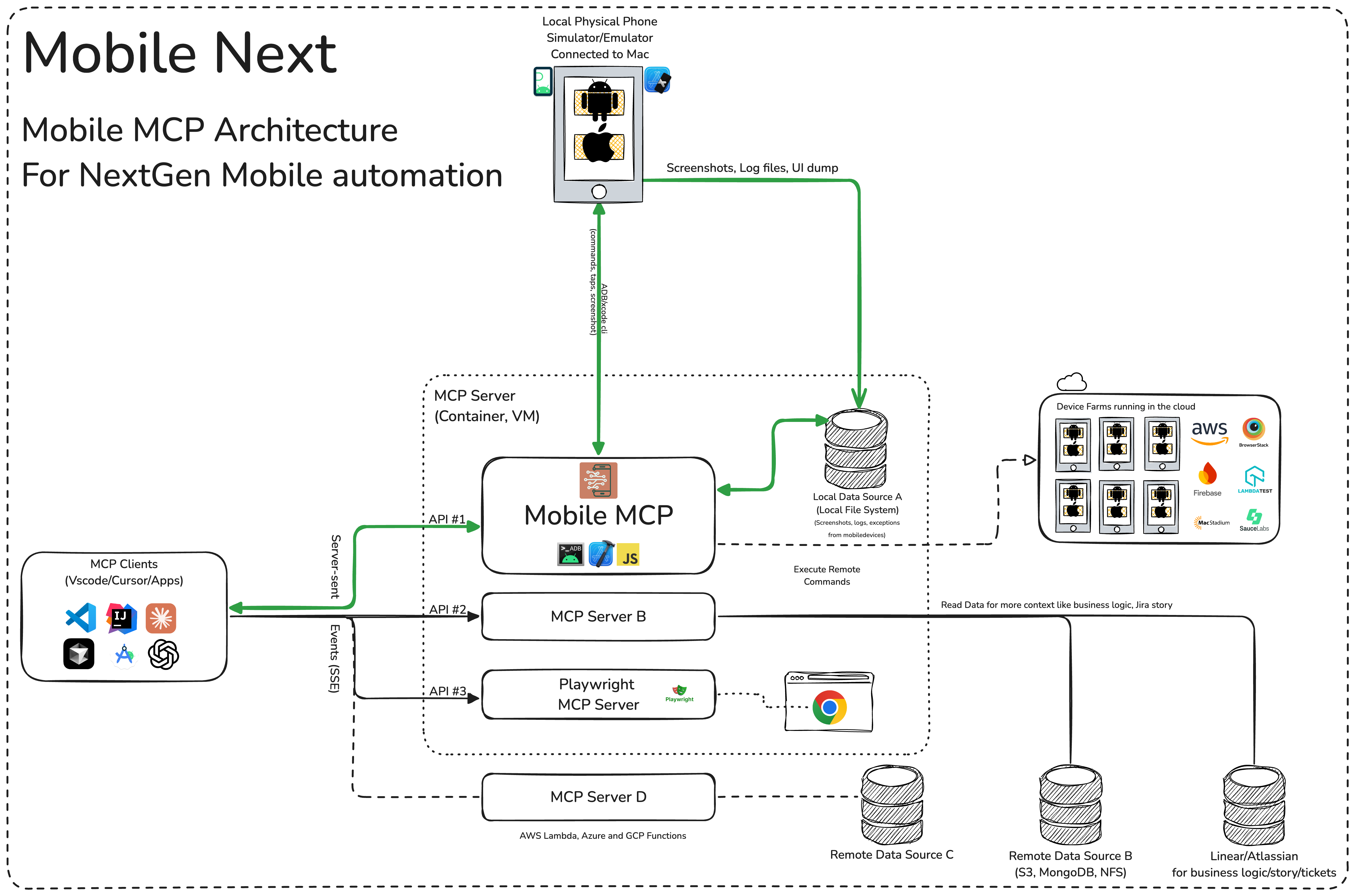
🏗️ Mobile MCP Architecture
📚 Wiki page
More details in our wiki page for setup, configuration and debugging related questions.
Installation and configuration
Standard config works in most of the tools:
{
  "mcpServers": {
    "mobile-mcp": {
      "command": "npx",
      "args": ["-y", "@mobilenext/mobile-mcp@latest"]
    }
  }
}
Amp
Add via the Amp VS Code extension settings screen or by updating your settings.json file:
"amp.mcpServers": {
  "mobile-mcp": {
    "command": "npx",
    "args": [
      "@mobilenext/mobile-mcp@latest"
    ]
  }
}
Amp CLI:
Run the following command in your terminal:
amp mcp add mobile-mcp -- npx @mobilenext/mobile-mcp@latest
Claude Code
Use the Claude Code CLI to add the Mobile MCP server:
claude mcp add mobile-mcp -- npx -y @mobilenext/mobile-mcp@latest
Claude Desktop
Follow the MCP install guide, use json configuration above.
Codex
Use the Codex CLI to add the Mobile MCP server:
codex mcp add mobile-mcp npx "@mobilenext/mobile-mcp@latest"
Alternatively, create or edit the configuration file ~/.codex/config.toml and add:
[mcp_servers.mobile-mcp]
command = "npx"
args = ["@mobilenext/mobile-mcp@latest"]
For more information, see the Codex MCP documentation.
Copilot
Use the Copilot CLI to interactively add the Mobile MCP server:
/mcp add
You can edit the configuration file ~/.copilot/mcp-config.json and add:
{
  "mcpServers": {
    "mobile-mcp": {
      "type": "local",
      "command": "npx",
      "tools": [
        "*"
      ],
      "args": [
        "@mobilenext/mobile-mcp@latest"
      ]
    }
  }
}
For more information, see the Copilot CLI documentation.
Cursor
Click the button to install:

Or install manually:
Go to Cursor Settings -> MCP -> Add new MCP Server. Name to your liking, use command type with the command npx -y @mobilenext/mobile-mcp@latest. You can also verify config or add command like arguments via clicking Edit.
Gemini CLI
Use the Gemini CLI to add the Mobile MCP server:
gemini mcp add mobile-mcp npx -y @mobilenext/mobile-mcp@latest
Goose
Click the button to install:
[ ](https://block.github.io/goose/extension?cmd=npx&arg=-y&arg
README truncated. View full README on GitHub.
Alternatives



Related Skills
Browse all skills"UI/UX design intelligence. 50 styles, 21 palettes, 50 font pairings, 20 charts, 8 stacks (React, Next.js, Vue, Svelte, SwiftUI, React Native, Flutter, Tailwind). Actions: plan, build, create, design, implement, review, fix, improve, optimize, enhance, refactor, check UI/UX code. Projects: website, landing page, dashboard, admin panel, e-commerce, SaaS, portfolio, blog, mobile app, .html, .tsx, .vue, .svelte. Elements: button, modal, navbar, sidebar, card, table, form, chart. Styles: glassmorphism, claymorphism, minimalism, brutalism, neumorphism, bento grid, dark mode, responsive, skeuomorphism, flat design. Topics: color palette, accessibility, animation, layout, typography, font pairing, spacing, hover, shadow, gradient."
Expert Next.js developer mastering Next.js 14+ with App Router and full-stack features. Specializes in server components, server actions, performance optimization, and production deployment with focus on building fast, SEO-friendly applications.
UI design system toolkit for Senior UI Designer including design token generation, component documentation, responsive design calculations, and developer handoff tools. Use for creating design systems, maintaining visual consistency, and facilitating design-dev collaboration.
Comprehensive guide for creating professional UI/UX designs in Penpot using MCP tools. Use this skill when: (1) Creating new UI/UX designs for web, mobile, or desktop applications, (2) Building design systems with components and tokens, (3) Designing dashboards, forms, navigation, or landing pages, (4) Applying accessibility standards and best practices, (5) Following platform guidelines (iOS, Android, Material Design), (6) Reviewing or improving existing Penpot designs for usability. Triggers: "design a UI", "create interface", "build layout", "design dashboard", "create form", "design landing page", "make it accessible", "design system", "component library".
Build React components, implement responsive layouts, and handle client-side state management. Masters React 19, Next.js 15, and modern frontend architecture. Optimizes performance and ensures accessibility. Use PROACTIVELY when creating UI components or fixing frontend issues.
Modern web development expertise covering React, Node.js, databases, and full-stack architecture. Use when: building web applications, developing APIs, creating frontends, setting up databases, deploying web apps, or when user mentions React, Next.js, Express, REST API, GraphQL, MongoDB, PostgreSQL, or full-stack development.