
Mureka.ai Music Generation
OfficialConnects to Mureka.ai's API to generate lyrics, complete songs, and instrumental tracks through AI. Requires a Mureka API key but no music production skills.
Provides a bridge to Mureka.ai's music generation capabilities, enabling on-demand creation of lyrics, complete songs, and instrumental tracks without requiring specialized music production knowledge.
What it does
- Generate song lyrics with custom themes and styles
- Create complete songs with vocals and music
- Produce instrumental background music tracks
- Customize music generation parameters
Best for
About Mureka.ai Music Generation
Mureka.ai Music Generation is an official MCP server published by skyworkai that provides AI assistants with tools and capabilities via the Model Context Protocol. Generate lyrics, songs, and tracks instantly with Mureka.ai Music Generation, an AI music generator. No production skills required. It is categorized under other, ai ml.
How to install
You can install Mureka.ai Music Generation in your AI client of choice. Use the install panel on this page to get one-click setup for Cursor, Claude Desktop, VS Code, and other MCP-compatible clients. This server runs locally on your machine via the stdio transport.
License
Mureka.ai Music Generation is released under the MIT license. This is a permissive open-source license, meaning you can freely use, modify, and distribute the software.




Official Mureka Model Context Protocol (MCP) server that enables interaction with powerful lyrics, song and bgm generating APIs. This server allows MCP clients like Claude Desktop, OpenAI Agents and others to generate lyrics, song and background music(instrumental).
Quickstart with Claude Desktop
- Get your API key from Mureka.
- Install
uv(Python package manager), install withcurl -LsSf https://astral.sh/uv/install.sh | shor see theuvrepo for additional install methods. - Go to Claude > Settings > Developer > Edit Config > claude_desktop_config.json to include the following:
{
    "mcpServers": {
        "Mureka": {
            "command": "uvx",
            "args": [
                "mureka-mcp"
            ],
            "env": {
                "MUREKA_API_KEY": "<insert-your-api-key-here>",
                "MUREKA_API_URL": "https://api.mureka.ai",
                "TIME_OUT_SECONDS":"300"
            }
        }
    }
}
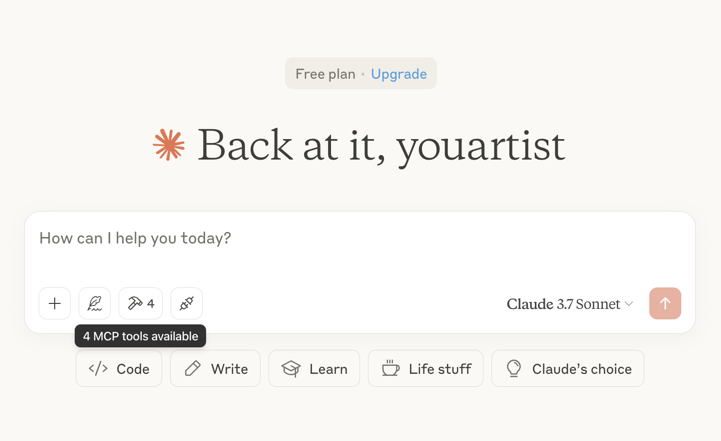
Then restart the Claude app and see 4 MCP tools available in the window, indicating successful loading
Optional features
You can add the TIME_OUT_SECONDS environment variable to the claude_desktop_config.json to set the timeout period for song or bgm generation waiting(Default 60s).
Example usage
⚠️ Warning: Mureka credits are needed to use these tools. Try asking Claude:
- "Please create a song for my daughter Jessica to wish her a happy birthday and play it"

- "Please generate lyrics about Christmas"
- "Please generate a song based on the lyrics just now"
- "Please generate background music suitable for playing in the coffee shop"

Troubleshooting
Logs when running with Claude Desktop can be found at:
- Windows:
%APPDATA%\Claude\logs\mcp-server-Mureka.log - macOS:
~/Library/Logs/Claude/mcp-server-Mureka.log
Quickstart with Openai agents sdk
Install Agents SDK
pip install openai-agents
Run example: openapi_agents_example/main.py
Key is required to be filled in:
MUREKA_API_KEY = "<insert-your-api-key-here>"
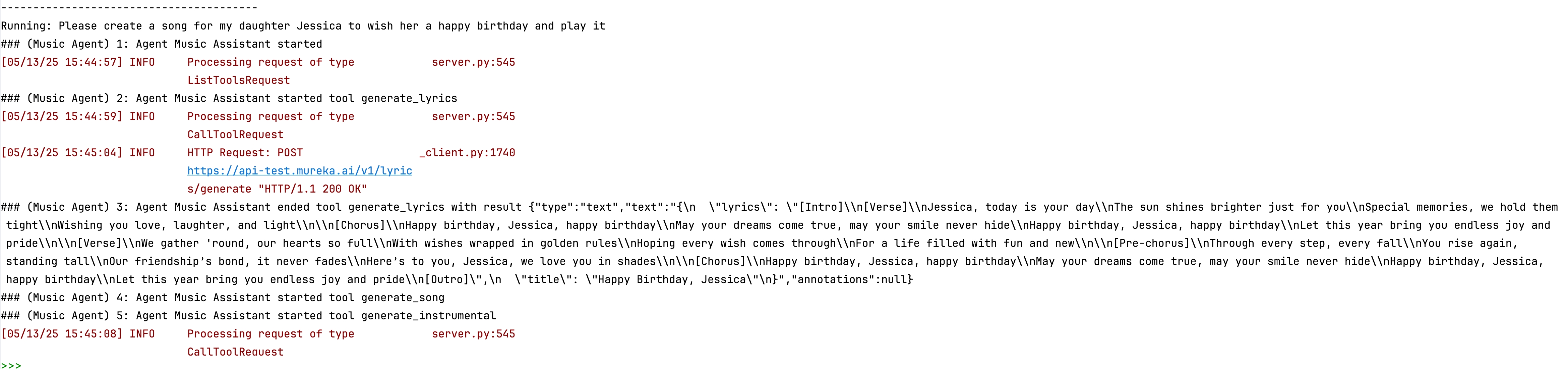
After running, you can see the composition process in the console

Alternatives




Related Skills
Browse all skillsTools, patterns, and utilities for creating music with code. Output as a .mp3 file with realistic instrument sounds. Write custom compositions to bring creativity to life through music. This skill should be used whenever the user asks for music to be created. Never use this skill for replicating songs, beats, riffs, or other sensitive works. The skill is not suitable for vocal/lyrical music, audio mixing/mastering (reverb, EQ, compression), real-time MIDI playback, or professional studio recording quality.
Recommend suitable prompts from 6000+ Nano Banana Pro image generation prompts based on user needs. Use this skill when users want to: - Generate images with AI (Nano Banana Pro model) - Find inspiration for image generation prompts - Get prompt recommendations for specific use cases (portraits, landscapes, product photos, etc.) - Create illustrations for articles, videos, podcasts, or other content - Translate and understand prompt techniques
Spawn Codex subagents via background shell to offload context-heavy work. Use for: deep research (3+ searches), codebase exploration (8+ files), multi-step workflows, exploratory tasks, long-running operations, documentation generation, or any other task where the intermediate steps will use large numbers of tokens.
Generate AI music and songs with Diffrythm, Tencent Song Generation via inference.sh CLI. Models: Diffrythm (fast song generation), Tencent Song Generation (full songs with vocals). Capabilities: text-to-music, song generation, instrumental, lyrics to song, soundtrack creation. Use for: background music, social media content, game soundtracks, podcasts, royalty-free music. Triggers: music generation, ai music, generate song, ai composer, text to music, song generator, create music with ai, suno alternative, udio alternative, ai song, ai soundtrack, generate soundtrack, ai jingle, music ai, beat generator
AI image, video, and music generation. Flux, Veo 3.1, Suno V5.
PyTorch library for audio generation including text-to-music (MusicGen) and text-to-sound (AudioGen). Use when you need to generate music from text descriptions, create sound effects, or perform melody-conditioned music generation.