
Notion ReadOnly
Provides read-only access to Notion workspaces with parallel processing and caching for faster content retrieval. Exposes only 6 essential tools instead of 15+ to improve AI assistant performance.
Provides an optimized read-only interface to Notion content with parallel processing and intelligent caching for faster document analysis and knowledge retrieval.
What it does
- Retrieve Notion pages and databases
- Query page properties and comments
- Fetch block content with parallel processing
- Search across Notion workspace content
- Access database entries and metadata
- Cache frequently accessed content
Best for
About Notion ReadOnly
Notion ReadOnly is a community-built MCP server published by taewoong1378 that provides AI assistants with tools and capabilities via the Model Context Protocol. Notion ReadOnly offers a fast, read-only interface for Notion content, using parallel processing and caching for efficient document analysis. It is categorized under productivity.
How to install
You can install Notion ReadOnly in your AI client of choice. Use the install panel on this page to get one-click setup for Cursor, Claude Desktop, VS Code, and other MCP-compatible clients. This server runs locally on your machine via the stdio transport.
License
Notion ReadOnly is released under the MIT license. This is a permissive open-source license, meaning you can freely use, modify, and distribute the software.
Notion ReadOnly MCP Server
This project implements an optimized read-only MCP server for the Notion API, focusing on performance and efficiency for AI assistants to query and retrieve Notion content.
Key Improvements
- Read-Only Design: Focused exclusively on data retrieval operations, ensuring safe access to Notion content.
- Minimized Tool Set: Reduced the number of exposed Notion API tools from 15+ to only 6 essential ones for document analysis.
- Parallel Processing: Enhanced performance by implementing asynchronous and parallel API requests for retrieving block content, significantly reducing response times.
- Extended Database Access: Added support for database, page property, and comment retrieval operations.
- Optimized for AI Assistants: Significantly reduced tool count addresses the "Too many tools can degrade performance" issue in AI assistants like Cursor, which limits models to approximately 40 tools.
Tool Comparison
This read-only implementation exposes far fewer tools compared to the standard Notion API integration, improving performance and compatibility with AI assistants:

The reduced tool set helps stay within the recommended tool limits for optimal AI assistant performance while still providing all essential functionality.
Installation
1. Setting up Integration in Notion:
Go to https://www.notion.so/profile/integrations and create a new internal integration or select an existing one.
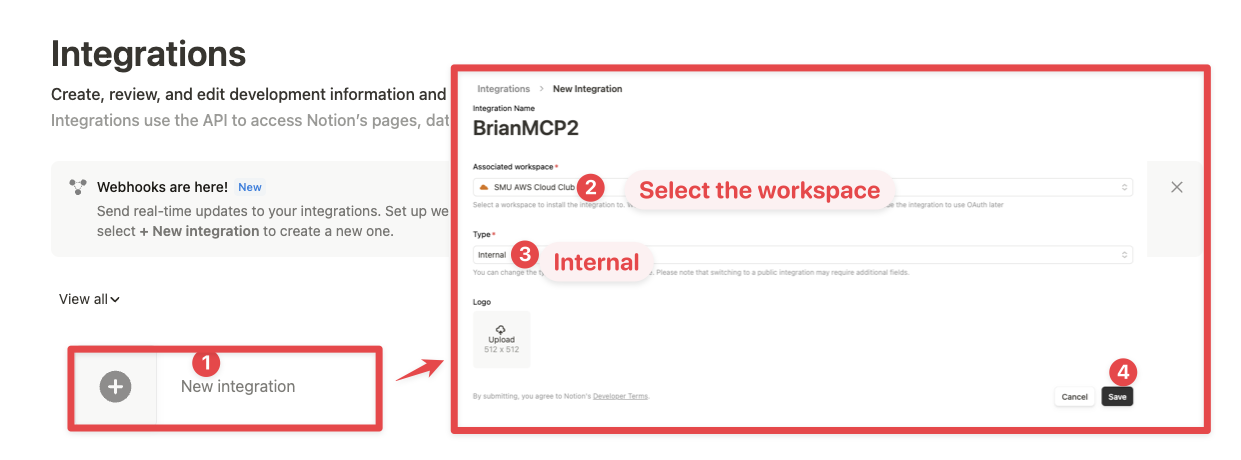
While we limit the scope of Notion API's exposed to read-only operations, there is a non-zero risk to workspace data by exposing it to LLMs. Security-conscious users may want to further configure the Integration's Capabilities.
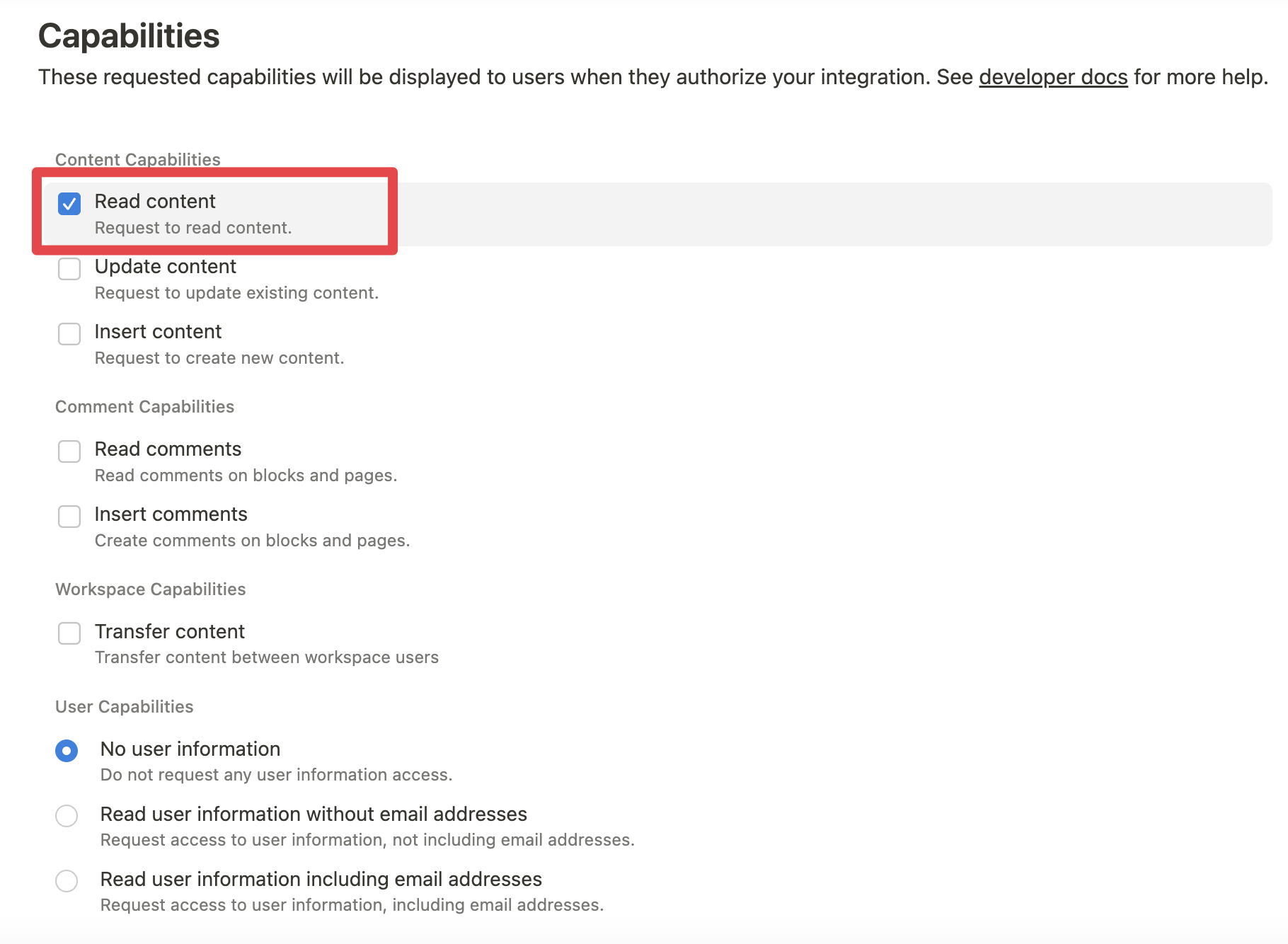
For example, you can create a read-only integration token by giving only "Read content" access from the "Configuration" tab:
2. Adding MCP config to your client:
Using npm:
Add the following to your .cursor/mcp.json or claude_desktop_config.json (MacOS: ~/Library/Application\ Support/Claude/claude_desktop_config.json)
{
  "mcpServers": {
    "notionApi": {
      "command": "npx",
      "args": ["-y", "notion-readonly-mcp-server"],
      "env": {
        "OPENAPI_MCP_HEADERS": "{\"Authorization\": \"Bearer ntn_****\", \"Notion-Version\": \"2022-06-28\" }"
      }
    }
  }
}
Using Docker:
Add the following to your .cursor/mcp.json or claude_desktop_config.json:
{
  "mcpServers": {
    "notionApi": {
      "command": "docker",
      "args": [
        "run",
        "--rm",
        "-i",
        "-e", "OPENAPI_MCP_HEADERS",
        "taewoong1378/notion-readonly-mcp-server"
      ],
      "env": {
        "OPENAPI_MCP_HEADERS": "{\"Authorization\":\"Bearer ntn_****\",\"Notion-Version\":\"2022-06-28\"}"
      }
    }
  }
}
Don't forget to replace ntn_**** with your integration secret. Find it from your integration configuration tab.
3. Connecting content to integration:
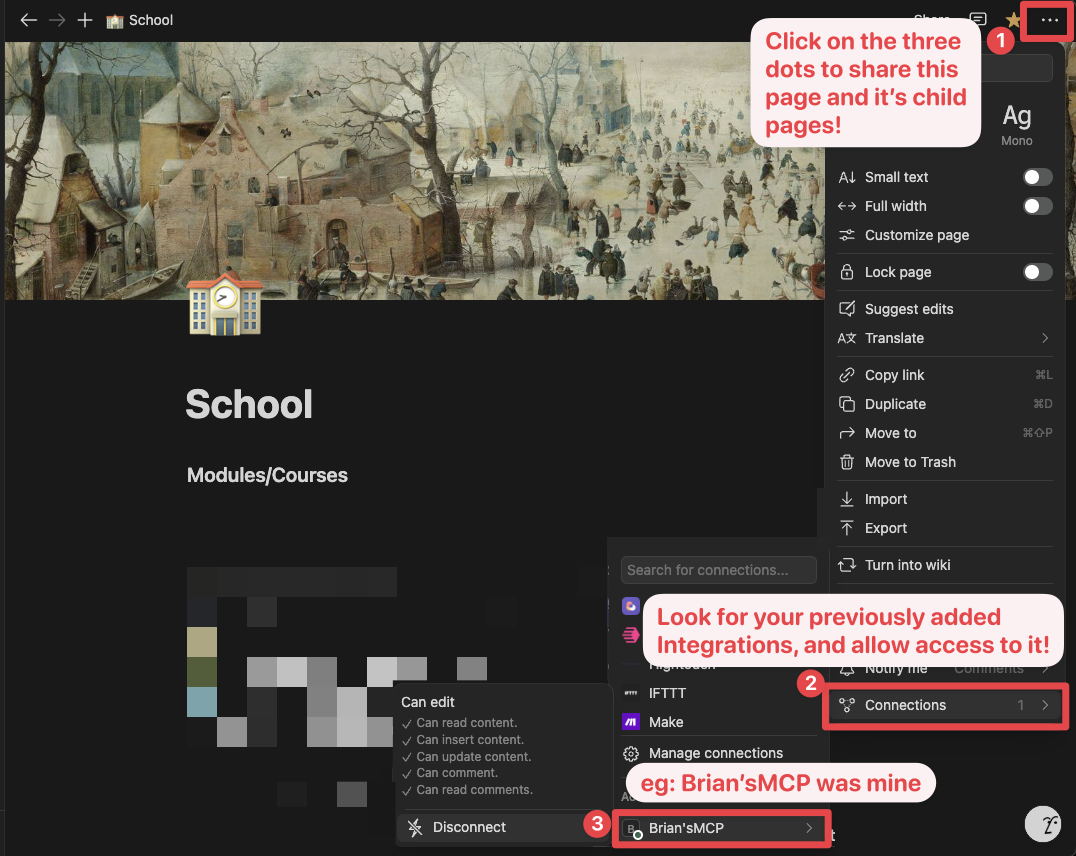
Ensure relevant pages and databases are connected to your integration.
To do this, visit the page, click on the 3 dots, and select "Connect to integration".
Available Tools
This optimized server exposes only essential read-only Notion API tools:
API-retrieve-a-page: Get page informationAPI-get-block-children: Get page content blocks (with parallel processing)API-retrieve-a-block: Get details about a specific blockAPI-retrieve-a-database: Get database informationAPI-retrieve-a-comment: Get comments on a page or blockAPI-retrieve-a-page-property: Get specific property information from a pageAPI-get-one-pager: NEW! Recursively retrieve a full Notion page with all its blocks, databases, and related content in a single call
By limiting to these 7 essential tools (compared to 15+ in the standard implementation), we ensure:
- Better performance in AI assistants like Cursor and Claude that have tool count limitations
- Reduced cognitive load for AI models when choosing appropriate tools
- Faster response times with fewer API options to consider
- Enhanced security through minimized API surface area
Automatic Content Exploration
The new API-get-one-pager tool provides a powerful way to explore Notion pages without requiring multiple API calls:
- Recursive retrieval: Automatically traverses the entire page structure including nested blocks
- Parallel processing: Fetches multiple blocks and their children simultaneously for maximum performance
- Intelligent caching: Stores retrieved data to minimize redundant API calls
- Comprehensive content: Includes pages, blocks, databases, comments, and detailed property information
- Customizable depth: Control the level of recursion to balance between detail and performance
Using One Pager Tool
{
  "page_id": "YOUR_PAGE_ID",
  "maxDepth": 5,               // Optional: Maximum recursion depth (default: 5)
  "includeDatabases": true,    // Optional: Include linked databases (default: true)
  "includeComments": true,     // Optional: Include comments (default: true)
  "includeProperties": true    // Optional: Include detailed page properties (default: true)
}
This automatic exploration capability is especially useful for AI assistants that need to understand the entire content of a Notion page without making dozens of separate API calls, resulting in much faster and more efficient responses.
Asynchronous Processing
The server implements advanced parallel processing techniques for handling large Notion documents:
- Multiple requests are batched and processed concurrently
- Pagination is handled automatically for block children
- Results are efficiently aggregated before being returned
- Console logging provides visibility into the process without affecting response format
Examples
- Using the following instruction:
Get the content of page 1a6b35e6e67f802fa7e1d27686f017f2
The AI will retrieve the page details efficiently with parallel processing of block content.
- Using database information:
Get the structure of database 8a6b35e6e67f802fa7e1d27686f017f2
Development
Build:
pnpm build
Execute:
pnpm dev
License
MIT
AI Assistant Performance Benefits
Modern AI assistants like Cursor and Claude have limitations on the number of tools they can effectively handle:
- Most models may not respect more than 40 tools in total
- Too many tools can degrade overall performance and reasoning capabilities
- Complex tool sets increase response latency and decision-making difficulty
This read-only implementation deliberately reduces the Notion API surface to address these limitations while preserving all essential functionality. The result is:
- Faster and more reliable responses from AI assistants
- Improved accuracy when interacting with Notion content
- Better overall performance through focused API design
Alternatives




Related Skills
Browse all skillsDeploy Granola integrations to Slack, Notion, HubSpot, and other apps. Use when connecting Granola to productivity tools, setting up native integrations, or configuring auto-sync. Trigger with phrases like "granola slack", "granola notion", "granola hubspot", "granola integration", "connect granola".
Notion workspace integration. Use when user wants to read/write Notion pages, search databases, create tasks, or sync content with Notion.
Transforms conversations and discussions into structured documentation pages in Notion. Captures insights, decisions, and knowledge from chat context, formats appropriately, and saves to wikis or databases with proper organization and linking for easy discovery.
Find, connect, and use MCP tools and skills via the Smithery CLI. Use when the user searches for new tools or skills, wants to discover integrations, connect to an MCP, install a skill, or wants to interact with an external service (email, Slack, Discord, GitHub, Jira, Notion, databases, cloud APIs, monitoring, etc.).
Prepare meeting materials with Notion context and Codex research; use when gathering context, drafting agendas/pre-reads, and tailoring materials to attendees.
Build rich text editors with Tiptap - headless editor framework with React and Tailwind v4. Covers SSR-safe setup, image uploads, prose styling, and collaborative editing. Use when creating blog editors, comment systems, or Notion-like apps, or troubleshooting SSR hydration errors, typography issues, or image upload problems.