
Npm Search
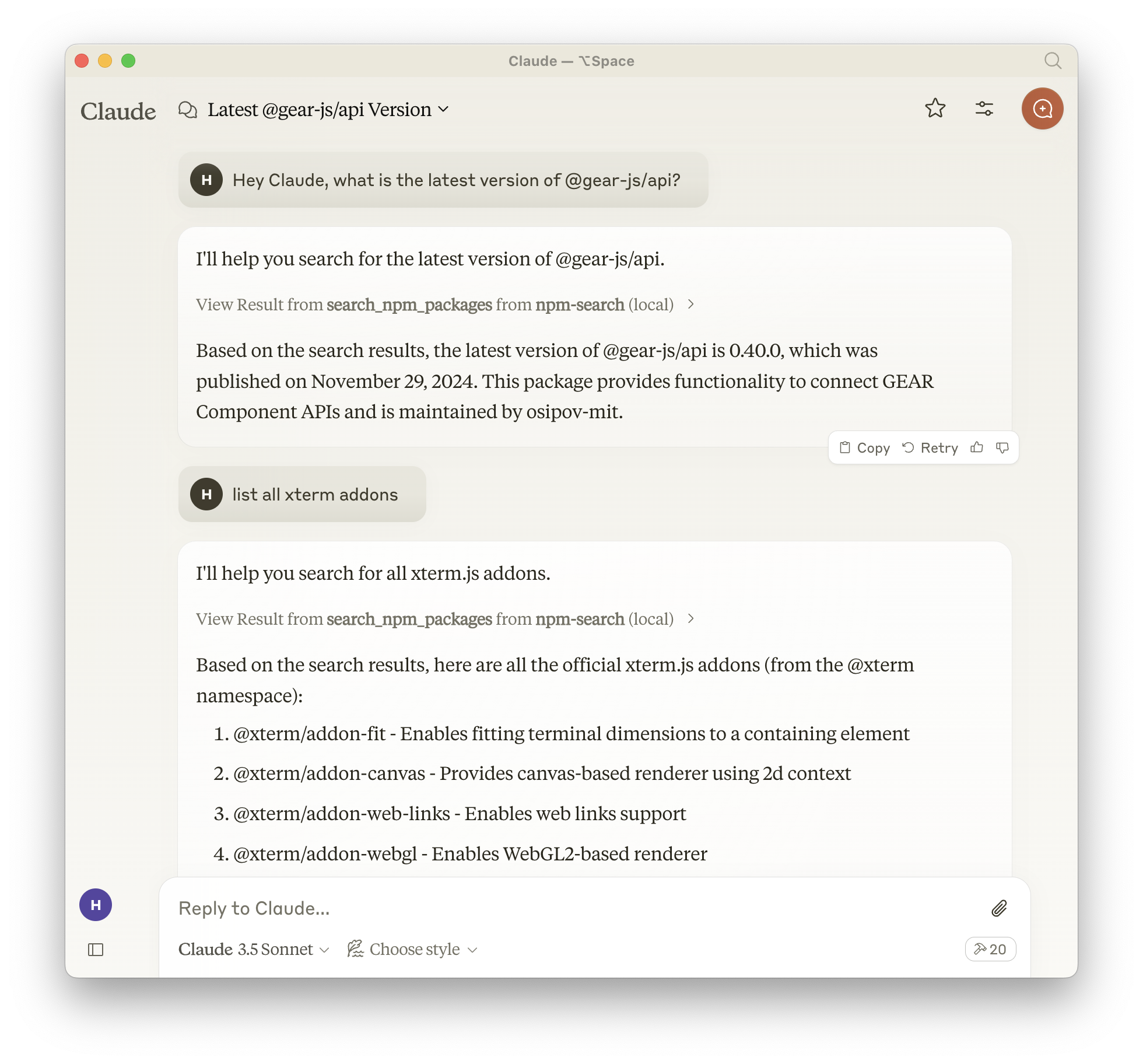
Search for npm packages directly from Claude using the npm search command. Find JavaScript libraries and dependencies without leaving your chat.
Enables npm package searches via CLI, facilitating JavaScript library discovery and dependency management
What it does
- Search npm package registry
- Find JavaScript libraries by keywords
- Query package names and descriptions
- Discover dependencies for projects
Best for
About Npm Search
Npm Search is a community-built MCP server published by btwiuse that provides AI assistants with tools and capabilities via the Model Context Protocol. Search and install node packages easily using the npm CLI. Streamline JavaScript library discovery and manage dependencies with the Node.js package manager. It is categorized under search web, developer tools. This server exposes 1 tool that AI clients can invoke during conversations and coding sessions.
How to install
You can install Npm Search in your AI client of choice. Use the install panel on this page to get one-click setup for Cursor, Claude Desktop, VS Code, and other MCP-compatible clients. This server runs locally on your machine via the stdio transport.
License
Npm Search is released under the MIT license. This is a permissive open-source license, meaning you can freely use, modify, and distribute the software.
Tools (1)
Search for npm packages
npm-search MCP Server
A Model Context Protocol server that allows you to search for npm packages by calling the npm search command.
Features:
- Search npm packages using the
npm searchcommand - Supports both stdio and HTTP (streamable-http) transport modes
- HTTP mode automatically enabled when
PORTenvironment variable is set - Structured logging with Pino
- Graceful shutdown handling
- Health check endpoint (
/health) - Session management for HTTP transport
Available Tools
search_npm_packages- Search for npm packages.- Required arguments:
query(string): The search query.
- Required arguments:
Installation
Installing via Smithery
To install npm-search for Claude Desktop automatically via Smithery:
npx -y @smithery/cli install npm-search-mcp-server --client claude
Using NPM (recommended)
Alternatively you can install npm-search-mcp-server via npm:
npm install -g npm-search-mcp-server
After installation, you can run it as a command using:
npm-search-mcp-server
Using uv
When using uv no specific installation is needed. We will
use uvx to directly run npm-search-mcp-server.
Configuration
Configure for Claude.app
Add to your Claude settings:
Using npm installation
"mcpServers": {
  "npm-search": {
    "command": "npx",
    "args": ["-y", "npm-search-mcp-server"]
  }
}
Using uvx
"mcpServers": {
  "npm-search": {
    "command": "uvx",
    "args": ["npm-search-mcp-server"]
  }
}
Configure for Zed
Add to your Zed settings.json:
Using npm installation
"context_servers": {
  "npm-search-mcp-server": {
    "command": "npx",
    "args": ["-y", "npm-search-mcp-server"]
  }
},
Using uvx
"context_servers": [
  "npm-search-mcp-server": {
    "command": "uvx",
    "args": ["npm-search-mcp-server"]
  }
],
Example Interactions
- Search for npm packages:
{
  "name": "search_npm_packages",
  "arguments": {
    "query": "express"
  }
}
Response:
{
  "results": [
    {
      "name": "express",
      "description": "Fast, unopinionated, minimalist web framework",
      "version": "4.17.1",
      "author": "TJ Holowaychuk",
      "license": "MIT"
    },
    ...
  ]
}
Debugging
You can use the MCP inspector to debug the server. For uvx installations:
npx @modelcontextprotocol/inspector npx -y npm-search-mcp-server
Or if you've installed the package in a specific directory or are developing on it:
cd path/to/servers/src/npm-search
npx @modelcontextprotocol/inspector uv run npm-search-mcp-server
Examples of Questions for Claude
- "Search for express package on npm"
- "Find packages related to react"
- "Show me npm packages for web development"
Docker
The server can be run in a Docker container with HTTP transport support:
# Build the image
docker build -t mcp/npm-search .

# Run the container (default port 3009)
docker run -p 3009:3009 mcp/npm-search

# Run with custom port via environment variable
docker run -p 3009:3009 -e PORT=3009 mcp/npm-search
The Docker image uses HTTP transport when the PORT environment variable is set. The server exposes:
POST /mcp- Main MCP endpoint for tool calls and session initializationGET /mcp- SSE stream endpoint for streaming responses (requires session ID)DELETE /mcp- Session termination endpointGET /health- Health check endpoint with service status and active session count
For Docker Compose integration:
services:
  npm-search-mcp:
    build: .
    ports:
      - "3009:3009"
    environment:
      PORT: 3009
Contributing
We encourage contributions to help expand and improve npm-search-mcp-server. Whether you want to add new npm-related tools, enhance existing functionality, or improve documentation, your input is valuable.
For examples of other MCP servers and implementation patterns, see: https://github.com/modelcontextprotocol/servers
Pull requests are welcome! Feel free to contribute new ideas, bug fixes, or enhancements to make npm-search-mcp-server even more powerful and useful.
License
npm-search-mcp-server is licensed under the MIT License. This means you are free to use, modify, and distribute the software, subject to the terms and conditions of the MIT License. For more details, please see the LICENSE file in the project repository.
Alternatives



Related Skills
Browse all skillsIntegrate Vercel AI SDK applications with You.com tools (web search, AI agent, content extraction). Use when developer mentions AI SDK, Vercel AI SDK, generateText, streamText, or You.com integration with AI SDK.
GPT Researcher is an autonomous deep research agent that conducts web and local research, producing detailed reports with citations. Use this skill when helping developers understand, extend, debug, or integrate with GPT Researcher - including adding features, understanding the architecture, working with the API, customizing research workflows, adding new retrievers, integrating MCP data sources, or troubleshooting research pipelines.
Build a unified, ADHD-friendly web UI that consolidates 70+ CLI tools into a beautiful liquid glass interface for the AI File Organizer. Use when creating the complete frontend application that replaces all terminal interactions with a macOS-inspired dashboard for file organization, search, VEO prompts, and system management.
This skill should be used when analyzing recent market-moving news events and their impact on equity markets and commodities. Use this skill when the user requests analysis of major financial news from the past 10 days, wants to understand market reactions to monetary policy decisions (FOMC, ECB, BOJ), needs assessment of geopolitical events' impact on commodities, or requires comprehensive review of earnings announcements from mega-cap stocks. The skill automatically collects news using WebSearch/WebFetch tools and produces impact-ranked analysis reports. All analysis thinking and output are conducted in English.
Z.AI CLI providing: - Vision: image/video analysis, OCR, UI-to-code, error diagnosis (GLM-4.6V) - Search: real-time web search with domain/recency filtering - Reader: web page to markdown extraction - Repo: GitHub code search and reading via ZRead - Tools: MCP tool discovery and raw calls - Code: TypeScript tool chaining Use for visual content analysis, web search, page reading, or GitHub exploration. Requires Z_AI_API_KEY.
Replaces ALL built-in search tools. You MUST invoke this skill BEFORE using WebSearch, Grep, or Glob. NEVER use the built-in Grep tool - use `grepai` instead.