
OECD
Provides access to over 5,000 OECD economic and statistical datasets from 38 countries covering economy, health, education, environment and other topics through an AI-accessible interface.
Access 5,000+ OECD economic and statistical datasets
What it does
- Search OECD datasets by keyword
- Query statistical data with customizable filters
- Browse datasets by category
- Generate OECD Data Explorer URLs
- Get dataset metadata and structure
- Find popular and commonly used datasets
Best for
About OECD
OECD is a community-built MCP server published by isakskogstad that provides AI assistants with tools and capabilities via the Model Context Protocol. Explore 5,000+ OECD economic and statistical datasets — authoritative data, charts, and indicators for research, policy, and business decisions. It is categorized under developer tools, analytics data. This server exposes 9 tools that AI clients can invoke during conversations and coding sessions.
How to install
You can install OECD in your AI client of choice. Use the install panel on this page to get one-click setup for Cursor, Claude Desktop, VS Code, and other MCP-compatible clients. This server supports remote connections over HTTP, so no local installation is required.
License
OECD is released under the MIT license. This is a permissive open-source license, meaning you can freely use, modify, and distribute the software.
Tools (9)
Search for OECD datasets (dataflows) by keyword. Returns matching datasets with their IDs, names, and descriptions.
List available OECD dataflows (datasets), optionally filtered by category. Use this to browse datasets by topic area.
Get the metadata and structure of a specific OECD dataset. Returns dimensions, attributes, and valid values for querying data.
Query actual statistical data from an OECD dataset. ⚠️ IMPORTANT: Defaults to last 100 observations (max 1000) to protect context window. Use filters, time periods, or last_n_observations to control data size. Large datasets (e.g. SOCX_AGG) can have 70,000+ observations - always specify limits!
Get all available OECD data categories (17 categories covering all topics: Economy, Health, Education, Environment, etc.)
OECD MCP Server




A Model Context Protocol (MCP) server providing AI assistants access to OECD's 5,000+ economic and statistical datasets via SDMX API. By connecting to the MCP server, you can use AI to search, analyze, and compare data from 38 OECD countries across economy, health, education, environment, and more.
🇸🇪 Svenska
En Model Context Protocol (MCP) server som ger AI-assistenter tillgång till OECD:s 5,000+ ekonomiska och statistiska dataset via SDMX API. Genom att ansluta till MCP-servern kan du med hjälp av AI söka, analysera och jämföra data från 38 OECD-länder inom ekonomi, hälsa, utbildning, miljö och mer.
Quick Start
🇸🇪 Snabbstart (Svenska)
Det är enkelt att ansluta en LLM / AI-chatbot till MCP-servern. Anslut antingen direkt till den hostade servern (enkelt och smidigt) eller installera lokalt. Nedan finner du guider för olika klienter.
It's easy to connect an LLM / AI chatbot to the MCP server. Connect either directly to the hosted server (simple and convenient) or install locally. Below you'll find guides for different clients.
1. AI Chatbots (Web)
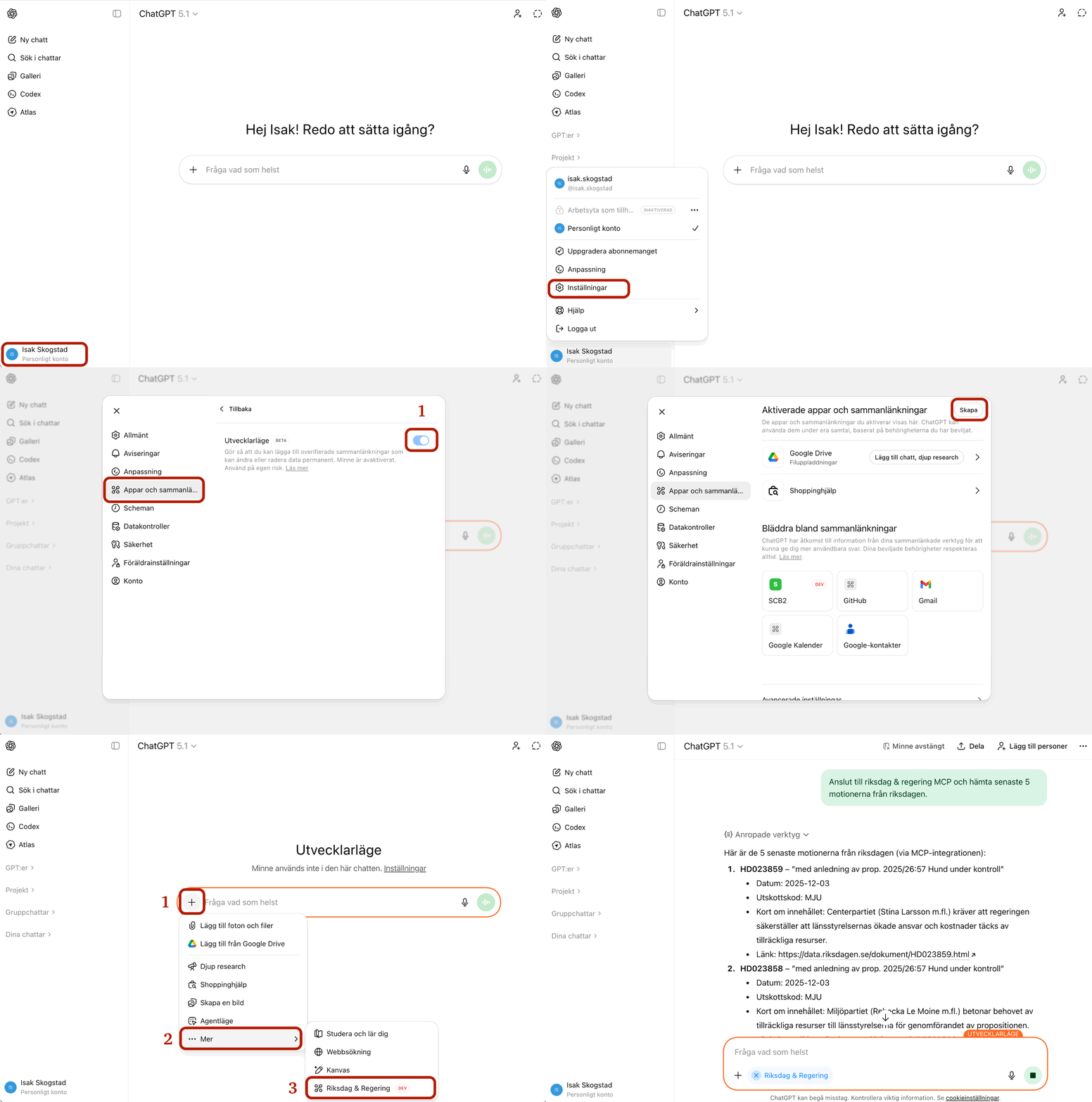
ChatGPT
- Open settings and enable Developer Mode
- Go to Connectors → Add Connection
- Enter URL:
https://oecd-mcp.onrender.com/mcp - Click Connect
Video Guide
Claude (Web)
- Go to https://claude.ai and log in
- Click your profile (bottom left) → Settings
- Go to Developer or Integrations
- Click Add MCP Server or Connect
- Name:
OECD, URL:https://oecd-mcp.onrender.com/mcp - Click Connect
Video Guide
https://github.com/user-attachments/assets/Claude-Web-MCP-guide.mp4

2. Local Installation
Claude Desktop
1. Clone and build:
git clone https://github.com/isakskogstad/OECD-MCP.git
cd OECD-MCP
npm install && npm run build
2. In Claude Desktop:
- Settings → Developer (not Connectors!)
- Click "Edit Config"
3. Add to the JSON file:
{
  "mcpServers": {
    "oecd": {
      "command": "node",
      "args": ["/absolute/path/to/OECD-MCP/dist/index.js"]
    }
  }
}
4. Save and restart Claude Desktop
Note: Local installation uses stdio transport via the Developer section, not Connectors.
Claude Code
Remote Server:
claude mcp add --transport http oecd https://oecd-mcp.onrender.com/mcp
Local (from source):
# After git clone and npm install (see above)
claude mcp add oecd node /absolute/path/to/dist/index.js
Verify: claude mcp list
OpenAI Codex
Remote Server (HTTP)
~/.codex/config.toml:
[mcp.oecd]
url = "https://oecd-mcp.onrender.com/mcp"
transport = "http"
Local Installation
1. Clone and build (if not already done):
git clone https://github.com/isakskogstad/OECD-MCP.git
cd OECD-MCP
npm install && npm run build
2. Configure stdio transport:
~/.codex/config.toml:
[mcp.oecd]
command = "node"
args = ["/absolute/path/to/OECD-MCP/dist/index.js"]
transport = "stdio"
Windows:
[mcp.oecd]
command = "node"
args = ["C:\\Users\\username\\OECD-MCP\\dist\\index.js"]
transport = "stdio"

Features
🇸🇪 Funktioner (Svenska)
Servern ansluter till OECD SDMX API och ger tillgång till 5,000+ dataset i 17 kategorier.
OECD SDMX API Tillgång till kvartalsvis nationalräkenskaper (QNA), huvudsakliga ekonomiska indikatorer (MEI), hälsostatistik, utbildningsdata, miljöindikatorer och mer från 38 OECD-medlemsländer plus partnerekonomier.
MCP-servern implementerar MCP-protokollet med stöd för:
- 9 verktyg — Dataset-upptäckt (5) och dataåtkomst (4)
- 7 resurser — Kategorier, länder, filterguide, ordlista, LLM-instruktioner
- 7 promptmallar — Ekonomisk analys, landsjämförelser, nordiskt fokus
The server connects to the OECD SDMX API providing access to 5,000+ datasets across 17 categories:
OECD SDMX API Access to quarterly national accounts (QNA), main economic indicators (MEI), health statistics, education data, environmental indicators, and more from 38 OECD member countries plus partner economies.
The MCP server implements the MCP protocol with support for:
- 9 tools — Dataset discovery (5) and data access (4)
- 7 resources — Categories, countries, filter guide, glossary, LLM instructions
- 7 prompt templates — Economic analysis, country comparisons, Nordic focus
Tools
| Tool | Description |
|---|---|
search_dataflows | Search for datasets by keyword |
list_dataflows | List datasets by category |
get_categories | List all 17 data categories |
get_popular_datasets | Get commonly used datasets |
search_indicators | Search for specific indicators |
get_data_structure | Get metadata for a dataset |
query_data | Query statistical data |
get_dataflow_url | Generate OECD Data Explorer link |
list_categories_detailed | Detailed category information |
Resources
| Resource | Description |
|---|---|
oecd://categories | 17 data categories with descriptions |
oecd://dataflows/popular | Curated popular datasets |
oecd://countries | ISO 3166-1 alpha-3 country codes |
oecd://filter-guide | SDMX filter syntax guide |
oecd://glossary | Definitions of OECD terms |
oecd://llm-instructions | Instructions for AI assistants |
oecd://api/info | API information |
Prompt Templates
| Prompt | Description |
|---|---|
analyze_economic_trend | Analyze economic trends over time |
compare_countries | Compare data between countries |
get_latest_statistics | Get latest statistics |
explore_dataset | Guided dataset exploration |
find_data_for_question | Find the right dataset for a question |
build_filter | Help building SDMX filters |
nordic_comparison | Compare Nordic countries |
Use Cases
🇸🇪 Användningsområden (Svenska)
Ekonomer & Forskare
Verktyg:
| Verktyg | Beskrivning |
|---|---|
query_data | Fråga BNP, inflation, arbetslöshetsdata |
search_dataflows | Hitta dataset för forskningsfrågor |
get_data_structure | Förstå dataset-dimensioner |
Exempel:
- "Jämför BNP-tillväxt mellan G7-länderna 2020-2024"
- "Analysera inflationstrender i eurozonen"
- "Hitta data om arbetsproduktivitet per sektor"
App-exempel: Mobil ekonomisk brief med BNP-trender och jämförelsediagram.
Policyanalytiker
Verktyg:
| Verktyg | Beskrivning |
|---|---|
get_categories | Bläddra i 17 policyområden |
list_dataflows | Hitta relevanta policy-dataset |
get_dataflow_url | Generera länkar för rapporter |
Exempel:
- "Vilken sjukvårdsutgiftsdata finns för Sverige?"
- "Hitta utbildningsresultatindikatorer för PISA-analys"
- "Jämför miljöpolicyer i nordiska länder"
App-exempel: Hälsostatistik-dashboard med donutdiagram och landjämförelser.
Datajournalister
Verktyg:
| Verktyg | Beskrivning |
|---|---|
search_indicators | Hitta specifika mätvärden |
get_popular_datasets | Få tillgång till ofta citerad data |
query_data | Hämta siffror för artiklar |
Exempel:
- "Hämta senaste arbetslöshetssiffror för EU-länder"
- "Hitta inkomstojämlikhetsdata (Gini-koefficient)"
- "Jämför skatteintäkter som % av BNP"
App-exempel: Produktivitetsjämförelse med stapeldiagram och trendlinjer.
Economists & Researchers
Tools:
| Tool | Description |
|---|---|
query_data | Query GDP, inflation, unemployment data |
search_dataflows | Find datasets for research questions |
get_data_structure | Understand dataset dimensions |
Examples:
- "Compare GDP growth between G7 countries 2020-2024"
- "Analyze inflation trends in the Eurozone"
- "Find data on labor productivity by sector"
App Example:
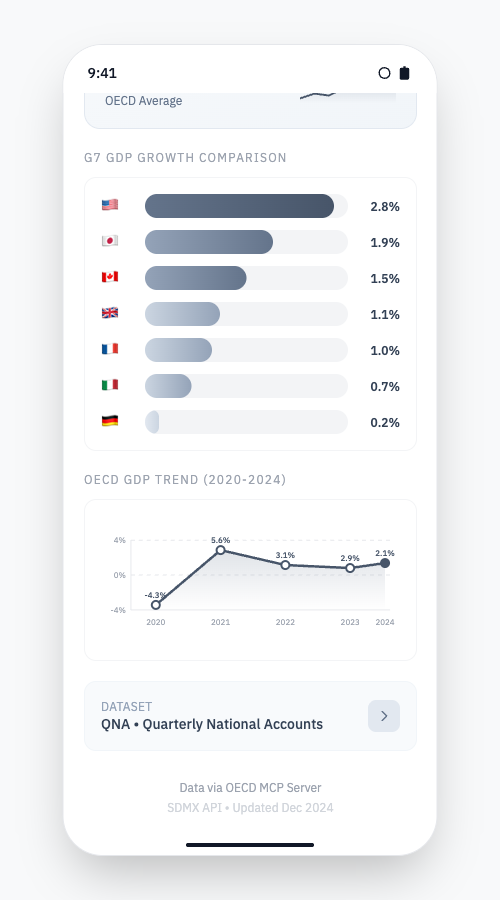
Mobile economic brief with GDP trends, G7 comparison charts, and sparkline visualizations from the QNA dataset.
Policy Analysts
Tools:
| Tool | Description |
|---|---|
get_categories | Browse 17 policy areas |
list_dataflows | Find relevant policy datasets |
| `get_dataflow_u |
README truncated. View full README on GitHub.
Alternatives



Related Skills
Browse all skillsUse when building MCP servers or clients that connect AI systems with external tools and data sources. Invoke for MCP protocol compliance, TypeScript/Python SDKs, resource providers, tool functions.
Export OpenClaw usage data to CSV for analytics tools like Power BI. Hourly aggregates by activity type, model, and channel.
CCXT cryptocurrency exchange library for TypeScript and JavaScript developers (Node.js and browser). Covers both REST API (standard) and WebSocket API (real-time). Helps install CCXT, connect to exchanges, fetch market data, place orders, stream live tickers/orderbooks, handle authentication, and manage errors. Use when working with crypto exchanges in TypeScript/JavaScript projects, trading bots, arbitrage systems, or portfolio management tools. Includes both REST and WebSocket examples.
.NET/C# backend developer for ASP.NET Core APIs with Entity Framework Core. Builds REST APIs, minimal APIs, gRPC services, authentication with Identity/JWT, authorization, database operations, background services, SignalR real-time features. Activates for: .NET, C#, ASP.NET Core, Entity Framework Core, EF Core, .NET Core, minimal API, Web API, gRPC, authentication .NET, Identity, JWT .NET, authorization, LINQ, async/await C#, background service, IHostedService, SignalR, SQL Server, PostgreSQL .NET, dependency injection, middleware .NET.
Build full-stack applications with Supabase (PostgreSQL, Auth, Storage, Real-time, Edge Functions). Use when implementing authentication, database design with RLS, file storage, real-time features, or serverless functions.
Senior Python developer expertise for writing clean, efficient, and well-documented code. Use when: writing Python code, optimizing Python scripts, reviewing Python code for best practices, debugging Python issues, implementing type hints, or when user mentions Python, PEP 8, or needs help with Python data structures and algorithms.