
OKX
Provides read-only access to your OKX cryptocurrency exchange account data including portfolios, positions, and order history for AI-powered trading analytics.
Integrates with OKX cryptocurrency exchange to provide read-only access to account portfolios, trading positions, order history, and account summaries for portfolio management and trading analytics.
What it does
- View portfolio balances and asset allocation
- Check open trading positions
- Access order history and trade records
- Generate account summaries
- Analyze trading performance
Best for
About OKX
OKX is a community-built MCP server published by mbarinov that provides AI assistants with tools and capabilities via the Model Context Protocol. Track your crypto portfolio with OKX. Access portfolio performance, trading positions & order history using this leading cryptocurrency portfolio tracker. It is categorized under finance, analytics data.
How to install
You can install OKX in your AI client of choice. Use the install panel on this page to get one-click setup for Cursor, Claude Desktop, VS Code, and other MCP-compatible clients. This server runs locally on your machine via the stdio transport.
License
OKX is released under the MIT license. This is a permissive open-source license, meaning you can freely use, modify, and distribute the software.
OKX MCP Server





A Model Context Protocol (MCP) server that provides access to OKX trading and portfolio management functionality. This package allows AI assistants to interact with your OKX account to retrieve portfolio information, trading positions, order history, and more.
This MCP server is designed with security as a top priority. Here's what makes it safe to use:
🔒 Built-in Security Features
- Read-Only Access: The server only requires read permissions - it cannot place trades or withdraw funds
- Local Processing: All data is processed locally on your machine and never stored or transmitted to third parties
- No Data Persistence: Your trading data is never saved to disk or cached permanently
- Direct API Communication: Connects directly to OKX APIs without intermediary servers
What You Can Do
📱 See It In Action
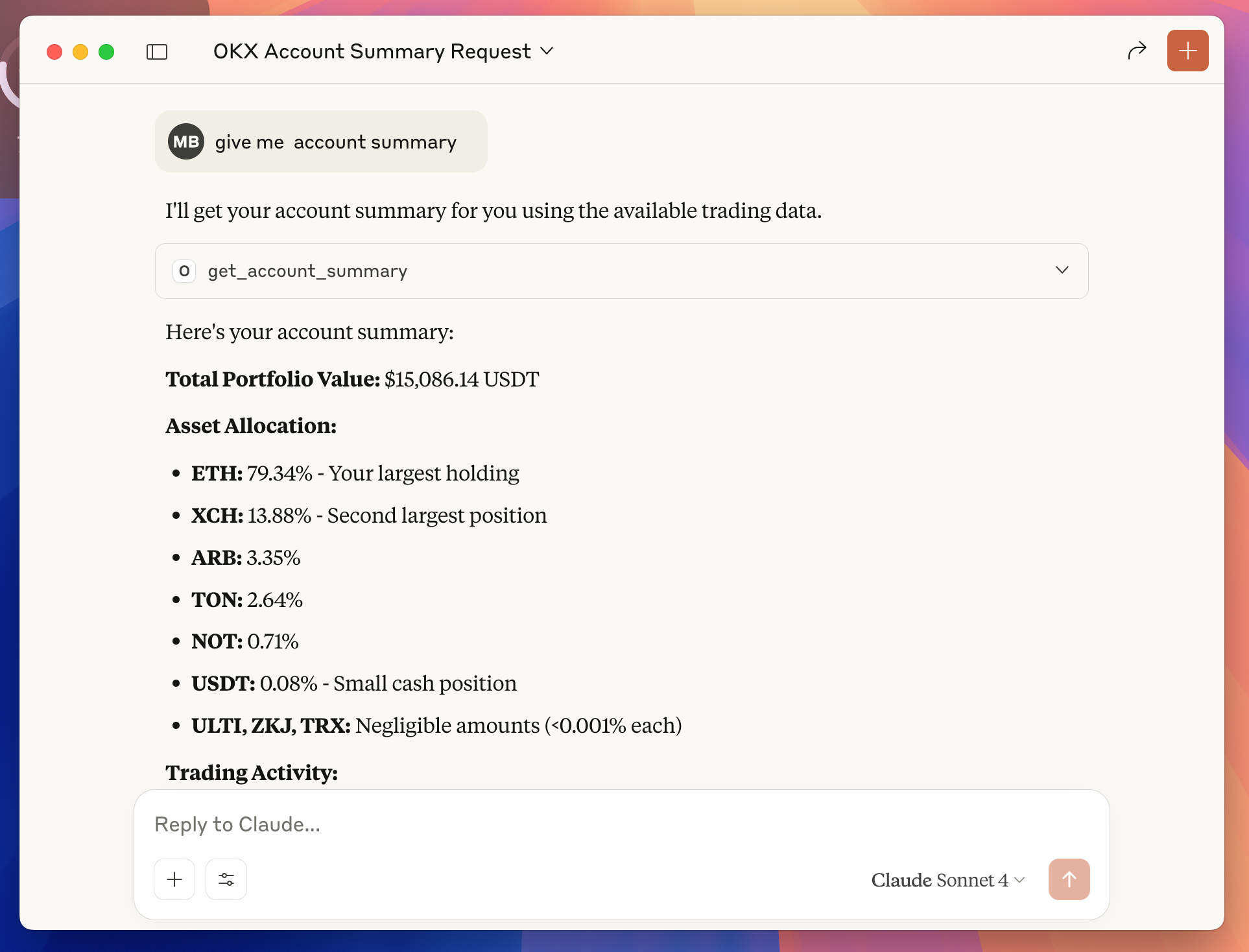
Example: Ask Claude "give me account summary" and instantly get your portfolio breakdown, asset allocation, and trading insights—all from your OKX account data.
Transform your trading experience with AI-powered portfolio insights. Once configured, you can ask Claude natural language questions about your OKX account:
💰 Portfolio Management
- "What's my current portfolio balance?"
- "Show me my asset allocation"
- "Which coins do I own and how much are they worth?"
- "What's my biggest position by value?"
📊 Trading Analysis
- "Show me my open positions with P&L"
- "What orders do I have pending?"
- "Analyze my BTC trading history from last month"
- "How did my ETH trades perform this week?"
🎯 Smart Insights
- "What's my total unrealized profit/loss?"
- "Which assets have gained the most value?"
- "Give me a summary of my trading activity"
- "How is my portfolio performing today?"
🔍 Detailed Reporting
- "Create a detailed report of my portfolio"
- "Show me all my completed trades for BTC-USDT"
- "What's my trading volume for this month?"
- "Break down my portfolio by percentage"
The AI can provide instant analysis, generate insights, and help you make informed trading decisions—all through simple conversation.
Quick Start
Step 1: Create OKX API Credentials
-
Access Your OKX Account:
-
Open API Management:
- Navigate directly to: https://www.okx.com/account/my-api
-
Create Your API Key:
- Click "Create API Key"
- Enter a descriptive name (e.g., "MCP Server")
- Create and save a secure passphrase (you'll need this later)
-
Set Read-Only Permissions:
- Read: ✅ Enable (required for portfolio access)
- Trade: ❌ Disable (not needed for this MCP server)
- Withdraw: ❌ Disable (not needed for this MCP server)
-
Generate and Copy Credentials:
- Click "Submit All" to create the API key
- Click "Show info" to reveal your credentials
- Click "Copy API key info" to copy all details
Your credentials will look like this:
apikey = "12345678-abcd-1234-efgh-123456789abc" secretkey = "ABCD1234EFGH5678IJKL9012MNOP3456" IP = "" API key name = "MCP Server" Permissions = "Read" -
Secure Your Credentials:
- Save the API Key, Secret Key, and Passphrase in a secure location
- ⚠️ Critical: The Secret Key is only shown once - save it immediately!
- These credentials will be used to configure Claude Desktop in the next step
Step 2: Install Prerequisites
Before configuring Claude Desktop, you need to install Node.js.
Install Node.js
Option 1: Download from Official Website
- Visit https://nodejs.org
- Download the LTS (Long Term Support) version for your operating system
- Run the installer and follow the setup wizard
Step 3: Configure Claude Desktop
-
Open Claude Desktop Settings:
- Launch Claude Desktop application
- Click on Settings (gear icon in the bottom-left corner)
-
Access Developer Section:
- Scroll down to the bottom of the settings panel
- Click on "Developer" section
-
Edit Configuration:
- Click on "Edit Config" button
- This will open the
claude_desktop_config.jsonfile in your default text editor
-
Add OKX MCP Server Configuration:
- Replace the entire file content with this configuration:
{ "mcpServers": { "okx-mcp": { "command": "okx-mcp", "env": { "OKX_API_KEY": "your_api_key_here", "OKX_API_SECRET": "your_secret_key_here", "OKX_API_PASSPHRASE": "your_passphrase_here" } } } } -
Update Your Credentials:
- Replace
your_api_key_herewith your actual API Key from Step 1 - Replace
your_secret_key_herewith your actual Secret Key from Step 1 - Replace
your_passphrase_herewith your actual Passphrase from Step 1 - Save the file and close the text editor
- Replace
-
Restart Claude Desktop:
- Close Claude Desktop completely
- Reopen the application to load the new configuration
-
Test the Connection:
- Start a new conversation in Claude Desktop
- Try asking: "Show my portfolio" or "Get my account summary"
- If successful, Claude will retrieve and display your OKX account data
Available Tools
This MCP server provides the following tools for AI assistants:
1. Get Account Summary
- Tool:
get_account_summary - Description: Get aggregated portfolio metrics including total value and asset allocation
- Parameters: None
2. Get Portfolio
- Tool:
get_portfolio - Description: Get detailed information about all assets in your account
- Parameters: None
- Returns: List of currencies with balances, available amounts, and USDT values
3. Get Positions
- Tool:
get_positions - Description: Get all open derivative trading positions
- Parameters: None
- Returns: Position details including size, entry price, and unrealized P&L
4. Get Open Orders
- Tool:
get_open_orders - Description: Get all currently open trading orders
- Parameters: None
- Returns: Order details including symbol, type, price, and status
5. Get Order History
- Tool:
get_order_history - Description: Get historical filled orders for analysis
- Parameters:
instId(required): Instrument ID (e.g., "BTC-USDT")begin(optional): Start timestampend(optional): End timestamp
- Returns: Historical order data with execution details
Development
Local Development
# Clone the repository
git clone https://github.com/maxbarinov/okx-mcp.git
cd okx-mcp

# Install dependencies
npm install

# Set up environment variables
cp .env.example .env
# Edit .env with your OKX API credentials

# Run in development mode
npm run dev
Building
npm run build
Project Structure
src/
├── services/
│   └── okxApiClient.ts    # OKX API client wrapper
└── tools/                # MCP tool implementations
    ├── get_account_summary.ts
    ├── get_portfolio.ts
    ├── get_positions.ts
    ├── get_open_orders.ts
    └── get_order_history.ts
Contributing
- Fork the repository
- Create a feature branch
- Make your changes
- Add tests if applicable
- Submit a pull request
License
MIT
Support
If you encounter any issues or have questions:
- Check the GitHub Issues
- Create a new issue with detailed information about your problem
- Include your environment details and error messages (without sensitive data)
Related Projects
Alternatives



Related Skills
Browse all skillsAnalyze Google Analytics data, review website performance metrics, identify traffic patterns, and suggest data-driven improvements. Use when the user asks about analytics, website metrics, traffic analysis, conversion rates, user behavior, or performance optimization.
Transform data into compelling narratives using visualization, context, and persuasive structure. Use when presenting analytics to stakeholders, creating data reports, or building executive presentations.
Advanced content and topic research skill that analyzes trends across Google Analytics, Google Trends, Substack, Medium, Reddit, LinkedIn, X, blogs, podcasts, and YouTube to generate data-driven article outlines based on user intent analysis
YouTube Data API v3 analytics toolkit. Analyze YouTube channels, videos, and search results. Use when the user asks to: check YouTube channel stats, analyze video performance, compare channels, search for videos, get subscriber counts, view engagement metrics, find trending videos, get channel uploads, or analyze YouTube competition. Requires a YouTube Data API v3 key from Google Cloud Console.
Expert data scientist for advanced analytics, machine learning, and statistical modeling. Handles complex data analysis, predictive modeling, and business intelligence. Use PROACTIVELY for data analysis tasks, ML modeling, statistical analysis, and data-driven insights.
Comprehensive personal finance management system for analyzing transaction data, generating insights, creating visualizations, and providing actionable financial recommendations. Use when users need to analyze spending patterns, track budgets, visualize financial data, extract transactions from PDFs, calculate savings rates, identify spending trends, generate financial reports, or receive personalized budget recommendations. Triggers include requests like "analyze my finances", "track my spending", "create a financial report", "extract transactions from PDF", "visualize my budget", "where is my money going", "financial insights", "spending breakdown", or any finance-related analysis tasks.