
Opentrons
Connects to Opentrons laboratory robots for natural language control of protocols, runs, and hardware operations. Includes comprehensive API documentation tools for developers.
Integrates with Opentrons laboratory robots to enable natural language control of protocol upload, run management, hardware operations, and system monitoring for both OT-2 and Flex platforms.
What it does
- Upload and manage laboratory protocols
- Start, stop and monitor robot runs
- Control robot hardware (homing, lights, basic operations)
- Search Opentrons API endpoints and documentation
- Monitor robot health and connectivity status
- Browse API endpoints by category
Best for
About Opentrons
Opentrons is a community-built MCP server published by yerbymatey that provides AI assistants with tools and capabilities via the Model Context Protocol. Integrate Opentrons with leading lab automation systems for seamless control of liquid handling robots and laboratory automation solutions. It is categorized under developer tools.
How to install
You can install Opentrons in your AI client of choice. Use the install panel on this page to get one-click setup for Cursor, Claude Desktop, VS Code, and other MCP-compatible clients. This server runs locally on your machine via the stdio transport.
License
Opentrons is released under the MIT license. This is a permissive open-source license, meaning you can freely use, modify, and distribute the software.
Opentrons MCP Server
A Model Context Protocol (MCP) server for Opentrons robot automation and API documentation. This tool provides both comprehensive API documentation and direct robot control capabilities for Opentrons Flex and OT-2 robots.
Features
API Documentation Tools
- Search Endpoints: Find API endpoints by functionality, method, or keyword
- Endpoint Details: Get comprehensive information about specific API endpoints
- Category Browsing: List endpoints by functional category
- API Overview: High-level overview of the entire Opentrons HTTP API
Robot Automation Tools
- Protocol Management: Upload, list, and manage protocol files
- Run Control: Create runs, start/stop execution, monitor progress
- Robot Health: Check connectivity and system status
- Hardware Control: Home robot, control lights, and basic operations
Installation
From npm (recommended)
npm install -g opentrons-mcp
From source
git clone https://github.com/yerbymatey/opentrons-mcp.git
cd opentrons-mcp
npm install
Configuration
Add to your Claude Desktop configuration file:
macOS: ~/Library/Application Support/Claude/claude_desktop_config.json
Windows: %APPDATA%\Claude\claude_desktop_config.json
{
  "mcpServers": {
    "opentrons": {
      "command": "opentrons-mcp",
      "args": []
    }
  }
}
If installed from source:
{
  "mcpServers": {
    "opentrons": {
      "command": "node",
      "args": ["/path/to/opentrons-mcp/index.js"]
    }
  }
}
Available Tools
Documentation Tools
search_endpoints
Search Opentrons HTTP API endpoints by functionality, method, path, or keyword.
query(required): Search termmethod(optional): Filter by HTTP method (GET, POST, PUT, DELETE, PATCH)tag(optional): Filter by API categoryinclude_deprecated(optional): Include deprecated endpoints
get_endpoint_details
Get comprehensive details about a specific API endpoint.
method(required): HTTP methodpath(required): API endpoint path
list_by_category
List all endpoints in a specific functional category.
category(required): API category (Health, Control, Protocol Management, etc.)
get_api_overview
Get high-level overview of the Opentrons HTTP API structure and capabilities.
Automation Tools
upload_protocol
Upload a protocol file to an Opentrons robot.
robot_ip(required): Robot IP addressfile_path(required): Path to protocol file (.py or .json)protocol_kind(optional): "standard" or "quick-transfer" (default: "standard")key(optional): Client tracking keyrun_time_parameters(optional): Runtime parameter values
get_protocols
List all protocols stored on the robot.
robot_ip(required): Robot IP addressprotocol_kind(optional): Filter by protocol type
create_run
Create a new protocol run on the robot.
robot_ip(required): Robot IP addressprotocol_id(required): ID of protocol to runrun_time_parameters(optional): Runtime parameter values
control_run
Control run execution (play, pause, stop, resume).
robot_ip(required): Robot IP addressrun_id(required): Run ID to controlaction(required): "play", "pause", "stop", or "resume-from-recovery"
get_runs
List all runs on the robot.
robot_ip(required): Robot IP address
get_run_status
Get detailed status of a specific run.
robot_ip(required): Robot IP addressrun_id(required): Run ID to check
robot_health
Check robot health and connectivity.
robot_ip(required): Robot IP address
control_lights
Turn robot lights on or off.
robot_ip(required): Robot IP addresson(required): true to turn lights on, false to turn off
home_robot
Home robot axes or specific pipette.
robot_ip(required): Robot IP addresstarget(optional): "robot" for all axes, "pipette" for specific mountmount(optional): "left" or "right" (required if target is "pipette")
Usage Examples
With Claude Desktop
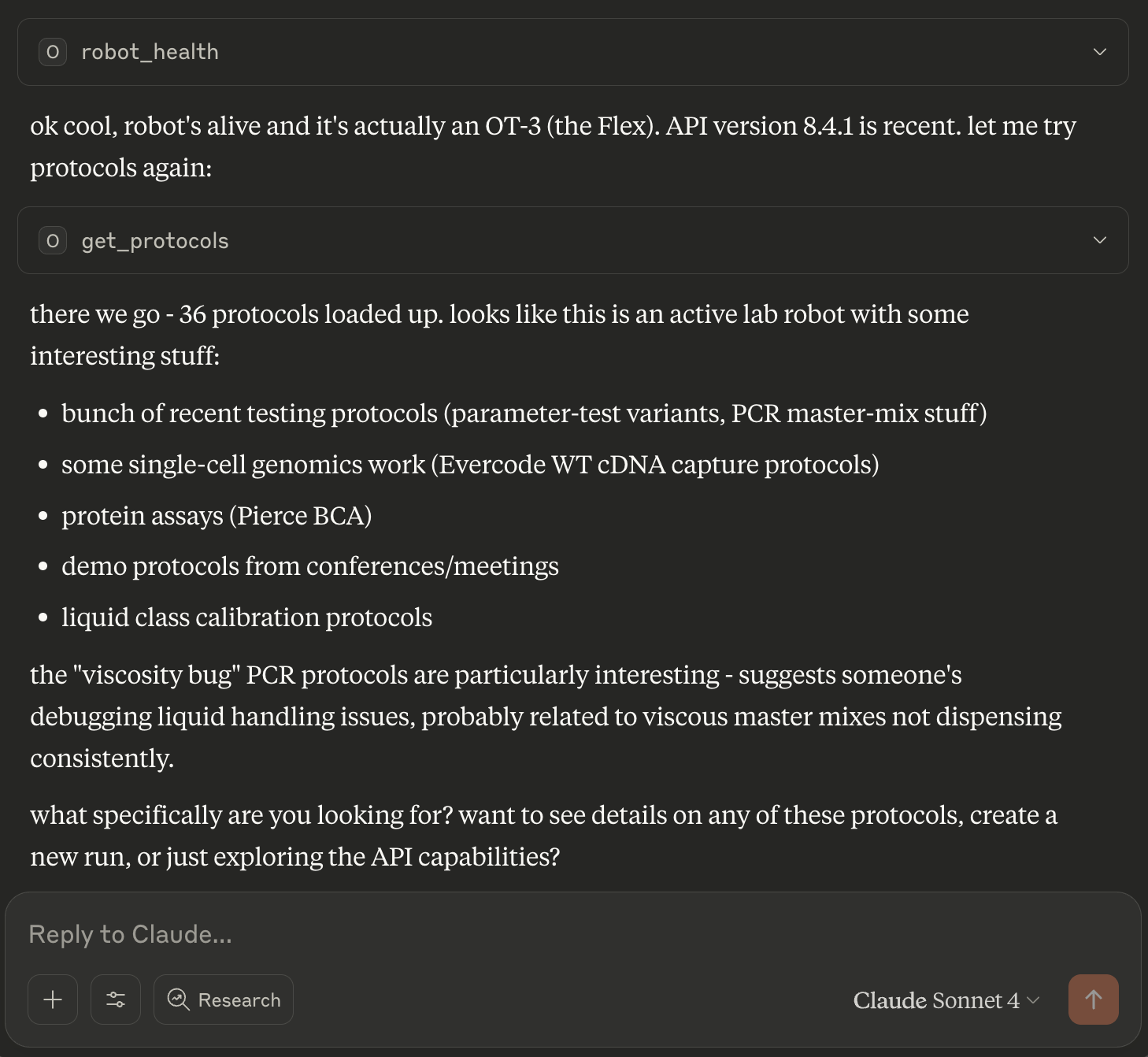 Screenshot showing the Opentrons MCP server in action with Claude Desktop after asking for current protocols with opentrons for the Flex, give it the robot ip!
Once configured, you can use natural language to control your robot:
Upload a protocol:
Upload the protocol file at /path/to/my_protocol.py to my robot at 192.168.1.100
Check robot status:
Check if my robot at 192.168.1.100 is healthy and ready
Run a protocol:
List all protocols on my robot, then create and start a run for the latest one
Monitor progress:
Show me the status of run abc123 on my robot
Programmatic Usage
import { Client } from "@modelcontextprotocol/sdk/client/index.js";

// Connect to MCP server
const client = new Client(/* transport */);

// Upload protocol
await client.request({
  method: "tools/call",
  params: {
    name: "upload_protocol",
    arguments: {
      robot_ip: "192.168.1.100",
      file_path: "/path/to/protocol.py",
      protocol_kind: "standard"
    }
  }
});
Requirements
- Node.js 18+
- Opentrons robot with HTTP API enabled (port 31950)
- Network connectivity between client and robot
Robot Setup
Ensure your Opentrons robot is:
- Connected to the same network as your client
- Running robot software version 7.0.0+
- Accessible on port 31950 (default for HTTP API)
You can verify connectivity by visiting http://your-robot-ip:31950/health in a browser.
API Reference
This tool provides access to the complete Opentrons HTTP API, including:
- Protocol Management: Upload, analyze, and manage protocol files
- Run Management: Create, control, and monitor protocol runs
- Hardware Control: Robot movement, homing, lighting, and calibration
- System Management: Health monitoring, settings, and diagnostics
- Module Control: Temperature modules, magnetic modules, thermocyclers
- Data Management: CSV files for runtime parameters
For detailed API documentation, use the search and documentation tools provided by this MCP server.
Troubleshooting
Cannot connect to robot
- Verify robot IP address is correct
- Ensure robot is powered on and connected to network
- Check that port 31950 is accessible
- Confirm robot software is running
Protocol upload fails
- Verify file path exists and is readable
- Ensure protocol file is valid Python (.py) or JSON format
- Check available disk space on robot
- Confirm protocol is compatible with robot type (OT-2 vs Flex)
Run execution issues
- Verify all required labware and modules are attached
- Check robot calibration status
- Ensure protocol analysis completed successfully
- Confirm no hardware errors or conflicts
Contributing
Contributions are welcome! Please feel free to submit issues and pull requests.
License
No license go brazy
Related Projects
Alternatives



Related Skills
Browse all skillsUI design system toolkit for Senior UI Designer including design token generation, component documentation, responsive design calculations, and developer handoff tools. Use for creating design systems, maintaining visual consistency, and facilitating design-dev collaboration.
Answer questions about the AI SDK and help build AI-powered features. Use when developers: (1) Ask about AI SDK functions like generateText, streamText, ToolLoopAgent, embed, or tools, (2) Want to build AI agents, chatbots, RAG systems, or text generation features, (3) Have questions about AI providers (OpenAI, Anthropic, Google, etc.), streaming, tool calling, structured output, or embeddings, (4) Use React hooks like useChat or useCompletion. Triggers on: "AI SDK", "Vercel AI SDK", "generateText", "streamText", "add AI to my app", "build an agent", "tool calling", "structured output", "useChat".
Use when working with the OpenAI API (Responses API) or OpenAI platform features (tools, streaming, Realtime API, auth, models, rate limits, MCP) and you need authoritative, up-to-date documentation (schemas, examples, limits, edge cases). Prefer the OpenAI Developer Documentation MCP server tools when available; otherwise guide the user to enable `openaiDeveloperDocs`.
Guide for building TypeScript CLIs with Bun. Use when creating command-line tools, adding subcommands to existing CLIs, or building developer tooling. Covers argument parsing, subcommand patterns, output formatting, and distribution.
Guide developers through setting up development environments with proper tools, dependencies, and configurations
Integrate Vercel AI SDK applications with You.com tools (web search, AI agent, content extraction). Use when developer mentions AI SDK, Vercel AI SDK, generateText, streamText, or You.com integration with AI SDK.