
Pandoc Markdown to PowerPoint
Converts Markdown content or files to PowerPoint presentations using pandoc, with support for automatic diagram rendering and custom templates.
Converts Markdown content to PowerPoint presentations using pandoc with automatic diagram rendering for Mermaid, PlantUML, and Graphviz code blocks, supporting custom templates and file path inputs for streamlined presentation generation from documentation and notes.
What it does
- Convert Markdown text to PPTX presentations
- Process Markdown files into PowerPoint format
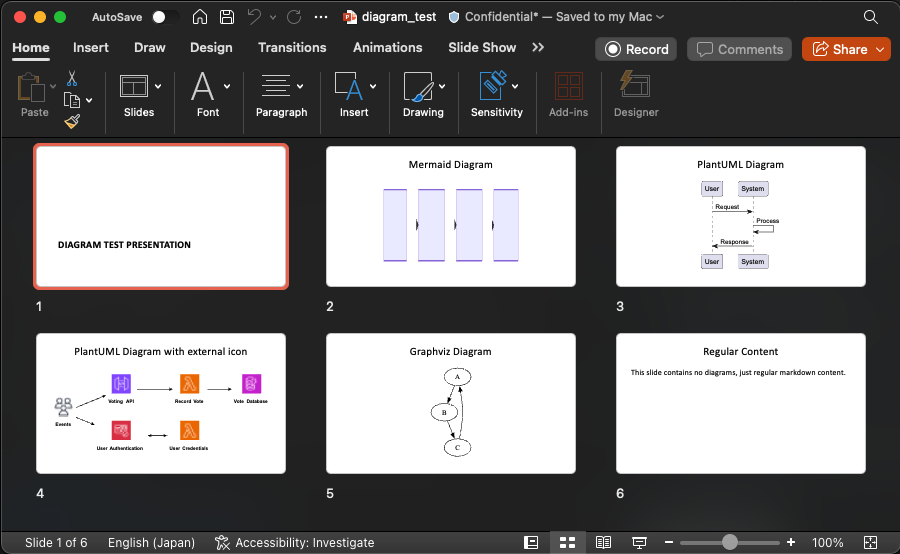
- Render Mermaid, PlantUML, and Graphviz diagrams automatically
- Apply custom PowerPoint templates for branding
- Preserve Markdown formatting and structure in slides
Best for
About Pandoc Markdown to PowerPoint
Pandoc Markdown to PowerPoint is a community-built MCP server published by maekawataiki that provides AI assistants with tools and capabilities via the Model Context Protocol. Pandoc Markdown to PowerPoint converts Markdown to PowerPoint with diagrams, templates, and custom file paths for fast documentation presentations. It is categorized under productivity. This server exposes 1 tool that AI clients can invoke during conversations and coding sessions.
How to install
You can install Pandoc Markdown to PowerPoint in your AI client of choice. Use the install panel on this page to get one-click setup for Cursor, Claude Desktop, VS Code, and other MCP-compatible clients. This server runs locally on your machine via the stdio transport.
License
Pandoc Markdown to PowerPoint is released under the MIT license. This is a permissive open-source license, meaning you can freely use, modify, and distribute the software.
Tools (1)
Converts Markdown content to PowerPoint (PPTX) format. 🚨 REQUIREMENTS: 1. Input: Only Markdown format is supported 2. Output: Only PPTX format is supported 3. File Path: Complete output path with filename and .pptx extension is required ✅ Usage Example: 'Convert this markdown to PowerPoint and save as /presentations/demo.pptx' 🎨 PPTX STYLING: * Use template parameter to apply custom PowerPoint templates * Create templates with your branding, fonts, and slide layouts * Example: 'Convert markdown to PPTX using /templates/theme.pptx as template and save as /presentations/pitch.pptx' ➡️ Diagram Support: * Diagram using mermaid, plantuml, graphviz is supported by default. Referencing external resource in plantuml is also supported. * Example: ```plantuml @startuml Two Modes - Technical View ' Uncomment the line below for "dark mode" styling '!$AWS_DARK = true !define AWSPuml https://raw.githubusercontent.com/awslabs/aws-icons-for-plantuml/v20.0/dist !include AWSPuml/AWSCommon.puml !include AWSPuml/AWSSimplified.puml !include AWSPuml/General/Users.puml !include AWSPuml/NetworkingContentDelivery/APIGateway.puml !include AWSPuml/SecurityIdentityCompliance/Cognito.puml !include AWSPuml/Compute/Lambda.puml !include AWSPuml/Database/DynamoDB.puml left to right direction Users(sources, "Events", "millions of users") APIGateway(votingAPI, "Voting API", "user votes") Cognito(userAuth, "User Authentication", "jwt to submit votes") Lambda(generateToken, "User Credentials", "return jwt") Lambda(recordVote, "Record Vote", "enter or update vote per user") DynamoDB(voteDb, "Vote Database", "one entry per user") sources --> userAuth sources --> votingAPI userAuth <--> generateToken votingAPI --> recordVote recordVote --> voteDb @enduml ``` 📋 Creating Reference Documents: * Generate PPTX template: pandoc -o template.pptx --print-default-data-file reference.pptx * Customize in PowerPoint: fonts, colors, slide layouts
mcp-pandoc-md2pptx: Markdown to PowerPoint Converter
A Model Context Protocol server for converting Markdown content to PowerPoint (PPTX) presentations using pandoc.
Overview
This MCP server provides a simple tool to transform Markdown content into PowerPoint presentations while preserving formatting and structure. Perfect for creating presentations from documentation, notes, or any Markdown content.
Tools
convert-contents- Converts Markdown content to PowerPoint (PPTX) format
- Inputs:
contents(string): Markdown content to convert (required if input_file not provided)input_file(string): Path to Markdown input file (required if contents not provided)output_file(string): Complete path for PPTX output file (required)template(string): Path to a template PPTX document to use for styling (optional)
Usage & Configuration
{
  "mcpServers": {
    "mcp-pandoc-md2pptx": {
      "command": "uvx",
      "args": ["mcp-pandoc-md2pptx"]
    }
  }
}
Prerequisites
-
Pandoc Installation
# macOS brew install pandoc # Ubuntu/Debian sudo apt-get install pandoc # Windows # Download from: https://pandoc.org/installing.html -
UV Package Installation
# macOS
brew install uv

# Windows/Linux
pip install uv
Examples
Basic Conversion
"Convert this markdown to PowerPoint and save as /presentations/demo.pptx:
# My Presentation
## Slide 1
Content here"
File Conversion
"Convert /path/to/input.md to PPTX and save as /path/to/output.pptx"
With Custom Template
"Convert markdown to PPTX using /templates/theme.pptx as template and save as /presentations/styled.pptx"
Template Support
Create custom PowerPoint templates for consistent branding:
-
Generate default template:
pandoc -o template.pptx --print-default-data-file reference.pptx -
Customize in PowerPoint with your fonts, colors, and slide layouts
-
Use in conversion:
"Convert content using /path/to/template.pptx as template"
Installation
Option 1: Manual Configuration
Add to your Claude Desktop config:
- macOS:
~/Library/Application Support/Claude/claude_desktop_config.json - Windows:
%APPDATA%/Claude/claude_desktop_config.json
{
  "mcpServers": {
    "mcp-pandoc-md2pptx": {
      "command": "uvx",
      "args": ["mcp-pandoc-md2pptx"]
    }
  }
}
Option 2: Smithery (Automatic)
npx -y @smithery/cli install mcp-pandoc-md2pptx --client claude
Development
Testing
uv run pytest
Building
uv sync
uv build
Publishing
uv publish
Contributing
- Report Issues: GitHub Issues
- Submit Pull Requests: Improve the codebase or add features
Acknowledgement
Special thanks to MCP Pandoc and pandoc-ext/diagram
Simple, focused Markdown to PowerPoint conversion via MCP
Alternatives




Related Skills
Browse all skillsConvert Markdown to Word, PowerPoint, and PDF using Pandoc - the universal document converter
Convert HTML/Markdown to PowerPoint presentations using Marp
Convert Markdown files to HTML similar to `marked.js`, `pandoc`, `gomarkdown/markdown`, or similar tools; or writing custom script to convert markdown to html and/or working on web template systems like `jekyll/jekyll`, `gohugoio/hugo`, or similar web templating systems that utilize markdown documents, converting them to html. Use when asked to "convert markdown to html", "transform md to html", "render markdown", "generate html from markdown", or when working with .md files and/or web a templating system that converts markdown to HTML output. Supports CLI and Node.js workflows with GFM, CommonMark, and standard Markdown flavors.
Convert Office documents (Word, Excel, PowerPoint, PDF) to Markdown using Microsoft's markitdown
Convert documents between 40+ formats using pandoc CLI. Handles Markdown ↔ Word ↔ PDF ↔ HTML ↔ LaTeX ↔ EPUB with smart defaults, professional templates, and comprehensive tooling.
Generate professional PDFs from Markdown using Pandoc and LaTeX with AI-powered content generation. Creates whitepapers, term sheets, memos, agreements, SAFEs, NDAs, and more.