
Panther Labs
OfficialConnects to Panther Labs' cybersecurity platform for managing security alerts, writing detection rules, and querying security logs. Enables AI-powered alert triage and incident response workflows.
Integrates with Panther Labs' cybersecurity platform to enable security alert triage, data lake querying, detection rule management, and log source analysis for incident response and threat hunting workflows.
What it does
- Query security logs using natural language
- Manage and triage security alerts
- Write and tune detection rules
- Generate AI-powered alert analysis
- Bulk update alert statuses and assignments
- Add comments to security incidents
Best for
About Panther Labs
Panther Labs is an official MCP server published by panther-labs that provides AI assistants with tools and capabilities via the Model Context Protocol. Integrate with Panther Labs to streamline cybersecurity workflows, manage detection rules, triage alerts, and boost incident response. It is categorized under auth security, analytics data.
How to install
You can install Panther Labs in your AI client of choice. Use the install panel on this page to get one-click setup for Cursor, Claude Desktop, VS Code, and other MCP-compatible clients. This server runs locally on your machine via the stdio transport.
License
Panther Labs is released under the Apache-2.0 license. This is a permissive open-source license, meaning you can freely use, modify, and distribute the software.
Panther MCP Server

Panther's Model Context Protocol (MCP) server provides functionality to:
- Write and tune detections from your IDE
- Interactively query security logs using natural language
- Triage, comment, and resolve one or many alerts
Available Tools
Alerts
| Tool Name | Description | Sample Prompt |
|---|---|---|
add_alert_comment | Add a comment to a Panther alert | "Add comment 'Looks pretty bad' to alert abc123" |
start_ai_alert_triage | Start an AI-powered triage analysis for a Panther alert with intelligent insights and recommendations | "Start AI triage for alert abc123" / "Generate a detailed AI analysis of alert def456" |
get_ai_alert_triage_summary | Retrieve the latest AI triage summary previously generated for a specific alert | "Get the AI triage summary for alert abc123" / "Show me the AI analysis for alert def456" |
get_alert | Get detailed information about a specific alert | "What's the status of alert 8def456?" |
get_alert_events | Get a small sampling of events for a given alert | "Show me events associated with alert 8def456" |
list_alerts | List alerts with comprehensive filtering options (date range, severity, status, etc.) | "Show me all high severity alerts from the last 24 hours" |
bulk_update_alerts | Bulk update multiple alerts with status, assignee, and/or comment changes | "Update alerts abc123, def456, and ghi789 to resolved status and add comment 'Fixed'" |
update_alert_assignee | Update the assignee of one or more alerts | "Assign alerts abc123 and def456 to John" |
update_alert_status | Update the status of one or more alerts | "Mark alerts abc123 and def456 as resolved" |
list_alert_comments | List all comments for a specific alert | "Show me all comments for alert abc123" |
Data Lake
| Tool Name | Description | Sample Prompt |
|---|---|---|
query_data_lake | Execute SQL queries against Panther's data lake with synchronous results | "Query AWS CloudTrail logs for failed login attempts in the last day" |
get_table_schema | Get schema information for a specific table | "Show me the schema for the AWS_CLOUDTRAIL table" |
list_databases | List all available data lake databases in Panther | "List all available databases" |
list_database_tables | List all available tables for a specific database in Panther's data lake | "What tables are in the panther_logs database" |
get_alert_event_stats | Analyze patterns and relationships across multiple alerts by aggregating their event data into time-based statistics | "Show me patterns in events from alerts abc123 and def456" |
Scheduled Queries
| Tool Name | Description | Sample Prompt |
|---|---|---|
list_scheduled_queries | List all scheduled queries with pagination support | "Show me all scheduled queries" / "List the first 25 scheduled queries" |
get_scheduled_query | Get detailed information about a specific scheduled query by ID | "Get details for scheduled query 'weekly-security-report'" |
Sources
| Tool Name | Description | Sample Prompt |
|---|---|---|
list_log_sources | List log sources with optional filters (health status, log types, integration type) | "Show me all healthy S3 log sources" |
get_http_log_source | Get detailed information about a specific HTTP log source by ID | "Show me the configuration for HTTP source 'webhook-collector-123'" |
Detections
| Tool Name | Description | Sample Prompt |
|---|---|---|
list_detections | List detections from Panther with comprehensive filtering support. Supports multiple detection types and filtering by name, state, severity, tags, log types, resource types, output IDs (destinations), and more. Returns outputIDs for each detection showing configured alert destinations | "Show me all enabled HIGH severity rules with tag 'AWS'" / "List disabled policies for S3 resources" / "Find all rules with outputID 'prod-slack'" / "Show me detections that alert to production destinations" |
get_detection | Get detailed information about a specific detection including the detection body and tests. Accepts a list with one detection type: ["rules"], ["scheduled_rules"], ["simple_rules"], or ["policies"] | "Get details for rule ID abc123" / "Get details for policy ID AWS.S3.Bucket.PublicReadACP" |
disable_detection | Disable a detection by setting enabled to false. Supports rules, scheduled_rules, simple_rules, and policies | "Disable rule abc123" / "Disable policy AWS.S3.Bucket.PublicReadACP" |
Global Helpers
| Tool Name | Description | Sample Prompt |
|---|---|---|
list_global_helpers | List global helper functions with comprehensive filtering options (name search, creator, modifier) | "Show me global helpers containing 'aws' in the name" |
get_global_helper | Get detailed information and complete Python code for a specific global helper | "Get the complete code for global helper 'AWSUtilities'" |
Data Models
| Tool Name | Description | Sample Prompt |
|---|---|---|
list_data_models | List data models that control UDM mappings in rules | "Show me all data models for log parsing" |
get_data_model | Get detailed information about a specific data model | "Get the complete details for the 'AWS_CloudTrail' data model" |
Schemas
| Tool Name | Description | Sample Prompt |
|---|---|---|
list_log_type_schemas | List available log type schemas with optional filters | "Show me all AWS-related schemas" |
get_log_type_schema_details | Get detailed information for specific log type schemas | "Get full details for AWS.CloudTrail schema" |
Metrics
| Tool Name | Description | Sample Prompt |
|---|---|---|
get_rule_alert_metrics | Get metrics about alerts grouped by rule | "Show top 10 rules by alert count" |
get_severity_alert_metrics | Get metrics about alerts grouped by severity | "Show alert counts by severity for the last week" |
get_bytes_processed_metrics | Get data ingestion metrics by log type and source | "Show me data ingestion volume by log type" |
Users & Access Management
| Tool Name | Description | Sample Prompt |
|---|---|---|
list_users | List all Panther user accounts with pagination support | "Show me all active Panther users" / "List the first 25 users" |
get_user | Get detailed information about a specific user | "Get details for user ID '[email protected]'" |
get_permissions | Get the current user's permissions | "What permissions do I have?" |
list_roles | List all roles with filtering options (name search, role IDs, sort direction) | "Show me all roles containing 'Admin' in the name" |
get_role | Get detailed information about a specific role including permissions | "Get complete details for the 'Admin' role" |
Panther Configuration
Follow these steps to configure your API credentials and environment.
-
Create an API token in Panther:
-
Navigate to Settings (gear icon) → API Tokens
-
Create a new token with the following permissions (recommended read-only approach to start):
-
View Required Permissions
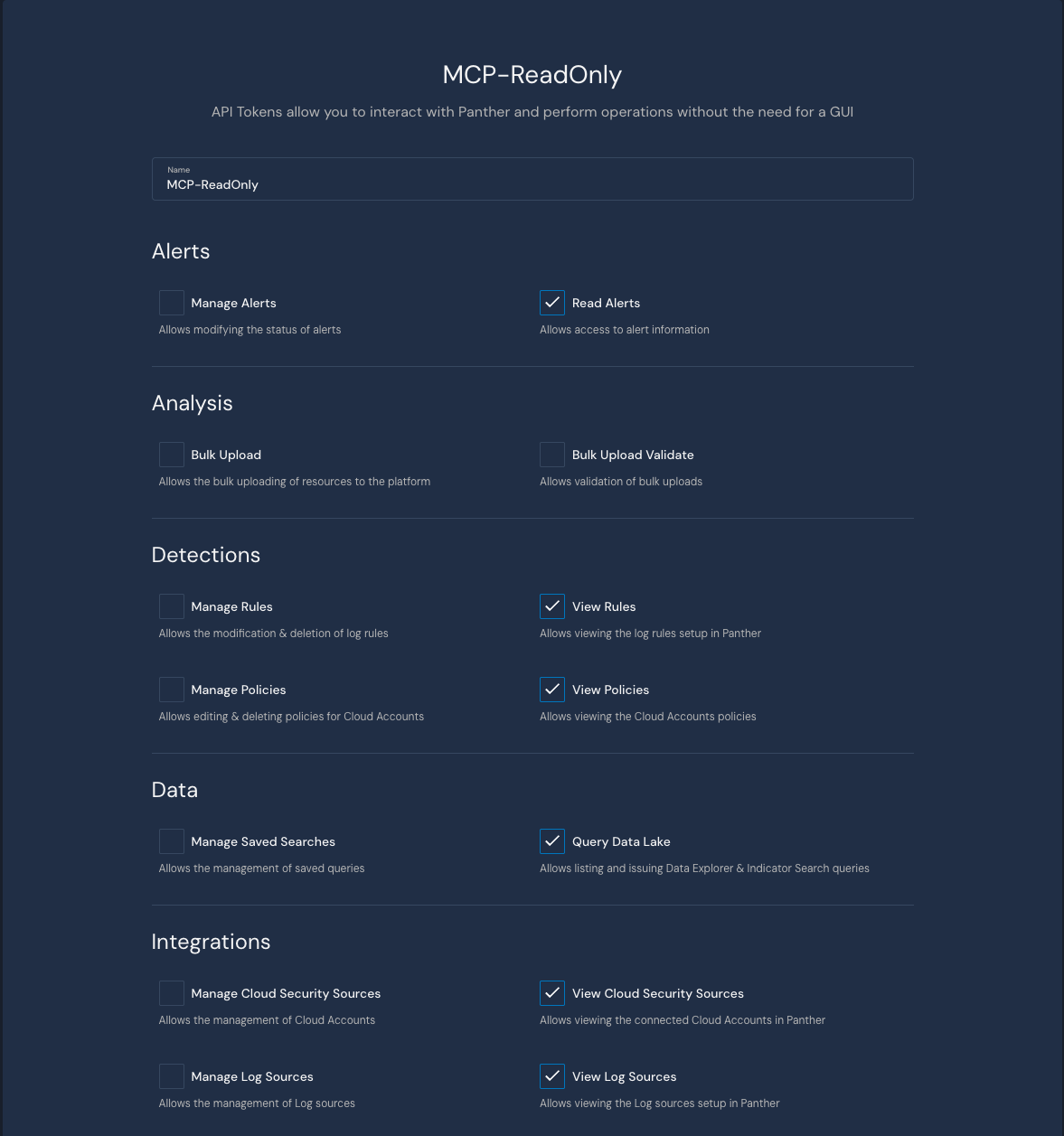
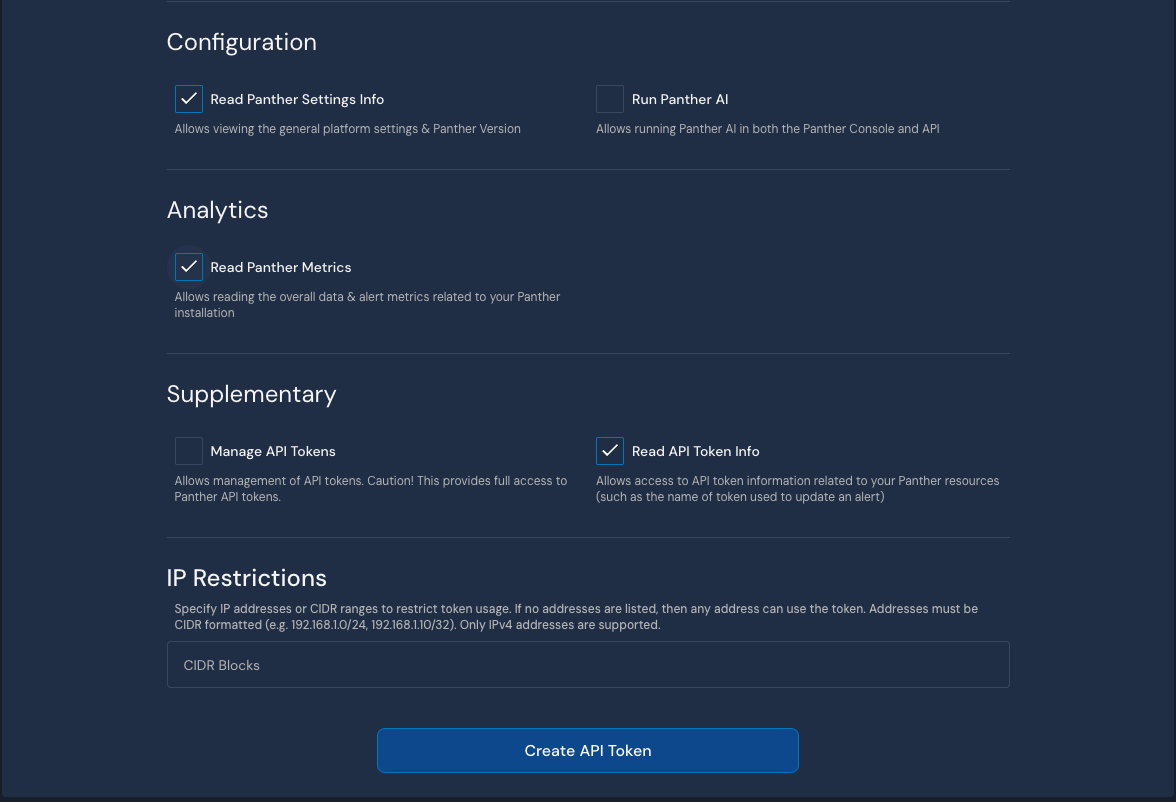
-
-
Store the generated token securely (e.g., 1Password)
-
Copy the Panther instance URL from your browser (e.g.,
https://YOUR-PANTHER-INSTANCE.domain)- Note: This must include
https://
- Note: This must include
MCP Server Installation
Choose one of the following installation methods:
Docker (Recommended)
The easiest way to get started is using our pre-built Docker image:
{
  "mcpServers": {
    "mcp-panther": {
      "command": "docker",
      "args": [
        "run",
        "-i",
        "-e", "PANTHER_INSTANCE_URL",
        "-e", "PANTHER_API_TOKEN",
        "--rm",
        "ghcr.io/panther-labs/mcp-panther"
      ],
      "env": {
        "PANTHER_INSTANCE_URL": "https://YOUR-PANTHER-INSTANCE.domain",
        "PANTHER_API_TOKEN": "YOUR-API-KEY"
      }
    }
  }
}
Version Pinning: For production stability, pin to a specific version tag:
"ghcr.io/panther-labs/mcp-panther:v2.2.0"
Available tags can be found on the GitHub Container Registry.
UVX
For Python users, you can run directly from PyPI using uvx:
-
Configure your MCP client:
{
  "mcpServers": {
    "mcp-panther": {
      "command": "uvx",
      "args": ["mcp-panther"],
      "env": {
        "PANTHER_INSTANCE_URL": "https://YOUR-PANTHER-INSTANCE.domain",
        "PANTHER_API_TOK

---

*README truncated. [View full README on GitHub](https://github.com/panther-labs/mcp-panther).*
Alternatives




Related Skills
Browse all skillsFirebase gives you a complete backend in minutes - auth, database, storage, functions, hosting. But the ease of setup hides real complexity. Security rules are your last line of defense, and they're often wrong. Firestore queries are limited, and you learn this after you've designed your data model. This skill covers Firebase Authentication, Firestore, Realtime Database, Cloud Functions, Cloud Storage, and Firebase Hosting. Key insight: Firebase is optimized for read-heavy, denormalized data. I
Comprehensive backend development skill for building scalable backend systems using NodeJS, Express, Go, Python, Postgres, GraphQL, REST APIs. Includes API scaffolding, database optimization, security implementation, and performance tuning. Use when designing APIs, optimizing database queries, implementing business logic, handling authentication/authorization, or reviewing backend code.
This skill should be used when the user requests to generate, create, or add Row-Level Security (RLS) policies for Supabase databases in multi-tenant or role-based applications. It generates comprehensive RLS policies using auth.uid(), auth.jwt() claims, and role-based access patterns. Trigger terms include RLS, row level security, supabase security, generate policies, auth policies, multi-tenant security, role-based access, database security policies, supabase permissions, tenant isolation.
Comprehensive security scanning and vulnerability detection. Includes input validation, path traversal prevention, CVE detection, and secure coding pattern enforcement. Use when: authentication implementation, authorization logic, payment processing, user data handling, API endpoint creation, file upload handling, database queries, external API integration. Skip when: read-only operations on public data, internal development tooling, static documentation, styling changes.
Implement security best practices for Guidewire InsuranceSuite including OAuth2, JWT handling, API roles, secure Gosu coding, and data protection. Trigger with phrases like "guidewire security", "oauth2 guidewire", "jwt token", "api roles", "secure gosu code", "guidewire authentication".
Detect API security vulnerabilities including injection, broken auth, and data exposure. Use when scanning APIs for security vulnerabilities. Trigger with phrases like "scan API security", "check for vulnerabilities", or "audit API security".