
Pega DX API
Enables natural language interaction with Pega Infinity applications through conversational case management and workflow automation. Uses OAuth2 authentication to access Pega's DX APIs for case handling, assignments, and data operations.
Integrates with Pega Infinity's DX APIs to enable conversational case management and workflow automation through OAuth2 authentication, supporting case creation and retrieval, assignment management, file attachments, bulk actions, and data querying with filtering and aggregation across Pega's enterprise platform.
What it does
- Create and retrieve Pega cases conversationally
- Manage case assignments and workflows
- Handle file attachments in Pega applications
- Perform bulk operations on cases
- Query and filter Pega data with aggregations
- Authenticate via OAuth2 to Pega systems
Best for
About Pega DX API
Pega DX API is a community-built MCP server published by marco-looy that provides AI assistants with tools and capabilities via the Model Context Protocol. Integrate with Pega DX API for secure case management, workflow automation, assignments, and data queries on the Pega Infinity platform. It is categorized under developer tools.
How to install
You can install Pega DX API in your AI client of choice. Use the install panel on this page to get one-click setup for Cursor, Claude Desktop, VS Code, and other MCP-compatible clients. This server runs locally on your machine via the stdio transport.
License
Pega DX API is released under the Apache-2.0 license. This is a permissive open-source license, meaning you can freely use, modify, and distribute the software.
Pega DX MCP Server




Enabling conversational interaction with Pega Infinity™ applications
This package transforms Pega Infinity™ interactions into intuitive, conversational experiences through the Model Context Protocol. By bridging Pega DX API with natural language interfaces, it enables GenAI Agents, IDEs, and other MCP-enabled tools to interact with Pega Infinity™ applications using simple, human-readable commands.
🧪 Experimental
The Pega DX MCP Server is an experimental project exploring the intersection of Model Context Protocol and Pega Infinity™ capabilities. This is not an official Pegasystems product and is not generally available. All commands, parameters, and other features are subject to change or deprecation at any time, with or without notice. Do not use this MCP server for production functionality. This experiment demonstrates the potential of natural language interfaces for Pega Infinity™ interactions. We welcome feedback and contributions to help shape the future of GenAI-powered business automation.
📡 API Support
- Constellation DX API (V2): ✅ Fully supported with 60+ tools
- Traditional DX API (V1): 🚧 Work in progress - Basic support for cases and case types
🌟 Key Features
- 🤖 Natural Language Interface - Demonstrates conversational case creation: "Create a travel claim for John"
- 🔌 Plug-and-Play Integration - Experimental compatibility with GenAI Agents, IDEs, and MCP-enabled tools
- 🧪 Innovation Prototype - Exploring enterprise-grade patterns with comprehensive error handling approaches
- 📡 API Integration Exploration - Investigating access to cases, assignments, attachments, and data operations with 67 comprehensive tools
- ⚡ Performance Research - Experimenting with intelligent caching and optimization strategies
- 🛡️ Security Framework - Implementing OAuth 2.1 with PKCE and role-based access control patterns
🚀 Quick Start
Prerequisites
- Node.js (22+) and npm
- Access to Pega Infinity™ (23+) with DX API enabled
- OAuth 2.1 client credentials
Installation
# Install from npm
npm install -g @marco-looy/pega-dx-mcp
Integration with MCP Clients
Compatible with Claude Desktop, Claude Code, Cline, and many other MCP-enabled applications.
Claude Code (Recommended)
Use the claude mcp add-json command to add the server:
claude mcp add-json pega-dx-mcp '{"command":"npx","args": ["-y", "@marco-looy/pega-dx-mcp"],"env":{"PEGA_BASE_URL":"https://your-pega-instance.com","PEGA_CLIENT_ID":"your-client-id","PEGA_CLIENT_SECRET":"your-client-secret","PEGA_API_VERSION":"v2","PEGA_ASSIGNMENT_TOOLS":"true","PEGA_ATTACHMENT_TOOLS":"true","PEGA_CASE_TOOLS":"true","PEGA_CASETYPE_TOOLS":"true","PEGA_DATAVIEW_TOOLS":"true","PEGA_DOCUMENT_TOOLS":"true","PEGA_FOLLOWER_TOOLS":"true","PEGA_PARTICIPANT_TOOLS":"true","PEGA_RELATED_CASE_TOOLS":"true","PEGA_SERVICE_TOOLS":"true","PEGA_TAG_TOOLS":"true","LOG_LEVEL":"info"}}'
Or for development/local testing, navigate to this project directory and run:
claude mcp add-json pega-dx-mcp '{"command":"node","args": ["src/index.js"],"env":{"PEGA_BASE_URL":"https://your-pega-instance.com","PEGA_CLIENT_ID":"your-client-id","PEGA_CLIENT_SECRET":"your-client-secret","PEGA_API_VERSION":"v2","PEGA_ASSIGNMENT_TOOLS":"true","PEGA_ATTACHMENT_TOOLS":"true","PEGA_CASE_TOOLS":"true","PEGA_CASETYPE_TOOLS":"true","PEGA_DATAVIEW_TOOLS":"true","PEGA_DOCUMENT_TOOLS":"true","PEGA_FOLLOWER_TOOLS":"true","PEGA_PARTICIPANT_TOOLS":"true","PEGA_RELATED_CASE_TOOLS":"true","PEGA_SERVICE_TOOLS":"true","PEGA_TAG_TOOLS":"true","LOG_LEVEL":"info"}}'
Other MCP Clients
Add to your MCP client's configuration file:
{
  "mcpServers": {
    "pega-dx-mcp": {
      "command": "npx",
      "args": ["-y", "@marco-looy/pega-dx-mcp"],
      "env": {
        "PEGA_BASE_URL": "https://your-pega-instance.com",
        "PEGA_CLIENT_ID": "your-client-id",
        "PEGA_CLIENT_SECRET": "your-client-secret",
        "PEGA_API_VERSION":"v2"
      }
    }
  }
}
For local:
{
  "mcpServers": {
    "pega-dx-mcp": {
      "command": "node",
      "args": ["src/index.js"],
      "env": {
        "PEGA_BASE_URL": "https://your-pega-instance.com",
        "PEGA_CLIENT_ID": "your-client-id",
        "PEGA_CLIENT_SECRET": "your-client-secret",
        "PEGA_API_VERSION":"v2"
      }
    }
  }
}
Configuration file locations:
- Claude Desktop: See Claude Desktop documentation how to add an MCP Server
- Claude Code: Use
claude mcp add-jsoncommand above or see configure MCP Servers - Cline: See Cline documentation how to edit Cline MCP settings
TIP: Restart your MCP client and confirm the Pega DX MCP tools are available.
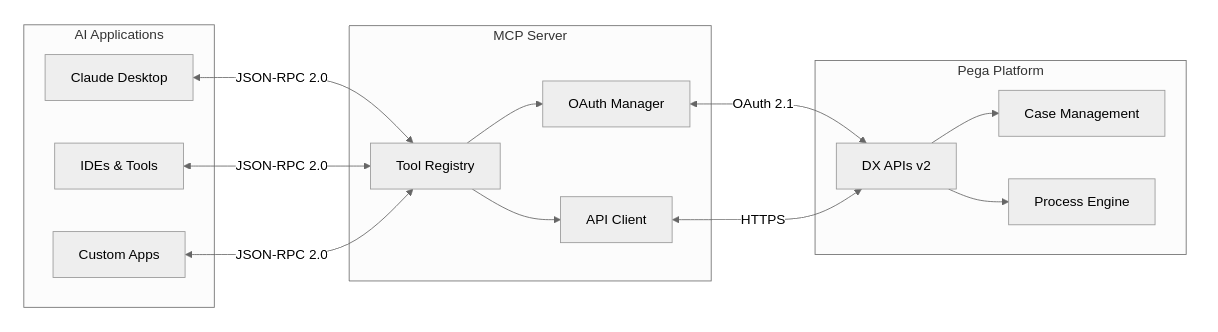
🏗️ Architecture
The Pega DX MCP Server bridges GenAI applications with Pega Infinity using the Model Context Protocol:
🛠️ Available Tools
The Pega DX MCP Server provides 67 comprehensive tools organized into 11 functional categories. Each category can be enabled or disabled via environment variables for granular control.
🔧 Tool Configuration
Control which tool categories are loaded using environment variables in your MCP client configuration. All categories are enabled by default - set to "false" to disable:
Example - Only core case management tools enabled:
{
  "mcpServers": {
    "pega-dx-mcp": {
      "command": "npx",
      "args": ["-y", "@marco-looy/pega-dx-mcp"],
      "env": {
        "PEGA_BASE_URL": "https://your-pega-instance.com",
        "PEGA_CLIENT_ID": "your-client-id",
        "PEGA_CLIENT_SECRET": "your-client-secret",
        "PEGA_API_VERSION":"v2",
        "PEGA_SERVICE_TOOLS": "true",
        "PEGA_CASETYPE_TOOLS": "true",
        "PEGA_CASE_TOOLS": "true",
        "PEGA_ASSIGNMENT_TOOLS": "false",
        "PEGA_ATTACHMENT_TOOLS": "false",
        "PEGA_DATAVIEW_TOOLS": "false",
        "PEGA_DOCUMENT_TOOLS": "false",
        "PEGA_FOLLOWER_TOOLS": "false",
        "PEGA_PARTICIPANT_TOOLS": "false",
        "PEGA_RELATED_CASE_TOOLS": "false",
        "PEGA_TAG_TOOLS": "false"
      }
    }
  }
}
📋 Complete Tool Inventory
Assignment Tools (9)
get_assignment- Get detailed assignment informationget_assignment_action- Get assignment action details and UI metadataget_next_assignment- Get next work assignment for userjump_to_step- Navigate to specific step in assignment flownavigate_assignment_previous- Navigate to previous step in assignmentperform_assignment_action- Execute assignment actionsrecalculate_assignment_fields- Recalculate assignment form fieldsrefresh_assignment_action- Refresh assignment action form datasave_assignment_action- Save assignment form data without executing
Attachment Tools (7)
add_case_attachments- Attach files/URLs to casesdelete_attachment- Remove attachments from casesget_attachment- Retrieve attachment contentget_attachment_categories- List available attachment categoriesget_case_attachments- List all case attachmentsupdate_attachment- Update attachment metadataupload_attachment- Upload files as temporary attachments
Case Tools (20)
add_optional_process- Add stage or case-wide optional processesbulk_cases_patch- Perform actions on multiple caseschange_to_next_stage- Navigate case to next stagechange_to_stage- Navigate case to specific stagecreate_case- Create new cases with contentdelete_case- Delete cases in create stageget_case- Retrieve detailed case informationget_case_action- Get case action details and metadataget_case_ancestors- Get case ancestor hierarchyget_case_descendants- Get case descendant hierarchyget_case_stages- List case stages and processesget_case_view- Get specific case view detailsget_case_view_calculated_fields- Calculate case view fieldsget_cases- Get all cases created by authenticated user (V1 EXCLUSIVE)perform_bulk_action- Execute bulk case operationsperform_case_action- Execute case-wide actionsrecalculate_case_action_fields- Recalculate case action fieldsrefresh_case_action- Refresh case action form datarelease_case_lock- Release pessimistic case locksupdate_case- Update case by modifying properties directly (V1 EXCLUSIVE)
Case Type Tools (3)
get_case_type_action- Get case type action metadataget_case_type_bulk_action- Get bulk action metadata for case typesget_case_types- List available case types
Data View Tools (7)
delete_data_record- Delete data records from savable data pagesget_data_objects- List available data objectsget_data_view_count- Get data view result countsget_data_view_metadata- Get data view metadata and parametersget_list_data_view- Query list data views with filteringupdate_data_record_full- Fully upd
README truncated. View full README on GitHub.
Alternatives



Related Skills
Browse all skillsUse when working with the OpenAI API (Responses API) or OpenAI platform features (tools, streaming, Realtime API, auth, models, rate limits, MCP) and you need authoritative, up-to-date documentation (schemas, examples, limits, edge cases). Prefer the OpenAI Developer Documentation MCP server tools when available; otherwise guide the user to enable `openaiDeveloperDocs`.
Master API documentation with OpenAPI 3.1, AI-powered tools, and modern developer experience practices. Create interactive docs, generate SDKs, and build comprehensive developer portals. Use PROACTIVELY for API documentation or developer portal creation.
CCXT cryptocurrency exchange library for TypeScript and JavaScript developers (Node.js and browser). Covers both REST API (standard) and WebSocket API (real-time). Helps install CCXT, connect to exchanges, fetch market data, place orders, stream live tickers/orderbooks, handle authentication, and manage errors. Use when working with crypto exchanges in TypeScript/JavaScript projects, trading bots, arbitrage systems, or portfolio management tools. Includes both REST and WebSocket examples.
AI agent skills for Sinch communication APIs. These Skills provides developers with a way to interact with Sinch APIs and services from supported developer tools or environments.
Guide for creating high-quality MCP (Model Context Protocol) servers that enable LLMs to interact with external services through well-designed tools. Use when building MCP servers to integrate external APIs or services, whether in Python (FastMCP) or Node/TypeScript (MCP SDK).
.NET/C# backend developer for ASP.NET Core APIs with Entity Framework Core. Builds REST APIs, minimal APIs, gRPC services, authentication with Identity/JWT, authorization, database operations, background services, SignalR real-time features. Activates for: .NET, C#, ASP.NET Core, Entity Framework Core, EF Core, .NET Core, minimal API, Web API, gRPC, authentication .NET, Identity, JWT .NET, authorization, LINQ, async/await C#, background service, IHostedService, SignalR, SQL Server, PostgreSQL .NET, dependency injection, middleware .NET.