
Perfetto Trace Analyzer
Converts natural language questions into Perfetto trace analysis queries and automatically detects Android performance issues like ANRs and memory leaks.
Turn natural language into powerful Perfetto trace analysis
What it does
- Convert plain English questions to Perfetto SQL queries
- Detect Application Not Responding (ANR) events
- Analyze CPU profiling and thread contention
- Find memory leaks and frame jank issues
- Profile Binder IPC performance
- Spot synchronization bottlenecks
Best for
About Perfetto Trace Analyzer
Perfetto Trace Analyzer is a community-built MCP server published by antarikshc that provides AI assistants with tools and capabilities via the Model Context Protocol. Analyze Perfetto traces easily with Perfetto Trace Analyzer: turn natural language into actionable trace analysis insights. It is categorized under developer tools, analytics data.
How to install
You can install Perfetto Trace Analyzer in your AI client of choice. Use the install panel on this page to get one-click setup for Cursor, Claude Desktop, VS Code, and other MCP-compatible clients. This server runs locally on your machine via the stdio transport.
License
Perfetto Trace Analyzer is released under the Apache-2.0 license. This is a permissive open-source license, meaning you can freely use, modify, and distribute the software.

Perfetto MCP
Turn natural language into powerful Perfetto trace analysis
A Model Context Protocol (MCP) server that transforms natural-language prompts into focused Perfetto analyses. Quickly explain jank, diagnose ANRs, spot CPU hot threads, uncover lock contention, and find memory leaks – all without writing SQL.
✨ Features
- Natural Language → SQL: Ask questions in plain English, get precise Perfetto queries
- ANR Detection: Automatically identify and analyze Application Not Responding events
- Performance Analysis: CPU profiling, frame jank detection, memory leak detection
- Thread Contention: Find synchronization bottlenecks and lock contention
- Binder Profiling: Analyze IPC performance and slow system interactions
📋 Prerequisites
- Python 3.13+ (macOS/Homebrew):
brew install [email protected] - uv (recommended):
brew install uv
🚀 Getting Started
Cursor

Or add to ~/.cursor/mcp.json (global) or .cursor/mcp.json (project):
{
  "mcpServers": {
    "perfetto-mcp": {
      "command": "uvx",
      "args": ["perfetto-mcp"]
    }
  }
}
Claude Code
Run this command. See Claude Code MCP docs for more info.
# Add to user scope
claude mcp add perfetto-mcp --scope user -- uvx perfetto-mcp
Or edit ~/claude.json (macOS) or %APPDATA%\Claude\claude.json (Windows):
{
  "mcpServers": {
    "perfetto-mcp": {
      "command": "uvx",
      "args": ["perfetto-mcp"]
    }
  }
}
VS Code

or add to .vscode/mcp.json (project) or run "MCP: Add Server" command:
{
  "mcpServers": {
    "perfetto-mcp": {
      "command": "uvx",
      "args": ["perfetto-mcp"]
    }
  }
}
Enable in GitHub Copilot Chat's Agent mode.
Codex
Edit ~/.codex/config.toml:
[mcp_servers.perfetto-mcp]
command = "uvx"
args = ["perfetto-mcp"]
Local Install (development server)
cd perfetto-mcp-server
uv sync
uv run mcp dev src/perfetto_mcp/dev.py
Local MCP
{
  "mcpServers": {
    "perfetto-mcp-local": {
      "command": "uv",
      "args": [
        "--directory",
        "/path/to/git/repo/perfetto-mcp",
        "run",
        "-m",
        "perfetto_mcp"
      ],
      "env": { "PYTHONPATH": "src" }
    }
  }
}
Using pip
pip3 install perfetto-mcp
python3 -m perfetto_mcp
📖 How to Use
Example starting prompt:
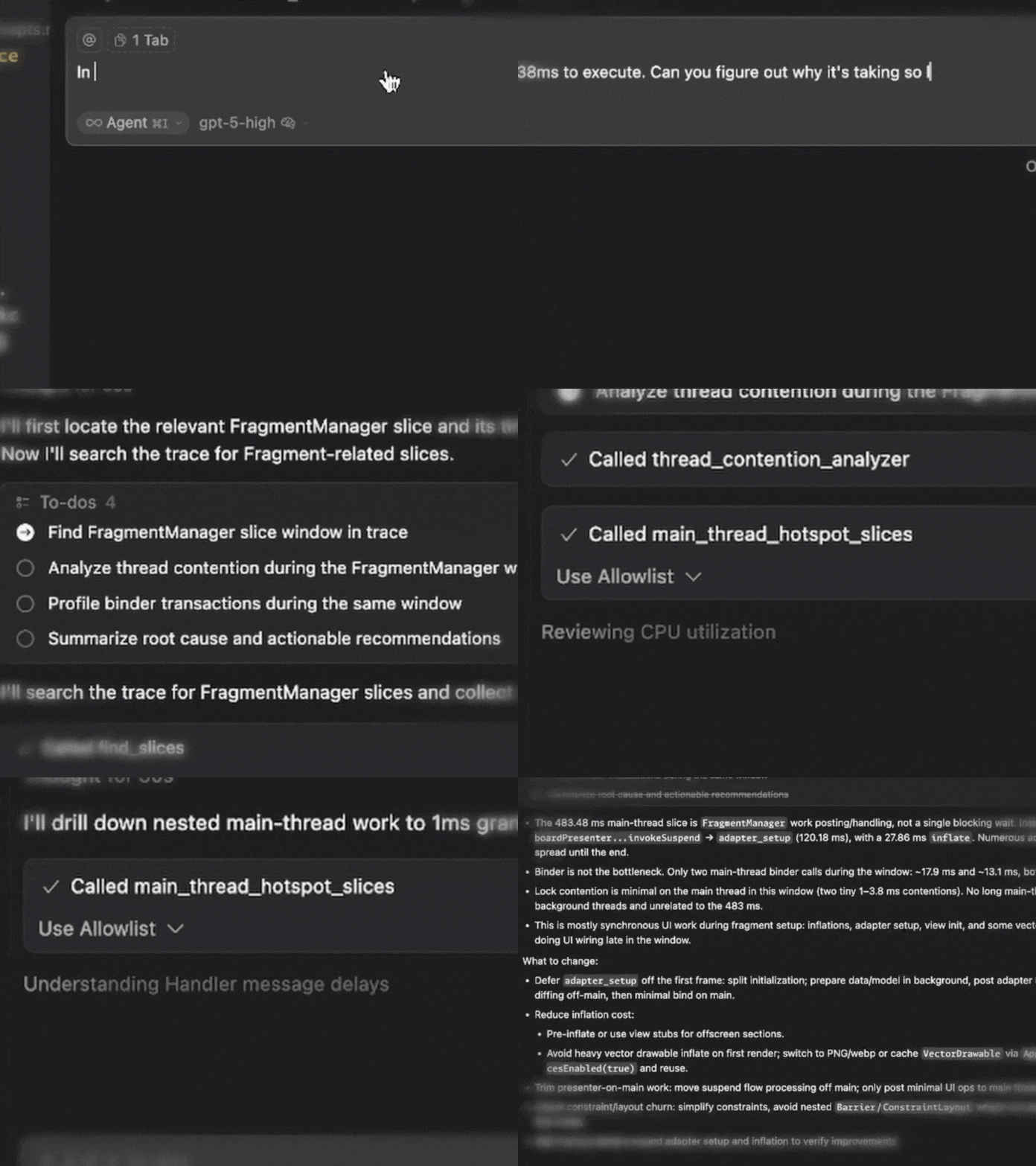
In the perfetto trace, I see that the FragmentManager is taking 438ms to execute. Can you figure out why it's taking so long?
Required Parameters
Every tool needs these two inputs:
| Parameter | Description | Example |
|---|---|---|
| trace_path | Absolute path to your Perfetto trace | /path/to/trace.perfetto-trace |
| process_name | Target process/app name | com.example.app |
In Your Prompts
Be explicit about the trace and process, prefix your prompt with:
"Use perfetto trace /absolute/path/to/trace.perfetto-trace for process com.example.app"
Optional Filters
Many tools support additional filtering (but let your LLM handle that):
- time_range:
{start_ms: 10000, end_ms: 25000} - Tool-specific thresholds:
min_block_ms,jank_threshold_ms,limit
🛠️ Available Tools
🔎 Exploration & Discovery
| Tool | Purpose | Example Prompt |
|---|---|---|
find_slices | Survey slice names and locate hot paths | "Find slice names containing 'Choreographer' and show top examples" |
execute_sql_query | Run custom PerfettoSQL for advanced analysis | "Run custom SQL to correlate threads and frames in the first 30s" |
🚨 ANR Analysis
Note: Helpful if the recorded trace contains ANR
| Tool | Purpose | Example Prompt |
|---|---|---|
detect_anrs | Find ANR events with severity classification | "Detect ANRs in the first 10s and summarize severity" |
anr_root_cause_analyzer | Deep-dive ANR causes with ranked likelihood | "Analyze ANR root cause around 20,000 ms and rank likely causes" |
🎯 Performance Profiling
| Tool | Purpose | Example Prompt |
|---|---|---|
cpu_utilization_profiler | Thread-level CPU usage and scheduling | "Profile CPU usage by thread and flag the hottest threads" |
main_thread_hotspot_slices | Find longest-running main thread operations | "List main-thread hotspots >50 ms during 10s–25s" |
📱 UI Performance
| Tool | Purpose | Example Prompt |
|---|---|---|
detect_jank_frames | Identify frames missing deadlines | "Find janky frames above 16.67 ms and list the worst 20" |
frame_performance_summary | Overall frame health metrics | "Summarize frame performance and report jank rate and P99 CPU time" |
🔒 Concurrency & IPC
| Tool | Purpose | Example Prompt |
|---|---|---|
thread_contention_analyzer | Find synchronization bottlenecks | "Find lock contention between 15s–30s and show worst waits" |
binder_transaction_profiler | Analyze Binder IPC performance | "Profile slow Binder transactions and group by server process" |
💾 Memory Analysis
| Tool | Purpose | Example Prompt |
|---|---|---|
memory_leak_detector | Find sustained memory growth patterns | "Detect memory-leak signals over the last 60s" |
heap_dominator_tree_analyzer | Identify memory-hogging classes | "Analyze heap dominator classes and list top offenders" |
Output Format
All tools return structured JSON with:
- Summary: High-level findings
- Details: Tool-specific results
- Metadata: Execution context and any fallbacks used
📚 Resources
- Trace Processor Python API - Perfetto's Python interface
- Perfetto SQL Syntax - SQL reference for custom queries
📄 License
Apache 2.0 License. See LICENSE for details.
Alternatives



Related Skills
Browse all skillsComprehensive backend development guide for Langfuse's Next.js 14/tRPC/Express/TypeScript monorepo. Use when creating tRPC routers, public API endpoints, BullMQ queue processors, services, or working with tRPC procedures, Next.js API routes, Prisma database access, ClickHouse analytics queries, Redis queues, OpenTelemetry instrumentation, Zod v4 validation, env.mjs configuration, tenant isolation patterns, or async patterns. Covers layered architecture (tRPC procedures → services, queue processors → services), dual database system (PostgreSQL + ClickHouse), projectId filtering for multi-tenant isolation, traceException error handling, observability patterns, and testing strategies (Jest for web, vitest for worker).
Analyze correlation analyzer operations. Auto-activating skill for Data Analytics. Triggers on: correlation analyzer, correlation analyzer Part of the Data Analytics skill category. Use when analyzing or auditing correlation analyzer. Trigger with phrases like "correlation analyzer", "correlation analyzer", "analyze correlation r".
Use when building MCP servers or clients that connect AI systems with external tools and data sources. Invoke for MCP protocol compliance, TypeScript/Python SDKs, resource providers, tool functions.
Analyze ab test analyzer operations. Auto-activating skill for Data Analytics. Triggers on: ab test analyzer, ab test analyzer Part of the Data Analytics skill category. Use when writing or running tests. Trigger with phrases like "ab test analyzer", "ab analyzer", "analyze ab test r".
Analyze date range analyzer operations. Auto-activating skill for Data Analytics. Triggers on: date range analyzer, date range analyzer Part of the Data Analytics skill category. Use when analyzing or auditing date range analyzer. Trigger with phrases like "date range analyzer", "date analyzer", "analyze date range r".
Export OpenClaw usage data to CSV for analytics tools like Power BI. Hourly aggregates by activity type, model, and channel.