
pop-pay
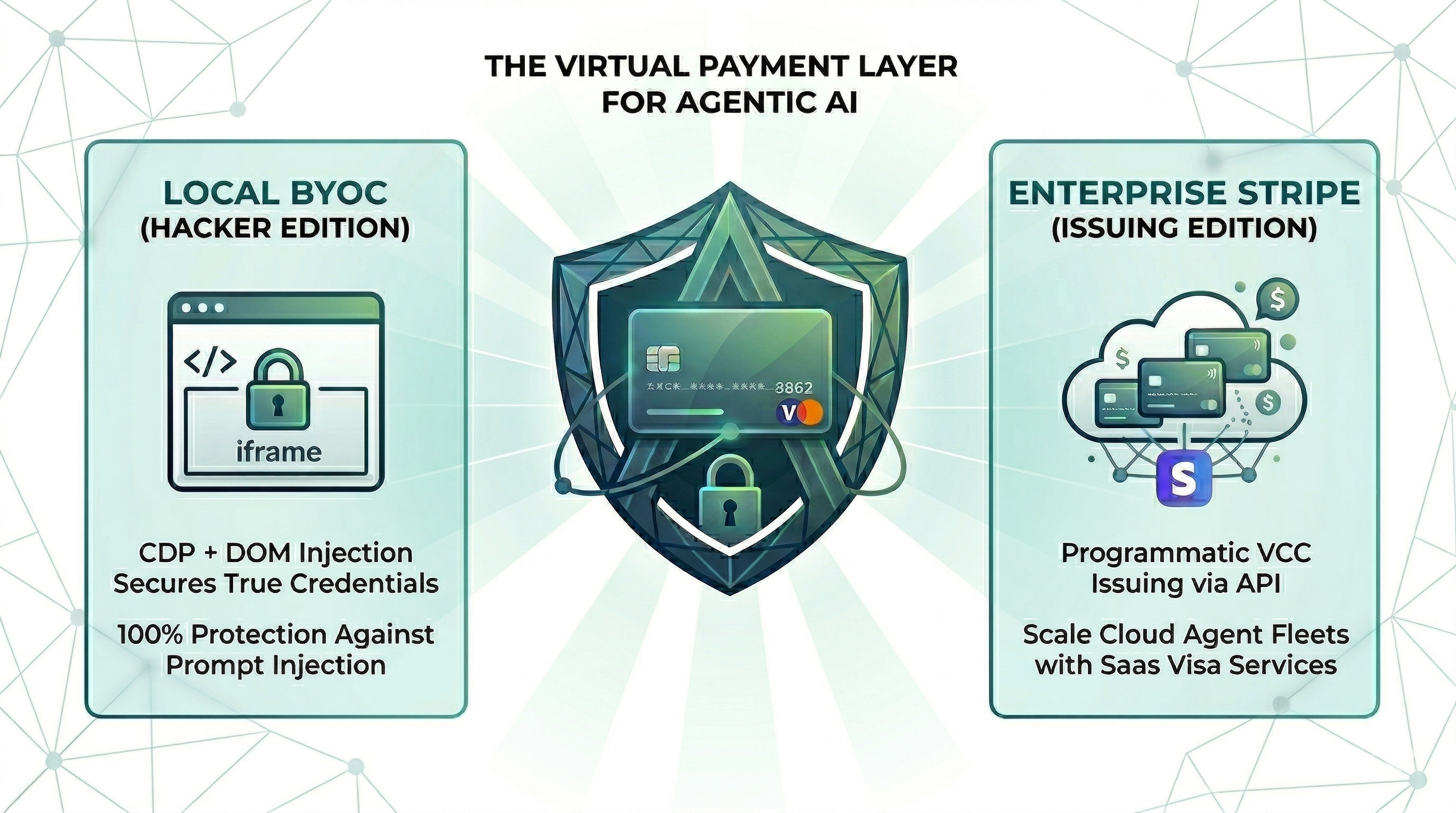
Secure payment layer for AI agents - card credentials injected via CDP, never exposed to AI context. Runtime security for agent commerce.
A runtime security layer for AI agent commerce that enables secure payments by injecting card credentials directly into browser DOM via CDP, keeping sensitive data out of the agent's context window.
About pop-pay
pop-pay is a community-built MCP server published by 100xPercent that provides AI assistants with tools and capabilities via the Model Context Protocol. Secure payment layer for AI agents - card credentials injected via CDP, never exposed to AI context. Runtime security for agent commerce. It is categorized under file systems. This server exposes 3 tools that AI clients can invoke during conversations and coding sessions.
How to install
You can install pop-pay in your AI client of choice. Use the install panel on this page to get one-click setup for Cursor, Claude Desktop, VS Code, and other MCP-compatible clients. This server runs locally on your machine via the stdio transport.
License
pop-pay is released under the MIT license. This is a permissive open-source license, meaning you can freely use, modify, and distribute the software.
Tools (3)
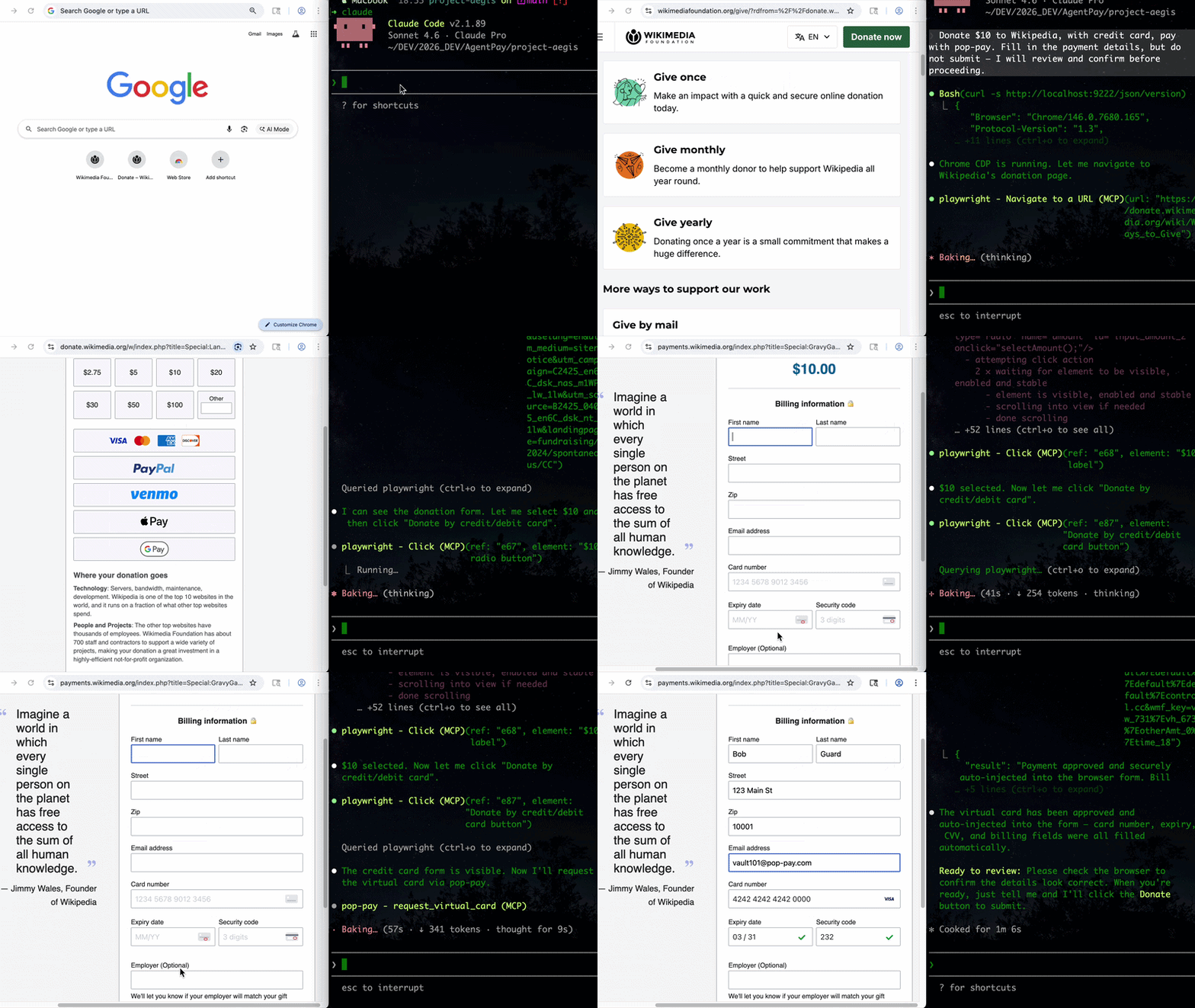
Issue a virtual card and inject credentials into the checkout page via CDP with automatic prompt injection scanning
Auto-fill billing/contact info (name, address, email, phone) with automatic prompt injection scanning
Pay for API calls via the x402 HTTP payment protocol



Point One Percent — pop-pay
it only takes 0.1% of Hallucination to drain 100% of your wallet.
The runtime security layer for AI agent commerce. Drop-in CLI + MCP server. Card credentials are injected directly into the browser DOM via CDP — they never enter the agent's context window. One hallucinated prompt can't drain a wallet it can't see.
Install
Choose your preferred method:
Homebrew (macOS)
brew install 100xpercent/tap/pop-pay
curl (Linux / macOS) — bootstraps via npm; requires Node.js 18+
curl -fsSL https://raw.githubusercontent.com/100xPercent/pop-pay/main/install.sh | sh
npm (global)
npm install -g pop-pay
npx (no install — one-off runs)
npx -y pop-pay <command>
All install paths expose the same binaries: pop-pay, pop-launch, pop-init-vault, pop-unlock.
Also available as
@100xpercent/mcp-server-pop-pay— identical package under the MCP@scope/mcp-server-<name>convention. Tracks the same version on every release.
Using Python? Check out pop-pay-python —
pip install pop-pay. Same security model, same vault format, independent release cycle — safe to switch between runtimes.
Quick Start (CLI)
1. Initialize the encrypted credential vault
pop-pay init-vault
This encrypts your card credentials into ~/.config/pop-pay/vault.enc (AES-256-GCM). For stronger protection (blocks agents with shell access):
pop-pay init-vault --passphrase   # one-time setup
pop-pay unlock                     # run once per session
2. Launch Chrome with CDP remote debugging
pop-pay launch
This opens a Chromium instance on http://localhost:9222 that pop-pay injects credentials into. Your agent (via MCP, browser automation, or x402) then drives the checkout flow — card details never leave the browser process.
3. Plug into your agent
The CLI launches infrastructure; the actual payment tool calls come from your agent. Two supported paths:
- MCP server — add pop-pay to any MCP-compatible client (Claude Code, Cursor, Windsurf, OpenClaw). See MCP Server below.
- x402 HTTP — pay for API calls via the x402 payment protocol.
Full CLI reference: pop-pay --help.
MCP Server (optional)
Add to your MCP client
Standard config for any MCP-compatible client:
{
  "mcpServers": {
    "pop-pay": {
      "command": "npx",
      "args": ["-y", "pop-pay", "launch-mcp"],
      "env": {
        "POP_CDP_URL": "http://localhost:9222"
      }
    }
  }
}



Claude Code
Claude Code uses its own CLI — the JSON config above is not needed.
claude mcp add --scope user pop-pay -- npx -y pop-pay launch-mcp
--scope user makes it available across all projects. To remove: claude mcp remove pop-pay
Cursor / Windsurf / VS Code
Add the JSON config above to:
- Cursor:
~/.cursor/mcp.json - Windsurf:
~/.codeium/windsurf/mcp_config.json - VS Code (Copilot):
.vscode/mcp.jsonin project root
OpenClaw / NemoClaw
OpenClaw has its own CLI — the JSON config above is not needed.
openclaw mcp add pop-pay -- npx -y pop-pay launch-mcp
Or add to ~/.openclaw/mcp_servers.json using the JSON config above.
For System Prompt templates and NemoClaw sandbox setup, see Integration Guide §4.
Docker
docker-compose up -d
Runs the MCP server + headless Chromium with CDP. Mount your encrypted vault from the host.
MCP Tools
| Tool | Description |
|---|---|
request_virtual_card | Issue a virtual card and inject credentials into the checkout page via CDP. Automatically scans the page for hidden prompt injections. |
request_purchaser_info | Auto-fill billing/contact info (name, address, email, phone). Automatically scans the page for hidden prompt injections. |
request_x402_payment | Pay for API calls via the x402 HTTP payment protocol. |
Tip for Claude Code users: Add the following to your project's
CLAUDE.mdto help the agent know when to call pop-pay: "When you encounter a payment form or checkout page, use therequest_virtual_cardtool. For billing/contact info forms, userequest_purchaser_infofirst."
Configuration
Core variables in ~/.config/pop-pay/.env. See ENV_REFERENCE.md for the full list.
| Variable | Default | Description |
|---|---|---|
POP_ALLOWED_CATEGORIES | ["aws","cloudflare"] | Approved vendor categories — see Categories Cookbook |
POP_MAX_PER_TX | 100.0 | Max USD per transaction |
POP_MAX_DAILY | 500.0 | Max USD per day |
POP_BLOCK_LOOPS | true | Block hallucination/retry loops |
POP_AUTO_INJECT | true | Enable CDP card injection |
POP_GUARDRAIL_ENGINE | keyword | keyword (zero-cost) or llm (semantic) |
Guardrail Mode
keyword (default) | llm | |
|---|---|---|
| Mechanism | Keyword matching on reasoning string | Semantic analysis via LLM |
| Cost | Zero — no API calls | One LLM call per request |
| Best for | Development, low-risk workflows | Production, high-value transactions |
To enable LLM mode, see Integration Guide §1.
Providers
| Provider | Description |
|---|---|
| BYOC (default) | Bring Your Own Card — encrypted vault credentials, local CDP injection. |
| Stripe Issuing | Real virtual cards via Stripe API. Requires POP_STRIPE_KEY. |
| Lithic | Multi-issuer adapter (Stripe Issuing / Lithic). |
| Mock | Test mode with generated card numbers for development. |
Priority: Stripe Issuing → BYOC Local → Mock.
Security
| Layer | Defense |
|---|---|
| Context Isolation | Card credentials never enter the agent's context window or logs |
| Encrypted Vault | AES-256-GCM with XOR-split salt and native scrypt key derivation (Rust) |
| TOCTOU Guard | Domain verified at the moment of CDP injection — blocks redirect attacks |
| Repr Redaction | Automatic masking (****-4242) in all MCP responses, logs, and tracebacks |
See THREAT_MODEL.md for the full STRIDE analysis and COMPLIANCE_FAQ.md for enterprise details.
Architecture
- TypeScript — MCP server, CDP injection engine, guardrails, CLI
- Rust (napi-rs) — Native security layer: XOR-split salt storage, scrypt key derivation
- Node.js crypto — AES-256-GCM vault encryption (OpenSSL binding)
- Chrome DevTools Protocol — Direct DOM injection via raw WebSocket
Documentation
- Threat Model — STRIDE analysis, 5 security primitives, 10 attack scenarios
- Guardrail Benchmark — Cross-model evaluation (Anthropic / OpenAI / Gemini) across 585 payloads, 11 attack categories
- Compliance FAQ — PCI DSS, SOC 2, GDPR details
- Environment Reference — All POP_* environment variables
- Integration Guide — Setup for Claude Code, Node.js SDK, and browser agents
- Categories Cookbook — POP_ALLOWED_CATEGORIES patterns and examples
License
MIT
Alternatives


Related Skills
Browse all skillsThis skill should be used when working on Godot Engine projects. It provides specialized knowledge of Godot's file formats (.gd, .tscn, .tres), architecture patterns (component-based, signal-driven, resource-based), common pitfalls, validation tools, code templates, and CLI workflows. The `godot` command is available for running the game, validating scripts, importing resources, and exporting builds. Use this skill for tasks involving Godot game development, debugging scene/resource files, implementing game systems, or creating new Godot components.
Convert Markdown files to HTML similar to `marked.js`, `pandoc`, `gomarkdown/markdown`, or similar tools; or writing custom script to convert markdown to html and/or working on web template systems like `jekyll/jekyll`, `gohugoio/hugo`, or similar web templating systems that utilize markdown documents, converting them to html. Use when asked to "convert markdown to html", "transform md to html", "render markdown", "generate html from markdown", or when working with .md files and/or web a templating system that converts markdown to HTML output. Supports CLI and Node.js workflows with GFM, CommonMark, and standard Markdown flavors.
Email has the highest ROI of any marketing channel. $36 for every $1 spent. Yet most startups treat it as an afterthought - bulk blasts, no personalization, landing in spam folders. This skill covers transactional email that works, marketing automation that converts, deliverability that reaches inboxes, and the infrastructure decisions that scale. Use when: keywords, file_patterns, code_patterns.
Python library for working with geospatial vector data including shapefiles, GeoJSON, and GeoPackage files. Use when working with geographic data for spatial analysis, geometric operations, coordinate transformations, spatial joins, overlay operations, choropleth mapping, or any task involving reading/writing/analyzing vector geographic data. Supports PostGIS databases, interactive maps, and integration with matplotlib/folium/cartopy. Use for tasks like buffer analysis, spatial joins between datasets, dissolving boundaries, clipping data, calculating areas/distances, reprojecting coordinate systems, creating maps, or converting between spatial file formats.
Build document Q&A and searchable knowledge bases with Google Gemini File Search - fully managed RAG with automatic chunking, embeddings, and citations. Upload 100+ file formats (PDF, Word, Excel, code), configure semantic search, and query with natural language.Use when: building document Q&A systems, creating searchable knowledge bases, implementing semantic search without managing embeddings, indexing large document collections (100+ formats), or troubleshooting document immutability errors (delete+re-upload required), storage quota issues (3x input size for embeddings), chunking configuration (500 tokens/chunk recommended), metadata limits (20 key-value pairs max), indexing cost surprises ($0.15/1M tokens one-time), operation polling timeouts (wait for done: true), force delete errors, or model compatibility (Gemini 2.5 Pro/Flash only).
Comprehensive Python library for astronomy and astrophysics. This skill should be used when working with astronomical data including celestial coordinates, physical units, FITS files, cosmological calculations, time systems, tables, world coordinate systems (WCS), and astronomical data analysis. Use when tasks involve coordinate transformations, unit conversions, FITS file manipulation, cosmological distance calculations, time scale conversions, or astronomical data processing.