
PostgreSQL Ops
Provides direct PostgreSQL database access for querying, schema inspection, and performance monitoring through conversational commands. Works with PostgreSQL 12-17 and includes specialized extensions for database troubleshooting.
Provides direct PostgreSQL database access with query execution, schema introspection, and performance monitoring through specialized extensions like pg_stat_statements for conversational database administration and troubleshooting.
What it does
- Execute PostgreSQL queries and commands
- Inspect database schemas and table structures
- Monitor query performance and slow queries
- Analyze table bloat and database statistics
- Generate maintenance recommendations
- Access pg_stat_statements for query analysis
Best for
About PostgreSQL Ops
PostgreSQL Ops is a community-built MCP server published by call518 that provides AI assistants with tools and capabilities via the Model Context Protocol. Access your Postgres database directly, run postgres commands, monitor performance, and troubleshoot with advanced extensions. It is categorized under databases, developer tools.
How to install
You can install PostgreSQL Ops in your AI client of choice. Use the install panel on this page to get one-click setup for Cursor, Claude Desktop, VS Code, and other MCP-compatible clients. This server runs locally on your machine via the stdio transport.
License
PostgreSQL Ops is released under the MIT license. This is a permissive open-source license, meaning you can freely use, modify, and distribute the software.
MCP Server for PostgreSQL Operations and Monitoring








Architecture & Internal (DeepWiki)

Overview
MCP-PostgreSQL-Ops is a professional MCP server for PostgreSQL database operations, monitoring, and management. Supports PostgreSQL 12-17 with comprehensive database analysis, performance monitoring, and intelligent maintenance recommendations through natural language queries. Most features work independently, but advanced query analysis capabilities are enhanced when pg_stat_statements and (optionally) pg_stat_monitor extensions are installed.
Features
- ✅ Zero Configuration: Works with PostgreSQL 12-17 out-of-the-box with automatic version detection.
- ✅ Natural Language: Ask questions like "Show me slow queries" or "Analyze table bloat."
- ✅ Production Safe: Read-only operations, RDS/Aurora compatible with regular user permissions.
- ✅ Extension Enhanced: Optional
pg_stat_statementsandpg_stat_monitorfor advanced query analytics. - ✅ Comprehensive Database Monitoring: Performance analysis, bloat detection, and maintenance recommendations.
- ✅ Smart Query Analysis: Slow query identification with
pg_stat_statementsandpg_stat_monitorintegration. - ✅ Schema & Relationship Discovery: Database structure exploration with detailed relationship mapping.
- ✅ VACUUM & Autovacuum Intelligence: Real-time maintenance monitoring and effectiveness analysis.
- ✅ Multi-Database Operations: Seamless cross-database analysis and monitoring.
- ✅ Enterprise-Ready: Safe read-only operations with RDS/Aurora compatibility.
- ✅ Developer-Friendly: Simple codebase for easy customization and tool extension.
🔧 Advanced Capabilities
- Version-aware I/O statistics (enhanced on PostgreSQL 16+).
- Real-time connection and lock monitoring.
- Background process and checkpoint analysis.
- Replication status and WAL monitoring.
- Database capacity and bloat analysis.
Tool Usage Examples
📸 More Examples with Screenshots →
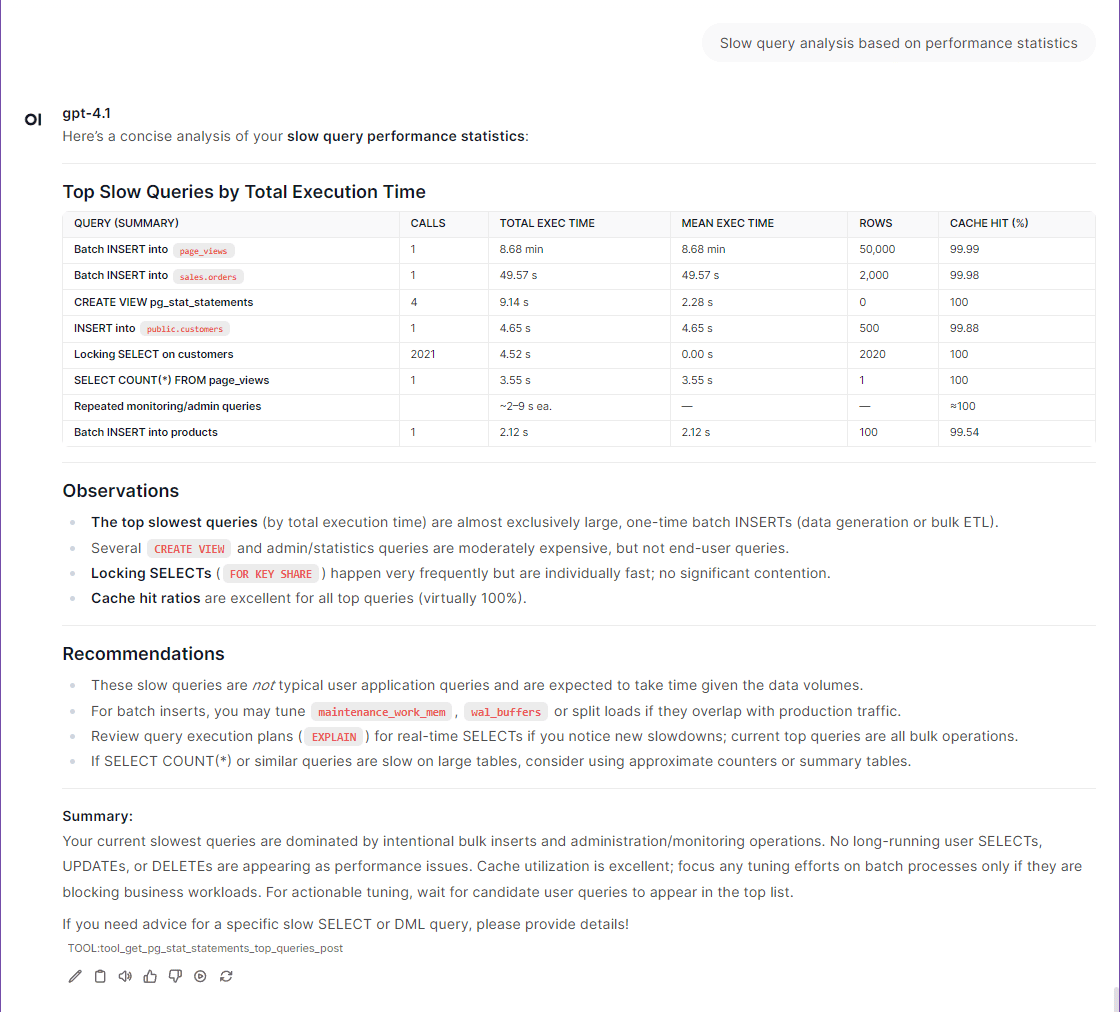
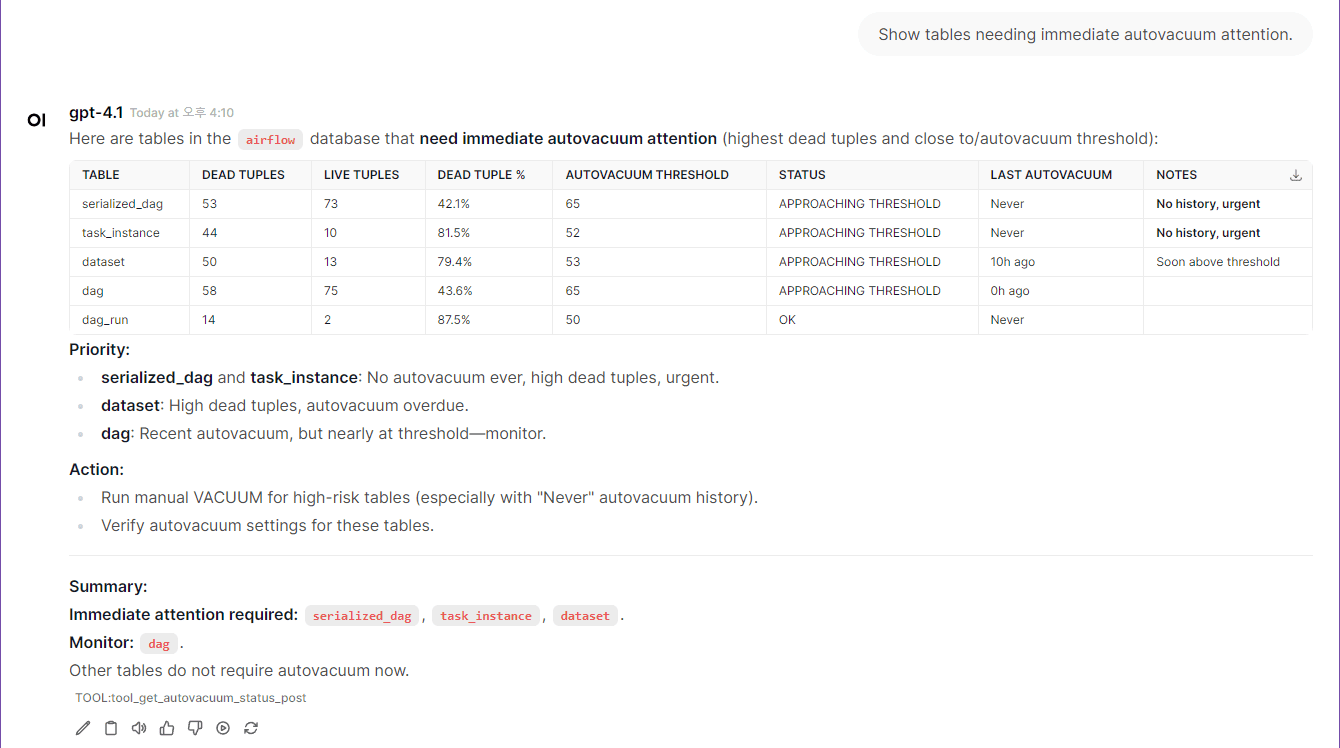
⭐ Quickstart (5 minutes)
Note: The
postgresqlcontainer included indocker-compose.ymlis intended for quickstart testing purposes only. You can connect to your own PostgreSQL instance by adjusting the environment variables as needed.
If you want to use your own PostgreSQL instance instead of the built-in test container:
- Update the target PostgreSQL connection information in your
.envfile (see POSTGRES_HOST, POSTGRES_PORT, POSTGRES_USER, POSTGRES_PASSWORD, POSTGRES_DB).- In
docker-compose.yml, comment out (disable) thepostgresandpostgres-init-extensionscontainers to avoid starting the built-in test database.
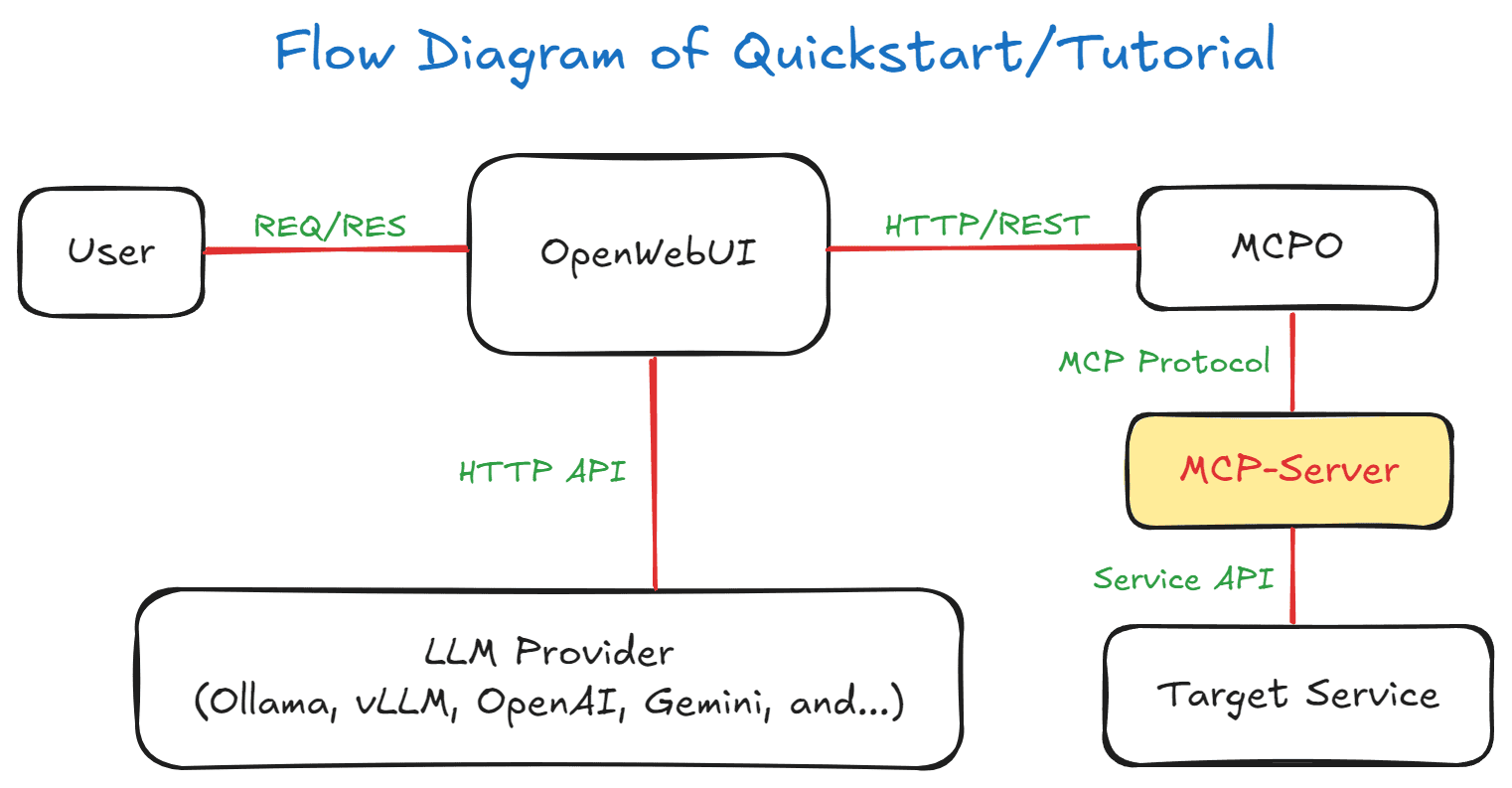
Flow Diagram of Quickstart/Tutorial
1. Environment Setup
Note: While superuser privileges provide access to all databases and system information, the MCP server also works with regular user permissions for basic monitoring tasks.
git clone https://github.com/call518/MCP-PostgreSQL-Ops.git
cd MCP-PostgreSQL-Ops

### Check and modify .env file
cp .env.example .env
vim .env
### No need to modify defaults, but if using your own PostgreSQL server, edit below:
POSTGRES_HOST=host.docker.internal
POSTGRES_PORT=15432  # External port for host access (mapped to internal 5432)
POSTGRES_USER=postgres
POSTGRES_PASSWORD=changeme!@34
POSTGRES_DB=ecommerce # Default connection DB. Superusers can access all DBs.
Note:
PGDATA=/data/dbis preconfigured for the Percona PostgreSQL Docker image, which requires this specific path for proper write permissions.
2. Start Demo Containers
# Start all containers including built-in PostgreSQL for testing
docker-compose up -d

# Alternative: If using your own PostgreSQL instance
# Comment out postgres and postgres-init-extensions services in docker-compose.yml
# Then use the custom configuration:
# docker-compose -f docker-compose.custom-db.yml up -d
⏰ Wait for Environment Setup: The initial environment setup takes a few minutes as containers are started in sequence:
- PostgreSQL container starts first with database initialization
- PostgreSQL Extensions container installs extensions and creates comprehensive test data (~83K records)
- MCP Server and MCPO Proxy containers start after PostgreSQL is ready
- OpenWebUI container starts last and may take additional time to load the web interface
💡 Tip: Wait 2-3 minutes after running
docker-compose up -dbefore accessing OpenWebUI to ensure all services are fully initialized.
🔍 Check Container Status (Optional):
# Monitor container startup progress
docker-compose logs -f

# Check if all containers are running
docker-compose ps

# Verify PostgreSQL is ready
docker-compose logs postgres | grep "ready to accept connections"
3. Access to OpenWebUI
- The list of MCP tool features provided by
swaggercan be found in the MCPO API Docs URL.- e.g:
http://localhost:8003/docs
- e.g:
4. Registering the Tool in OpenWebUI
📌 Note: Web-UI configuration instructions are based on OpenWebUI v0.6.22. Menu locations and settings may differ in newer versions.
- logging in to OpenWebUI with an admin account
- go to "Settings" → "Tools" from the top menu.
- Enter the
postgresql-opsTool address (e.g.,http://localhost:8003/postgresql-ops) to connect MCP Tools. - Setup Ollama or OpenAI.
5. Complete!
Congratulations! Your MCP PostgreSQL Operations server is now ready for use. You can start exploring your databases with natural language queries.
🚀 Try These Example Queries:
- "Show me the current active connections"
- "What are the slowest queries in the system?"
- "Analyze table bloat across all databases"
- "Show me database size information"
- "What tables need VACUUM maintenance?"
📖 Next Steps:
- Browse the Example Queries section below for more query examples
- Check out Tool Usage Examples with Screenshots for visual guides
- Explore the Tool Compatibility Matrix to understand available features
(NOTE) Sample Test Data Overview
The create-test-data.sql script is executed by the postgres-init-extensions container (defined in docker-compose.yml) on first startup, automatically generating comprehensive test databases for MCP tool testing:
| Database | Purpose | Schema & Tables | Scale |
|---|---|---|---|
| ecommerce | E-commerce system | public: categories, products, customers, orders, order_items | 10 categories, 500 products, 100 customers, 200 orders, 400 order items |
| analytics | Analytics & reporting | public: page_views, sales_summary | 1,000 page views, 30 sales summaries |
| inventory | Warehouse management | public: suppliers, inventory_items, purchase_orders | 10 suppliers, 100 items, 50 purchase orders |
| hr_system | HR management | public: departments, employees, payroll | 5 departments, 50 employees, 150 payroll records |
Test users created: app_readonly, app_readwrite, analytics_user, backup_user
Optimized for testing: Intentional table bloat, various indexes (used/unused), time-series data, complex relationships
Tool Compatibility Matrix
Automatic Adaptation: All tools work transparently across supported versions - no configuration needed!
🟢 Extension-Independent Tools (No Extensions Required)
| Tool Name | Extensions Required | PG 12 | PG 13 | PG 14 | PG 15 | PG 16 | PG 17 | System Views/Tables Used |
|---|---|---|---|---|---|---|---|---|
get_server_info | ❌ None | ✅ | ✅ | ✅ | ✅ | ✅ | ✅ | version(), pg_extension |
get_active_connections | ❌ None | ✅ | ✅ | ✅ | ✅ | ✅ | ✅ | pg_stat_activity |
get_postgresql_config | ❌ None | ✅ | ✅ | ✅ | ✅ | ✅ | ✅ | pg_settings |
get_database_list | ❌ None | ✅ | ✅ | ✅ | ✅ | ✅ | ✅ | pg_database |
get_table_list | ❌ None | ✅ | ✅ | ✅ | ✅ | ✅ | ✅ | information_schema.tables |
get_table_schema_info | ❌ None | ✅ | ✅ | ✅ | ✅ | ✅ | ✅ | information_schema.*, pg_indexes |
get_database_schema_info | ❌ None | ✅ | ✅ | ✅ | ✅ | ✅ | ✅ | pg_namespace, pg_class, pg_proc |
get_table_relationships | ❌ None | ✅ | ✅ | ✅ | ✅ | ✅ | ✅ | information_schema.* (constraints) |
| `get_user_l |
README truncated. View full README on GitHub.
Alternatives



Related Skills
Browse all skillsModern web development expertise covering React, Node.js, databases, and full-stack architecture. Use when: building web applications, developing APIs, creating frontends, setting up databases, deploying web apps, or when user mentions React, Next.js, Express, REST API, GraphQL, MongoDB, PostgreSQL, or full-stack development.
.NET/C# backend developer for ASP.NET Core APIs with Entity Framework Core. Builds REST APIs, minimal APIs, gRPC services, authentication with Identity/JWT, authorization, database operations, background services, SignalR real-time features. Activates for: .NET, C#, ASP.NET Core, Entity Framework Core, EF Core, .NET Core, minimal API, Web API, gRPC, authentication .NET, Identity, JWT .NET, authorization, LINQ, async/await C#, background service, IHostedService, SignalR, SQL Server, PostgreSQL .NET, dependency injection, middleware .NET.
Build full-stack applications with Supabase (PostgreSQL, Auth, Storage, Real-time, Edge Functions). Use when implementing authentication, database design with RLS, file storage, real-time features, or serverless functions.
Comprehensive guide for PostgreSQL psql - the interactive terminal client for PostgreSQL. Use when connecting to PostgreSQL databases, executing queries, managing databases/tables, configuring connection options, formatting output, writing scripts, managing transactions, and using advanced psql features for database administration and development.
UI design system toolkit for Senior UI Designer including design token generation, component documentation, responsive design calculations, and developer handoff tools. Use for creating design systems, maintaining visual consistency, and facilitating design-dev collaboration.
Answer questions about the AI SDK and help build AI-powered features. Use when developers: (1) Ask about AI SDK functions like generateText, streamText, ToolLoopAgent, embed, or tools, (2) Want to build AI agents, chatbots, RAG systems, or text generation features, (3) Have questions about AI providers (OpenAI, Anthropic, Google, etc.), streaming, tool calling, structured output, or embeddings, (4) Use React hooks like useChat or useCompletion. Triggers on: "AI SDK", "Vercel AI SDK", "generateText", "streamText", "add AI to my app", "build an agent", "tool calling", "structured output", "useChat".