
Rootly
OfficialIntegrates with Rootly's incident management API to handle production incidents directly from your code editor. Resolves incidents in under a minute without switching tools.
Integrates with Rootly's incident management API to enable real-time production incident resolution directly within code editors, focusing on core endpoints with optimized pagination to prevent context overflow.
What it does
- Query incident status and details
- Manage incident resolution workflows
- Get on-call handoff summaries
- Track on-call shift metrics
- Update incident information
- Access team schedules and assignments
Best for
About Rootly
Rootly is an official MCP server published by rootly-ai-labs that provides AI assistants with tools and capabilities via the Model Context Protocol. Integrate Rootly's incident management API for real-time production issue resolution in code editors with efficient context handling. It is categorized under developer tools.
How to install
You can install Rootly in your AI client of choice. Use the install panel on this page to get one-click setup for Cursor, Claude Desktop, VS Code, and other MCP-compatible clients. This server runs locally on your machine via the stdio transport.
License
Rootly is released under the Apache-2.0 license. This is a permissive open-source license, meaning you can freely use, modify, and distribute the software.
Rootly MCP Server




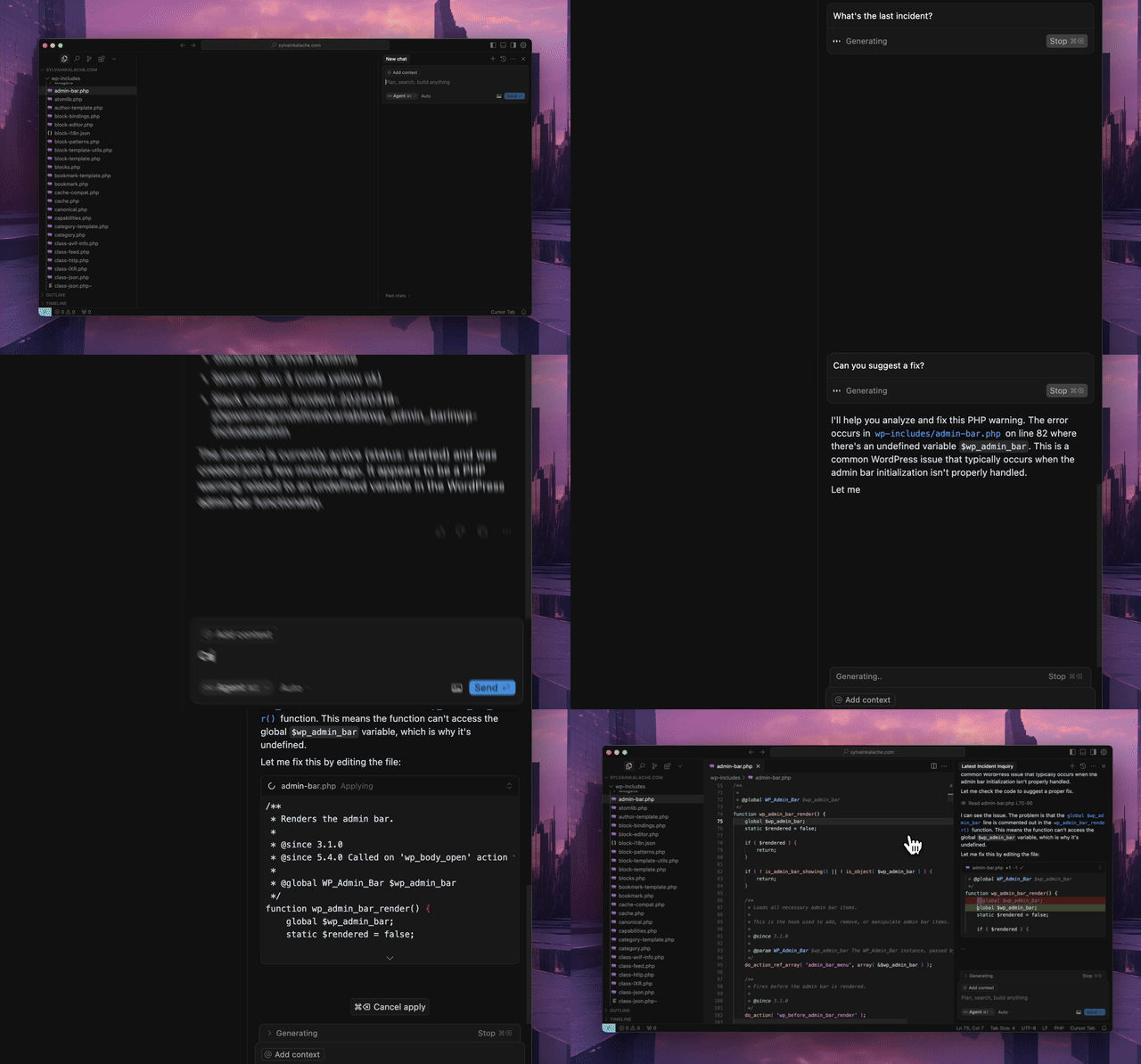
An MCP server for the Rootly API that integrates seamlessly with MCP-compatible editors like Cursor, Windsurf, and Claude. Resolve production incidents in under a minute without leaving your IDE.
Prerequisites
- Python 3.12 or higher
uvpackage managercurl -LsSf https://astral.sh/uv/install.sh | sh- Rootly API token with appropriate permissions (see below)
API Token Permissions
The MCP server requires a Rootly API token. Choose the appropriate token type based on your needs:
- Global API Key (Recommended): Full access to all entities across your Rootly instance. Required for organization-wide visibility across teams, schedules, and incidents.
- Team API Key: Team Admin permissions with full read/edit access to entities owned by that team. Suitable for team-specific workflows.
- Personal API Key: Inherits the permissions of the user who created it. Works for individual use cases but may have limited visibility.
For full functionality of tools like get_oncall_handoff_summary, get_oncall_shift_metrics, and organization-wide incident search, a Global API Key is recommended.
Quick Start
The fastest way to get started is to connect to our hosted MCP server — no installation required.
Hosted (Streamable HTTP, recommended)
{
  "mcpServers": {
    "rootly": {
      "url": "https://mcp.rootly.com/mcp",
      "headers": {
        "Authorization": "Bearer <YOUR_ROOTLY_API_TOKEN>"
      }
    }
  }
}
Hosted (SSE, backward compatible)
{
  "mcpServers": {
    "rootly": {
      "url": "https://mcp.rootly.com/sse",
      "headers": {
        "Authorization": "Bearer <YOUR_ROOTLY_API_TOKEN>"
      }
    }
  }
}
For Claude Desktop, if direct url config causes launch issues on your build, use this fallback:
{
  "mcpServers": {
    "rootly": {
      "command": "npx",
      "args": [
        "-y",
        "mcp-remote",
        "https://mcp.rootly.com/sse",
        "--transport",
        "sse-only",
        "--header",
        "Authorization: Bearer <YOUR_ROOTLY_API_TOKEN>"
      ]
    }
  }
}
For Claude Code, run:
claude mcp add rootly --transport http https://mcp.rootly.com/mcp \
  --header "Authorization: Bearer YOUR_ROOTLY_API_TOKEN"
SSE fallback:
claude mcp add rootly-sse --transport sse https://mcp.rootly.com/sse \
  --header "Authorization: Bearer YOUR_ROOTLY_API_TOKEN"
For Gemini CLI, install the extension:
gemini extensions install https://github.com/Rootly-AI-Labs/Rootly-MCP-server
Or configure manually in ~/.gemini/settings.json:
{
  "mcpServers": {
    "rootly": {
      "command": "uvx",
      "args": ["--from", "rootly-mcp-server", "rootly-mcp-server"],
      "env": {
        "ROOTLY_API_TOKEN": "<YOUR_ROOTLY_API_TOKEN>"
      }
    }
  }
}
Alternative Installation (Local)
If you prefer to run the MCP server locally, configure your editor with one of the options below. The package will be automatically downloaded and installed when you first open your editor.
With uv
{
  "mcpServers": {
    "rootly": {
      "command": "uv",
      "args": [
        "tool",
        "run",
        "--from",
        "rootly-mcp-server",
        "rootly-mcp-server"
      ],
      "env": {
        "ROOTLY_API_TOKEN": "<YOUR_ROOTLY_API_TOKEN>"
      }
    }
  }
}
Self-Hosted Transport Options
Choose one transport per server process:
- Streamable HTTP endpoint path:
/mcp - SSE endpoint path:
/sse
Example Docker run (Streamable HTTP):
docker run -p 8000:8000 \
  -e ROOTLY_TRANSPORT=streamable-http \
  -e ROOTLY_API_TOKEN=<YOUR_ROOTLY_API_TOKEN> \
  rootly-mcp-server
Example Docker run (SSE):
docker run -p 8000:8000 \
  -e ROOTLY_TRANSPORT=sse \
  -e ROOTLY_API_TOKEN=<YOUR_ROOTLY_API_TOKEN> \
  rootly-mcp-server
With uvx
{
  "mcpServers": {
    "rootly": {
      "command": "uvx",
      "args": [
        "--from",
        "rootly-mcp-server",
        "rootly-mcp-server"
      ],
      "env": {
        "ROOTLY_API_TOKEN": "<YOUR_ROOTLY_API_TOKEN>"
      }
    }
  }
}
Features
- Dynamic Tool Generation: Automatically creates MCP resources from Rootly's OpenAPI (Swagger) specification
- Smart Pagination: Defaults to 10 items per request for incident endpoints to prevent context window overflow
- API Filtering: Limits exposed API endpoints for security and performance
- Intelligent Incident Analysis: Smart tools that analyze historical incident data
find_related_incidents: Uses TF-IDF similarity analysis to find historically similar incidentssuggest_solutions: Mines past incident resolutions to recommend actionable solutions
- MCP Resources: Exposes incident and team data as structured resources for easy AI reference
- Intelligent Pattern Recognition: Automatically identifies services, error types, and resolution patterns
- On-Call Health Integration: Detects workload health risk in scheduled responders
Supported Tools
The default server configuration currently exposes 99 tools (including custom agentic tools and OpenAPI-generated tools).
Custom Agentic Tools
check_oncall_health_riskcheck_responder_availabilitycreate_override_recommendationfind_related_incidentsget_alert_by_short_idget_oncall_handoff_summaryget_oncall_schedule_summaryget_oncall_shift_metricsget_server_versionget_shift_incidentslist_endpointslist_shiftssearch_incidentssuggest_solutions
OpenAPI-Generated Tools
attachAlert
createAlert
createEnvironment
createEscalationLevel
createEscalationLevelPaths
createEscalationPath
createEscalationPolicy
createFunctionality
createIncidentActionItem
createIncidentType
createOnCallRole
createOnCallShadow
createOverrideShift
createSchedule
createScheduleRotation
createScheduleRotationActiveDay
createScheduleRotationUser
createService
createSeverity
createTeam
createWorkflow
deleteEscalationLevel
deleteEscalationPath
deleteEscalationPolicy
deleteSchedule
deleteScheduleRotation
getAlert
getCurrentUser
getEnvironment
getEscalationLevel
getEscalationPath
getEscalationPolicy
getFunctionality
getIncidentType
getOnCallRole
getOnCallShadow
getOverrideShift
getSchedule
getScheduleRotation
getScheduleShifts
getService
getSeverity
getTeam
getUser
getWorkflow
listAlerts
listEnvironments
listEscalationLevels
listEscalationLevelsPaths
listEscalationPaths
listEscalationPolicies
listFunctionalities
listIncidentActionItems
listIncidentAlerts
listIncident_Types
listOnCallRoles
listOnCallShadows
listOverrideShifts
listScheduleRotationActiveDays
listScheduleRotationUsers
listScheduleRotations
listSchedules
listServices
listSeverities
listShifts
listTeams
listUsers
listWorkflows
updateAlert
updateEnvironment
updateEscalationLevel
updateEscalationPath
updateEscalationPolicy
updateFunctionality
updateIncidentType
updateOnCallRole
updateOnCallShadow
updateOverrideShift
updateSchedule
updateScheduleRotation
updateService
updateSeverity
updateTeam
updateUser
updateWorkflow
Delete operations are intentionally scoped to screenshot coverage paths:
deleteSchedule, deleteScheduleRotation, deleteEscalationPolicy, deleteEscalationPath, deleteEscalationLevel.
On-Call Health Integration
Rootly MCP integrates with On-Call Health to detect workload health risk in scheduled responders.
Setup
Set the ONCALLHEALTH_API_KEY environment variable:
{
  "mcpServers": {
    "rootly": {
      "command": "uvx",
      "args": ["rootly-mcp-server"],
      "env": {
        "ROOTLY_API_TOKEN": "your_rootly_token",
        "ONCALLHEALTH_API_KEY": "och_live_your_key"
      }
    }
  }
}
Usage
check_oncall_health_risk(
    start_date="2026-02-09",
    end_date="2026-02-15"
)
Returns at-risk users who are scheduled, recommended safe replacements, and action summaries.
Example Skills
Want to get started quickly? We provide pre-built Claude Code skills that showcase the full power of the Rootly MCP server:
🚨 Rootly Incident Responder
An AI-powered incident response specialist that:
- Analyzes production incidents with full context
- Finds similar historical incidents using ML-based similarity matching
- Suggests solutions based on past successful resolutions
- Coordinates with on-call teams across timezones
- Correlates incidents with recent code changes and deployments
- Creates action items and remediation plans
- Provides confidence scores and time estimates
Quick Start:
# Copy the skill to your project
mkdir -p .claude/skills
cp examples/skills/rootly-incident-responder.md .claude/skills/

# Then in Claude Code, invoke it:
# @rootly-incident-responder analyze incident #12345
This skill demonstrates a complete incident response workflow using Rootly's intelligent tools combined with GitHub integration for code correlati
README truncated. View full README on GitHub.
Alternatives



Related Skills
Browse all skillsUI design system toolkit for Senior UI Designer including design token generation, component documentation, responsive design calculations, and developer handoff tools. Use for creating design systems, maintaining visual consistency, and facilitating design-dev collaboration.
Answer questions about the AI SDK and help build AI-powered features. Use when developers: (1) Ask about AI SDK functions like generateText, streamText, ToolLoopAgent, embed, or tools, (2) Want to build AI agents, chatbots, RAG systems, or text generation features, (3) Have questions about AI providers (OpenAI, Anthropic, Google, etc.), streaming, tool calling, structured output, or embeddings, (4) Use React hooks like useChat or useCompletion. Triggers on: "AI SDK", "Vercel AI SDK", "generateText", "streamText", "add AI to my app", "build an agent", "tool calling", "structured output", "useChat".
Use when working with the OpenAI API (Responses API) or OpenAI platform features (tools, streaming, Realtime API, auth, models, rate limits, MCP) and you need authoritative, up-to-date documentation (schemas, examples, limits, edge cases). Prefer the OpenAI Developer Documentation MCP server tools when available; otherwise guide the user to enable `openaiDeveloperDocs`.
Guide for building TypeScript CLIs with Bun. Use when creating command-line tools, adding subcommands to existing CLIs, or building developer tooling. Covers argument parsing, subcommand patterns, output formatting, and distribution.
Guide developers through setting up development environments with proper tools, dependencies, and configurations
Integrate Vercel AI SDK applications with You.com tools (web search, AI agent, content extraction). Use when developer mentions AI SDK, Vercel AI SDK, generateText, streamText, or You.com integration with AI SDK.