
Seitrace
OfficialProvides comprehensive analytics and data access for Sei blockchain, including token balances, transaction history, and holder information across multiple token standards.
Integrates with Sei blockchain networks to provide token analytics, balance tracking, transaction history, and holder data across ERC-20, ERC-721, ERC-1155, CW-20, CW-721, ICS-20, and native tokens for DeFi analysis and portfolio management.
What it does
- Query token balances and transfers for ERC-20, CW-20, native, and ICS-20 tokens
- Track NFT collections and instances across ERC-721, ERC-1155, and CW-721 standards
- Analyze address transaction history and token holdings
- Search and retrieve official asset information by name or symbol
- Execute RPC/LCD requests for general blockchain queries
- Request testnet faucet tokens for development
Best for
About Seitrace
Seitrace is an official MCP server published by seitrace that provides AI assistants with tools and capabilities via the Model Context Protocol. Seitrace offers Sei blockchain token analytics, transactions, and portfolio management for DeFi. Track balances, holders, and more across all major token types. It is categorized under analytics data, developer tools.
How to install
You can install Seitrace in your AI client of choice. Use the install panel on this page to get one-click setup for Cursor, Claude Desktop, VS Code, and other MCP-compatible clients. This server runs locally on your machine via the stdio transport.
License
Seitrace is released under the MIT license. This is a permissive open-source license, meaning you can freely use, modify, and distribute the software.
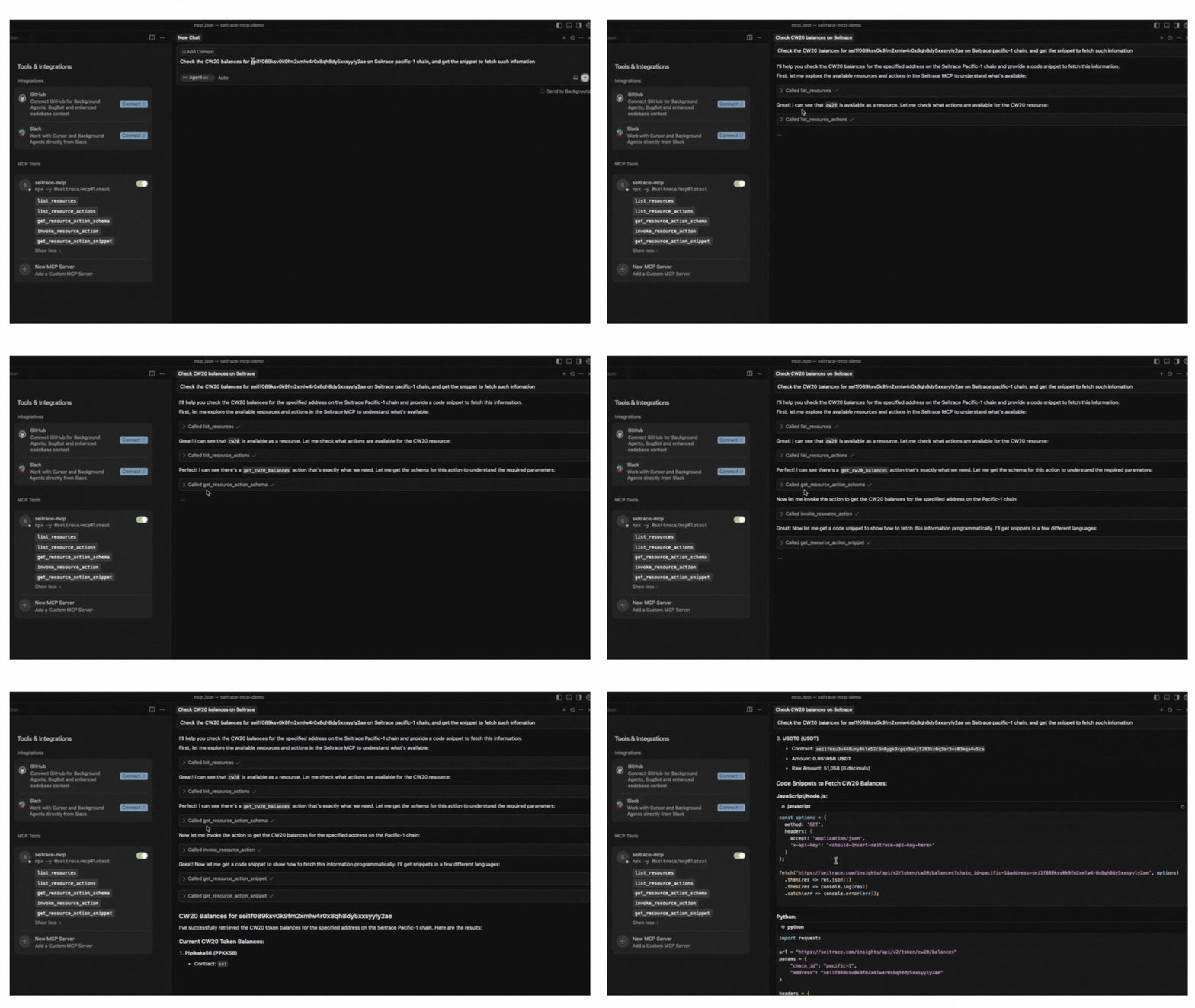
Seitrace MCP
The essential MCP (Model Context Protocol) server for the Sei blockchain.
Available tools 🧰
Five tools that form the resource-based interface (use in order 1→2→3→4):
list_resources— list available resources (start here)list_resource_actions— list actions for a resourceget_resource_action_schema— REQUIRED get the JSON Schema for an action before invokinginvoke_resource_action— invoke an action with payload matching the schemaget_resource_action_snippet— (optional) generate a code snippet to perform a resource action in the specified language
Supported resources
General
general_faucet- enable requesting faucet for developersgeneral_rpc_lcd- enable general rpc/lcd inquiries for the agents, and execute the rpc/lcd requests based on the demandsgeneral_associations— query hybrid associations (EOA/assets/txs) across EVM and native Sei. Returns simplified pointer/pointee fields when applicable.
Insights
insights_address— Query address data: details, transactions, token transfers.insights_erc20— Query ERC-20 tokens: info, balances, transfers, holders.insights_cw20— Query CW20 tokens: info, balances, transfers, holders.insights_native— Query native tokens: info, transfers, balances, holders.insights_ics20— Query ICS20 tokens: info, transfers, balances, holders.insights_erc721— Query ERC-721 tokens: info, holders, instances, balances, transfers.insights_erc1155— Query ERC-1155 tokens: info, holders, instances, balances, transfers.insights_cw721— Query CW721 tokens: info, instances, balances, holders, transfers.insights_smart_contract— Query smart contract details.insights_assets— Search official assets by name/symbol/identifier and get asset details by identifier. Uses Sei gateway endpoints; search is performed offline over the fetched assets list.insights_earnings— Search/list earnings pools (APR/APY) for pacific-1 and fetch a pool by address. Returns simplified fields: name, address, url, image, provider, tvl, apr, apy.insights_transactions— Query transaction details by hash via gateway (pacific-1, atlantic-2, arctic-1).
Smart Contract
smart_contract— Query smart contract state via Multicall3, search verified contracts, or download smart contract ABI from Seitrace (pacific-1, atlantic-2, arctic-1).
Getting started
Make sure you obtain an API Key for free here
Check installation guide
Highlights ✨
What MCP provides to end users and assistants:
- Natural‑language access to Seitrace insights. The assistant performs API calls on your behalf.
- Self‑describing tool flow: enumerate actions, retrieve the input schema, then invoke.
- Input validation and clear error messages using per‑action JSON Schemas.
- Concise discovery: minimal list output; detailed payloads only when invoking actions.
- Integration with MCP‑enabled VS Code extensions (e.g., Continue, Cline).
- Simple, secure API key handling via environment variables (sent as
x-api-key). - Quick start via npx:
npx -y @seitrace/mcp.
Typical Flow 🔁
Using the MCP SDK, drive the resource-based flow via the five tools. Important: Always follow this sequence, especially step 3:
// 1) Discover available resources
const resources = await client.callTool({ name: 'list_resouces', arguments: {} });
// -> { resources: ['erc20', 'erc721', 'native', ...] }

// 2) List actions for a resource
const actions = await client.callTool({
  name: 'list_resouce_actions',
  arguments: { resource: 'insights_erc20' },
});
// -> { resource: 'erc20', actions: [{ name, description }, ...] }

// 3) **REQUIRED** Get the JSON Schema for a specific action
// This step is critical - parameter names in descriptions may differ from actual schema
const schema = await client.callTool({
  name: 'get_resource_action_schema',
  arguments: { resource: 'insights_erc20', action: 'get_erc20_token_info' },
});
// -> { resource: 'insights_erc20', action: 'get_erc20_token_info', schema }
// The schema reveals exact parameter names like "q" instead of "query", "chain" instead of "chain_id", etc.

// 4) Invoke the action with payload matching the schema structure
const res = await client.callTool({
  name: 'invoke_resource_action',
  arguments: {
    resource: 'insights_erc20',
    action: 'get_erc20_token_info',
    payload: { chain: 'pacific-1', contract_address: '0x...' },
  },
});
// res.content[0].text -> "API Response (Status: 200):\n{ ... }"

// 5) Optionally, generate a code snippet for an action
const snippet = await client.callTool({
  name: 'get_resource_action_snippet',
  arguments: { resource: 'insights_erc20', action: 'get_erc20_token_info', language: 'node' },
});
// -> { resource, action, language, snippet }
The server validates payload against the action’s schema and returns a pretty-printed JSON body when applicable.
Requirements 🔧
- Node.js 20+
- A Seitrace Insights API key (optional for discovery, required for most live calls), obtain it here
Install 📦
npm install
Configure 🔐
Copy .env.example to .env and set your values as needed.
Environment variables:
API_BASE_URL(optional) — defaults tohttps://seitrace.com/insightsSECRET_APIKEY— Seitrace API key; used to set headerx-api-key
Build and Run 🏃
# Type-check and compile to build/
npm run build

# Run the MCP server over stdio (used by MCP clients)
npm start
This server is designed to be launched by an MCP-compatible client (e.g., via a command/args configuration). It communicates over stdio.
End-to-End Test ✅
Run the E2E to verify the root resource flow and (optionally) a live positive-call:
# Optionally provide your API key so the positive path runs
SEITRACE_API_KEY=your_key_here npm run test:e2e
Troubleshooting 🛠️
Make sure you run our e2e test to see the common errors we covered.
- E2E:
npm run test:e2e(optionalE2E_DEBUG=1for[E2E]logs). - Node: Use v20+.
Contributing 🤝
- Keep
tools/listoutput compact. Do not embed per-action details there—fetch them viagetResourceActionSchema. - New endpoints should appear under the correct resource; root tool methods should provide discovery and invocation consistently.
- Prefer small, focused modules in
src/lib/for shared logic.
License 📄
See LICENSE
Support 📨
Please shoot emails to [email protected]
Alternatives



Related Skills
Browse all skillsUse when building MCP servers or clients that connect AI systems with external tools and data sources. Invoke for MCP protocol compliance, TypeScript/Python SDKs, resource providers, tool functions.
Export OpenClaw usage data to CSV for analytics tools like Power BI. Hourly aggregates by activity type, model, and channel.
CCXT cryptocurrency exchange library for TypeScript and JavaScript developers (Node.js and browser). Covers both REST API (standard) and WebSocket API (real-time). Helps install CCXT, connect to exchanges, fetch market data, place orders, stream live tickers/orderbooks, handle authentication, and manage errors. Use when working with crypto exchanges in TypeScript/JavaScript projects, trading bots, arbitrage systems, or portfolio management tools. Includes both REST and WebSocket examples.
.NET/C# backend developer for ASP.NET Core APIs with Entity Framework Core. Builds REST APIs, minimal APIs, gRPC services, authentication with Identity/JWT, authorization, database operations, background services, SignalR real-time features. Activates for: .NET, C#, ASP.NET Core, Entity Framework Core, EF Core, .NET Core, minimal API, Web API, gRPC, authentication .NET, Identity, JWT .NET, authorization, LINQ, async/await C#, background service, IHostedService, SignalR, SQL Server, PostgreSQL .NET, dependency injection, middleware .NET.
Build full-stack applications with Supabase (PostgreSQL, Auth, Storage, Real-time, Edge Functions). Use when implementing authentication, database design with RLS, file storage, real-time features, or serverless functions.
Senior Python developer expertise for writing clean, efficient, and well-documented code. Use when: writing Python code, optimizing Python scripts, reviewing Python code for best practices, debugging Python issues, implementing type hints, or when user mentions Python, PEP 8, or needs help with Python data structures and algorithms.