
Source Map Parser
Maps minified JavaScript stack traces back to original source code locations using source maps. Helps developers debug production errors by showing the actual source code that caused the error.
Maps minified JavaScript stack traces back to original source code locations for efficient production error debugging.
What it does
- Parse error stack traces from minified JavaScript
- Look up original source code context for specific positions
- Extract all source files from source maps
- Map production errors back to development code
Best for
About Source Map Parser
Source Map Parser is a community-built MCP server published by masonchow that provides AI assistants with tools and capabilities via the Model Context Protocol. Source Map Parser maps minified JavaScript stack traces back to original source locations for fast, accurate production error debugging. It is categorized under developer tools. This server exposes 3 tools that AI clients can invoke during conversations and coding sessions.
How to install
You can install Source Map Parser in your AI client of choice. Use the install panel on this page to get one-click setup for Cursor, Claude Desktop, VS Code, and other MCP-compatible clients. This server runs locally on your machine via the stdio transport.
License
Source Map Parser is released under the MIT license. This is a permissive open-source license, meaning you can freely use, modify, and distribute the software.
Tools (3)
# Parse Error Stack Trace This tool allows you to parse error stack traces by providing the following: - A downloadable source map URL. - The line and column numbers from the stack trace. The tool will map the provided stack trace information to the corresponding source code location using the source map. It also supports fetching additional context lines around the error location for better debugging. ## Parameters: - **stacks**: An array of stack trace objects, each containing: - **line**: The line number in the stack trace. - **column**: The column number in the stack trace. - **sourceMapUrl**: The URL of the source map file corresponding to the stack trace. - **ctxOffset** (optional): The number of additional context lines to include before and after the error location in the source code. Defaults to 5. ## Returns: - A JSON object containing the parsed stack trace information, including the mapped source code location and context lines. - If parsing fails, an error message will be returned for the corresponding stack trace.
# Lookup Source Code Context This tool looks up original source code context for a specific line and column position in compiled/minified code. ## Parameters: - **line**: The line number in the compiled code (1-based) - **column**: The column number in the compiled code - **sourceMapUrl**: The URL of the source map file - **contextLines** (optional): Number of context lines to include before and after the target line (default: 5) ## Returns: - A JSON object containing the source code context snippet with file path, target line info, and surrounding context lines - Returns null if the position cannot be mapped
# Unpack Source Map Sources This tool extracts all source files and their content from a source map. ## Parameters: - **sourceMapUrl**: The URL of the source map file to unpack ## Returns: - A JSON object containing: - **sources**: Object with source file paths as keys and their content as values - **sourceRoot**: The source root path from the source map - **file**: The original file name - **totalSources**: Total number of source files found
Source Map Parser





This project implements a WebAssembly-based Source Map parser that can map JavaScript error stack traces back to source code and extract relevant context information. Developers can easily map JavaScript error stack traces back to source code for quick problem identification and resolution. This documentation aims to help developers better understand and use this tool.
MCP Integration
Note: Requires Node.js 20+ support
Option 1: Run directly with NPX
npx -y source-map-parser-mcp@latest
Option 2: Download the build artifacts
Download the corresponding version of the build artifacts from the GitHub Release page, then run:
node dist/main.es.js
Use as an npm package (bring your own MCP server)
You can embed the tools into your own MCP server process and customize behavior.
Install:
npm install source-map-parser-mcp
Minimal server (TypeScript):
import { McpServer } from '@modelcontextprotocol/sdk/server/mcp.js';
import { StdioServerTransport } from '@modelcontextprotocol/sdk/server/stdio.js';
import {
  registerTools,
  Parser,
  type ToolsRegistryOptions,
} from 'source-map-parser-mcp';

const server = new McpServer(
  { name: 'your-org.source-map-parser', version: '0.0.1' },
  { capabilities: { tools: {} } }
);

// Optional: control context lines via env
const options: ToolsRegistryOptions = {
  contextOffsetLine:
    Number(process.env.SOURCE_MAP_PARSER_CONTEXT_OFFSET_LINE) || 1,
};

registerTools(server, options);

// Start as stdio server
const transport = new StdioServerTransport();
await server.connect(transport);

// If you need programmatic parsing without MCP:
const parser = new Parser({ contextOffsetLine: 1 });
// await parser.parseStack({ line: 10, column: 5, sourceMapUrl: 'https://...' });
// await parser.batchParseStack([{ line, column, sourceMapUrl }]);
Build and Type Declarations
This project ships both ESM and CJS builds and a single bundled TypeScript declaration file.
- Build outputs:
- ESM:
dist/index.es.js - CJS:
dist/index.cjs.js - CLI entry:
dist/main.es.js - Types:
dist/index.d.ts(single bundled d.ts)
- ESM:
Quick build locally:
npm install
npm run build
Using types in your project:
import {
  Parser,
  registerTools,
  type ToolsRegistryOptions,
} from 'source-map-parser-mcp';
Runtime Parameter Configuration
System runtime parameters can be flexibly configured through environment variables to meet the needs of different scenarios
SOURCE_MAP_PARSER_RESOURCE_CACHE_MAX_SIZE: Sets the maximum memory space occupied by resource cache, default is 200MB. Adjusting this value appropriately can balance performance and memory usage.SOURCE_MAP_PARSER_CONTEXT_OFFSET_LINE: Defines the number of context code lines to display around the error location, default is 1 line. Increasing this value provides more context information, facilitating problem diagnosis.
Example:
# Set 500MB cache and display 3 lines of context
export SOURCE_MAP_PARSER_RESOURCE_CACHE_MAX_SIZE=500
export SOURCE_MAP_PARSER_CONTEXT_OFFSET_LINE=3
npx -y source-map-parser-mcp@latest
Feature Overview
- Stack Parsing: Parse the corresponding source code location based on provided line number, column number, and Source Map file.
- Batch Processing: Support parsing multiple stack traces simultaneously and return batch results.
- Context Extraction: Extract context code for a specified number of lines to help developers better understand the environment where errors occur.
- Context Lookup: Look up original source code context for specific compiled code positions.
- Source Unpacking: Extract all source files and their content from source maps.
MCP Service Tool Description
operating_guide
Get usage instructions for the MCP service. Provides information on how to use the MCP service through chat interaction.
parse_stack
Parse stack information by providing stack traces and Source Map addresses.
Request Example
- stacks: Stack information including line number, column number, and Source Map address.
- line: Line number, required.
- column: Column number, required.
- sourceMapUrl: Source Map address, required.
{
  "stacks": [
    {
      "line": 10,
      "column": 5,
      "sourceMapUrl": "https://example.com/source.map"
    }
  ]
}
Response Example
{
  "content": [
    {
      "type": "text",
      "text": "[{\"success\":true,\"token\":{\"line\":10,\"column\":5,\"sourceCode\":[{\"line\":8,\"isStackLine\":false,\"raw\":\"function foo() {\"},{\"line\":9,\"isStackLine\":false,\"raw\":\"  console.log('bar');\"},{\"line\":10,\"isStackLine\":true,\"raw\":\"  throw new Error('test');\"},{\"line\":11,\"isStackLine\":false,\"raw\":\"}\"}],\"src\":\"index.js\"}}]"
    }
  ]
}
lookup_context
Look up original source code context for a specific line and column position in compiled/minified code.
Request Example
- line: The line number in the compiled code (1-based), required.
- column: The column number in the compiled code, required.
- sourceMapUrl: The URL of the source map file, required.
- contextLines: Number of context lines to include (default: 5), optional.
{
  "line": 42,
  "column": 15,
  "sourceMapUrl": "https://example.com/app.js.map",
  "contextLines": 5
}
Response Example
{
  "content": [
    {
      "type": "text",
      "text": "{\"filePath\":\"src/utils.js\",\"targetLine\":25,\"contextLines\":[{\"lineNumber\":23,\"content\":\"function calculateSum(a, b) {\"},{\"lineNumber\":24,\"content\":\"  if (a < 0 || b < 0) {\"},{\"lineNumber\":25,\"content\":\"    throw new Error('Negative numbers not allowed');\"},{\"lineNumber\":26,\"content\":\"  }\"},{\"lineNumber\":27,\"content\":\"  return a + b;\"}]}"
    }
  ]
}
unpack_sources
Extract all source files and their content from a source map.
Request Example
- sourceMapUrl: The URL of the source map file to unpack, required.
{
  "sourceMapUrl": "https://example.com/bundle.js.map"
}
Response Example
{
  "content": [
    {
      "type": "text",
      "text": "{\"sources\":{\"src/index.js\":\"import { utils } from './utils.js';\\nconsole.log('Hello World!');\",\"src/utils.js\":\"export const utils = { add: (a, b) => a + b };\"},\"sourceRoot\":\"/\",\"file\":\"bundle.js\",\"totalSources\":2}"
    }
  ]
}
Parsing Result Description
success: Indicates whether the parsing was successful.token: The Token object returned when parsing is successful, containing source code line number, column number, context code, and other information.error: Error information returned when parsing fails.
Example Run
System Prompt
According to actual needs, you can use system prompts to guide the model on how to parse stack information. For security or performance reasons, some teams may not want to expose Source Maps directly to the browser for parsing, but instead process the upload path of the Source Map. For example, converting the path bar-special.js to special/bar.js.map. In this case, you can instruct the model to perform path conversion through prompt rules.
Here is an example:
# Error Stack Trace Parsing Rules

When performing source map parsing, please follow these rules:

1. If the URL contains `special`, the file should be parsed into the `special/` directory, while removing `-special` from the filename.
2. All source map files are stored in the following CDN directory:
   `https://cdn.jsdelivr.net/gh/MasonChow/source-map-parser-mcp@main/example/`

## Examples

- Source map address for `bar-special.js`:
  `https://cdn.jsdelivr.net/gh/MasonChow/source-map-parser-mcp@main/example/special/bar.js.map`
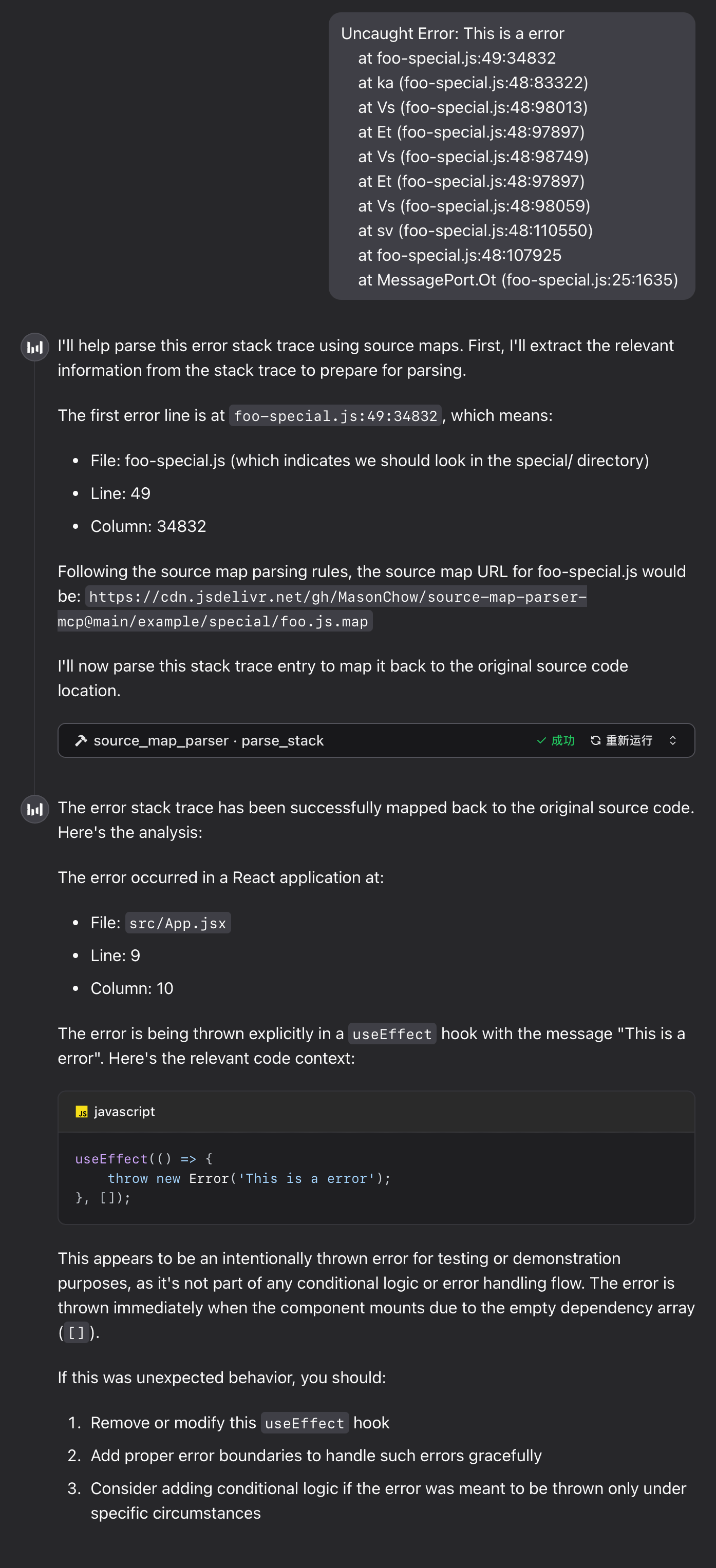
Runtime Example
Error Stack
Uncaught Error: This is a error
    at foo-special.js:49:34832
    at ka (foo-special.js:48:83322)
    at Vs (foo-special.js:48:98013)
    at Et (foo-special.js:48:97897)
    at Vs (foo-special.js:48:98749)
    at Et (foo-special.js:48:97897)
    at Vs (foo-special.js:48:98059)
    at sv (foo-special.js:48:110550)
    at foo-special.js:48:107925
    at MessagePort.Ot (foo-special.js:25:1635)
FAQ
1. WebAssembly Module Loading Failure
If the tool returns the following error message, please troubleshoot as follows:
parser init error: WebAssembly.instantiate(): invalid value type 'externref', enable with --experimental-wasm-reftypes @+86
- Check Node.js Version: Ensure Node.js version is 20 or higher. If it's lower than 20, please upgrade Node.js.
- Enable Experimental Flag: If Node.js version
README truncated. View full README on GitHub.
Alternatives



Related Skills
Browse all skillsUse when building MCP servers or clients that connect AI systems with external tools and data sources. Invoke for MCP protocol compliance, TypeScript/Python SDKs, resource providers, tool functions.
This skill should be used when working on Godot Engine projects. It provides specialized knowledge of Godot's file formats (.gd, .tscn, .tres), architecture patterns (component-based, signal-driven, resource-based), common pitfalls, validation tools, code templates, and CLI workflows. The `godot` command is available for running the game, validating scripts, importing resources, and exporting builds. Use this skill for tasks involving Godot game development, debugging scene/resource files, implementing game systems, or creating new Godot components.
Comprehensive PMP/PMBOK project management methodologies and best practices. Use this skill when users need guidance on project management processes, templates, knowledge areas, process groups, tools, techniques, or certification preparation. Covers all 10 PMBOK Knowledge Areas and 5 Process Groups with practical templates, frameworks, and industry-standard approaches. Includes risk management, stakeholder engagement, schedule management, cost control, quality assurance, and resource planning.
UI design system toolkit for Senior UI Designer including design token generation, component documentation, responsive design calculations, and developer handoff tools. Use for creating design systems, maintaining visual consistency, and facilitating design-dev collaboration.
Interface for MCP (Model Context Protocol) servers via CLI. Use when you need to interact with external tools, APIs, or data sources through MCP servers, list available MCP servers/tools, or call MCP tools from command line.
Orchestrate Unity Editor via MCP (Model Context Protocol) tools and resources. Use when working with Unity projects through MCP for Unity - creating/modifying GameObjects, editing scripts, managing scenes, running tests, or any Unity Editor automation. Provides best practices, tool schemas, and workflow patterns for effective Unity-MCP integration.