
SQL Database Bridge
Connects to SQL databases (currently MSSQL, with MySQL and PostgreSQL planned) to run queries, inspect schemas, and monitor performance through the Model Context Protocol.
Provides a bridge to SQL databases (MSSQL, MySQL, PostgreSQL) for executing queries, exploring schemas, monitoring performance, and generating reports with features like connection pooling and transaction management.
What it does
- Execute SQL queries with parameterized statements
- Inspect database schemas and metadata
- Monitor query performance and statistics
- Manage database connections with pooling
- Run batch operations and transactions
- Generate database reports
Best for
About SQL Database Bridge
SQL Database Bridge is a community-built MCP server published by ryudg that provides AI assistants with tools and capabilities via the Model Context Protocol. Bridge to SQL databases for queries, schema exploration, database activity monitoring, and more in a SQL Server Management Studio software. It is categorized under databases, developer tools.
How to install
You can install SQL Database Bridge in your AI client of choice. Use the install panel on this page to get one-click setup for Cursor, Claude Desktop, VS Code, and other MCP-compatible clients. This server runs locally on your machine via the stdio transport.
License
SQL Database Bridge is released under the MIT license. This is a permissive open-source license, meaning you can freely use, modify, and distribute the software.
MCP SQL Server




A Model Context Protocol server that provides comprehensive access to SQL databases, starting with MSSQL support. This server enables AI assistants to inspect database schemas, execute queries, and perform database operations with enterprise-grade security and performance monitoring.
Current Status: MSSQL fully supported. MySQL and PostgreSQL support coming in future releases.
✨ Key Features
- Database Support: Full MSSQL support (MySQL and PostgreSQL coming soon)
- Schema Inspection: Comprehensive database structure analysis and metadata extraction
- Query Execution: Safe SQL execution with parameterized queries and result formatting
- Performance Monitoring: Real-time metrics, query statistics, and performance reports
- Security First: SQL injection prevention, connection encryption, and access controls
- Batch Operations: Efficient bulk query execution and transaction management
- Connection Pooling: Optimized connection management with configurable pool settings
- MCP Integration: Native support for Claude Desktop, Cursor, and other MCP-compatible tools
📦 Installation & Setup
Prerequisites
- Node.js 18.0.0+ - Download here
- Database Server: Microsoft SQL Server (MSSQL)
- AI Assistant: Claude Desktop, Cursor, or any MCP-compatible tool
Note: Currently only MSSQL is supported. MySQL and PostgreSQL support will be added in future releases.
Quick Installation
# Install globally via NPM
npm install -g @donggyunryu/mcp-sql
Basic Configuration
Refer to
env.example
Create a .env file with your database settings:
# Create .env file with your database settings
# DB_TYPE=mssql # Current only MSSQL supported
DB_HOST=localhost
DB_PORT=1433
DB_DATABASE=your_database
DB_USER=your_username
DB_PASSWORD=your_password
DB_ENCRYPT=false
DB_TRUST_SERVER_CERTIFICATE=true
Test Connection
# Test your database connection
npm run test:db # in local environment

#or
npx @donggyunryu/mcp-sql test:db
🚀 Quick Start
Local Environment
-
Clone the repository:
git clone https://github.com/ryudg/mcp-sql.git cd mcp-sql -
Install dependencies
npm install -
Build the project
npm run build -
Add to your
mcp.jsonorsetting.json,claude_desktop_config.json{ "mcpServers": { "mcp-sql": { "command": "node", "args": ["/full/path/to/mcp-mysql/build/index.js"], "env": { // "DB_TYPE": "mssql", # Current only MSSQL supported "DB_SERVER": "localhost", "DB_PORT": "1433", "DB_DATABASE": "your_database", "DB_USER": "your_username", "DB_PASSWORD": "your_password", "DB_ENCRYPT": "false", "DB_TRUST_SERVER_CERTIFICATE": "true", "NODE_ENV": "development", "LOG_LEVEL": "info" } } } }
Configure AI Assistant
For Claude Desktop:
Add to your claude_desktop_config.json:
{
  "mcpServers": {
    "mcp-sql": {
      "command": "npx",
      "args": ["-y", "@donggyunryu/mcp-sql"],
      "env": {
        // "DB_TYPE": "mssql", # Current only MSSQL supported
        "DB_HOST": "localhost",
        "DB_PORT": "1433",
        "DB_DATABASE": "your_database",
        "DB_USER": "your_username",
        "DB_PASSWORD": "your_password",
        "DB_ENCRYPT": "false",
        "DB_TRUST_SERVER_CERTIFICATE": "true"
      }
    }
  }
}
For Cursor(VSCode, Windsurf... etc IDE):
Add to your MCP settings:
{
  "mcpServers": {
    "mcp-sql": {
      "command": "npx",
      "args": ["-y", "@donggyunryu/mcp-sql"],
      "env": {
        // "DB_TYPE": "mssql", # Current only MSSQL supported
        "DB_HOST": "localhost",
        "DB_PORT": "1433",
        "DB_DATABASE": "your_database",
        "DB_USER": "your_username",
        "DB_PASSWORD": "your_password",
        "DB_ENCRYPT": "false",
        "DB_TRUST_SERVER_CERTIFICATE": "true"
      }
    }
  }
}
Start Using
Restart your AI assistant and try:
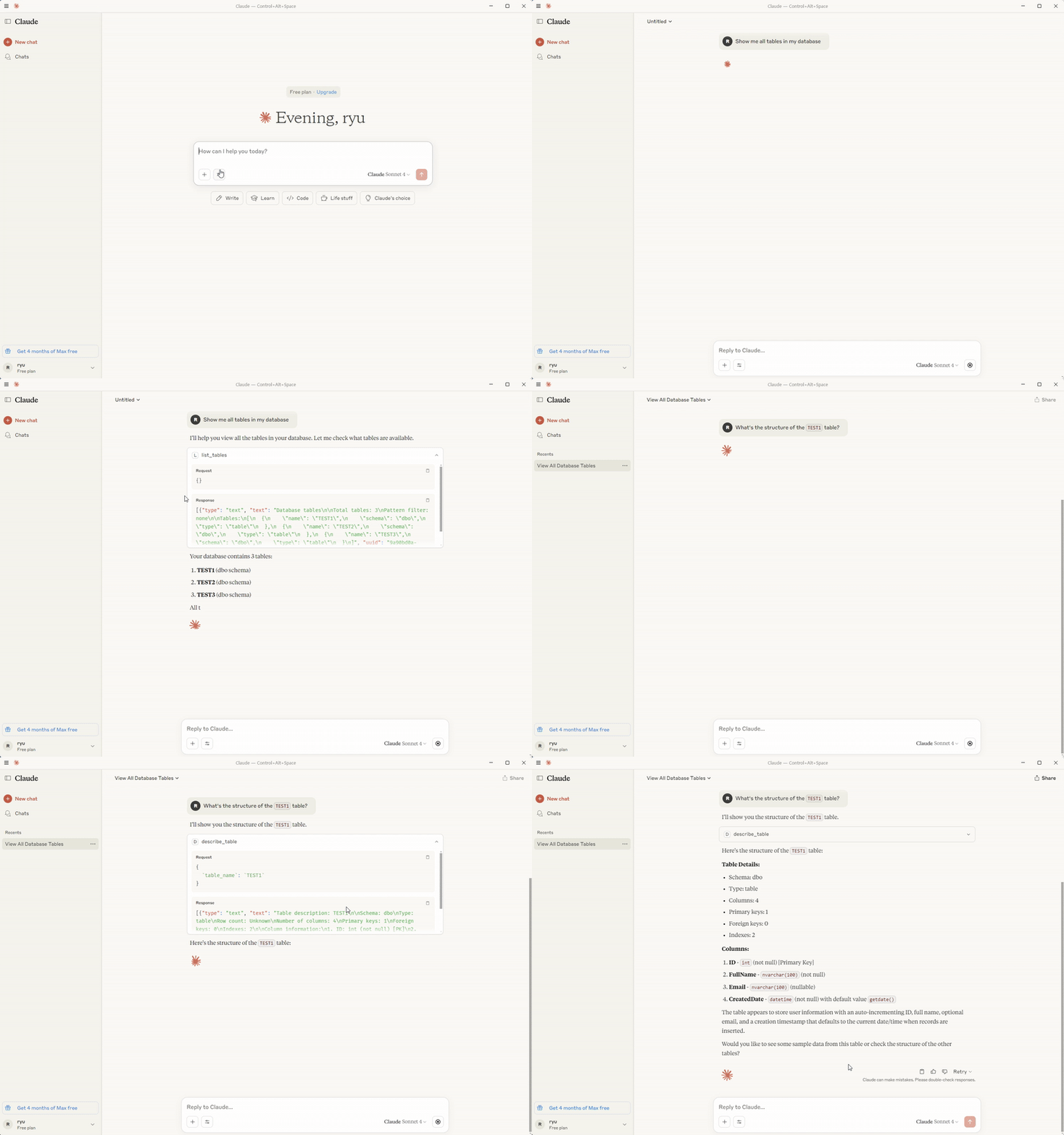
"Show me all tables in my database"
"What's the structure of the users table?"
"Find all active users from the last 30 days"
💬 Usage Examples
Schema Exploration
"Show me all tables in the database"
"What's the structure of the users table?"
"List all columns in the orders table with their data types"
Data Queries
"Find all active users registered in the last 30 days"
"Show me the top 10 customers by total order value"
"Get all pending orders from this month"
Performance Monitoring
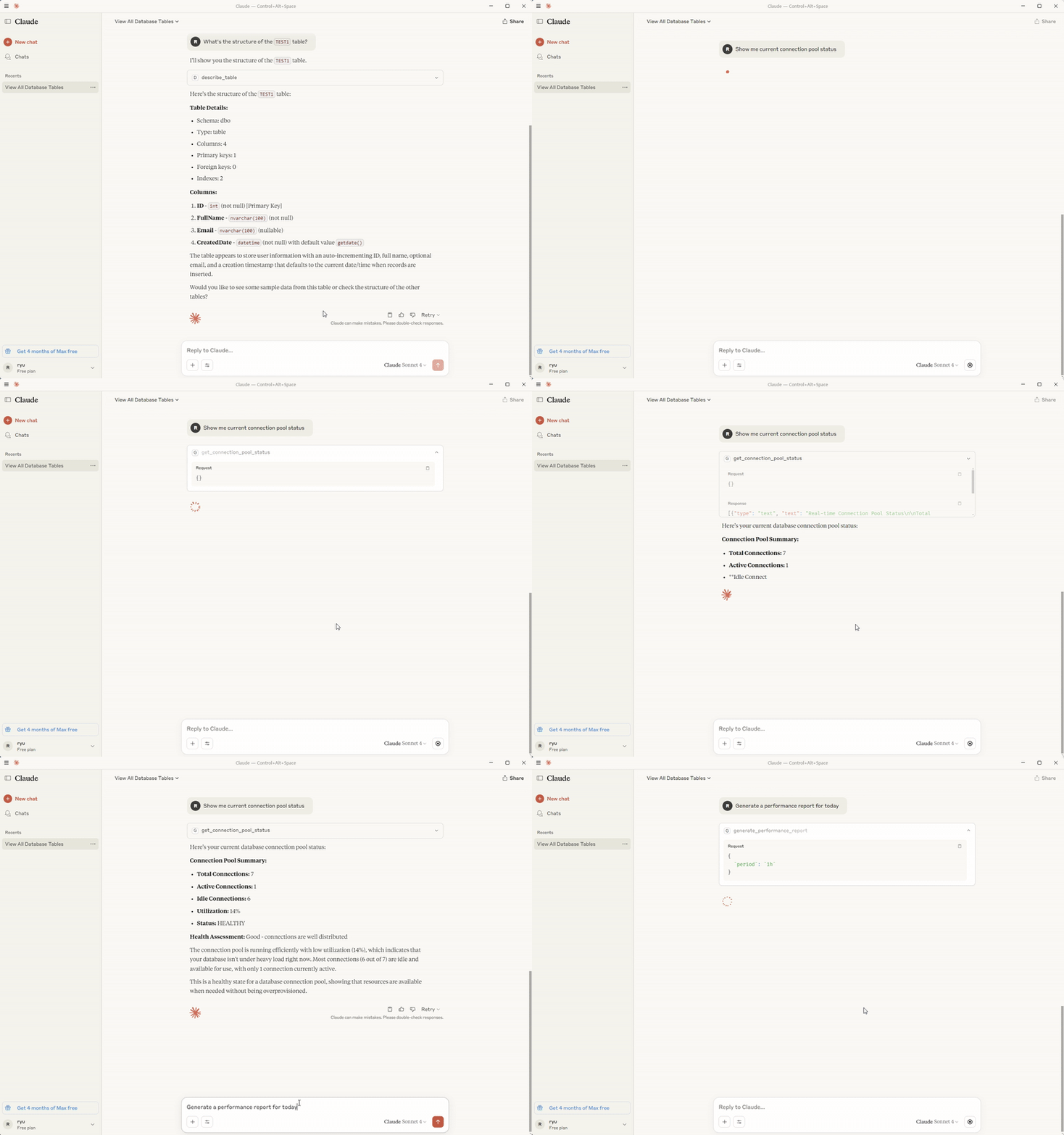
"Show me current connection pool status"
"What are the slowest queries in the last hour?"
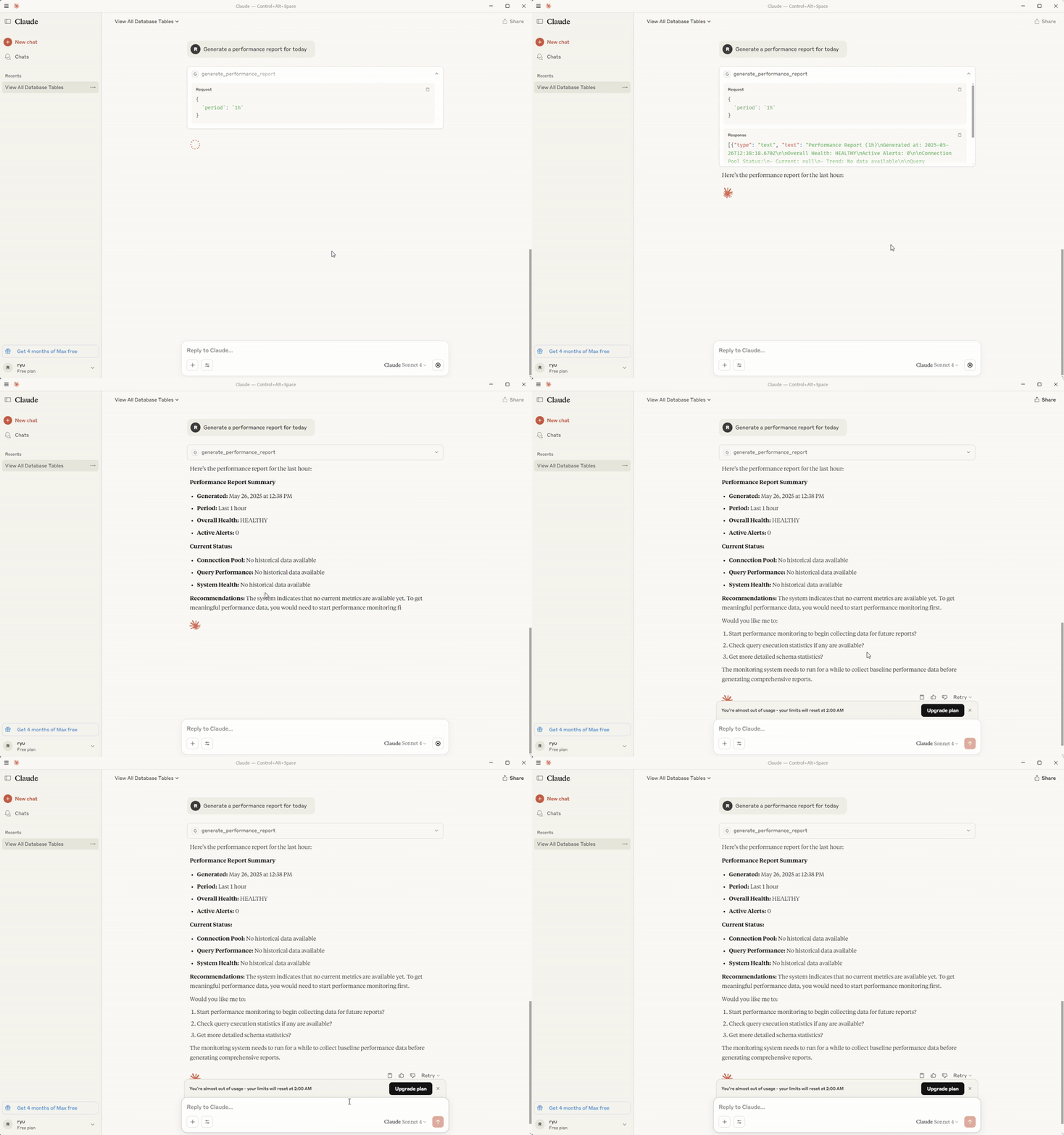
"Generate a performance report for today"
🛠️ Available Tools
The MCP SQL server provides the following tools for database interaction:
Schema & Discovery Tools
| Tool | Description | Parameters |
|---|---|---|
list_tables | List all tables in database | pattern (optional): Filter pattern |
describe_table | Get detailed table structure | table_name: Name of table to describe |
get_schema | Get complete database schema | include_system_tables: Include system tables |
get_schema_statistics | Get schema statistics information | None |
Query Execution Tools
| Tool | Description | Parameters |
|---|---|---|
execute_query | Execute SQL queries safely | query: SQL statementparameters: Bind parameters |
start_batch_processing | Process multiple queries in batch | queries: Array of SQL statements |
Performance & Monitoring Tools
| Tool | Description | Parameters |
|---|---|---|
get_connection_pool_status | Get database connection pool status | None |
get_query_stats | Get query execution statistics | period: Time period (optional) |
start_performance_monitoring | Start performance monitoring | interval: Monitoring interval (ms) |
generate_performance_report | Generate performance analysis report | timeRange: Report period |
clear_caches | Initialize cache data | None |
🛡️ Security
- Connection Encryption: TLS/SSL connection support
- Parameter Binding: SQL injection prevention
- Access Control: Database user permission-based control
- Logging: Complete query execution logging
- Input Validation: Comprehensive input sanitization
Security Best Practices
- Use dedicated database users with minimal required permissions
- Enable SSL/TLS encryption for database connections when possible
- Use connection pooling with appropriate limits
- Never commit credentials to version control
- Use environment variables for all sensitive configuration
🗺️ Roadmap
Upcoming Features
-
🔮 Multi-Database Support
- MySQL adapter implementation
- PostgreSQL adapter implementation
- Unified database interface
-
⚡ Performance & Caching
- Query result caching system
- Advanced performance optimization
- Connection pool enhancements
-
🧪 Testing & Quality
- Comprehensive test coverage (100%)
- Automated CI/CD pipeline
- Performance benchmarking
-
🚀 Advanced Features
- GraphQL integration support
- Enhanced monitoring dashboard
- Plugin architecture for extensibility
-
📊 Analytics & Insights
- Advanced query analytics
- Database performance insights
- Usage statistics and reporting
Support & Community
- 📋 Issues: Report bugs or request features
- 💬 Discussions: Community discussions and Q&A
- 📖 Documentation: Comprehensive guides and API docs
📝 License
This project is licensed under the MIT License. See the LICENSE file for details.
Made with for the AI-powered development community
MCP SQL Server v1.0.0 - Bridging AI and databases
Alternatives



Related Skills
Browse all skillsModern web development expertise covering React, Node.js, databases, and full-stack architecture. Use when: building web applications, developing APIs, creating frontends, setting up databases, deploying web apps, or when user mentions React, Next.js, Express, REST API, GraphQL, MongoDB, PostgreSQL, or full-stack development.
Guidance for recovering data from corrupted or truncated SQLite database files through binary analysis and manual parsing. This skill applies when working with damaged SQLite databases that cannot be opened with standard tools, particularly when corruption is due to binary truncation, incomplete writes, or filesystem errors.
Search and deploy services from Railway's template marketplace. Use when user wants to add a service from a template, find templates for a specific use case, or deploy tools like Ghost, Strapi, n8n, Minio, Uptime Kuma, etc. For databases (Postgres, Redis, MySQL, MongoDB), prefer the railway-database skill.
.NET/C# backend developer for ASP.NET Core APIs with Entity Framework Core. Builds REST APIs, minimal APIs, gRPC services, authentication with Identity/JWT, authorization, database operations, background services, SignalR real-time features. Activates for: .NET, C#, ASP.NET Core, Entity Framework Core, EF Core, .NET Core, minimal API, Web API, gRPC, authentication .NET, Identity, JWT .NET, authorization, LINQ, async/await C#, background service, IHostedService, SignalR, SQL Server, PostgreSQL .NET, dependency injection, middleware .NET.
Build full-stack applications with Supabase (PostgreSQL, Auth, Storage, Real-time, Edge Functions). Use when implementing authentication, database design with RLS, file storage, real-time features, or serverless functions.
Comprehensive guide for PostgreSQL psql - the interactive terminal client for PostgreSQL. Use when connecting to PostgreSQL databases, executing queries, managing databases/tables, configuring connection options, formatting output, writing scripts, managing transactions, and using advanced psql features for database administration and development.