
SSH Rails Runner
Executes Rails console commands remotely via SSH, providing safe read-only operations and controlled mutations on production Rails applications.
Enables safe remote execution of Rails console commands via SSH for efficient data operations and administrative tasks on production Rails applications.
What it does
- Execute read-only Rails console commands remotely
- Run dry-run mutations before making changes
- Execute approved database mutations via Rails console
- Manage and store code snippets locally
- Connect to production Rails apps over SSH
Best for
About SSH Rails Runner
SSH Rails Runner is a community-built MCP server published by tadasant that provides AI assistants with tools and capabilities via the Model Context Protocol. SSH Rails Runner enables secure remote Rails console command execution via SSH for streamlined data and admin tasks in production apps. It is categorized under databases, developer tools.
How to install
You can install SSH Rails Runner in your AI client of choice. Use the install panel on this page to get one-click setup for Cursor, Claude Desktop, VS Code, and other MCP-compatible clients. This server runs locally on your machine via the stdio transport.
License
SSH Rails Runner is released under the MIT license. This is a permissive open-source license, meaning you can freely use, modify, and distribute the software.
MCP Server: SSH Rails Runner
An MCP server that enables secure remote execution of Rails console commands via SSH. This server provides tools for both read-only operations and carefully managed mutations in a deployed Rails environment.
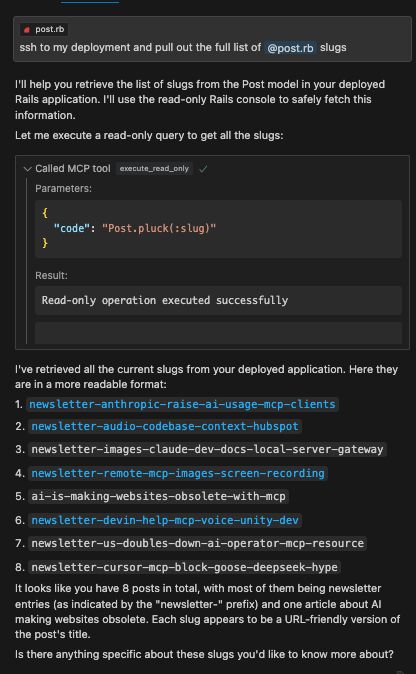
This works great with Cursor. You can use Cursor Composer to pull in your Rails model files as context and then use the execute_read_only, dry_run_mutate, and execute_mutate tools to make changes to the database. No need to trudge through complicated Admin UI's to get your data wrangling and analysis done.
Example
Features
- Remote Rails console execution over SSH
- Safe read-only operations
- Dry-run capability for mutations
- Execution of approved mutations
- Resource management for code snippets
Installation
npm install
npm run build
Configuration
Set the following environment variables:
SSH_HOST=your.remote.host
SSH_USER=your_ssh_user
SSH_PRIVATE_KEY_PATH=your_SSH_PRIVATE_KEY_PATH
RAILS_WORKING_DIR=/path/to/rails/app
Usage with Claude Desktop
Add to your Claude Desktop configuration:
{
  "mcpServers": {
    "ssh-rails-runner": {
      "command": "npx",
      "args": ["mcp-server-ssh-rails-runner"],
      "env": {
        "SSH_HOST": "your.remote.host",
        "SSH_USER": "your_ssh_user",
        "SSH_PRIVATE_KEY_PATH": "your_SSH_PRIVATE_KEY_PATH",
        "RAILS_WORKING_DIR": "/path/to/rails/app/root",
        "PROJECT_NAME_AS_CONTEXT": "Name that shows up in tool descriptions to help the LLM describe what kind of Rails project we're working with.",
        "CODE_SNIPPET_FILE_DIRECTORY": "/path/to/store/code/snippets/locally"
      }
    }
  }
}
If CODE_SNIPPET_FILE_DIRECTORY is not provided, snippets will be stored in a temporary directory (e.g., /tmp/mcp-ssh-rails-runner-code-snippets).
PROJECT_NAME_AS_CONTEXT is optional and helps identify the project context in tool descriptions.
Available Tools
The server now uses a Prepare -> Execute workflow:
mcp_ssh_rails_runner_prepare_code_snippet
- Arguments:
name(string, for filename),type(enum: "readOnly" | "mutate"),code(string, Ruby code),description(string, optional). - Function: Saves the provided Ruby code to a local file named
code_snippet_<name>.json, marks it as read-only or mutate, and opens the file for review. - Returns: The
file://URI of the created snippet.
mcp_ssh_rails_runner_execute_code_snippet_read_only
- Arguments:
uri(string,file://URI fromprepareCodeSnippet). - Function: Reads the code snippet from the URI, verifies it's marked as
readOnly, performs a safety check on the code, and executes it. - Returns: The output of the Rails command.
mcp_ssh_rails_runner_execute_code_snippet_mutate
- Arguments:
uri(string,file://URI fromprepareCodeSnippet). - Function: DANGER ZONE! Reads the code snippet, verifies it's marked as
mutate, and executes it directly. There is no dry run or further safety check within this tool. - Returns: The output of the Rails command.
- Usage: ONLY CALL THIS AFTER THE USER HAS REVIEWED the prepared code (via the opened file from
prepareCodeSnippet) AND EXPLICITLY CONFIRMED they want to execute the mutation.
Security Considerations
- Only use with trusted SSH endpoints from your own local machine that is (temporarily) provided access to the remote environment.
- Crucially, always review the code saved by
prepareCodeSnippetbefore executing any mutation withexecuteCodeSnippetMutate. The responsibility for confirming mutations lies with the user and the calling AI.
License
MIT
Alternatives



Related Skills
Browse all skillsUI design system toolkit for Senior UI Designer including design token generation, component documentation, responsive design calculations, and developer handoff tools. Use for creating design systems, maintaining visual consistency, and facilitating design-dev collaboration.
Modern web development expertise covering React, Node.js, databases, and full-stack architecture. Use when: building web applications, developing APIs, creating frontends, setting up databases, deploying web apps, or when user mentions React, Next.js, Express, REST API, GraphQL, MongoDB, PostgreSQL, or full-stack development.
Answer questions about the AI SDK and help build AI-powered features. Use when developers: (1) Ask about AI SDK functions like generateText, streamText, ToolLoopAgent, embed, or tools, (2) Want to build AI agents, chatbots, RAG systems, or text generation features, (3) Have questions about AI providers (OpenAI, Anthropic, Google, etc.), streaming, tool calling, structured output, or embeddings, (4) Use React hooks like useChat or useCompletion. Triggers on: "AI SDK", "Vercel AI SDK", "generateText", "streamText", "add AI to my app", "build an agent", "tool calling", "structured output", "useChat".
Find, connect, and use MCP tools and skills via the Smithery CLI. Use when the user searches for new tools or skills, wants to discover integrations, connect to an MCP, install a skill, or wants to interact with an external service (email, Slack, Discord, GitHub, Jira, Notion, databases, cloud APIs, monitoring, etc.).
Deploy and manage Railway projects. Authenticate, link projects, deploy code, manage variables, view logs, SSH into services, and provision databases. Use /railway to quickly deploy or manage Railway services.
Use when working with the OpenAI API (Responses API) or OpenAI platform features (tools, streaming, Realtime API, auth, models, rate limits, MCP) and you need authoritative, up-to-date documentation (schemas, examples, limits, edge cases). Prefer the OpenAI Developer Documentation MCP server tools when available; otherwise guide the user to enable `openaiDeveloperDocs`.