
TextArtTools
Transform plain text into styled Unicode formats (bold, italic, cursive, etc.) and generate ASCII art banners using 300+ fonts.
Unicode text styling and ASCII art generation with 23 styles and 322+ figlet fonts
What it does
- Style text with 23 Unicode formats
- Generate ASCII art banners with 322+ fonts
- Transform text to bold, italic, cursive, and fraktur styles
- Create decorative headers and text displays
- Preview different ASCII art fonts
Best for
About TextArtTools
TextArtTools is a community-built MCP server published by humanjesse that provides AI assistants with tools and capabilities via the Model Context Protocol. Create stylish Unicode text and ASCII art with 23 text styles and 322+ FIGlet fonts. Fast, free TextArtTools for banners, signatures, and social posts. It is categorized under developer tools, design.
How to install
You can install TextArtTools in your AI client of choice. Use the install panel on this page to get one-click setup for Cursor, Claude Desktop, VS Code, and other MCP-compatible clients. This server supports remote connections over HTTP, so no local installation is required.
License
TextArtTools is released under the MIT license. This is a permissive open-source license, meaning you can freely use, modify, and distribute the software.
TextArtTools MCP Server



🌐 Live Server: https://mcp.textarttools.com
Transform text with Unicode styles and create ASCII art banners. A production-ready Model Context Protocol (MCP) server deployed globally on Cloudflare Workers.
📺 Demo
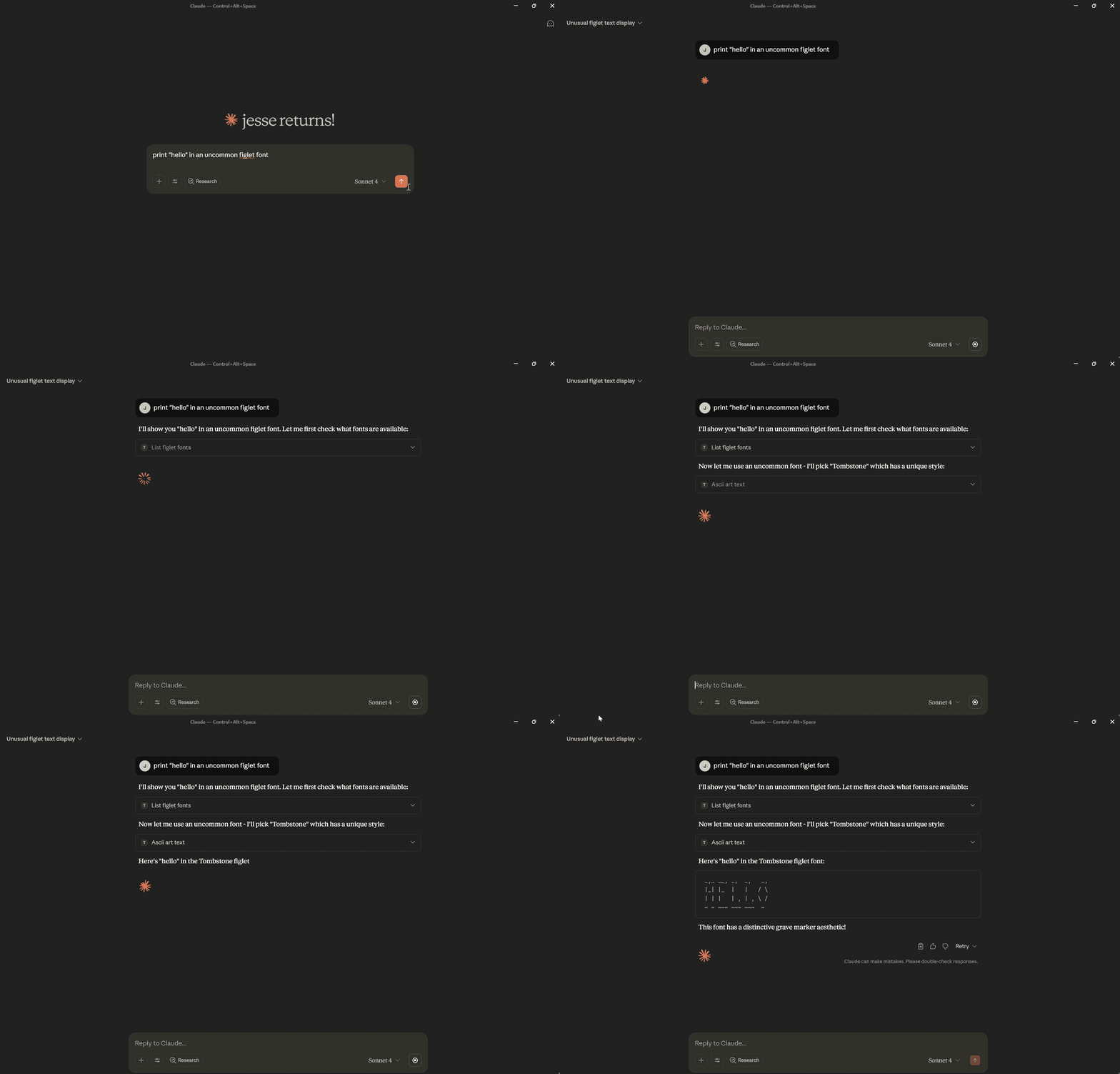
✨ Features
- 23 Unicode Text Styles - Transform text to 𝗯𝗼𝗹𝗱, 𝘪𝘵𝘢𝘭𝘪𝘤, 𝒸𝓊𝓇𝓈𝒾𝓋𝓮, 𝔣𝔯𝔞𝔨𝔱𝔲𝔯, and more
- 322+ ASCII Art Fonts - Create stylized text banners for headers and decorations
- No Authentication - Public server ready to use immediately
- Global Performance - Deployed on Cloudflare Workers edge network
- Rate Limited - 100 requests per minute with burst protection
- Secure - Input validation, XSS prevention, and comprehensive security headers
🚀 Quick Start
Install with Claude Desktop
-
Install the MCP remote proxy:
npm install -g @anthropic/mcp-remote -
Add to your Claude Desktop config (
claude_desktop_config.json):{ "mcpServers": { "textarttools": { "command": "mcp-server", "args": ["https://mcp.textarttools.com/sse"] } } } -
Restart Claude Desktop and start using text styling tools!
💡 Example Usage
Try the live API directly:
# Transform text to bold Unicode style
curl -X POST https://mcp.textarttools.com/sse \
  -H "Content-Type: application/json" \
  -d '{
    "jsonrpc": "2.0",
    "id": 1,
    "method": "tools/call",
    "params": {
      "name": "unicode_style_text",
      "arguments": {
        "text": "Hello World",
        "style": "bold"
      }
    }
  }'

# Create ASCII art banner
curl -X POST https://mcp.textarttools.com/sse \
  -H "Content-Type: application/json" \
  -d '{
    "jsonrpc": "2.0",
    "id": 2,
    "method": "tools/call",
    "params": {
      "name": "ascii_art_text",
      "arguments": {
        "text": "Hello",
        "font": "Big"
      }
    }
  }'
🛠️ Available Tools
The server provides 7 MCP tools:
Unicode Text Styling:
unicode_style_text- Transform text with any of 23 Unicode styleslist_available_styles- Get all available styles with examplespreview_styles- Preview text in multiple stylesget_style_info- Get detailed style information and compatibility
ASCII Art Banners:
ascii_art_text- Generate stylized text banners with 322+ fontslist_figlet_fonts- Get all available fonts from R2 storagepreview_figlet_fonts- Preview text in multiple fonts
Visit https://mcp.textarttools.com/ for complete API documentation.
🏗️ Local Development
Want to run your own instance or contribute?
# Clone the repository
git clone https://github.com/humanjesse/textarttools-mcp.git
cd textarttools-mcp

# Install dependencies
npm install

# Create local environment file
cp .dev.vars.example .dev.vars
# Edit .dev.vars with your development values

# Start development server
npm run dev

# Test locally (server runs at http://localhost:8788)
curl -X POST http://localhost:8788/sse \
  -H "Content-Type: application/json" \
  -d '{"jsonrpc":"2.0","id":1,"method":"tools/list"}'
Development Commands
npm run dev        # Start development server
npm run build      # Build for production
npm run deploy     # Deploy to Cloudflare Workers (requires auth)
npm run lint       # Check code quality
npm run typecheck  # Validate TypeScript
📖 Documentation
- Live Server: https://mcp.textarttools.com
- API Documentation: https://mcp.textarttools.com/ (AI-friendly)
- Health Check: https://mcp.textarttools.com/health
- MCP Protocol: Model Context Protocol Spec
🤝 Contributing
Contributions are welcome! Please see CONTRIBUTING.md for guidelines.
📝 License
MIT License - see LICENSE file for details.
Built with Model Context Protocol • Deployed on Cloudflare Workers
Alternatives



Related Skills
Browse all skillsUI design system toolkit for Senior UI Designer including design token generation, component documentation, responsive design calculations, and developer handoff tools. Use for creating design systems, maintaining visual consistency, and facilitating design-dev collaboration.
Use when building CLI tools, implementing argument parsing, or adding interactive prompts. Invoke for CLI design, argument parsing, interactive prompts, progress indicators, shell completions.
Guide for creating high-quality MCP (Model Context Protocol) servers that enable LLMs to interact with external services through well-designed tools. Use when building MCP servers to integrate external APIs or services, whether in Python (FastMCP) or Node/TypeScript (MCP SDK).
Build full-stack applications with Supabase (PostgreSQL, Auth, Storage, Real-time, Edge Functions). Use when implementing authentication, database design with RLS, file storage, real-time features, or serverless functions.
Designer-turned-developer who crafts stunning UI/UX even without design mockups
Master REST and GraphQL API design principles to build intuitive, scalable, and maintainable APIs that delight developers. Use when designing new APIs, reviewing API specifications, or establishing API design standards.